
On this page
Start here
Quick answer
If a Blomberg refrigerator is not working, first separate a completely dead appliance from one that has power but is not cooling. Check the accessible plug, cable, household supply, thermostat or display setting, and whether the door closes and seals; Blomberg's own general FAQ starts with the cable and fuses. If the display or light works but the cabinet is warm, check for a recent power interruption, a long-open or poorly sealed door, blocked airflow, heavy frost, or an unsuitable setting without removing covers. A hum can indicate that the appliance has power, but it does not prove that cooling is healthy. If the refrigerator was recently moved or restarted, follow the exact model manual's settling and cool-down instructions rather than guessing a universal delay. Protect perishable food when cooling is unreliable. If the refrigerator remains dead, does not cool, repeatedly trips power, has smoke, a burning smell, a damaged cord, water near electrical parts, or would require internal electrical, compressor, fan, defrost, or sealed-system work, stop using it as appropriate and arrange qualified appliance service.
Before you begin
Safety first
- This article covers external power, controls, door, gasket, visible airflow/frost, and operating-pattern observations only. A qualified technician must handle electrical covers, internal controls and sensors, fans, compressors, refrigerant, and live testing.
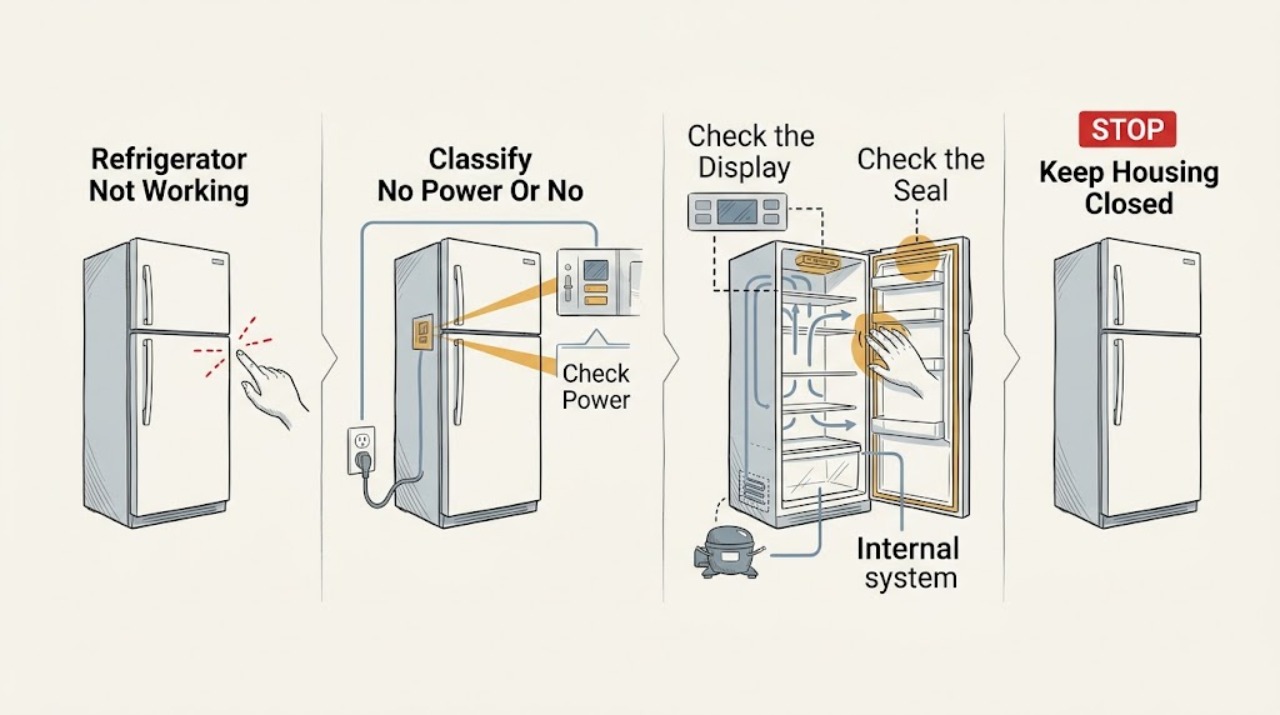
Work through in order
Diagnostic checks
Use only checks that match the exact appliance or system and its official guide.
-
Check 1
Record the model and serial number, then classify the symptom: no display or interior light, display/light present but no cooling, one compartment warm, both compartments warm, or a new noise/odor. Note any recent power interruption, move, cleaning, or long-open door.
Expected result: The refrigerator is completely dark, the controls respond but food is warming, only the fridge or freezer is warm, or the problem began after a power event or relocation.
Next step: Use the matching power, temperature, or airflow check below and preserve the model identity for the manual and service request.
Stop if: Stop for smoke, burning odor, arcing, exposed wiring, a damaged cord, water near electrical parts, or repeated circuit trips.
Why this matters
Why: A dark appliance points first toward supply, control, or electrical power. A lit appliance with warm food shifts attention to settings, door sealing, airflow, frost, compressor/fan behavior, or a cooling fault. A recent move or power event requires the exact model instructions rather than a guessed reset.
-
Check 2
Inspect the accessible plug and cable, confirm the appliance is connected to its normal outlet, and check that the thermostat or display is not set to an off, vacation, or unusually warm state. Check household protection only from the normal user interface; do not remove covers or repeatedly reset a tripping circuit.
Expected result: The plug is loose, the cable or outlet is damaged, a fuse or supply has tripped, the control is off or unusually warm, or the external supply and setting look normal.
Next step: Correct only an obvious loose plug or exact manual setting. If the cable, outlet, fuse, display, or control remains abnormal, leave the appliance out of service and arrange qualified help.
Stop if: Do not fit a higher-rated fuse, bypass protection, probe live wiring, remove an electrical panel, or keep resetting a breaker that trips again.
Why this matters
Why: A loose connection, supply interruption, or documented control setting can explain a dark or warm refrigerator. A normal external supply and setting do not prove that an internal control, compressor, fan, or sealed system is healthy.
-
Check 3
With the doors closed as much as possible, check whether the interior is actually cold using the exact model instructions or a suitable appliance thermometer. Inspect that each door closes fully and that the accessible gasket is clean, continuous, and contacting the cabinet around the perimeter.
Expected result: The cabinet is warm, a door was ajar, the gasket has a gap or damage, the display temperature differs from the measured condition, or the doors seal evenly and cooling appears normal.
Next step: Remove only an item obstructing the door and clean the accessible gasket as the manual permits. Protect food and arrange service if the gasket is damaged, the temperature remains unsafe, or cooling does not recover.
Stop if: Do not force hinges, pry a gasket, move a built-in refrigerator by the door, or consume food whose safety is uncertain.
Why this matters
Why: A set-temperature display is not necessarily the actual internal temperature on every model. A door gap can admit warm air and make the appliance run without recovering; a sound seal and normal measured temperature make a simple door explanation less likely.
-
Check 4
Inspect only the visible interior vents, shelves, and rear wall for overloading, food blocking an air path, unusual frost, or a persistent sheet of ice. Keep food away from documented vents without removing fixed panels; if a manual defrost is required, follow the exact model procedure.
Expected result: Vents are blocked, shelves are tightly packed, heavy frost covers an air path, condensation is occasional, or the visible airflow and frost pattern look normal.
Next step: Rearrange accessible food and use the model-approved defrost procedure once if applicable. If frost returns, cooling remains poor, or an obstruction is behind a fixed panel, stop and arrange service.
Stop if: Do not chip ice, pierce a panel, apply direct high heat, insert tools into a fan, or dismantle an evaporator cover.
Why this matters
Why: Blomberg's guidance associates blocked airflow, overloading, door sealing, and excessive frost or condensation with uneven cooling. A clear visible path does not rule out an internal fan, defrost, control, or sealed-system fault; it only moves the next diagnosis beyond a safe visual check.
-
Check 5
From outside the cabinet, note whether the compressor or fan hums, whether the appliance is in a documented defrost cycle, and whether a recent power interruption or move preceded the symptom. Do not repeatedly unplug and reconnect it as a test; use the exact model manual for any restart or settling instruction.
Expected result: There is a normal-looking hum, no compressor sound while the cabinet is warm, a periodic defrost indication, an unusual loud/rubbing sound, or a recent move/power event.
Next step: Allow only the model-manual procedure or documented stabilization period to complete. If the refrigerator remains warm or the operating pattern is abnormal, record it for qualified service rather than guessing a compressor or fan part.
Stop if: Do not open the compressor compartment, handle refrigerant, test energized components, or continue operation through burning odor, smoke, arcing, or a damaged cord.
Why this matters
Why: A hum suggests that some power is present but does not prove adequate cooling. A named FNT9673P manual lists defrost, power outage, and compressor-protection behavior as model-specific possibilities; another model may behave differently. Persistent silence, abnormal noise, or no temperature recovery needs service diagnosis.
-
Check 6
If the refrigerator is still dead or not cooling after the external checks, prepare a service request with the exact model/serial number, power and display behavior, compartment temperatures, door and gasket result, frost pattern, operating sound, and any recent power or relocation event.
Expected result: The appliance remains dark, both compartments stay warm, the warning returns, the compressor/fan pattern is abnormal, or further diagnosis would require a cover or internal test.
Next step: Leave the appliance disconnected or out of service when unsafe and arrange qualified Blomberg or appliance service. Protect perishable food and provide the captured observations instead of ordering an unverified part.
Stop if: Do not open panels, bypass protection, handle refrigerant, or continue using a refrigerator with an electrical or burning hazard.
Why this matters
Why: This pattern is consistent with a deeper control, sensor, fan, compressor, defrost, wiring, or sealed-system problem, but it does not identify a particular part. Blomberg directs owners toward model-specific manuals and repair support rather than recommending do-it-yourself repairs.
Use your observations
Decision map
Find the observation that best matches what you see, then follow the next safe action.
-
PATH 01Safety boundary
What you see
The display and interior light are off, and the accessible plug, cable, and normal household supply check does not restore operation.
Do this next
Keep the refrigerator out of service and arrange qualified diagnosis. Provide the model/serial number and whether any fuse or circuit protection operated.
Why this path and its safety boundary
Why it matters: An appliance power, control, or electrical fault is more likely than a blocked vent or low temperature setting.
Safety stop: Do not bypass fuses or protection, probe live wiring, or use a damaged cord or outlet.
-
PATH 02Safety boundary
What you see
The refrigerator has power, but a door was ajar, the gasket has a visible gap, shelves block vents, or heavy frost covers a documented airflow path.
Do this next
Correct only the accessible loading or door obstruction and use the exact manual's defrost instructions if applicable. Protect food and call service if cooling does not recover or the condition returns.
Why this path and its safety boundary
Why it matters: Warm-air entry or restricted circulation is more likely than an immediately confirmed compressor failure.
Safety stop: Do not force the door, chip ice, pierce panels, or remove fixed covers.
-
PATH 03Safety boundary
What you see
The problem began after transport, relocation, unplugging, or a power interruption, and there is no electrical damage or burning hazard.
Do this next
Follow the exact model manual's placement, settling, and restart instructions once. If it remains warm or does not start after that documented procedure, arrange service.
Why this path and its safety boundary
Why it matters: A model-specific settling, compressor-protection, or recovery period is possible, but the duration and restart procedure cannot be generalized across Blomberg models.
Safety stop: Do not repeatedly cycle the power, move a built-in unit unsafely, or continue if the cord or outlet is damaged.
-
PATH 04Safety boundary
What you see
Power and controls appear normal, but both compartments remain warm, the compressor/fan behavior is abnormal, a warning persists, or the accessible checks do not change the temperature.
Do this next
Keep doors closed, protect perishable food, and arrange qualified refrigerator service with the complete model and recorded operating pattern.
Why this path and its safety boundary
Why it matters: A control, sensor, fan, defrost, compressor, or sealed-system fault is more likely than a simple setting or loading issue; the exact component cannot be identified safely from this symptom alone.
Safety stop: Do not open the sealed system, test live components, or select a replacement part without model-specific diagnosis.
Helpful context
Understand the symptom
Start by identifying what ‘not working’ means
A dark display and no interior light are a different problem from a refrigerator that lights up but stays warm. A powered cabinet may have a normal compressor or fan sound, a defrost cycle, an incorrect control setting, or a cooling fault. Note whether the fridge compartment, freezer compartment, or both are warm; whether the compressor hums; and whether the symptom followed a power cut, move, door left ajar, or recent loading. Keep the model number with those observations because Blomberg panels and instructions vary by model.
Keep the inspection external
Do not remove electrical covers, probe live wiring, open the sealed refrigeration circuit, or reach behind a fixed panel. Inspect only the plug, cable, display, door, gasket, shelves, and visible vents. If there is smoke, a burning smell, arcing, damaged insulation, water near electrical parts, or repeated circuit tripping, isolate the appliance only if it is safe to do so and arrange qualified service. Keep the doors closed as much as possible while deciding what to do with perishable food.
Power, temperature, and airflow can produce similar symptoms
Blomberg's fridge guidance notes that an external display may show a set temperature rather than the actual internal temperature on some models. It also links uneven or inadequate cooling with blocked air circulation, overloading, frequent door opening, and worn door seals. A clear display therefore does not prove that the cabinet is cold, and a warm cabinet does not identify a particular failed part. Use an appliance thermometer or the exact manual's checking method, then escalate when the accessible checks do not restore reliable cooling.
Safety boundary
Stop conditions
- Stop using the refrigerator for smoke, burning odor, arcing, a hot or damaged cord, exposed wiring, water near electrical parts, or repeated circuit trips.
- Do not remove electrical, compressor, evaporator, or control covers; handle refrigerant; test energized components; bypass protection; or chip or pierce ice.
- Do not keep repeatedly resetting, unplugging, or reconnecting an appliance that trips power or shows heat, odor, noise, or visible damage.
- If cooling is unreliable, keep doors closed and follow local food-safety guidance for food that may have warmed.
When checks do not resolve it
Need a professional?
Safety scope: This article covers external power, controls, door, gasket, visible airflow/frost, and operating-pattern observations only. A qualified technician must handle electrical covers, internal controls and sensors, fans, compressors, refrigerant, and live testing.
Common questions
FAQ
Why is my Blomberg refrigerator completely dead?
Check the accessible cable and plug, the normal outlet connection, and applicable household fuses or protection. If the display and interior light remain off with no obvious external supply issue, stop instead of opening the refrigerator and arrange qualified service.
Why does my Blomberg refrigerator have power but stay warm?
Check the exact control setting, actual internal temperature, door closure and seal, blocked vents, overloading, and visible frost. A display may show a set temperature rather than actual temperature on some models. If both compartments remain warm after accessible checks, arrange service.
Can a power outage make a Blomberg refrigerator seem not to work?
Yes, a power interruption can leave the appliance warm or produce a model-specific recovery condition. Check the food and follow the exact model manual for restart and cool-down instructions. Do not repeatedly cycle power or assume a universal waiting time.
What should I check if my Blomberg fridge is making a noise but not cooling?
A hum suggests that some power is present, but it does not prove adequate cooling. Check the actual temperature, door seal, loading, visible airflow, and frost pattern. Persistent warmth, abnormal noise, or a need to access the compressor or fan requires qualified diagnosis.
When should I call a professional for a Blomberg refrigerator that is not working?
Call when it remains dead, both compartments stay warm, the problem returns after the exact model's external checks, or diagnosis requires internal electrical, fan, compressor, defrost, or sealed-system access. Treat smoke, burning odor, arcing, damaged wiring, water near electrical parts, and repeated circuit trips as immediate stop conditions.
Read the exact guide
Official sources
- Find Your Model & Serial NumberBlomberg · Official Blomberg support guidance for finding the identification needed for manuals, repairs, accessories, and parts.
- 7 Troubleshooting (FNT9673P refrigerator manual)Blomberg · Official manual for the FNT9673P model only; its plug, fuse, defrost, compressor-protection, and temperature entries must not be generalized to other Blomberg refrigerators.
- Why are there droplets of water or ice on fridge rear wall?Blomberg · Official Blomberg fridge FAQ for visible condensation or ice symptoms; exact model manual controls defrost and drain procedures.
- What’s the best temperature for my fridge?Blomberg · Official Blomberg fridge FAQ; display behavior, settings, and controls vary by exact model.
- FAQBlomberg Appliances · Official Blomberg FAQ with a general refrigerator no-operation check; exact model instructions control any additional steps.
- How long should you wait to turn on a fridge after delivery?Blomberg · Official Blomberg delivery guidance; exact model instructions and transport position govern a particular refrigerator.
- Product SupportBlomberg · Official Blomberg support hub for manuals, troubleshooting, repairs, parts, contact support, and safety notices.
- Product ManualsBlomberg · Official Blomberg manual portal; select the exact refrigerator model before applying control, restart, defrost, or service instructions.
Community feedback
Share a repair observation
Share a plain-text repair observation. Accepted observations are published automatically; this page may take a moment to update.