
On this page
Start here
Quick answer
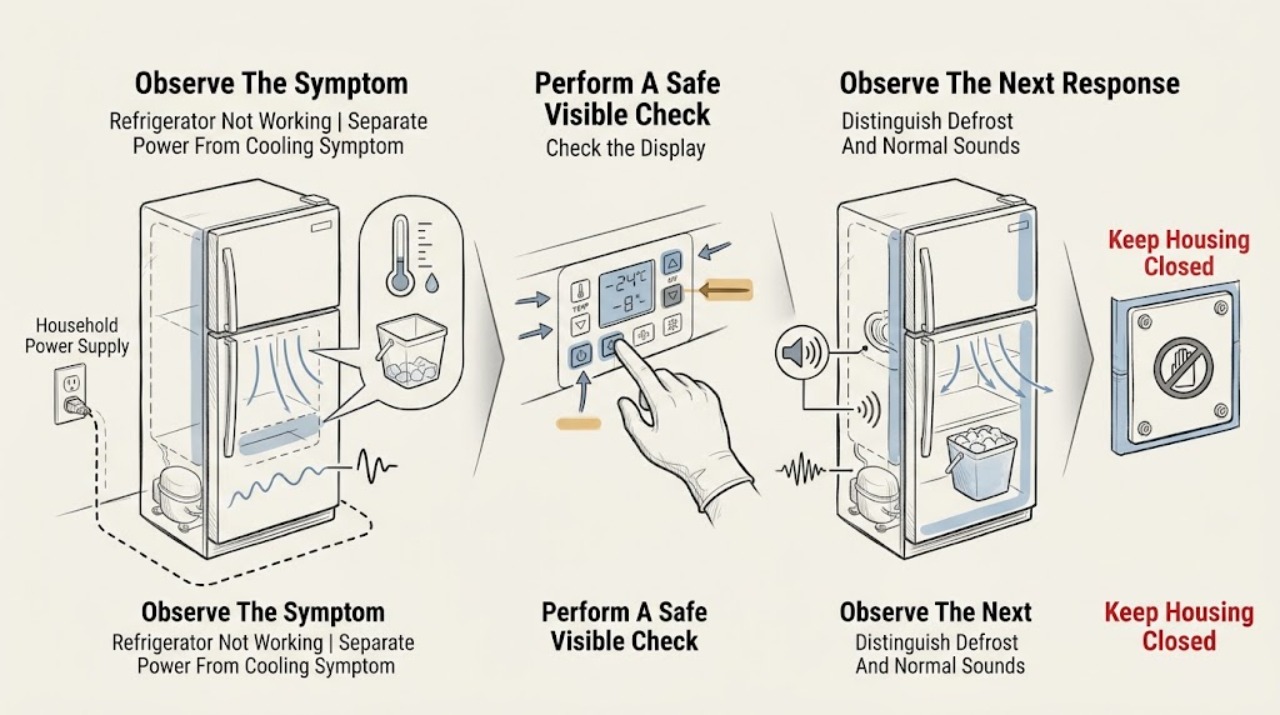
First separate a completely dead Crosley refrigerator from one that has lights but is not cooling or has only an ice, water, noise, or alarm symptom. From a dry visible position, confirm the plug and household supply, check that the cooling control is not OFF or 0, and make sure doors close and seals and the lower air path are not obviously blocked. A cooling system can be disabled by a model-specific control while lights remain on, and an automatic defrost cycle or normal compressor, fan, refrigerant, valve, and ice-maker sounds can be mistaken for failure. For a side-by-side model, check only the user-facing dispenser lock, water supply, ice-maker switch or arm, and filter condition described by the exact manual. If food is warming, a fault persists, the compressor or control is abnormal, there is a refrigerant or sealed-system concern, water is leaking, or electrical parts are damaged, hot, smoky, or repeatedly tripping protection, stop using the refrigerator and arrange qualified service. Do not remove panels, test live circuits, pierce the sealed system, or handle moving or heated ice-maker parts while powered.
Before you begin
Safety first
- This article covers visible power, user-facing controls, door and airflow observations, normal-sound recognition, and model-directed ice/dispenser checks. A qualified technician must handle live electrical diagnosis, sealed refrigeration, compressor, fan, defrost, control, sensor, wiring, water valve, tubing, and powered ice-maker components.
Work through in order
Diagnostic checks
Use only checks that match the exact appliance or system and its official guide.
-
Check 1
From a dry visible position, note whether the interior light, display, fan sound, or control response is present. Check that the plug is fully seated and inspect the accessible cord and outlet for moisture, heat, scorching, looseness, or damage. Check the refrigerator's labelled breaker or fuse status only at the normal household control point; do not open the outlet or make a live measurement.
Expected result: There are no lights or controls, the cord or plug is damaged or wet, the outlet or breaker is unavailable, the lights work but the cabinet is warm, or the visible power path appears normal.
Next step: For moisture, heat, damage, a burning odor, or a breaker that trips again, stop and arrange qualified electrical or appliance service. If the panel or light works, continue with cooling and control observations rather than treating the refrigerator as completely dead.
Stop if: Do not repeatedly reset protection, use an extension cord or adapter, repair the cord, open the outlet, or perform live electrical testing.
Why this matters
Why: No lights and no response make household power or an internal electrical fault more likely. Lights with warm food mean the refrigerator has at least some power and shift attention to cooling control, temperature, airflow, defrost, or sealed-system symptoms. A normal-looking outlet does not clear internal wiring or controls.
-
Check 2
Read the exact model manual and check that the freezer and fresh-food temperature controls are not set to OFF, OF, 0, or another cooling-disabled state. On electronic models, check the documented cooling On/Off control; on mechanical models, use the normal recommended range rather than the OFF position. Close both doors and inspect the visible gasket contact, obvious door obstruction, lower front grille, and interior cold-air vents without removing panels.
Expected result: Cooling is disabled, a control is set unusually warm, a door is slightly open or the gasket does not seal, the grille or vents are blocked, or the controls and visible airflow path appear normal.
Next step: Restore only an obvious model-documented cooling setting and allow the temperature to stabilise as the manual directs. Correct only visible door or loading obstructions; if the seal is damaged, airflow remains abnormal, or the refrigerator stays warm, move to service rather than removing covers.
Stop if: Do not remove interior covers, scrape ice from hidden coils, open the control housing, or alter sealed-system components.
Why this matters
Why: A disabled cooling setting, warm control, leaking door seal, blocked grille, or blocked internal airflow can make a powered refrigerator appear not to work. On the documented electronic model, cooling can be off while lights and other electrical components still have power; this is different from unplugging the unit.
-
Check 3
Observe the symptom without placing hands near fans, the compressor, or the ice maker: record whether the refrigerator is in a periodic defrost pause, whether the cabinet has recently been installed or unplugged, and whether the sound is a familiar hum, click, gurgle, fan airflow, water-valve buzz, ice drop, or defrost hiss rather than a new harsh noise. Check actual food temperature with safe food-handling judgment, not by relying only on sound.
Expected result: Cooling returns after a documented defrost interval, the refrigerator is newly installed or recently reconnected, familiar sounds occur while temperatures are safe, or there is a new loud, grinding, repeated-clicking, burning, or silent-with-warm-food pattern.
Next step: Keep doors closed and allow the model's documented cool-down or stabilisation period only when food remains safe. If the abnormal sound persists, temperatures rise, or the compressor never resumes, stop repeated cycling and arrange service.
Stop if: Do not touch moving fans or powered ice-maker parts, bypass a fan or door switch, or remove covers to locate a sound.
Why this matters
Why: Crosley manuals describe automatic defrost pauses and refrigerant, fan, compressor, valve, and ice-maker sounds as normal in applicable models. A persistent warm cabinet, abnormal repeated clicking, burning odor, or new mechanical noise is not proven normal from sound alone and can indicate a service issue.
-
Check 4
If the refrigerator compartment is cold but ice or water is the only problem, identify whether the model has an ice maker, an in-door dispenser, a dispenser lock, or a water filter. From the user-accessible area, confirm the ice-maker arm or switch is in the model's ON position, the household water valve is open, the freezer door is fully closed, the dispenser lock is not active, and the filter is fully seated or due for replacement as the manual states. Do not reach into the ejector mechanism or heater while powered.
Expected result: The refrigerator has no ice-maker or dispenser, the ice maker is OFF or its arm is blocked, the water valve is closed, the freezer door is open, the dispenser is locked, the filter is blocked or unseated, or the ice and water system appears normal.
Next step: Correct only an obvious user setting, door, lock, filter seating, or water-valve condition using the exact manual. If the system remains inoperative, leaks, or requires access to the valve, tubing, wiring, or ice-maker mechanism, stop and arrange service.
Stop if: Do not touch the moving ejector or heater while plugged in, force an auger, bypass a freezer-door switch, disconnect water tubing, or open the dispenser or ice-maker housing.
Why this matters
Why: Ice and dispenser features are model-dependent and can fail while refrigeration remains normal. Crosley manuals associate no ice or slow dispensing with the ice-maker switch or arm, freezer temperature, water valve, filter, door state, or a jam; these checks do not diagnose an internal valve or control safely.
-
Check 5
After the external checks, record the exact model and serial information, whether lights and controls work, control settings, door and gasket observations, time since installation or power restoration, food temperature trend, compressor or fan behavior, ice/dispenser symptoms, alarms, and any odor, leak, heat, or trip event. Stop immediately if food is warming beyond safe handling, the refrigerator leaks, or an electrical or fire hazard appears.
Expected result: The refrigerator recovers after a documented control or door correction, only the ice or dispenser remains affected, familiar sounds occur with safe cooling, cooling remains poor, the compressor is silent or repeatedly clicks, an alarm or display fault persists, or a hazard is present.
Next step: Protect perishable food and arrange Crosley or qualified refrigerator service for persistent cooling or electrical symptoms. For an ice or dispenser-only symptom, provide the exact model and the water, filter, door, and ice-maker observations to the technician.
Stop if: Do not remove panels, probe live circuits, handle refrigerant, replace a compressor or control, or keep operating a leaking, smoking, sparking, or overheated refrigerator.
Why this matters
Why: A recovery after a control, door, water, lock, or filter correction supports that user-facing condition. Persistent warm temperatures or abnormal compressor, fan, alarm, or control behavior may involve sealed-system, refrigerant, sensor, defrost, motor, or internal electrical work and cannot be isolated safely from outside.
Use your observations
Decision map
Find the observation that best matches what you see, then follow the next safe action.
-
PATH 01Safety boundary
What you see
The interior light and control panel are dark, the plug or cord is wet or damaged, the outlet or breaker is unavailable, or household power is also absent.
Do this next
Use normal household electrical help for the outlet or supply and qualified appliance service for the refrigerator. Protect food while the unit is without power.
Why this path and its safety boundary
Why it matters: A visible supply problem or internal electrical fault is more likely than a temperature setting, ice maker, or dispenser issue.
Safety stop: Do not open the outlet, repair the cord, repeatedly reset a tripping breaker, or perform live testing.
-
PATH 02Safety boundary
What you see
Lights or controls work, but both compartments are warm, the cooling control is OFF/0, doors do not seal, vents or grille are blocked, or the compressor does not resume after normal stabilisation.
Do this next
Correct only the exact model's visible control or loading issue and allow the documented stabilisation time. If food remains warm or compressor behavior is abnormal, arrange refrigerator service and protect perishables.
Why this path and its safety boundary
Why it matters: A disabled cooling setting, airflow or door-seal problem, defrost pause, compressor/control fault, or sealed-system issue is more likely than total loss of power.
Safety stop: Do not open panels, scrape hidden coils, test the compressor, or work on refrigerant or sealed-system components.
-
PATH 03Safety boundary
What you see
The refrigerator and freezer are cold, but the ice maker, ice dispenser, or water dispenser does not work or is slow.
Do this next
Check only the user-facing switch or arm, door, lock, water valve, and filter condition described by the exact manual. Arrange service for leaks, persistent no-ice, valve/tubing faults, or powered mechanism work.
Why this path and its safety boundary
Why it matters: A model-specific ice-maker setting, freezer door state, dispenser lock, water valve, filter, frozen or jammed ice, or water-line issue is more likely than a whole-refrigerator cooling failure.
Safety stop: Do not reach into the powered ice maker, force the dispenser, bypass a door switch, or disconnect tubing.
-
PATH 04Safety boundary
What you see
The refrigerator is cooling safely but makes a hum, click, gurgle, hiss, water-valve buzz, ice drop, or defrost sound, or a door-ajar/alarm indicator appears.
Do this next
Close the door to reset a documented door-ajar alarm and monitor safe temperatures. If the noise or alarm is new, persistent, or accompanied by poor cooling or hazard symptoms, arrange service.
Why this path and its safety boundary
Why it matters: The documented sound may be normal operation, automatic defrost, water fill, or a door-ajar reminder. A new harsh sound, persistent alarm, rising temperature, or burning odor is not cleared by the existence of normal sound descriptions.
Safety stop: Do not disable an alarm by disconnecting safety sensors, touch powered moving parts, or remove covers to silence a sound.
-
PATH 05Safety boundary
What you see
Power, controls, doors, visible airflow, water/dispenser settings, and model-directed checks are normal, but temperatures remain unsafe, the compressor or fan is abnormal, a display fault persists, or the unit leaks or trips protection.
Do this next
Stop repeated restart attempts, protect food, and arrange Crosley or qualified refrigerator service with the model, temperature trend, sounds, alarms, and external observations.
Why this path and its safety boundary
Why it matters: An internal control, sensor, fan, defrost, compressor, wiring, water-valve, or sealed-system fault is more likely; a user-visible symptom cannot justify a part or refrigerant diagnosis.
Safety stop: Do not dismantle the refrigerator, probe internal circuits, handle refrigerant, or operate through smoke, sparking, overheating, or a leak.
-
PATH 06Safety boundary
What you see
There is smoke, burning odor, sparking, a hot or damaged cord, repeated electrical trips, a refrigerant or water leak, or abnormal heat.
Do this next
Stop using the refrigerator. If safe without touching the hazard, disconnect power and close the water supply, keep clear, and arrange qualified service.
Why this path and its safety boundary
Why it matters: The immediate issue is an electrical, fire, chemical, shock, or water hazard rather than a safe setting adjustment.
Safety stop: Do not touch wet electrical parts, continue operation, or attempt live testing, refrigerant work, or disassembly.
Helpful context
Understand the symptom
Not working can describe several different refrigerator states
A refrigerator with no lights or no response has a different starting point from one with lights but warm food, a working refrigerator with no ice, a locked dispenser, or familiar operating noises. Crosley sells top-freezer, bottom-mount, and side-by-side families with different controls and features; some have a cooling On/Off control, while some have only mechanical temperature controls. Identify the model and serial label before applying any control sequence, temperature setting, filter procedure, or ice-maker check.
Keep electrical, refrigerant, and powered ice-maker work professional
Unplug the refrigerator before cleaning or any permitted maintenance, and remember that setting a control to OFF may stop cooling without disconnecting power. Do not use an extension cord or adapter, open the electrical compartment, probe live wiring, work on the compressor or sealed refrigerant circuit, or touch the moving ejector or heater of a powered ice maker. For smoke, burning odor, sparking, a hot or damaged cord, a refrigerant or water leak, repeated trips, or unsafe temperatures, stop using the appliance and arrange qualified service. Move the unit only as the model manual allows and without stressing water lines.
Safety boundary
Stop conditions
- Stop immediately for smoke, burning odor, sparking, abnormal heat, a hot or damaged cord, repeated electrical trips, a water or refrigerant leak, or unsafe food temperatures with no recovery; disconnect power and close the water supply only if safe.
- Unplug before cleaning or permitted maintenance. A control set to OFF may stop cooling without disconnecting electrical power.
- Do not use an extension cord or adapter, open electrical panels, probe live wiring, pierce the sealed system, handle refrigerant, or touch the powered ice-maker ejector or heater.
- Persistent cooling, compressor, fan, control, defrost, alarm, water-valve, ice-maker, or dispenser faults requiring internal access require Crosley or qualified refrigerator service.
When checks do not resolve it
Need a professional?
Safety scope: This article covers visible power, user-facing controls, door and airflow observations, normal-sound recognition, and model-directed ice/dispenser checks. A qualified technician must handle live electrical diagnosis, sealed refrigeration, compressor, fan, defrost, control, sensor, wiring, water valve, tubing, and powered ice-maker components.
Common questions
FAQ
Why is my Crosley refrigerator not working?
First determine whether it has no lights or power, or whether it has power but is warm. Check the visible supply, the exact model's cooling control, door sealing, airflow, defrost or normal-sound pattern, and any ice or dispenser symptom. Persistent warming or electrical symptoms require service.
Why are the lights on but my Crosley refrigerator is not cooling?
On some Crosley models, cooling can be disabled by a control while lights remain on. Check the exact model's control, door seals, visible airflow path, and recent defrost or installation state. If food remains warm or the compressor and fan behave abnormally, arrange qualified refrigerator service.
Are clicking, humming, gurgling, or hissing sounds normal on a Crosley refrigerator?
Some models document refrigerant flow, fans, compressors, water valves, ice drops, and defrost sounds as normal. A new harsh sound, repeated clicking with warm food, burning odor, or persistent alarm is not cleared by the normal-sound list and should be serviced.
Why is my Crosley ice maker or dispenser not working when the refrigerator is cold?
The ice maker or dispenser may be off or locked, the freezer door may not be closed, the water valve may be closed, the filter may be clogged or unseated, or ice may be jammed. Check only the user-facing conditions in the exact manual and do not touch powered ice-maker parts.
When should I call Crosley service for a refrigerator that is not working?
Call when visible power and model-directed settings do not restore cooling, food remains warm, an alarm or abnormal compressor/fan behavior persists, or the ice/dispenser issue needs internal access. Stop immediately for smoke, burning odor, sparking, a hot cord, repeated trips, or a water or refrigerant leak.
Read the exact guide
Official sources
- Crosley 1812/2113 Refrigerator Use & Care GuideCrosley Corporation · Official legacy Crosley guide for the documented 1812/2113 family; troubleshooting examples are not universal to all Crosley refrigerators.
- Automatic Icemaker (on some models)Crosley · Official Crosley XRS/XRE ice-maker section; only models equipped with the applicable ice maker have these controls and behavior.
- Crosley Side by Side Refrigerator Use & Care ManualCrosley Corporation · Official Crosley side-by-side manual PN 242111500; controls and feature availability are model-specific.
- Top-Freezer Refrigerators Owner's Manual and Installation InstructionsCrosley · Official manual for Crosley top-freezer models beginning XRS or XRE; do not assume its controls or optional ice-maker features on other families.
- Crosley Refrigerator Product PagesCrosley Home Products · Official Crosley CRSW2135 side-by-side product page; used to show feature variation and not to prescribe settings for another model.
Community feedback
Share a repair observation
Share a plain-text repair observation. Accepted observations are published automatically; this page may take a moment to update.