
On this page
Start here
Quick answer
Do not guess what a Bosch cooktop display means from a single letter or symbol. Record the complete code exactly as shown, the cooktop type, the affected zone, and whether all indicators are flashing. Bosch's official error guide maps different displays to different actions: a wet or covered control panel may make all indicators flash, F2/F4 can reflect overheating, some D/E displays indicate demo or operational faults, and U400 or related codes can indicate abnormal supply voltage. Remove only a visible object or moisture from the control surface and allow hot cookware or electronics to cool when the model instructions say to do so. Use a documented user-level reset only once; if the code returns, the display is unlisted, the appliance will not switch off, the supply is suspect, or a gas ignition fault is involved, stop using the cooktop and arrange qualified appliance or electrical service. Do not open the cooktop, change wiring, bypass a lock or safety control, or work on gas parts.
Before you begin
Safety first
- This article supports recording the display, clearing a visible surface obstruction, allowing safe cooling, and one exact model-directed user reset. Electrical-panel work, live testing, cooktop disassembly, wiring, gas connections, ignition, burners, and safety controls require qualified professionals.
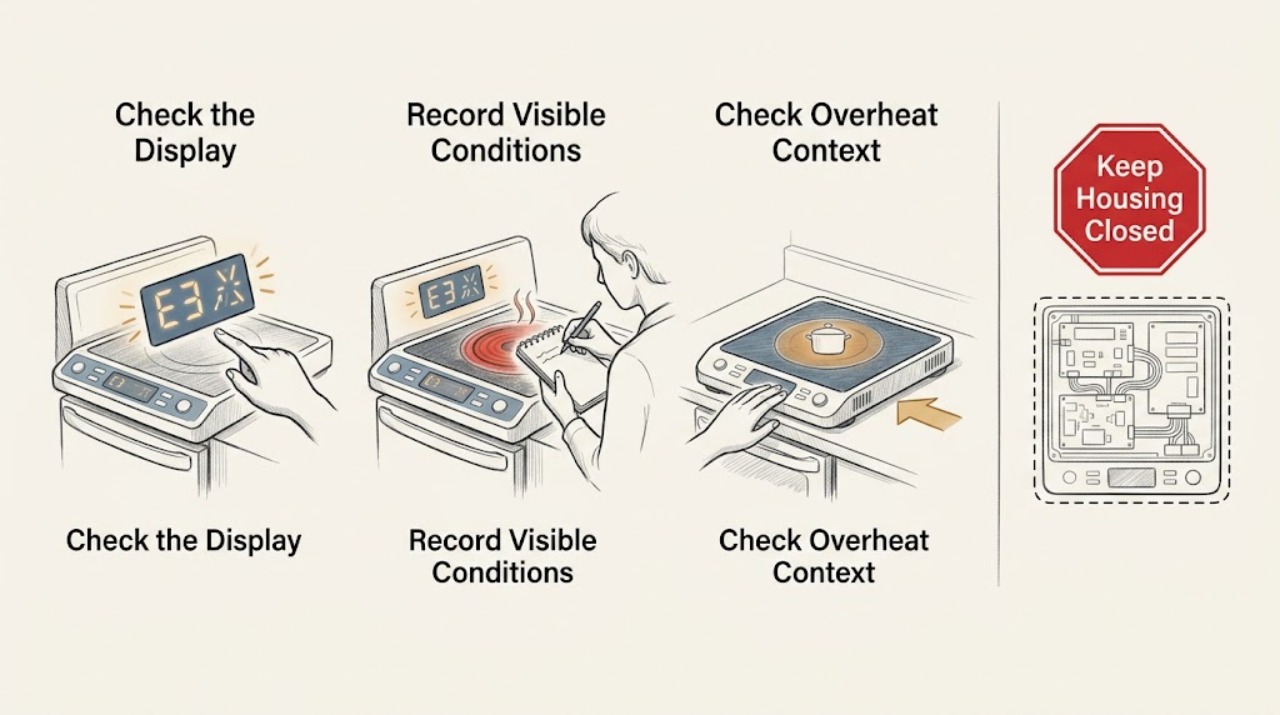
Work through in order
Diagnostic checks
Use only checks that match the exact appliance or system and its official guide.
-
Check 1
From a normal operating position, record every character, decimal, symbol, flashing indicator, signal tone, affected cooking zone, and the Bosch model or rating information without removing any cover.
Expected result: Classify the display as a complete listed code, a partial or ambiguous symbol, all indicators flashing, a power-level or lock indication, or an unlisted message; note whether the cooktop is electric, induction, or gas.
Next step: Use the exact Bosch model documentation or error guide for that code; if the code is incomplete, unlisted, or returns after a documented reset, keep the cooktop out of service and arrange support.
Stop if: Do not test random buttons, remove the glass, expose terminals, or continue cooking to see whether an unknown error clears.
Why this matters
Why: Bosch assigns different causes to different cooktop types and code families. A complete code and model prevent a demo-mode, overheat, control-panel, voltage, or gas-ignition path from being confused with another one.
-
Check 2
If all indicators are flashing or controls do not respond, switch the cooktop off through its normal control if possible and inspect the glass control area for a visible object, food overflow, or moisture; remove only what can be cleared without reaching into gaps.
Expected result: Record whether the panel is visibly damp or obstructed, clean and dry, or still unresponsive after the surface is safe and clear.
Next step: Allow the surface to dry naturally and follow the exact model instruction for the control-panel message; if the error persists, stop and request qualified service.
Stop if: Do not spray cleaner into the controls, pry the glass, use a sharp tool in a touch key, or bypass a panel lock or safety function.
Why this matters
Why: Bosch identifies a wet or covered control panel as a cause of flashing indicators on relevant models. If the clean, dry panel continues to display the error, the cause is not established as a surface obstruction.
-
Check 3
For an F2, F4, F5, F1, or similar overheat indication, turn the cooking zones off through normal controls, move cookware away from the control area only when it can be handled safely, and allow the electronics and surface to cool.
Expected result: Note whether the code disappears after cooling and whether the same zone, control area, or display fault returns when the cooktop is later operated according to the model instructions.
Next step: If the code clears once and the manual permits continued use, monitor conservatively; if it returns, the surface remains unusually hot, or the cooktop shuts down again, stop using it and arrange service.
Stop if: Do not touch hot glass or cookware to diagnose the code, place hot cookware on the controls, block appliance ventilation, or open the cooktop to inspect electronics.
Why this matters
Why: Bosch associates several F-code paths with an overheated cooking zone, electronics, or hot cookware near the control panel. A recurring code after cooling means the protection event or its cause remains unresolved.
-
Check 4
When the cooktop is cool, dry, free of objects, and the model instructions allow it, perform one documented user-level reset, such as switching the appliance off and on; use a power disconnect only if the exact instructions identify a safe user-accessible disconnect and no panel or wiring work is required.
Expected result: Record whether the display clears and the cooktop returns to normal standby, clears once but returns during operation, or remains present immediately after the reset.
Next step: Stop using the cooktop and provide the exact code, model, reset performed, and result to Bosch support or a qualified technician when the code returns or the display does not clear.
Stop if: Do not repeat resets, remove a breaker-panel cover, disconnect conductors, alter a circuit diagram, or continue operation under a persistent error.
Why this matters
Why: Bosch treats a one-time operational error differently from a message that appears again. A recurring or immediate code indicates an unresolved fault, wiring or supply issue, overheating condition, or model-specific problem that a reset cannot diagnose.
-
Check 5
Classify the remaining display without opening the appliance: note whether it indicates abnormal supply voltage, gas ignition or burner operation, a persistent electronics fault, a damaged control surface, or an unknown condition.
Expected result: Record a voltage-related code or broad power symptom, an E/F gas-cooktop error or failed automatic ignition, a persistent display after cooling and reset, or no safe classification.
Next step: Keep the cooktop out of service and arrange qualified appliance or electrical service; for any gas odor, shut the burners off if this can be done normally without risk, leave the area, and contact the local gas emergency service from safety.
Stop if: Do not test supply voltage, change wiring, relight or adjust gas burners, remove a regulator, bypass an ignition or safety control, or replace a board based on the display alone.
Why this matters
Why: Bosch directs voltage-related indications toward the electrical supply provider or support, and gas-cooktop E/F or ignition faults toward professional assistance. A persistent or unknown display is not evidence for a particular board, sensor, burner, or wiring part.
Use your observations
Decision map
Find the observation that best matches what you see, then follow the next safe action.
-
PATH 01Safety boundary
What you see
All indicators are flashing and the control panel is visibly damp or covered by an object.
Do this next
Remove the visible object and allow the surface to dry as the model instructions permit; if the display remains, stop using the cooktop and arrange service.
Why this path and its safety boundary
Why it matters: Bosch identifies a wet or obstructed control panel as a possible cause on relevant cooktop models.
Safety stop: Do not probe gaps, spray the controls, or remove the glass to dry internal parts.
-
PATH 02Safety boundary
What you see
The code is an overheat-related F indication or cookware is hot near the control panel.
Do this next
Turn normal controls off, move cookware away when safe, allow cooling, and use the model instruction to clear the message; call for service if it returns.
Why this path and its safety boundary
Why it matters: The cooktop may have shut a zone off to protect its electronics or surface.
Safety stop: Do not continue cooking through the code, touch hot surfaces to check them, or open the appliance.
-
PATH 03Safety boundary
What you see
The display matches a Bosch demo-mode indication or a D/E operational fault and clears after the model-directed reset.
Do this next
Follow the exact model instructions and monitor; if the code returns, record it and request qualified support.
Why this path and its safety boundary
Why it matters: The event may have been a setting or one-time operational condition rather than a confirmed component failure.
Safety stop: Do not alter wiring or enter service settings to force the cooktop to operate.
-
PATH 04Safety boundary
What you see
The code indicates incorrect supply voltage, a connection fault, or a broad power-supply problem.
Do this next
Stop using the cooktop and contact the electrical utility or a qualified electrician and Bosch support as appropriate; provide the exact code and model.
Why this path and its safety boundary
Why it matters: The condition may be external to the cooktop and cannot be diagnosed by changing the appliance's internal wiring.
Safety stop: Do not measure live voltage, open the panel, reconnect conductors, change breaker ratings, or operate the cooktop with the warning present.
-
PATH 05Safety boundary
What you see
The Bosch cooktop is gas and shows an E/F indication or automatic ignition is not working.
Do this next
Turn burners off through normal controls, keep the cooktop out of service, and arrange qualified gas-appliance service; if there is a gas odor, leave immediately and contact emergency gas support from safety.
Why this path and its safety boundary
Why it matters: Bosch associates these paths with an electronics or overheat fault and requires model-specific assistance when the message persists.
Safety stop: Do not relight repeatedly, adjust burners, disconnect gas tubing, bypass ignition or safety controls, or open the cooktop.
-
PATH 06Safety boundary
What you see
The code is unlisted, incomplete, remains after one documented reset, or returns during use.
Do this next
Keep the cooktop out of service and give a qualified technician the exact code, model, appliance type, affected zone, operating context, and reset result.
Why this path and its safety boundary
Why it matters: A transient reset has not established the cause; the fault may involve electronics, supply, controls, heat protection, or another model-specific subsystem.
Safety stop: Do not guess a part, continue cycling power, or substitute another model's code procedure.
Helpful context
Understand the symptom
The complete display and appliance type determine the next check
A Bosch cooktop may show a letter, number, combined code, flashing power level, or a group of flashing indicators. The same-looking letter can have different meanings on electric, induction, and gas models. Bosch's general guide separates those categories and recommends model-specific documentation when the code is not listed. Photograph the display and rating information before resetting so a technician can distinguish a one-time state from a recurring fault.
Safe user checks are limited to the surface and documented controls
Bosch identifies a damp or obstructed control panel as one reason displays can flash, and identifies hot cookware or overheated electronics in several F-code paths. Remove an object from the controls and wipe the surface only when it is safe to do so; move cookware away from the controls and allow the appliance to cool. Do not pour liquid into gaps, remove the glass, or open the electrical enclosure to investigate an error.
A recurring code is a service decision, not a parts diagnosis
A single reset can clear a transient condition, but the display returning changes the decision. Bosch directs users to provide the precise code and model information when a fault returns, and its manual warns that repairs should be done by qualified technicians or authorized providers using appropriate replacement parts. A display associated with supply voltage, gas ignition, or a persistent electronics fault should remain out of service until assessed.
Safety boundary
Stop conditions
- Stop using the cooktop for a persistent or unlisted error, abnormal supply indication, repeated shutdown, damaged surface, smoke, burning odor, gas odor, or failed normal shutoff.
- Do not open the cooktop, remove the glass or electrical-panel cover, probe terminals, measure live voltage, move conductors, or alter a circuit connection.
- Do not relight or adjust gas burners, disconnect gas tubing, bypass ignition or safety controls, or replace a board, sensor, burner, or other part from the display alone.
- Do not repeatedly reset a returning error, continue cooking through an overheat code, or place hot cookware over the control panel.
- Arrange qualified appliance, electrical, or gas service when the code returns after the exact user-level procedure, the model or code is unknown, or the fault involves supply, gas ignition, electronics, or concealed wiring.
When checks do not resolve it
Need a professional?
Arrange qualified Bosch appliance service for any unlisted, incomplete, or recurring code, a display that will not clear, a cooktop that will not shut off normally, repeated overheat indications, damaged controls, or any suspected electronics fault. Contact a qualified electrician or electrical utility for voltage or connection indications. For a gas odor, leave immediately and contact local gas emergency support from a safe location; do not troubleshoot gas components yourself.
Safety scope: This article supports recording the display, clearing a visible surface obstruction, allowing safe cooling, and one exact model-directed user reset. Electrical-panel work, live testing, cooktop disassembly, wiring, gas connections, ignition, burners, and safety controls require qualified professionals.
Common questions
FAQ
What should I do when a Bosch cooktop shows an error?
Record the complete code, model, cooktop type, affected zone, and what was happening. Check only for a visible object or moisture on the control panel and allow safe cooling when the model instructions call for it. Use one documented reset; if the message returns or is unlisted, stop using the cooktop and arrange qualified service.
Why are all the Bosch cooktop indicators flashing?
Bosch identifies a wet control panel or an object covering it as a possible cause on relevant models. Clear only the visible obstruction and dry the surface safely. If all indicators continue flashing, the panel is not visibly obstructed, or the code returns, keep the cooktop out of service and request support.
Can I reset a Bosch cooktop error at the breaker?
Only follow the exact model instructions. Bosch documents brief power disconnection for some codes, but do not remove a panel cover, touch wiring, or improvise a disconnect procedure. If the code returns after one documented reset, call qualified service.
What do Bosch F2, F4, or F5 errors mean?
Depending on the cooktop type and exact display, Bosch associates these codes with overheated electronics, a hot cooking zone, hot cookware near controls, or an ignition-related overheat condition. Turn normal controls off and allow safe cooling as the model instructions say. A recurring code needs service.
When does a Bosch cooktop error need a technician?
Arrange service for an unlisted or recurring code, failed reset, abnormal supply indication, repeated overheat, gas ignition or electronics fault, damaged controls, or any need to open the cooktop or work on wiring or gas parts. If you smell gas, leave immediately and contact local emergency gas support from safety.
Read the exact guide
Official sources
- Bosch Cooktop & Rangetop Error CodesBosch Home Appliances · Bosch's U.S. error-code guide spans multiple cooktop technologies; the exact model documentation controls a particular display and safe reset procedure.
- Bosch Gas Cooktop Error CodesBosch Home Appliances · Bosch gas-cooktop guidance; it does not authorize gas-component or ignition repair by an unqualified user.
- Use and Care Manual NIT5663UC | Bosch, Manuel d'utilisation NIT5663UCBosch Home Appliances · A Bosch induction-cooktop manual used for model-specific safety and troubleshooting principles; the assigned cooktop may differ and its own manual controls.
Community feedback
Share a repair observation
Share a plain-text repair observation. Accepted observations are published automatically; this page may take a moment to update.