
On this page
Start here
Quick answer
Record the exact characters, whether they flash or beep, and whether one zone or the whole cooktop is affected. Samsung's cooktop guide groups common displays into sensor errors, stuck-button errors, communication errors, and an underlined u pan-detection indication. First turn the cooktop off, remove cookware and objects, and dry the touch panel. For an induction cooktop showing an underlined u, use a suitable magnetic pan of the correct size and position. If the model guide permits a power cycle, perform it only with the appliance off and no hazard present. Stop and request Samsung service if the code returns, the panel remains unresponsive, the surface is cracked, there is smoke or burning odor, liquid entered the controls, the breaker trips, or the cooktop heats without a command.
Before you begin
Safety first
- Touch panels, sensors, induction elements, power modules, control boards, and wiring require model-specific diagnosis by qualified personnel.
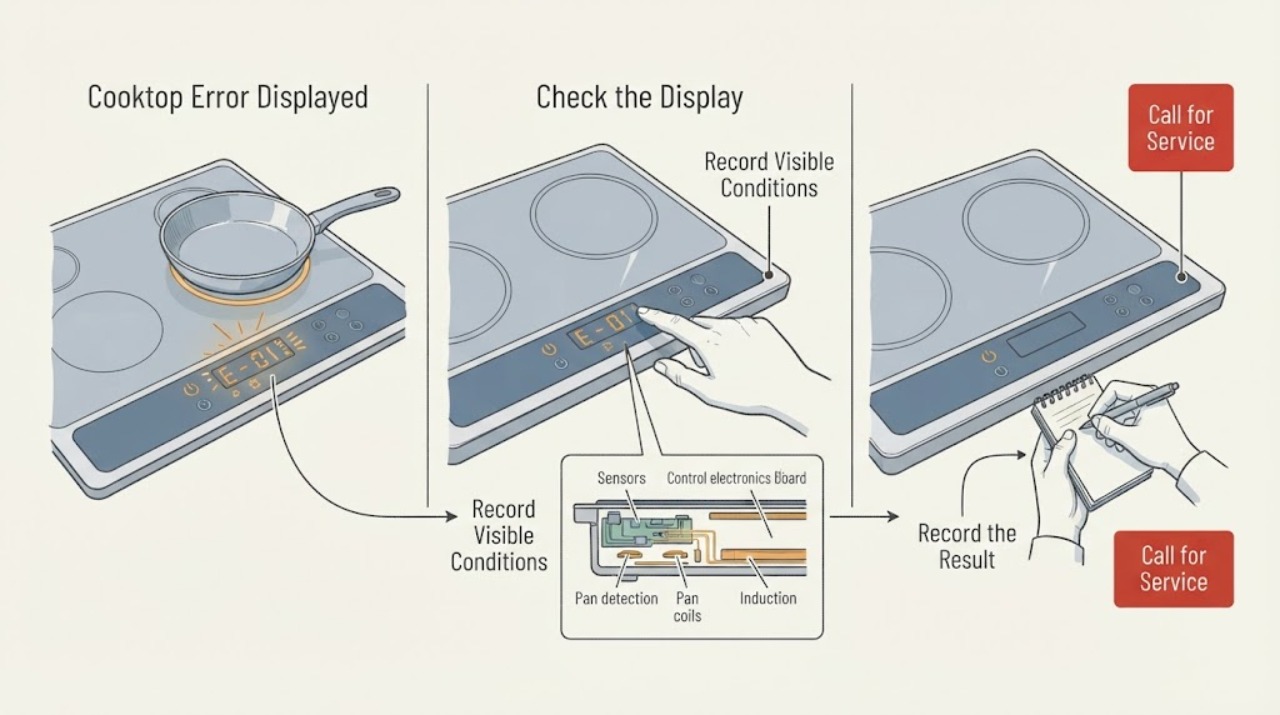
Work through in order
Diagnostic checks
Use only checks that match the exact appliance or system and its official guide.
-
Check 1
Stop cooking and screen for immediate danger before touching the controls: check for smoke, flames, sparks, burning odor, cracked or shattered glass, liquid entering the panel, a hot connection, a tripped breaker, or a zone heating without a command.
Expected result: The surface is intact and cool enough to approach, with no smoke, odor, liquid ingress, repeated trip, or unintended heat; or one of those hazards is present.
Next step: If any hazard is present, stop using the cooktop, isolate power only from a safe position if appropriate, and arrange urgent qualified service. If there is an active fire, evacuate and contact emergency services. If no hazard is present, continue by recording the display.
Why this matters
Why: A clean safety screen permits a low-risk code check. A hazard means the displayed code is secondary to safe shutdown and professional assessment.
-
Check 2
Record the exact display characters, including capitalization, dashes, underlines, flashing, beeps, and the affected zone. Note whether the code appears at idle, when a zone is selected, when a pan is placed, or after the surface becomes hot.
Expected result: The display resembles a sensor family, a stuck-button indication, a communication family, an underlined u, or an unlisted code; or the entire panel is blank or unresponsive.
Next step: Use the exact model manual to confirm the characters. Do not replace a part or repeat a heating test before the code and affected zone are known.
Why this matters
Why: The code family changes the first check. Underlined u points to induction pan detection, a stuck-button indication points to the touch surface, and sensor or communication families point toward a restart and service branch. A blank panel adds a power or control-path question.
-
Check 3
Turn the cooktop off with the Power button, remove cookware and anything touching the controls, and dry the panel with a soft cloth. Leave the surface clear before turning it back on.
Expected result: The code clears and the controls respond; a stuck-button indication returns; or the panel remains unresponsive after the surface is clear and dry.
Next step: If the code returns or the panel stays unresponsive, stop and arrange Samsung service. Do not press harder, scrape the panel, or open the cooktop.
Why this matters
Why: Moisture or an object can make the panel interpret a control as continuously touched. A returning code or unresponsive panel indicates that clearing the surface did not resolve the underlying condition.
-
Check 4
If the cooktop is induction and the display shows an underlined u or another pan-detection indication, place one flat, magnetic pan of suitable size on the marked zone with stable contact and correct positioning.
Expected result: The zone recognizes the pan and accepts a setting; the indication remains; or the indication affects only one zone or every zone.
Next step: If the pan is recognized, use the zone normally while monitoring it. If the indication remains with known suitable cookware, stop further tests and arrange service; do not use live electrical measurements.
Why this matters
Why: A successful response points to pan material, size, or placement rather than a confirmed electronics fault. Persistent detection on one zone narrows the service observation to that zone; detection failure on every zone suggests a shared control or power path.
-
Check 5
For a sensor, communication, or other documented code, follow the model manual's Power-button restart procedure. If the manual allows disconnecting power, ensure the cooktop is off, cool, dry, and free of hazards before performing one controlled power cycle.
Expected result: The code clears and does not return; it returns immediately; or it returns only when a particular zone or function is selected.
Next step: If the code returns, stop cycling power and request Samsung service with the exact model and code. Do not bypass a sensor or interlock and do not open the cabinet.
Why this matters
Why: A one-time clear can remove a transient control state but does not prove the fault is fixed. Immediate or function-specific recurrence points toward a persistent sensor, zone, communication, or control problem.
-
Check 6
Prepare a service handoff without opening the appliance: record the model, exact code, affected zone, surface condition, cookware type if induction, whether the code clears after the documented restart, breaker behavior, and any unusual heat, sound, or odor.
Expected result: The issue is repeatable without a hazard, or it cannot be safely repeated without another code, power loss, or abnormal heating.
Next step: Keep the cooktop out of service if the code returns or the controls behave abnormally. Request Samsung support or a qualified appliance technician; do not continue operating through a recurring error.
Why this matters
Why: A clear record gives support enough information to identify model-specific documentation and service needs while avoiding unsafe reproduction.
Use your observations
Decision map
Find the observation that best matches what you see, then follow the next safe action.
-
PATH 01Next step
What you see
Smoke, sparks, burning odor, cracked glass, liquid in controls, repeated breaker trip, or unintended heating
Do this next
Stop using the cooktop and arrange urgent qualified service. For an active fire, evacuate and contact emergency services; do not reset or continue tests.
-
PATH 02Next step
What you see
The surface is wet or an object is touching the controls and a stuck-button indication appears
Do this next
Turn the cooktop off, clear and dry the panel, then restart with the Power button. If the indication returns, request service.
-
PATH 03Next step
What you see
An underlined u appears on an induction zone
Do this next
Use a suitable magnetic pan of the correct size and placement. If the pan remains undetected, stop and arrange service for the affected zone.
-
PATH 04Next step
What you see
A sensor or communication code returns after the documented restart
Do this next
Stop cycling power and request Samsung service with the exact code and model; do not bypass controls or sensors.
-
PATH 05Next step
What you see
The code is unlisted or the panel is blank and unresponsive
Do this next
Use the exact model manual and contact Samsung support. Do not assume a generic code meaning or attempt internal electrical testing.
Helpful context
Understand the symptom
An error on a Samsung cooktop is a symptom, not a universal diagnosis. The same-looking display can be a sensor fault, a wet or continuously touched button, an electronics communication problem, or a pan-detection indication on an induction model. Photograph or write down the exact characters before restarting; a letter, digit, dash, or underlined symbol can change the troubleshooting path.
Begin with a cool, dry, clear control surface. Remove pans and objects from the controls, wipe away moisture without flooding the panel, and use the Power button to turn the appliance off. Do not scrape the glass, open the cooktop, probe wiring, or continue operating through smoke, burning odor, cracked glass, liquid ingress, or unintended heating.
For induction models, an underlined u is a pan-detection path rather than proof that the electronics have failed. A suitable magnetic pan must match the active element and be positioned correctly. Other codes, including sensor or communication families, normally merit a documented restart first and service if they return. Do not infer the cause from a generic code list when the exact model manual differs.
A code that clears once but returns during ordinary use should be treated as unresolved. Record the affected zone, code, surface condition, cookware, sounds, and whether the breaker moved. Those observations help Samsung support distinguish a user-input condition from a sensor, element, or control fault without exposing the user to live electrical work.
Only after diagnosis
Potential parts
- touch-control panel
Consider this only when the panel is clear and dry but a stuck-button or unresponsive-control indication persists and service testing isolates the interface.
Confirm the exact Samsung model and manufacturer fit information before any part decision. - surface temperature or control sensor
Consider this only when a documented sensor code returns after the model-specific restart and a technician confirms a sensor-path fault.
Use the exact model documentation and diagnostic findings; do not infer fit from a code alone. - induction coil or pan-detection assembly
Consider this only when suitable magnetic cookware remains undetected on one zone after the surface and controls are verified.
Confirm the affected zone, exact model, and manufacturer fit information before replacement. - power module or control board
Consider this only when a communication or multi-zone code persists and qualified testing isolates the shared electronics or power path.
Board selection is model-specific and must follow service diagnosis; do not replace it from a generic code list.
When checks do not resolve it
Need a professional?
Call Samsung support or a qualified appliance technician when a code returns after the model-specific restart or when any electrical, thermal, or glass hazard appears.
Safety scope: Touch panels, sensors, induction elements, power modules, control boards, and wiring require model-specific diagnosis by qualified personnel.
Have this ready
- Provide the Samsung model, exact code and symbol shape, affected zone, whether the cooktop is induction, panel condition, cookware used, restart result, breaker behavior, and any odor, smoke, heat, or sound.
Common questions
FAQ
What should I do when my Samsung cooktop displays an error?
Record the exact code, turn the cooktop off, clear and dry the controls, and follow the model-specific restart procedure. If the code returns, request Samsung service.
What does an underlined u mean on a Samsung induction cooktop?
It indicates that the zone is not detecting suitable cookware. Use a magnetic pan of the correct size and placement. If it remains undetected, arrange service.
Why does Samsung show a stuck-button error?
The panel may detect continuous touch from moisture, debris, or an object. Turn the cooktop off, clear and dry the panel, then restart. A recurring indication needs service.
Can I clear a Samsung cooktop error by turning the breaker off and on?
Only if the exact model guidance permits a controlled power cycle and there is no smoke, liquid, heat damage, or other hazard. If the code returns, stop cycling power and request service.
When should I call Samsung cooktop service?
Call immediately for smoke, sparks, burning odor, cracked glass, liquid in the controls, repeated breaker trips, or unintended heating. Call after a documented restart when the code returns or the panel or zone remains unusable.
Read the exact guide
Official sources
- Meaning of the error codes displayed on your Samsung cooktopSamsung Canada · Official Samsung cooktop error guidance for sensor, stuck-button, communication, and induction pan-detection indications; settings may differ by country and model
- Samsung range or wall oven error codesSamsung US · Official Samsung US guidance for underlined u pan detection, cooktop-related information codes, power connection, and service escalation; verify the exact model manual
Community feedback
Share a repair observation
Share a plain-text repair observation. Accepted observations are published automatically; this page may take a moment to update.