
On this page
Start here
Quick answer
A Samsung cooktop error code is a symptom, not a universal diagnosis: the meaning depends on the exact model, cooktop type, country, and whether the code appears during normal cooking, startup, or self-test. Photograph or transcribe the code and model information without touching a hot surface. On Samsung's cooktop guidance, a wet or obstructed touch panel can cause a stuck-button indication, an underlined u on an induction model can indicate cookware detection, and sensor or communication codes may clear after a model-approved restart but need service if they return. Turn the cooktop off, keep cookware and flammables clear, and stop for smoke, sparks, burning odor, abnormal heat, a cracked surface, or an error that leaves a burner active; do not open the glass, bypass controls, or reset repeatedly.
Before you begin
Safety first
- Owner checks are limited to safe code and model identification, external observation, clearing safe room-temperature moisture or debris, confirming documented cookware, and one model-approved restart when the cooktop is cool and hazard-free. A qualified professional must handle breaker isolation when uncertain, live or de-energized electrical testing, glass or panel access, sensors, controls, power circuits, and component replacement.
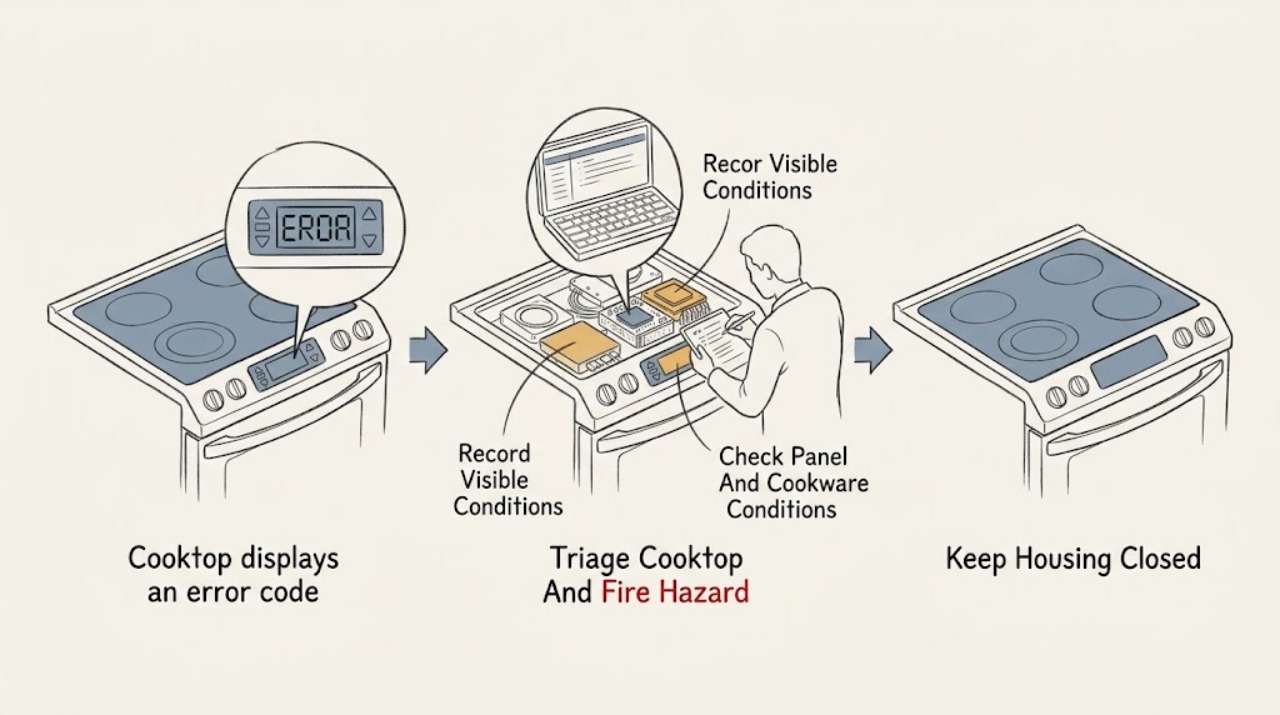
Work through in order
Diagnostic checks
Use only checks that match the exact appliance or system and its official guide.
-
Check 1
From a safe position, check whether the cooktop has smoke, sparks, crackling, a burning smell, abnormal heat, a cracked surface, exposed wiring, an unresponsive active burner, or a pan that is overheating. Do not touch the surface or move cookware across an active or hot zone to investigate the code.
Expected result: The cooktop is off or behaving normally with only a code; or smoke, heat, odor, sparks, damage, or uncontrolled heating is present.
Next step: For smoke, fire, or active arcing, leave and contact emergency help from a safe location. Otherwise turn the cooktop off using its normal control if safe, keep people clear, and arrange qualified appliance or electrical service; do not restart it to reproduce the code.
Stop if: Stop immediately for smoke, fire, sparks, crackling, burning odor, a hot or cracked surface, exposed conductors, an active burner that will not stop, or any need to touch a hot pan or surface.
Why this matters
Why: A code that appears with a safe, inactive cooktop can be identified through the model guide. Smoke, fire, arcing, abnormal heat, cracked glass, or a burner that cannot be turned off is an immediate burn, fire, or electrical hazard.
-
Check 2
From a safely visible label, paperwork, or the support app, record the full model number, cooktop type, country or market, exact display characters, which element or control was active, and whether the code appeared during startup, cooking, cleaning, or self-test. Do not remove trim or lift the cooktop to find a label.
Expected result: The code matches a model-specific Samsung guide; only a generic or regional code list is available; the code appears only during self-test; or the code is unclear or incomplete.
Next step: Use the exact model's manual or Samsung support page to interpret the code. If the identity or code is uncertain, photograph the display and arrange support; do not test alternate burners or settings to force a clearer code.
Stop if: Stop if identification requires moving the appliance, touching a hot surface, opening a panel, or entering an energized area.
Why this matters
Why: Model, market, cooktop type, and operating context determine whether a code is an information notice, cookware detection, a control condition, or a fault requiring service. An unclear code should not be guessed from a similar-looking character.
-
Check 3
If the model guide points to a touch or cookware condition, wait until the surface is safe and inspect without touching hot glass: clear water, grease, debris, and objects from the control area; for induction, confirm the pan is centered, appropriately sized, and magnetic. Do not pick up a hot pan or scrape the panel with a sharp tool.
Expected result: The touch area is wet or obstructed; the induction pan is absent, too small, misplaced, or nonmagnetic; the panel and cookware match the manual; or the cooktop type is not induction.
Next step: Allow the surface and controls to dry naturally, remove only safe room-temperature obstructions, or use the model-specified cookware. If the code remains or returns with a clear panel and correct pan, stop and request service; do not bypass detection.
Stop if: Stop for a hot surface, spilled liquid entering controls, a cracked panel, a pan that cannot be moved safely, or any need to open the cooktop or probe controls.
Why this matters
Why: Samsung identifies a wet or obstructed touch panel as a possible stuck-button condition and incompatible or absent cookware as an induction pan-detection condition. A clear panel and suitable pan make a recurring code more likely to be a control, sensor, communication, or electrical fault.
-
Check 4
Only when the cooktop is off, cool enough to approach, dry, and free of an active hazard, follow the exact model guide for one normal restart using the Power control. If the guide explicitly directs a power disconnect, have a qualified person perform the electrical isolation; do not repeatedly cycle a breaker or unplug a hardwired cooktop.
Expected result: The code clears and does not return; it clears briefly and returns; it remains immediately; or the restart cannot be performed safely.
Next step: If the code returns or remains, leave the cooktop unused and arrange qualified Samsung appliance or electrical service. Do not use a reset to bypass a sensor, communication, pan-detection, or temperature protection condition.
Stop if: Stop for heat, moisture, smoke, sparks, repeated breaker trips, a hardwired connection, or any need to access a panel or live circuit.
Why this matters
Why: A code that clears and stays away can be a temporary control state. A returning or persistent code, or an unsafe restart, indicates that a reset has not addressed the underlying condition and service may be required.
-
Check 5
Compare the code with the activity that preceded it: induction cookware detection, a wet touch panel, simultaneous burner use, self-clean or self-diagnosis, SmartThings activity, or normal cooking. Note whether every element is affected or only one, and whether the cooktop still heats or turns off normally; do not continue cooking merely to compare zones.
Expected result: The code occurs only with a pan or touch condition; only during self-test or a special mode; on one zone; across all controls; or during ordinary cooking without an obvious trigger.
Next step: Follow only the exact model guide for a special-mode or cookware notice. For a code during ordinary cooking, a recurring single-zone code, or an all-control failure, stop using the cooktop and arrange service.
Stop if: Stop if the cooktop will not turn off, the display is erratic, a burner remains active, the panel is hot or wet, or comparison requires repeated heating.
Why this matters
Why: A context-specific information notice may have a model-defined user remedy, while an untriggered or all-zone code is more concerning for a shared control, power, sensor, or communication issue. A single-zone recurrence may indicate localized service, but it is not safe to isolate by repeated cooking.
-
Check 6
Prepare a service record with the exact model and serial information, cooktop type, full error display, timing and operating mode, affected zone, cookware details if induction, panel condition, restart result, recent installation or power work, and any heat, odor, leak, or damage observation.
Expected result: The code was a documented cookware or wet-panel condition and stays cleared; it returns after a safe model-approved restart; it appears during ordinary cooking or self-test; or the cause remains uncertain.
Next step: Keep the cooktop off for a recurring or unsafe code and give the record to Samsung support or a qualified appliance technician. Do not remove the glass, replace a control board, or rewire the cooktop based on a code list.
Stop if: End owner troubleshooting when diagnosis requires panel removal, electrical testing, sensor or control access, software or communication repair, or component replacement.
Why this matters
Why: A code that stays cleared after the documented user remedy is less likely to need repair, but a recurring, unexplained, or safety-related code needs model-specific diagnosis of the control, sensor, communication, power, or heating system.
Use your observations
Decision map
Find the observation that best matches what you see, then follow the next safe action.
-
PATH 01Next step
What you see
The display resembles a stuck-button indication, the touch area is wet or obstructed, and the cooktop is cool and inactive.
Do this next
Clear only safe room-temperature debris, let the panel dry, and follow the model's Power restart procedure once. If the code returns on a dry, clear panel, stop and request service.
Why this path and its safety boundary
Why it matters: Moisture, grease, or an object continuously touching the touch panel is more likely than a failed sensor or board.
-
PATH 02Next step
What you see
An induction cooktop shows an underlined u or similar pan-detection indication, and the zone is not heating.
Do this next
When safe, use cookware that the exact manual identifies as compatible, centered and sized for the zone. If a suitable pan still produces the code, stop using that zone and arrange service.
Why this path and its safety boundary
Why it matters: The pan may be absent, too small, off-center, or not magnetic; Samsung says the exact indication applies to induction operation.
-
PATH 03Next step
What you see
A sensor or communication-style code appears during ordinary use and returns or remains after the exact model's normal restart.
Do this next
Keep the cooktop off and request qualified Samsung appliance service. Do not repeatedly cycle power, open the cooktop, or replace a control board without diagnosis.
Why this path and its safety boundary
Why it matters: A sensor, control, communication, or power fault is more likely than a temporary display state.
-
PATH 04Next step
What you see
The code appears only during self-clean, self-diagnosis, SmartThings activity, or a special mode, or the available code list is for a different country or model.
Do this next
Exit the mode only as the exact model guide directs and use the model's support page. If the code appears during normal cooking or outside the documented test, stop and arrange service.
Why this path and its safety boundary
Why it matters: The code may be an information notice with a mode-specific remedy, but a regional or model mismatch makes generic decoding unreliable.
-
PATH 05Next step
What you see
The code recurs on one cooking zone, several zones, or the full control panel despite a dry panel, correct settings, and suitable cookware.
Do this next
Stop using the affected cooktop and provide the zone pattern and code to qualified appliance service. Do not move the appliance, remove the glass, or test live wiring.
Why this path and its safety boundary
Why it matters: A localized element or sensor fault may affect one zone, while an all-zone code can involve shared control, power, or communication circuitry; neither can be safely isolated by repeated cooking.
-
PATH 06Next step
What you see
Smoke, burning odor, sparks, abnormal heat, a cracked glass surface, exposed wiring, water near electrical parts, or an element that will not turn off is present.
Do this next
Stop using the cooktop and keep clear. Leave for fire or active arcing and contact emergency help; otherwise arrange urgent qualified appliance or electrical service without restarting it.
Why this path and its safety boundary
Why it matters: The immediate risk is fire, shock, or burn injury; the displayed code is secondary to making the area safe.
Helpful context
Understand the symptom
Do not decode a Samsung cooktop code without the model
The same-looking display can mean different things on a radiant electric, induction, or gas cooktop, and Samsung notes that its published cooktop error information can vary by country. Start with the exact model manual or support page. Preserve the code exactly, including dashes, lowercase letters, underlines, and characters that resemble numbers.
Common patterns are clues, not permission to keep cooking
A wet or obstructed touch panel can produce a stuck-button indication, while an induction unit can display a pan-detection indication when cookware is absent, too small, misplaced, or not magnetic. Sensor and communication indications that return after a restart are service conditions. Never use a code list to override a hot-surface warning or an active burner.
Reset once only when the cooktop is safe and the manual allows it
Samsung provides model- and market-specific restart steps. A normal power-button restart may clear a temporary indication; a circuit-breaker disconnect is an electrical isolation step, not a repair. If the code returns, the cooktop behaves inconsistently, or the reset would require approaching heat, water, smoke, or exposed wiring, stop and obtain qualified service.
Safety boundary
Stop conditions
- Stop and leave the area for smoke, fire, active sparking, crackling, or a strong burning smell; contact emergency help from a safe location.
- Do not touch the glass, elements, pan, grates, controls, or hot-surface area to test a code. Treat the cooktop as hot after use even if the display is unclear.
- Do not open the cooktop or control panel, probe live wiring, bypass pan detection or safety controls, force a burner off, or repeatedly cycle a breaker to clear an error.
- Do not move hot cookware, pour liquid on the panel, scrape with a sharp tool, or use a generic code list from another model or country as a repair instruction.
- Call qualified appliance service for a recurring or unexplained code, sensor or communication indication, a code during normal cooking, a burner that will not turn off, a cracked surface, or any diagnosis requiring electrical, control, sensor, or component access.
Only after diagnosis
Potential parts
- Samsung cooktop touch-control panel or user-interface assembly
Consider this only when a qualified technician confirms that a dry, clear panel still reports a stuck-button or control-input fault after model-approved checks.
Verify exact model, control revision, connector, glass layout, and manufacturer service information; do not replace a panel because a code resembles a control error. - Samsung cooktop sensor or temperature-sensing component
Consider this only when qualified testing confirms a sensor fault and rules out cookware, surface temperature, wiring, and control conditions.
Confirm exact model, sensor type, location, connector, calibration, and safety requirements; do not bypass or substitute a sensor. - Samsung cooktop control board or communication module
Consider this only after a technician confirms a recurring communication or shared-control fault and determines that the model is serviceable.
Verify exact model, board revision, firmware or configuration requirements, connectors, and manufacturer fit information; do not install a board from a similar-looking cooktop. - Samsung cooktop induction or radiant heating element
Consider this only when qualified diagnosis confirms a localized element fault after cookware, settings, control, sensor, and power conditions are ruled out.
Verify exact model, element type, position, electrical rating, mounting, glass compatibility, and service instructions; heating-element work is not an owner code reset.
When checks do not resolve it
Need a professional?
Call qualified Samsung appliance service when the error code returns after the exact model's safe panel, cookware, and restart checks, appears during ordinary cooking, affects one or all zones, or requires control, sensor, power, software, or glass access. Treat smoke, sparks, burning odor, abnormal heat, a cracked surface, exposed wiring, water near electrical parts, and an element that will not turn off as urgent hazards; leave for fire or active arcing and contact emergency help.
Safety scope: Owner checks are limited to safe code and model identification, external observation, clearing safe room-temperature moisture or debris, confirming documented cookware, and one model-approved restart when the cooktop is cool and hazard-free. A qualified professional must handle breaker isolation when uncertain, live or de-energized electrical testing, glass or panel access, sensors, controls, power circuits, and component replacement.
Common questions
FAQ
What should I do first when my Samsung cooktop displays an error code?
Turn it off if safe, keep clear of hot cookware, photograph the exact display, and record the model, cooktop type, and operating context. Use the exact model guide; do not guess from a similar code.
What does an underlined u mean on a Samsung induction cooktop?
Samsung describes it as a pan-detection indication: the pan may be absent, too small, misplaced, or not magnetic. When safe, use compatible cookware as the manual specifies; if the indication remains, stop using that zone and request service.
What does d0 mean on a Samsung cooktop?
Samsung's cooktop guide uses d0 for a stuck-button condition that can occur when the panel is wet or continuously touched. Let the panel dry and clear safe debris, then follow the model's restart guidance. A returning code needs service.
What do C0, C1, C2, or C3 mean on a Samsung cooktop?
Samsung's Canada guide labels these as sensor errors and recommends a model-approved restart, followed by service if the condition continues. Code meanings can vary by market and model, so verify the exact manual before acting.
What do F0, F1, or F2 mean on a Samsung cooktop?
Samsung's Canada guide labels these as communication errors and directs a restart followed by service if the code returns. Do not open the cooktop or replace a control board from the code alone.
Can a wet Samsung cooktop control panel cause an error?
Yes. Samsung identifies moisture or an object continuously touching a capacitive panel as a possible stuck-button condition. Turn the cooktop off, let it dry naturally, and do not scrape or probe the controls.
Can I reset a Samsung cooktop error code?
Only follow the exact model's restart procedure when the cooktop is cool, dry, and hazard-free. A code that returns after a normal Power restart or a model-approved disconnect needs service; repeated breaker cycling is not a repair.
Why does the same Samsung cooktop code mean something different online?
Cooktop type, model, market, and operating mode affect error meanings. Samsung notes that its published cooktop information can differ by country. Preserve the full display and use the exact model support guide.
Should I keep cooking if the cooktop still heats with an error code?
Do not continue cooking to test it if the code is unexplained, recurring, or accompanied by heat, odor, flicker, sparks, a cracked surface, or a burner that will not turn off. Stop and arrange qualified service.
When should I call a technician for a Samsung cooktop error?
Call when the code returns after the exact model's safe checks, appears during ordinary cooking, affects one or all zones, or points to a sensor, communication, control, power, or heating fault. Treat smoke, sparks, burning odor, abnormal heat, and uncontrolled heating as urgent.
Read the exact guide
Official sources
- Samsung range or wall oven error codesSamsung US Support · Official Samsung US troubleshooting for listed range and cooktop contexts; use the exact model manual for codes or products not covered.
- Samsung Cooktop FAQsSamsung US · Official Samsung FAQ guidance for common cooktop conditions; exact model instructions and safety notices take precedence.
- Cooktops & Hoods | Samsung Support USSamsung US Support · Official Samsung support entry for identifying the exact cooktop model and obtaining model-specific manuals and service.
- Meaning of the error codes displayed on your Samsung cooktopSamsung Canada Support · Official Samsung Canada guidance; it explicitly notes that settings and options may differ by country, so verify the exact model and market.
- Samsung electric and induction cooktop temperature issuesSamsung US Support · Official Samsung safety and operation guidance that cooktops can remain hot after controls are changed or turned off; use the model guide for exact indicators and service.
Community feedback
Share a repair observation
Share a plain-text repair observation. Accepted observations are published automatically; this page may take a moment to update.