
On this page
Start here
Quick answer
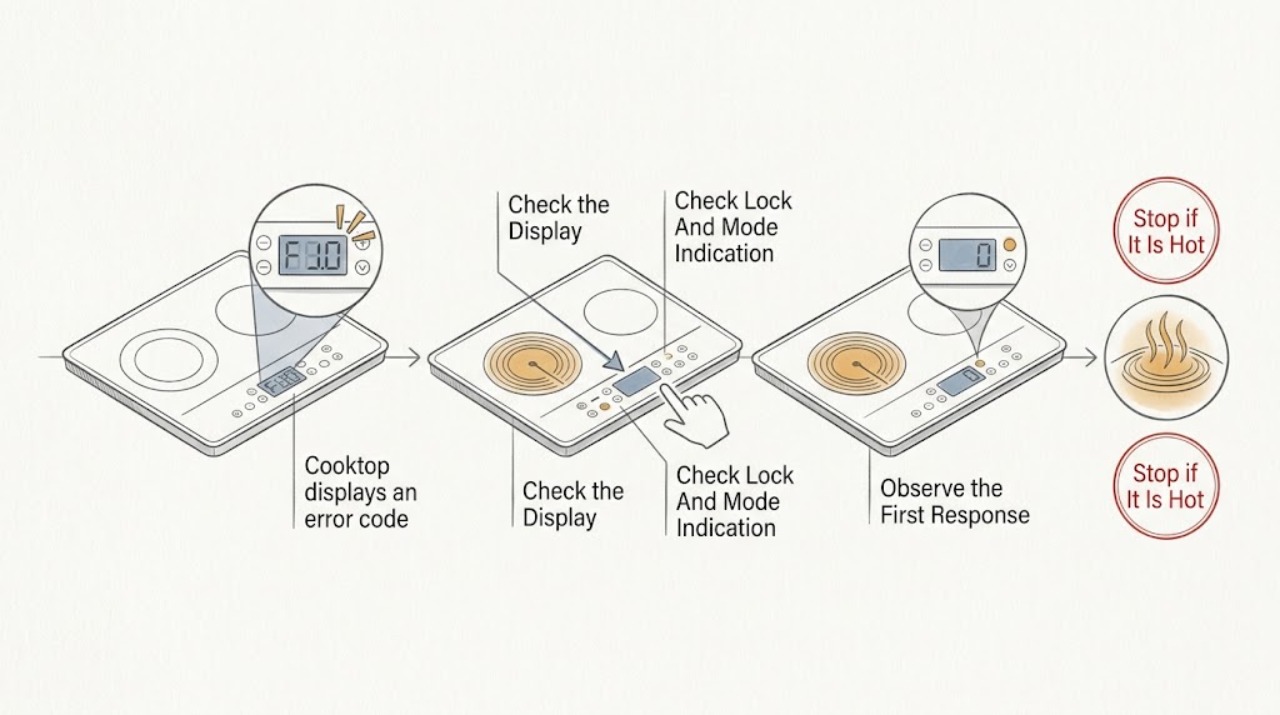
Record the exact Bosch code or symbol, whether the cooktop is gas, electric, or induction, which zone is affected, and whether cooking has stopped. Then turn the affected zone off and remove any cookware from the control area without touching a hot surface. Bosch lists different meanings by cooktop family: a wet or covered control panel, child lock, overheating, hot cookware near controls, demo or time-limit mode, electronics fault, and incorrect supply voltage are not interchangeable problems. Let an overheated surface or electronics cool, dry the control panel and remove an object when that is the listed condition, and use only the exact model manual for a reset. Do not open the cooktop, test wiring, bypass a lock, keep operating a cracked surface, or continue after a gas smell, smoke, sparks, shock, or uncontrolled heating. If the code is not listed for the exact model, returns after the permitted reset or cooling step, or indicates voltage or an electronics fault, leave the cooktop off and arrange qualified appliance service.
Work through in order
Diagnostic checks
Use only checks that match the exact appliance or system and its official guide.
-
Check 1
With all cooking zones turned off, record the Bosch model marking, whether the cooktop is gas, electric, or induction, the exact code or symbol, the affected zone, and whether the display is steady, flashing, beeping, or unresponsive.
Expected result: Separate a specific E/F, F, U, dE, lock, or all-indicators pattern from a blank or generic display, and note whether one zone or the entire panel is affected.
Next step: Use the exact model manual and the matching Bosch cooktop-family code guide; do not guess a part or apply another appliance family's code table.
Stop if: Stop immediately for gas odor, smoke, sparks, shock, uncontrolled heating, a cracked surface, exposed wiring, or a hot zone that will not turn off; leave the area safe and arrange qualified help.
Why this matters
Why: Bosch publishes family-specific meanings; the same-looking letter can have different implications across gas, electric, and induction models. A blank panel, a voltage indication, or an unlisted code requires a different service path than a wet panel or overheated zone.
-
Check 2
Once the surface is safe to approach, inspect the touch-control area for a spill, moisture, food, cookware, or another object covering a control, and remove only the external object or moisture without opening the cooktop.
Expected result: Note whether all indicators are flashing, one key is covered, the panel becomes responsive after it is dry and clear, or the same code remains.
Next step: Keep the cooktop off while the panel is drying and follow the model guide if the code clears; arrange service if the code returns or the controls remain unresponsive.
Stop if: Do not spray liquid into controls, pry a touch panel, use the cooktop with liquid entering seams, or continue if a crack exposes the panel or wiring.
Why this matters
Why: Bosch associates all-indicator flashing on applicable models with a wet or covered control panel, and it identifies panel-lock states separately. A persistent code after the external condition is cleared is more consistent with a fault or model-specific issue.
-
Check 3
Check whether a key or lock symbol, dE/demo indication, or time-limit indication is shown, then use only the exact model's normal touch-key or mode procedure with the cooktop off and no cookware covering controls.
Expected result: Record whether the lock or mode indicator clears and the zones respond normally, or whether the code persists, returns immediately, or affects only one zone.
Next step: If the indicator clears once, test only the normal operation described in the manual; if it returns or the control remains locked, stop and arrange service rather than bypassing it.
Stop if: Never defeat a lock, hold a key indefinitely outside the model instructions, or remove the control panel to restore operation.
Why this matters
Why: A child/panel lock, demo mode, or automatic time limitation can prevent normal heating without proving component failure. A recurring fault after the listed procedure makes an electronics, control, or zone problem more likely.
-
Check 4
For a code that Bosch identifies as an overheated zone, overheated electronics, or hot cookware near the controls, turn the affected heating off and allow the surface and electronics to cool; move cookware away from the control area only when safe to handle.
Expected result: Note whether the code is paired with a very hot zone, cookware over or near the panel, a no-heat condition, or a normal display after cooling.
Next step: Follow the exact model's restart instruction only after cooling; stop using the cooktop and arrange service if the code returns, a zone stays on, or the surface or controls behave abnormally.
Stop if: Do not touch hot glass, pour water on a hot surface, cover the panel with cookware, or continue cooking when heat cannot be controlled.
Why this matters
Why: Bosch lists different overheat and hot-cookware conditions by cooktop family. A code that clears after cooling supports a protective shutdown, but a recurring code, uneven heat, or controls that remain disabled needs diagnosis.
-
Check 5
For a blank display, supply-voltage code, or code that returns after the permitted external checks, observe whether the home's appliance circuit has an obvious tripped breaker without removing covers or touching wiring; do not repeatedly reset a breaker that trips again.
Expected result: Record whether the cooktop is completely blank, the breaker is tripped, the breaker holds but the code remains, or the code specifically identifies incorrect voltage.
Next step: Use qualified electrical or appliance service for recurring trips, incorrect-voltage codes, a blank panel with normal household power, or any wiring concern; do not open the cooktop or junction box.
Stop if: Do not remove a breaker-panel deadfront, test live conductors, reset a hot or sparking circuit, or continue if there is smoke, odor, heat damage, or shock.
Why this matters
Why: A loss of supply can explain a blank control, while Bosch's voltage codes indicate a supply or connection concern that cannot be diagnosed by a homeowner's visual check. A breaker that trips again or a code that returns points to service or electrical evaluation.
-
Check 6
After photographing the code and only when there is no heat, gas, water, electrical, or surface hazard, perform one reset exactly as the Bosch model guide permits; then record whether the same code returns before attempting further cooking.
Expected result: Distinguish a one-off code that clears from a code that reappears immediately, returns after heating, affects the same zone, or changes to a different fault.
Next step: Stop repeating resets and arrange qualified appliance service for a recurring, unlisted, voltage, or electronics code. Provide the model, family, exact code, zone, and reset result.
Stop if: Do not reset a cooktop with active gas odor, smoke, sparks, shock, uncontrolled heating, damaged wiring, cracked glass, or a breaker that trips again.
Why this matters
Why: Bosch allows a reset for some listed one-off, demo, or control conditions, but recurrence is evidence for a persistent fault rather than a reason to repeat resets. A changed code is also service information, not proof of a new part.
Use your observations
Decision map
Find the observation that best matches what you see, then follow the next safe action.
-
PATH 01Next step
What you see
The panel shows all indicators flashing or a control is unresponsive, and there is visible moisture, food, or an object covering the touch area; the display returns to normal after the external condition is safely cleared.
Do this next
Keep the panel dry and clear, then use the exact model's normal controls. If the code returns or the panel remains unresponsive, keep the cooktop off and arrange service.
-
PATH 02Next step
What you see
A lock, dE/demo, or time-limit indication is shown, there is no heat or electrical hazard, and the model's normal key or mode procedure clears the indication once.
Do this next
Use only the model manual's normal mode or unlock procedure and verify ordinary response without bypassing safety controls. Arrange service if the indicator returns or prevents safe heating.
-
PATH 03Next step
What you see
The code matches the Bosch family guidance for an overheated cooking zone, overheated electronics, or hot cookware near the control panel, and the affected zone can be turned off normally.
Do this next
Remove cookware from controls when safe, allow cooling, and follow the exact model's restart guidance once. Stop using the cooktop and arrange service if the code returns, heat remains uncontrolled, or the zone does not respond normally.
-
PATH 04Next step
What you see
The code is unlisted for the exact model, identifies incorrect supply voltage, indicates an electronics fault, returns after the permitted reset, or appears with a blank display or recurring breaker trip.
Do this next
Leave the cooktop off and arrange qualified appliance or electrical service. Give the technician the exact model, family, code, zone, breaker behavior, and reset result; do not open the appliance or junction box.
-
PATH 05Next step
What you see
A gas odor, flame abnormality, smoke, sparks, shock, uncontrolled heating, cracked glass, exposed wiring, severe overheating, or a hot zone that will not turn off accompanies the code.
Do this next
Turn controls off if it is safe, leave the area for gas odor or active fire, keep people away, and use emergency or qualified service appropriate to the hazard. Do not touch or operate the cooktop until it is cleared.
Helpful context
Understand the symptom
Start with the code, not a guessed part
A Bosch cooktop code is meaningful only in the context of the appliance family and exact model. Photograph the display or write the code exactly, including a dash, letter, number, lock symbol, flashing indicator, or all-panel pattern. Note whether a zone is hot, whether the control surface is wet or covered, and whether the cooktop still responds. Bosch publishes separate code guidance for electric, induction, and gas cooktops, so do not apply an induction code explanation to a gas or electric model without checking the model manual.
The low-risk checks Bosch actually lists
Turn the cooking zone off and move cookware away from the touch controls only when it is safe to handle. If all indicators are flashing, dry the control panel and remove an object covering a touch key. If a child or panel lock symbol is shown, use the exact model's normal unlock procedure. For an identified overheating condition, stop heating and allow the electronics or zone to cool. These steps address specific displayed conditions; they are not a substitute for opening the appliance or testing its wiring.
Treat voltage and electronics codes differently
Bosch identifies several induction codes as incorrect supply voltage and identifies E or F on a gas cooktop as an electronics fault. A reset may be listed for some one-off or mode conditions, but a voltage or electronics indication that returns is not a reason to keep trying the controls. Do not remove the cooktop from the counter, open a junction box, or make live measurements; keep the appliance off and use qualified service or electrical support as appropriate.
A persistent or unsafe code needs service
If the exact code is not in Bosch's model-specific guidance, returns after the listed cooling or reset step, or appears with a cracked surface, uncontrolled heat, gas odor, smoke, sparks, shock, or damaged wiring, stop using the cooktop. Give the technician the model marking, appliance family, exact code, affected zone, recent spill or overheating event, and what happened after the safe check. The code narrows the diagnostic path but does not identify a replacement component by itself.
Safety boundary
Stop conditions
- Stop using the cooktop for gas odor, smoke, sparks, shock, uncontrolled heating, a hot zone that will not turn off, cracked glass, exposed wiring, severe overheating, or a breaker that trips again.
- Do not open the cooktop, remove it from the counter, test live wiring, open a junction box, bypass a child or panel lock, pour water on a hot surface, or keep resetting an unexplained code.
- A safe user check is limited to recording the exact model and code, removing an external object or moisture from a cool control area, waiting for a listed overheat condition to cool, checking an obvious control or lock state, and following one exact model-approved reset; persistent or unlisted faults belong to qualified service.
Only after diagnosis
Potential parts
- Bosch cooktop electronic control board
Relevant only if qualified diagnosis confirms a control or electronics fault after the exact code, supply, panel condition, and wiring are evaluated.
Confirm the exact Bosch model and manufacturer-approved component; a generic E/F or recurring code does not prove board failure. - Bosch cooktop touch-control panel or module
Relevant only when a technician confirms that the touch panel or its interface is not responding after moisture, object, lock, and supply causes are excluded.
Match the exact model and approved assembly; do not replace a panel solely because all indicators flashed once. - Bosch cooktop temperature or overheat sensor
Relevant only when qualified testing links a recurring overheat indication or uncontrolled thermal response to a failed sensor or its circuit.
Confirm model-specific fit and diagnostic evidence before replacement; an overheated zone can be a protective response to cookware or operating conditions. - Bosch gas cooktop ignition or burner control module
Relevant only for a gas model when qualified diagnosis confirms an ignition or burner-control fault after gas supply and electronics checks.
Use only the exact model's approved component and qualified installation; do not infer an ignition-module fault from an unspecified E or F display.
When checks do not resolve it
Need a professional?
Arrange qualified Bosch appliance service when the code is not listed for the exact model, returns after the permitted cooling or reset step, identifies an electronics or supply-voltage fault, leaves a zone unable to heat or turn off normally, or persists after a dry and clear control panel and normal lock check. Use qualified electrical help for recurring breaker trips or suspected supply problems, and emergency help for gas odor, active fire, shock, or immediate danger. Provide the model marking, cooktop family, exact code, affected zone, surface condition, and reset or cooling result.
Common questions
FAQ
What should I do first when my Bosch cooktop shows an error code?
Turn the affected zone off, record the exact code or symbol and model, and identify whether the cooktop is gas, electric, or induction. Check the control area for moisture or an object only when the surface is safe. Use the Bosch guide for that exact family; do not guess a part or apply another family's code meaning.
What does it mean if all Bosch cooktop indicators are flashing?
Bosch lists a wet control panel or an object covering it as a cause on applicable cooktops. Turn heating off, let the surface become safe, dry the control area, and remove the external object. If the display remains or returns, stop using the cooktop and arrange service.
Can an overheated Bosch cooktop error clear by itself?
Some Bosch codes identify an overheated cooking zone or electronics that switched off for protection. Stop heating and allow the relevant surface or electronics to cool, then follow the exact model's restart instruction. A recurring code, uncontrolled heat, or a zone that will not respond needs qualified service.
Is a Bosch E or F code the same on every cooktop?
No. Bosch publishes different code tables for gas, electric, and induction cooktops, and model details can vary. A gas guide uses E or F for an electronics fault, while induction and electric tables list more specific conditions. Record the exact model and code before choosing a response.
Should I reset a Bosch cooktop after an error code?
Only when the exact Bosch model guide lists a reset for that condition and there is no heat, gas, water, or electrical hazard. Record the code first and perform one permitted reset. If it returns, do not keep cycling power; arrange qualified appliance or electrical service.
What if the Bosch code says the supply voltage is incorrect?
Leave the cooktop off and do not open it or test live wiring. Bosch treats several induction codes as incorrect supply voltage; a visual breaker check is not a substitute for qualified electrical diagnosis. Arrange appropriate appliance or electrical service, especially if the breaker trips again.
When is a Bosch cooktop error code an emergency?
Stop using it for gas odor, smoke, sparks, shock, uncontrolled heating, a hot zone that will not turn off, cracked glass, exposed wiring, severe overheating, or immediate fire risk. Leave the area for gas odor or active fire, keep others away, and use emergency or qualified help appropriate to the hazard.
Read the exact guide
Official sources
- Bosch Electric Cooktop TroubleshootingBSH Home Appliances Corporation · Bosch electric cooktop power, child-lock, overheating, error-code, and service guidance
- Bosch Cooktop & Rangetop Error CodesBSH Home Appliances Corporation · Bosch electric, induction, and gas cooktop and rangetop error-code categories
- Bosch Induction Cooktop Error CodesBSH Home Appliances Corporation · Bosch induction cooktop code meanings, cooling, control-panel, voltage, and reset guidance
- Bosch Gas Cooktop Error CodesBSH Home Appliances Corporation · Bosch gas cooktop and rangetop E/F and overheating error guidance
Community feedback
Share a repair observation
Share a plain-text repair observation. Accepted observations are published automatically; this page may take a moment to update.