
On this page
Start here
Quick answer
A cooktop error code can be a temporary control lockout, overheating condition, wet or obstructed touch panel, supply-power problem, or a persistent electronics, sensor, wiring, or heating fault. A power reset may clear a one-time code, but it does not identify or repair the underlying cause. Turn all controls off, remove cookware, let the surface and controls cool and dry, and record the exact code before attempting any reset. Use the owner manual's reset procedure; if it requires a breaker, operate it only when the circuit and panel are safely accessible and you are comfortable doing so. If the code returns, the cooktop will not operate normally, the panel is cracked or wet, a breaker trips, there is smoke, heat, arcing, gas odor, or the code concerns supply voltage, stop using the cooktop and arrange qualified appliance or electrical service.
Before you begin
Safety first
- A qualified technician should interpret the model-specific code, inspect controls, sensors, heating zones, cooling paths, wiring, supply connections, and safety devices. A qualified electrician should handle branch-circuit, breaker, supply-voltage, and connection concerns. Keep homeowner work to controls-off, cool-and-dry, model lookup, documentation, and a single manual-authorized reset.
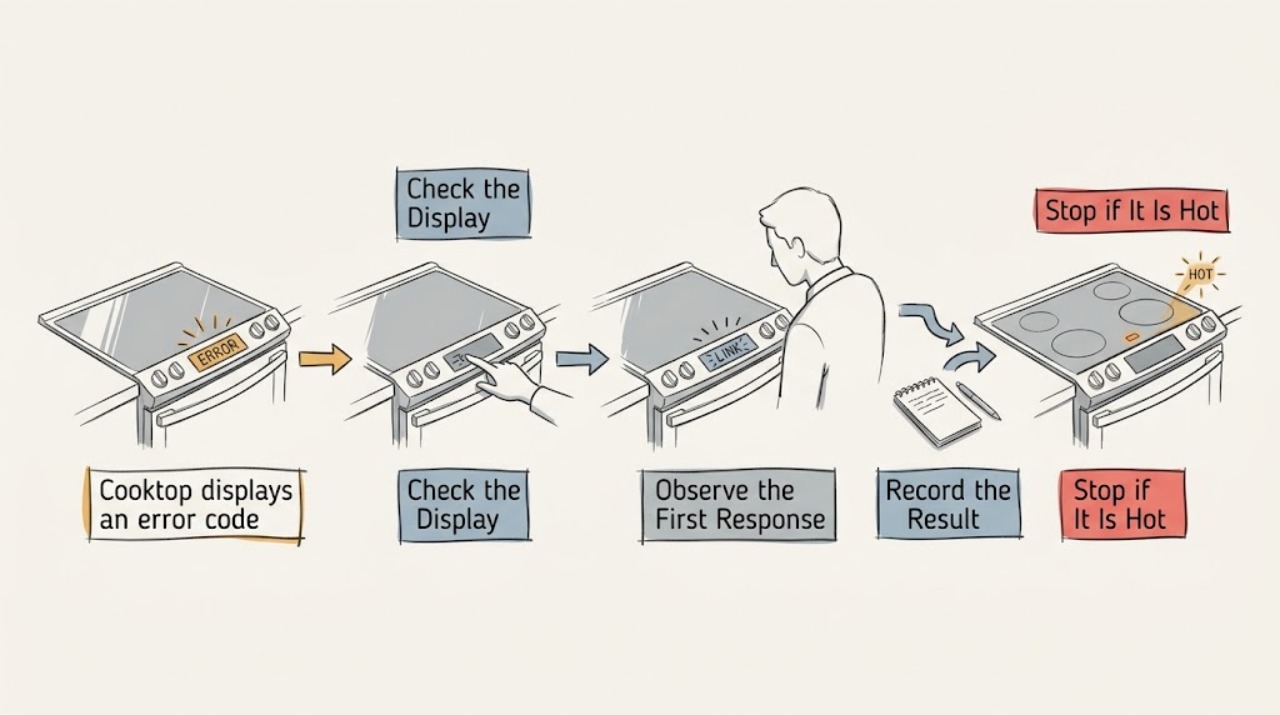
Work through in order
Diagnostic checks
Use only checks that match the exact appliance or system and its official guide.
-
Check 1
Turn every cooktop control off, remove cookware from the control area, and stop using the appliance if there is smoke, sparking, a burning smell, gas odor, a cracked surface, exposed wiring, or water entering the controls.
Expected result: The code appears with an active burner or hot cookware, a wet or obstructed touch panel, a cracked surface, or an electrical or gas warning; or none of those hazards is present.
Next step: For any hazard, leave controls off, ventilate and leave the area for a gas odor as appropriate, and arrange qualified appliance or electrical service. Otherwise let the surface cool and continue with visual checks.
Why this matters
Why: Heat, spills, and blocked keys can cause a temporary control response, but physical, electrical, or gas hazards are not reset problems and can make continued use unsafe.
-
Check 2
Clean and dry the accessible touch-control area as directed by the owner manual, and remove any utensil, pot edge, cloth, or spill that could be resting on a key.
Expected result: The code or flashing indicators disappear after the panel is dry and clear, or the code remains with the controls clean and unobstructed.
Next step: If the display clears, keep the panel dry and test only as the manual allows. If it remains, record the exact code and move to the model-specific documentation rather than repeatedly pressing keys.
Why this matters
Why: A wet or continuously pressed key is more likely when clearing the panel changes the display. A persistent code points toward a model-specific control, sensor, temperature, or supply issue.
-
Check 3
Allow the cooktop and nearby controls to cool completely, especially if the code appeared after prolonged high-power cooking or the display indicates heat; do not apply direct heat or cover the appliance while it cools.
Expected result: The code disappears after cooling, a single zone remains disabled, the whole panel remains disabled, or the code returns as soon as heating is attempted.
Next step: Resume use only if the manual says the cleared condition is safe and the cooktop operates normally. If the code returns or cooking remains unavailable, stop using the affected appliance and arrange service.
Why this matters
Why: A code that clears after cooling is consistent with a protective overheat response, but recurrence can indicate blocked ventilation, a sensor, control-electronics, or heat-management fault. The disabled area helps the technician narrow the symptom but does not identify a part.
-
Check 4
Write down the exact code and display behavior, appliance type (electric, radiant, induction, or gas), model label, affected zone, recent spill or cleaning, and whether the breaker or power recently changed.
Expected result: The code is a complete repeatable alphanumeric message, only a hot or lock indicator is shown, the display is blank, or different codes appear after a power event.
Next step: Use the model manual or official support page to interpret that exact display. Do not substitute a code definition from another cooktop or assume that a blank display is fixed by a reset.
Why this matters
Why: A complete repeatable code is the most useful model-specific diagnostic clue. A hot or lock indicator may be a normal protective or control state, while a blank display or multiple codes raises a power or control concern.
-
Check 5
If the manual permits a power reset, confirm all controls are off and the surface is cool, then follow the manual's appliance-disconnect or circuit-breaker procedure once; do not remove covers or work inside the electrical connection.
Expected result: The code clears and the cooktop passes the manual's normal-operation check, or the code remains, returns, or the breaker will not stay on.
Next step: If it clears and all functions work normally, monitor for recurrence and retain the recorded code. If it remains, returns, or the breaker trips, leave the cooktop off and arrange qualified service; do not repeat resets to keep cooking.
Why this matters
Why: A code that clears once may have been transient, but a reset is not proof that the appliance is repaired. A returning code or unstable breaker indicates a persistent fault, supply issue, or safety response.
-
Check 6
After a successful documented reset, test only the normal controls and one cooking zone as the manual directs, while watching for renewed code text, abnormal heat, beeps, lockout, or uneven operation.
Expected result: The display remains clear and the zone heats and responds normally, or the code reappears, a zone fails, the control locks, or abnormal heat/noise occurs.
Next step: Stop the test immediately for recurrence or abnormal behavior, keep the appliance off, and give the technician the code, reset result, model, and conditions when it occurred.
Why this matters
Why: Normal operation after a one-time clear supports a transient event but does not rule out an intermittent fault. Any recurrence or abnormal behavior means the underlying condition remains unresolved.
-
Check 7
Prepare the appliance for service by preserving the code record, photos of the display and model label, reset timing, affected zone, and whether the fault follows a spill, overheating, power interruption, or normal use.
Expected result: The fault is intermittent, returns after every reset, affects only one zone, affects the full control panel, or appears with a breaker trip or other appliance power symptom.
Next step: Arrange a qualified appliance technician; use a qualified electrician when the symptom involves the supply circuit, breaker, wiring, or voltage. Do not order a control board, sensor, or element from the code alone.
Why this matters
Why: These patterns help separate a local zone or sensor issue from a shared control, supply, or wiring concern, but they do not authorize opening the cooktop or diagnosing live circuits.
Use your observations
Decision map
Find the observation that best matches what you see, then follow the next safe action.
-
PATH 01Next step
What you see
The code disappears after the panel is dried, cookware is moved away, and the surface has cooled, with no abnormal operation afterward.
Do this next
Follow the owner manual's normal-use check and monitor for recurrence. Stop using the appliance if the message returns or controls behave unexpectedly.
Why this path and its safety boundary
Why it matters: A temporary wet-key, blocked-control, hot-cookware, or overheat response is more likely than a persistent electronics failure, but the exact code still depends on the model.
-
PATH 02Next step
What you see
A manual-authorized power reset clears the code once, and every tested control and zone then operates normally without heat, odor, or unusual sounds.
Do this next
Keep the exact code and reset result with the appliance records and monitor it. Arrange service if any code returns instead of performing repeated resets.
Why this path and its safety boundary
Why it matters: The event may have been transient, but the reset only changes the diagnostic state; it does not establish that a control, sensor, wiring, or power fault cannot recur.
-
PATH 03Next step
What you see
The code returns after reset, the cooktop will not heat or turns off again, only one zone remains disabled, or the code appears without a visible spill or overheating event.
Do this next
Keep the cooktop off and arrange model-specific appliance service. Provide the exact code, model, affected zone, and reset history; do not bypass the control or replace parts by code similarity.
Why this path and its safety boundary
Why it matters: A persistent electronics, sensor, heating-zone, control, or wiring fault is more likely than a one-time software state; a code alone cannot identify the replacement part.
-
PATH 04Next step
What you see
The display is blank after a power event, a breaker trips or will not stay on, the code indicates incorrect supply voltage, or wiring, smoke, arcing, or gas odor is suspected.
Do this next
Do not reset repeatedly or open the appliance. Leave it off and obtain qualified electrical or appliance service; for gas odor, follow local emergency gas-safety guidance and leave the area as appropriate.
Why this path and its safety boundary
Why it matters: The pattern may involve the branch circuit, supply connection, or an electrical or gas safety hazard rather than a resettable control fault.
-
PATH 05Next step
What you see
A cooktop code is accompanied by a cracked glass surface, persistent wetness under the controls, repeated overheating, or a lockout that prevents safe control of a burner or zone.
Do this next
Stop using the cooktop and arrange qualified inspection. Do not tape over a crack, continue heating through a lockout, or open the control housing to dry or reset it.
Why this path and its safety boundary
Why it matters: Physical damage, moisture ingress, thermal protection, or failed controls can create shock, burn, fire, or uncontrolled-heating risk.
Helpful context
Understand the symptom
What a reset can and cannot tell you
Digital cooktops use model-specific codes rather than one universal error language. A brief power interruption can clear a transient control fault, but the same code returning means the reset only removed the symptom temporarily. The exact model manual is needed to interpret the code; do not assume that a code seen on one brand or cooktop type has the same meaning on another.
Start with heat, moisture, and control-panel checks
Before any power reset, turn every control off, move cookware away from the touch area, and allow the surface and electronics to cool. Wipe the control panel dry with the method allowed by the manual. Hot cookware, spills, and an object resting on a touch key can create a lockout or overheating indication, and these conditions are handled differently from an electronics or supply-voltage fault.
Use the exact model documentation
Record the full display, including letters, numbers, punctuation, flashing lights, and beeps, plus whether one zone or the entire cooktop stopped. Find the model-specific error-code list and reset instructions in the owner manual or manufacturer support site. A generic reset duration or a code list from another model is not a substitute for that documentation.
Know when a reset is the end of homeowner troubleshooting
If the code returns, the controls behave erratically, a cooking zone remains unavailable, or the appliance shows a power-supply or wiring concern, keep the cooktop off and obtain qualified service. Do not remove the glass, control panel, junction box, or electrical covers, measure live voltage, bypass a thermal or control safety, or continue cooking through a recurring fault.
Safety boundary
Stop conditions
- Stop using the cooktop for smoke, sparking, arcing, burning odor, gas odor, a cracked surface, water entering controls, a breaker that trips again, or uncontrolled heating; obtain qualified appliance or electrical help.
- Do not remove the glass, control panel, junction box, terminal cover, or service-panel cover, test live voltage, bypass a thermal or control safety, or replace a control board, sensor, or element from the code alone.
- Do not repeatedly cycle power to keep cooking when the code returns, a zone remains disabled, controls act erratically, the display is blank, or the manual identifies a supply-voltage or wiring concern.
- For a gas cooktop with a gas odor or suspected combustion problem, turn controls off if safe, avoid flames and electrical switching, leave the area as appropriate, and follow local emergency gas-safety guidance before arranging service.
Only after diagnosis
Potential parts
- cooktop electronic control board
Consider this only after model-specific diagnosis confirms the control board is faulty; a recurring code can also come from a sensor, power connection, zone, moisture, or thermal condition.
Confirm the exact cooktop model, revision, electrical ratings, connectors, software or configuration requirements, and manufacturer fit information before ordering or installing. - cooktop temperature sensor
Consider this only when testing confirms a failed or out-of-range sensor after the control panel is dry and the supply and wiring are checked.
Match the exact cooktop model, sensor location, connector, sensing characteristics, and service procedure; do not infer fit from a similar code. - cooktop heating element or induction zone component
Consider this only when a technician confirms that one cooking zone or its associated component has failed; a general error display does not identify the heating part.
Confirm the exact cooktop technology, model, zone position, electrical ratings, mounting, and manufacturer instructions before replacement. - cooktop power connection or terminal component
Consider this only after a qualified electrician or appliance technician confirms a damaged or incorrect supply connection; do not open or alter the connection as a homeowner reset.
Verify the exact appliance, approved connection method, circuit requirements, local code, and installation documentation.
When checks do not resolve it
Need a professional?
Safety scope: A qualified technician should interpret the model-specific code, inspect controls, sensors, heating zones, cooling paths, wiring, supply connections, and safety devices. A qualified electrician should handle branch-circuit, breaker, supply-voltage, and connection concerns. Keep homeowner work to controls-off, cool-and-dry, model lookup, documentation, and a single manual-authorized reset.
Common questions
FAQ
Can a power reset clear a cooktop error code?
Sometimes. Manufacturer guidance says a brief power interruption can clear some one-time fault, lockout, or indicator states, but a code that returns usually needs model-specific service. Record the exact display first, follow the owner manual, and do not use repeated resets to keep operating a cooktop with a recurring fault.
What should I do before resetting a cooktop that shows an error?
Turn all controls off, move cookware away from the touch panel, remove visible objects or spills using the manual-approved method, let the surface cool, and record the complete code. If there is smoke, sparking, gas odor, a crack, water entering controls, or a breaker problem, do not reset it; arrange qualified help.
Why does my cooktop error code come back after a reset?
The reset may have cleared only the control state. A returning code can reflect overheating, a wet or failed control, a sensor or cooking-zone fault, wiring or supply voltage, or another model-specific condition. Keep the cooktop off and give the technician the exact code and reset result rather than replacing a part from the code alone.
Can I reset a cooktop at its circuit breaker?
Only when the owner manual directs that method and the breaker and surrounding area are safely accessible. Make sure all cooktop controls are off and the surface is cool, and do not open the panel or work on wiring. If the breaker trips again or will not stay on, leave it off and arrange qualified electrical or appliance service.
When should I stop using a cooktop with an error code?
Stop for a returning code, a disabled zone, uncontrolled or abnormal heating, repeated overheating, a blank display after a power event, a breaker trip, cracked glass, wet controls, smoke, sparking, burning odor, or gas odor. A qualified technician can interpret the model-specific code and test the control, sensor, zone, wiring, and safety systems.
Read the exact guide
Official sources
- Cooktop - Error, Fault, or Function CodesGE Appliances · Provides model-dependent context that a fault code identifies a diagnostic issue, a brief breaker shutdown may clear some codes, and recurring codes generally require trained service.
- Bosch Electric Cooktop TroubleshootingBSH Home Appliances Corporation · Supports checking power and lock states, allowing an overheated cooktop to cool, consulting the code list, and seeking service when the condition persists or the glass is cracked.
- Range Error Code F40 / F41 - Cooktop Lock OutFrigidaire · Provides an example of a cooktop-specific lockout where disconnecting power can be attempted once and persistent failure moves to service; the article does not generalize the code to other models.
- Bosch Cooktop & Rangetop Error CodesBSH Home Appliances Corporation · Shows that code meanings vary by appliance type and can involve demo mode, operational faults, overheating, hot cookware, wet controls, lockout, and incorrect supply voltage; recurring faults require support.
- Indicator or Hot Light On - Electric CooktopWhirlpool Corporation · Directly describes turning controls off, allowing the cooktop to cool, using the product's breaker reset procedure, monitoring for recurrence, and contacting service if the indication remains.
Community feedback
Share a repair observation
Share a plain-text repair observation. Accepted observations are published automatically; this page may take a moment to update.