
On this page
Start here
Quick answer
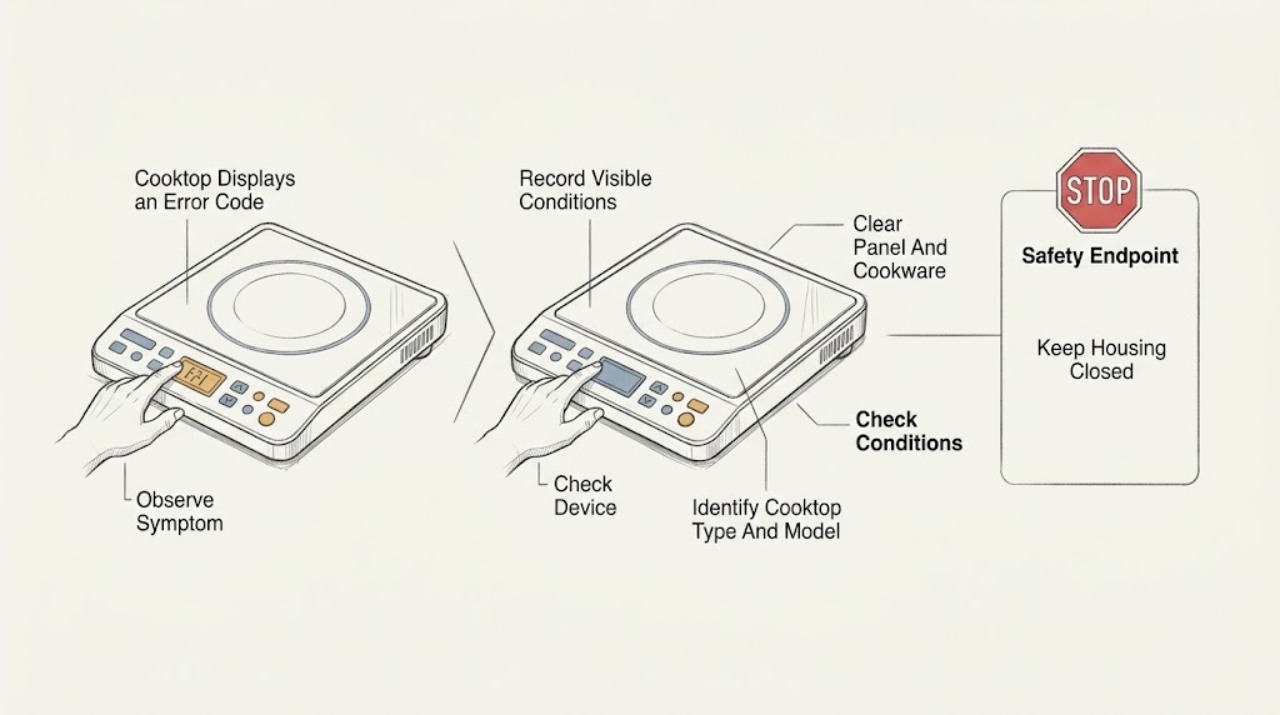
A visible cooktop error code is a symptom, not a universal diagnosis. First photograph or transcribe the complete code, identify whether the cooktop is electric, induction, or gas, and record which zone or control is affected. Manufacturer charts show that similar displays can represent a wet or covered touch panel, a lock or demo setting, cookware detection, overheating, an electrical supply problem, or an electronics fault; the meaning depends on the exact model. Turn the controls off, remove cookware or objects from the control area, and dry the panel. If the model manual permits a user power reset, use only the documented procedure and make one normal test. If the code returns, the display is missing or unreadable, the glass is cracked, the unit smells burned, the breaker trips, or the supply-voltage or internal-electronics path is suspected, stop using the cooktop and arrange qualified appliance or electrical service. Do not open the cooktop, probe live wiring, bypass a lock, or choose a control board from a code alone.
Work through in order
Diagnostic checks
Use only checks that match the exact appliance or system and its official guide.
-
Check 1
With the cooktop controls off and the surface safe to approach, photograph or transcribe the entire display. Record every letter, number, symbol, flashing segment, affected cooking zone, beeping pattern, and whether the code repeats or remains steady.
Expected result: The full code is readable; only part of it is visible; all displays flash; one zone flashes; the control panel is blank; or the display changes as the cooktop cools.
Next step: Write down the make, model, cooktop type, and code before clearing anything. Use the owner manual or manufacturer chart for that exact model; if the code cannot be read, arrange service rather than guessing.
Stop if: Stop if the glass is cracked, the panel is hot or wet, smoke or a burning odor is present, or the display is accompanied by sparking or repeated breaker trips.
Why this matters
Why: The complete code and display behavior select the correct manufacturer chart. A partial or changing display cannot support a specific part diagnosis, while all displays flashing or a blank display can follow a panel, power, or electronics path.
-
Check 2
From the appliance label, documentation, or control-panel markings, identify the manufacturer, full model, and whether the unit is electric radiant, induction, or gas. Do not remove the cooktop or open a panel to find the label.
Expected result: The model and type are known; only the brand is known; the unit is induction with cookware detection; the unit is gas with electronic ignition; or no reliable identification is available.
Next step: Select only the matching manual or official error-code chart. If the model is unknown, use only the general external checks in this article and stop before disassembly or part selection.
Stop if: Do not infer a code meaning from a different brand or model, and do not remove trim, the glass, or an electrical cover to identify the appliance.
Why this matters
Why: Error meanings and safe recovery steps differ by appliance type and model. A code on a gas ignition control is not interchangeable with a code on an induction zone or radiant control board.
-
Check 3
Turn all controls off. Remove utensils, packaging, and cookware from the control area, wipe the touch panel dry with the approved method, and on an induction unit move a suitable pan away from the controls and center it only after the surface is safe.
Expected result: The code clears after drying or removing an object; a lock symbol remains; a pan or power level flashes; the zone is hot; or the code remains with a clean, uncovered panel.
Next step: Use the exact manual for a lock or cookware response and allow the unit to cool if the manual describes overheating. If the code remains on a clean, dry, uncovered panel, continue to the controlled power and service decision.
Stop if: Do not pour water on a hot surface, scrape the panel with metal, operate with cracked glass, defeat a lock, or keep heating while an error or overheating indication remains.
Why this matters
Why: A wet or covered key, active lock, unsuitable or misplaced induction pan, hot cookware near controls, or an overheating condition can create a display response without proving a failed control board. A persistent code after these conditions are removed is more likely a model-specific fault requiring its chart.
-
Check 4
From a dry position, observe the clearly labeled cooktop circuit or accessible supply connection without removing covers. Note whether the display follows a recent outage, the breaker is tripped, other appliances on the circuit are affected, or the breaker trips again after one ordinary reset.
Expected result: There was a power interruption; the breaker is normally on; the breaker trips again; the display is blank; or the supply cannot be confirmed safely.
Next step: If the breaker is ordinarily tripped and there is no heat, odor, water, or visible damage, reset it once and observe. If it trips again or the supply is uncertain, leave it off and call a qualified electrician or appliance technician; do not repeatedly cycle power.
Stop if: Do not remove an electrical cover, touch conductors, use an extension cord for a built-in cooktop, or reset a hot, wet, smoking, or repeatedly tripping circuit.
Why this matters
Why: A power event can explain a temporary display or a no-display condition, while a repeated trip or uncertain supply indicates an electrical fault. An external power observation cannot distinguish a control board, wiring, or supply-voltage failure inside the cooktop.
-
Check 5
If the exact owner manual permits a user power reset and the cooktop is off, cool, dry, intact, and connected to an accessible identified disconnect, follow that manual's reset sequence once. Do not remove a built-in cooktop or expose wiring to reach power.
Expected result: The code disappears and the controls operate normally; the same code returns immediately; a different code appears; or the cooktop remains blank, locked, hot, or unresponsive.
Next step: Record the before-and-after code and stop if the message returns, the display is blank, or operation is abnormal. Use the model-specific chart and arrange service for a persistent or unlisted code.
Stop if: Do not reset a circuit repeatedly, bypass a disconnect, open the appliance, or restart a cooktop with cracked glass, burning odor, water intrusion, or a persistent electronics fault.
Why this matters
Why: A one-time reset can clear a transient panel, power, or electronics state, but recurrence means the underlying condition remains. A different code is a new diagnostic result, not proof that the first part was faulty.
-
Check 6
Compare the complete recorded code and symptom with the exact manufacturer chart, then classify it as a panel or setting condition, cookware or heat condition, power or voltage condition, or electronics fault before considering any replacement part.
Expected result: The chart gives a low-risk external correction; the code is not listed; it returns after the listed correction; it indicates supply voltage or electronics; or the chart requires internal testing.
Next step: Perform only the chart's external correction. For an unlisted or persistent code, a supply-voltage message, damaged glass, or an internal electronics instruction, stop using the cooktop and provide the technician the model, code, photos, and observations.
Stop if: Do not replace a control board, probe live wiring, bypass a lock, open an induction or gas control assembly, or alter electrical connections based only on a visible code.
Why this matters
Why: The chart result determines whether cleaning, cooling, cookware correction, or a documented reset is appropriate. An unlisted, recurring, voltage-related, or electronics code requires model-specific diagnosis and does not identify a control board by itself.
Use your observations
Decision map
Find the observation that best matches what you see, then follow the next safe action.
-
PATH 01Next step
What you see
The display clears after the panel is dried and uncovered, or the all-flashing symptom occurs while moisture or an object is on the controls.
Do this next
Keep the controls off until the surface is dry and clear, then make one normal test. If the display returns on a clean, dry panel, use the exact model chart and arrange service if it persists.
Why this path and its safety boundary
Why it matters: The control-panel condition is more likely than a failed board. Official cooktop guidance links flashing displays or indicators to wet panels, permanently pressed keys, or objects covering the controls.
-
PATH 02Next step
What you see
An induction zone flashes a pan or power indication, the pan is not centered or suitable, or the display follows hot cookware or an overheated zone.
Do this next
Remove cookware from the controls, allow the surface to cool, and use the exact manual to confirm pan requirements and placement. Stop if the code remains after cooling or the surface is damaged.
Why this path and its safety boundary
Why it matters: Cookware detection, a control-area obstruction, or thermal protection is more likely than a control-board failure. Manufacturer examples describe pan detection and overheating responses that can clear after correct cookware placement or cooling.
-
PATH 03Next step
What you see
A key or lock symbol is shown, the controls do not respond, or the code corresponds to a documented demo or lock state on the exact model.
Do this next
Use the exact owner manual's lock or demo instructions. If the setting cannot be cleared or the display shows a true fault afterward, stop and arrange service.
Why this path and its safety boundary
Why it matters: A setting is more likely than a component failure. Lock and demo behavior varies by model, so a generic key sequence can make the situation worse or fail to clear it.
-
PATH 04Next step
What you see
The display is blank or shows a power or voltage-related code, the symptom follows an outage, or the breaker trips again after one safe external reset.
Do this next
Leave the circuit off when it trips again or the voltage is uncertain. Call a qualified electrician or appliance technician and provide the exact code and recent power history.
Why this path and its safety boundary
Why it matters: The electrical supply, installation, wiring, or internal power stage is more likely than a repair that can be selected from the code alone. Manufacturer charts direct users to service or electrical support for incorrect supply voltage and persistent no-display symptoms.
-
PATH 05Next step
What you see
The code is not listed for the model, returns after the panel is clean and dry and the manual-permitted reset, or is paired with heat, odor, a cracked surface, abnormal controls, or an electronics fault message.
Do this next
Stop using the cooktop and arrange qualified service. Provide the full model, code, display photo, affected zone, reset result, and any heat, odor, power, or glass damage observations.
Why this path and its safety boundary
Why it matters: A persistent internal electronics, sensor, control, or wiring fault remains possible. The visible code does not prove that the control board is the failed part or that a replacement will be compatible.
Helpful context
Understand the symptom
The code must be read in context
A cooktop may show a letter, number, symbol, flashing power level, or a group of flashing indicators. The same-looking display is not a cross-brand code. Note the complete characters, whether the code flashes, the affected zone, whether the controls beep, and whether the cooktop still heats. Keep the make and model ready because official support pages separate electric, induction, and gas cooktop charts and often require the exact code for service.
Start with the external conditions manufacturers call out
Before assuming an electronic board failed, look for a wet or covered touch panel, an object resting on a key, hot cookware near the controls, an active child lock, or an induction pan that is not detected or is not centered. Turn the controls off, remove the object or cookware, and dry the surface. Do not cover the panel with a towel while it is hot or keep using a display that remains in an error state.
A reset is a test, not a repair
Some manufacturer instructions allow a model-specific power reset after the cooktop is off. Use the owner manual and an accessible, clearly identified disconnect only; do not remove a built-in cooktop or expose wiring to reach power. If the code disappears and the cooktop operates normally, record the event. If it returns, persists after cooling, or is paired with a tripped breaker, heat, odor, crack, or abnormal operation, stop and arrange service.
Safety boundary
Stop conditions
- Stop before resetting or disassembling if the glass is cracked, the panel is wet and hot, smoke or a burning odor is present, the appliance sparks, the breaker trips repeatedly, water reaches electrical parts, the display is blank with an uncertain supply, or the cooktop behaves unpredictably. Do not open a built-in cooktop, probe live wiring, bypass a lock, defeat thermal or cookware protections, or replace a control board from a generic code. Arrange qualified appliance service for any unlisted or recurring code, voltage-related message, internal-electronics instruction, or fault that remains after the exact manual's external correction.
Only after diagnosis
Potential parts
- cooktop control panel or touch-control assembly
Consider this only when the exact model service procedure confirms a failed control panel after moisture, objects, lock settings, cookware, and power conditions have been ruled out.
Touch-control assemblies are model- and revision-specific. Confirm the full cooktop model and official service documentation before selection; a visible code alone is not proof of panel failure. - cooktop electronic control board
Consider this only when qualified diagnosis and the exact manufacturer chart or service procedure identify an internal control-board fault rather than a sensor, power, panel, wiring, cookware, or overheating condition.
Control boards vary by cooktop type, model, revision, and configuration. Do not select a board from a generic code or visual similarity; verify the complete model and official fit information. - cooktop temperature or zone sensor
Consider this only when the model diagnostic procedure identifies a failed temperature or zone sensor and the wiring and control board have been tested by a qualified technician.
Sensor type, connector, placement, and calibration vary by model. Confirm the exact model service documentation before selection and do not probe the live circuit.
When checks do not resolve it
Need a professional?
Call a qualified appliance technician when the code is unlisted or returns after the model-directed correction, the control panel remains blank or unresponsive, a zone will not operate, an electronics or sensor fault is indicated, or the correct model and part are uncertain. Call an electrician for a hot, arcing, wet, or repeatedly tripping supply circuit. Use urgent service for smoke, burning odor, exposed energized wiring, flooding, or a cracked surface with abnormal operation.
Have this ready
- Provide the cooktop manufacturer, full model, electric, induction, or gas type, complete code and display photo, affected zone, whether the panel was wet or covered, cookware and temperature observations, recent outage, reset result, breaker behavior, and any crack, heat, odor, or water symptom.
Common questions
FAQ
What should I do first when my cooktop displays an error code?
Photograph or transcribe the complete code, record the manufacturer, full model, cooktop type, affected zone, and whether the display is flashing. Turn the controls off, remove objects from the panel, and dry it. Then use only the exact model's owner manual or manufacturer error-code chart.
Can a wet control panel cause a cooktop error display?
Yes. Bosch identifies a wet or covered control panel as a cause of flashing indicators on some cooktops, and Whirlpool describes water, debris, or a permanently pressed key as possible causes of a flashing indicator. Turn controls off, remove objects, and dry the panel; a recurring code needs model-specific diagnosis.
Does a visible cooktop error code mean the control board failed?
No. The code may indicate cookware detection, overheating, a lock or demo setting, a wet panel, power supply, or another electronics condition. Match the complete code to the exact model chart first. A control board should be considered only after qualified diagnosis confirms it.
Can I reset a cooktop error code at the breaker?
Only if the exact owner manual permits a user power reset and the appliance is off, cool, dry, intact, and connected to an accessible identified disconnect. Follow that model's procedure once. If the code returns or the breaker trips again, leave the circuit off and arrange service; do not repeatedly cycle power.
Why does an induction cooktop flash a pan symbol or power level?
On some induction models, the indication can mean the cookware is not detected, is too small, is not centered, or is too hot near the controls. Move objects away, allow the surface to cool, and use the exact model guidance for cookware requirements. If the display remains after correction, treat it as a persistent fault.
When should I stop using a cooktop with a visible error code?
Stop for a code that is unlisted or returns after the documented correction, a blank or unresponsive panel, repeated breaker trips, supply-voltage indication, overheating, burning odor, smoke, a crack, water near electrical parts, or abnormal heating. Do not open the cooktop or bypass its protections; arrange qualified appliance or electrical service.
What information should I give a cooktop technician?
Provide the manufacturer, complete model, electric, induction, or gas type, exact code and photo, affected zone, whether the panel was wet or covered, cookware and temperature observations, recent outage, reset result, breaker behavior, and any crack, heat, odor, or water symptom. Do not provide a guessed control-board part number as the diagnosis.
Read the exact guide
Official sources
- Bosch Electric Cooktop TroubleshootingBosch Home Appliances · Official Bosch electric cooktop troubleshooting page covering power and breaker observations, lock settings, error-code lookup, overheating, cooling, and escalation when a fault persists.
- Bosch Induction Cooktop Error CodesBosch Home Appliances · Official Bosch induction error-code guide directing users to identify the model, distinguish lock, wet-panel, cookware, overheating, voltage, and electronics states, and contact support when a code persists or is not listed.
- Indicator or Display Flashing - Electric and Induction CooktopWhirlpool Product Help · Official Whirlpool troubleshooting page explaining that flashing indicators can result from a permanently pressed key, wet or covered control area, cookware detection, or performance settings, with a documented external power-reset and service boundary.
- Bosch Cooktop & Rangetop Error CodesBosch Home Appliances · Official Bosch error-code reference showing distinct electric, induction, and gas sections and examples involving wet or covered controls, locks, overheating, cookware, power supply, and electronics faults.
Community feedback
Share a repair observation
Share a plain-text repair observation. Accepted observations are published automatically; this page may take a moment to update.