
On this page
Start here
Quick answer
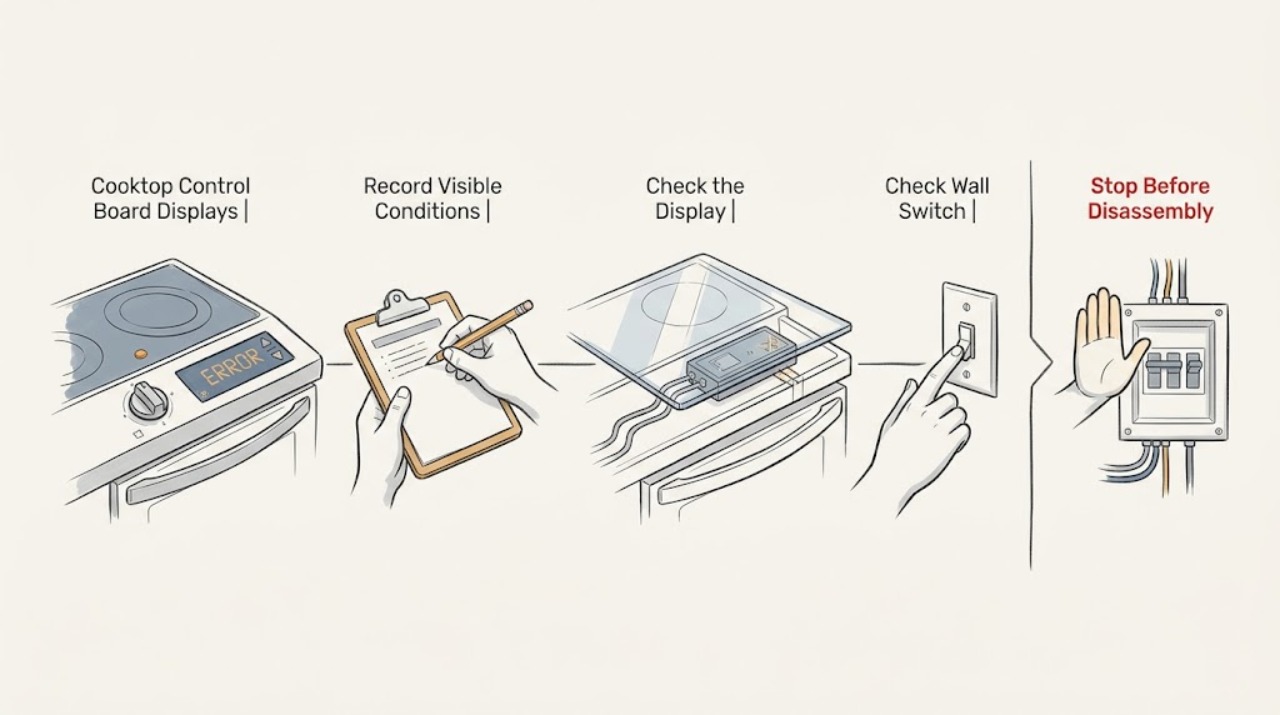
Record the exact Bosch error code, cooktop type, affected zone, and what was happening just before it appeared; Bosch error meanings differ between electric, induction, and gas cooktops. First remove any object or moisture from the control panel, and let overheated cookware or electronics cool when the code's instructions identify overheating. A child or panel lock can also look like a control failure. If the code is a one-off operational fault, follow the exact Bosch manual's one-time reset procedure using only a normal accessible control or disconnect. Do not open the cooktop, remove the glass or control board, measure live wiring, or guess at a board replacement. Stop using the cooktop for a recurring or unknown code, incorrect-supply indication, smoke, sparks, cracked glass, gas odor, or a control that stays unresponsive, and arrange qualified appliance service.
Work through in order
Diagnostic checks
Use only checks that match the exact appliance or system and its official guide.
-
Check 1
Write down the exact characters, symbols, and beeps on the Bosch display before clearing anything. Record whether the cooktop is electric, induction, or gas, which zone is affected, whether all zones stopped, whether cookware was hot or near the controls, whether the panel was wet or covered, and whether the code appeared after installation, a power event, or long use.
Expected result: The display shows a general E or F family, a heat-related indication, a lock symbol, an incorrect-supply indication, all indicators flashing, a demo or time-limit message, or an unfamiliar code.
Next step: Use the exact Bosch model manual and the matching error-code section. Keep the code visible for service if it returns; do not erase it by opening the cooktop or changing the board.
Why this matters
Why: Bosch uses different recovery instructions by cooktop type and code. The context separates panel obstruction, overheating, lock, operating-state, power-supply, and electronics branches; an unfamiliar code cannot be translated safely by appearance alone.
-
Check 2
Turn all cooking zones off and, once the surface is safe to approach, inspect the touch-control area from above. Remove a utensil, cloth, spill, food overflow, or other object covering a key, and dry the panel with a soft dry cloth. Do not pour cleaner into gaps, scrape the glass, or continue cooking while the panel is wet.
Expected result: All indicators were flashing, the panel was damp or covered, the message clears after drying and removing the object, or the code remains on a dry unobstructed panel.
Next step: If the panel recovers and remains responsive, monitor one normal use cycle. If the code returns, controls stay unresponsive, or moisture entered the appliance, stop using it and arrange service.
Why this matters
Why: Bosch identifies a wet or covered control panel as a cause of flashing indicators and control faults. If the message persists when the panel is dry and clear, a simple touch-surface obstruction is less likely.
-
Check 3
If the code appeared after a hot pan was near the control panel or after prolonged cooking, switch all zones off and move cookware away only by its normal safe handle. Wait for the cooktop and controls to cool naturally; do not cover the panel or use water to accelerate cooling. Touch a normal control only after the surface is cool enough to approach safely.
Expected result: The code names overheated electronics or a cooking zone, hot cookware was near the panel, the message clears after cooling, or it returns immediately or during ordinary use.
Next step: If the code clears and the cooktop operates normally, follow the manual's use and cooling guidance. If it returns, a zone remains off, or the surface or controls are damaged, stop using the appliance and call for qualified service.
Why this matters
Why: Bosch identifies hot cookware near the panel and overheated electronics or zones as protective conditions that can switch a zone off. A code that returns after cooling suggests ventilation, sensor, power, or control diagnosis rather than normal heat protection alone.
-
Check 4
Check whether a child lock or panel lock indicator is active. With the cooktop off and the panel clean and cool, use only the exact Bosch manual's documented lock or unlock control; do not repeatedly press random keys or force a control. Keep hands away from hot cookware and do not test a lock by trying to defeat it.
Expected result: A lock symbol is shown, the control panel responds after the documented unlock, no lock is shown, or the lock indication remains after the correct owner control.
Next step: Use the cooktop only if the lock clears and all controls respond normally. If it does not clear, the display is erratic, or the panel cannot be operated, stop and arrange Bosch-qualified service.
Why this matters
Why: Bosch says a panel lock can activate accidentally from spills, overflow, or an object on a touch key and can disable operation. A persistent lock indication after the documented control points toward a control or interface fault.
-
Check 5
For a listed one-off operational fault or demo-mode message, follow the exact Bosch model instructions for a single reset. If those instructions call for an accessible power disconnect, use only the normal user-accessible disconnect and do not remove a panel cover or touch wiring; wait only the period Bosch specifies before restoring power. Do not repeat a reset to suppress a recurring code.
Expected result: The display clears after the documented one-time reset, the same code returns, the display stays blank, or a supply-related message appears.
Next step: If the same code returns, leave the cooktop off and provide the code and model to qualified service. Never open the cooktop or attempt to reconnect its supply conductors yourself.
Why this matters
Why: Bosch permits a one-time model-specific recovery for some operational or demo conditions. A recurring or supply-related message is not cleared by repeated resets and can involve the appliance connection, household supply, or electronics.
-
Check 6
If the display is blank or shows an incorrect-supply indication, check only the normal household symptoms from outside the appliance: whether other nearby appliances have power and whether a household protective device has operated. Do not measure voltage, remove a breaker or cooktop cover, reset a device that is hot or damaged, or alter the cooktop connection.
Expected result: Other appliances also lack power, only the cooktop is affected, the code identifies supply voltage, the display remains dark, or the protective device trips again.
Next step: Use an electrician for a household supply or protective-device problem and qualified Bosch appliance service for a cooktop-only fault. Keep the cooktop off; do not perform live electrical tests.
Why this matters
Why: A whole-area power problem points toward household electrical service; a cooktop-only blank display or supply code can involve its connection, electronics, or control board. A repeat trip or damaged device is an electrical safety condition.
-
Check 7
Stop owner troubleshooting when the code is recurring, unknown, or paired with a nonresponsive panel, a zone that will not switch off, a cracked glass surface, smoke, sparks, a hot electrical smell, or gas odor. Give the technician the exact code, model, cooktop type, affected zone, recent event, and the safe external checks already completed; do not open the control-board area.
Expected result: The code persists after the permitted external recovery, multiple zones remain disabled, the board or touch panel appears damaged, or any heat, electrical, glass, or gas warning is present.
Next step: Keep the appliance off and arrange qualified appliance service. For smoke, active sparking, or a gas odor, move away and follow appropriate emergency or gas-safety procedures; do not continue testing.
Why this matters
Why: The likely possibilities include the control board, user interface, sensor, power connection, cooling or overheat protection, or another internal fault. A display code alone cannot distinguish those parts or establish compatibility.
Use your observations
Decision map
Find the observation that best matches what you see, then follow the next safe action.
-
PATH 01Next step
What you see
All indicators flash or a spill, utensil, cloth, or other object covers the clean-control area.
Do this next
The panel obstruction or moisture is more likely than a failed control board.
-
PATH 02Next step
What you see
A heat-related code appears after prolonged use or hot cookware near the controls and clears after the cooktop cools.
Do this next
Protective overheat behavior is more likely than a permanent board failure.
-
PATH 03Next step
What you see
A lock symbol is present and the cooktop responds after the exact model's documented unlock, or the lock remains despite a clean panel.
Do this next
A lock setting explains the first pattern; a persistent lock or unresponsive panel makes an interface or control fault more likely.
-
PATH 04Next step
What you see
The exact Bosch code is a listed one-off operational or demo condition and clears after one manual-approved reset.
Do this next
A temporary operating state is more likely than a confirmed control-board failure.
-
PATH 05Next step
What you see
The display is blank, an incorrect-supply code appears, a household protective device trips, or other appliances also lose power.
Do this next
A household or appliance power-supply fault is more likely than a simple touch-panel lock.
-
PATH 06Next step
What you see
The code is unknown or returns after cleaning, cooling, unlocking, and one permitted reset, or several zones remain disabled.
Do this next
An internal control, interface, sensor, communication, power, or thermal fault is more likely and the control board cannot be condemned from the display alone.
Helpful context
Understand the symptom
An error code does not prove the control board has failed
Bosch lists several external or recoverable causes for cooktop messages: a damp or covered touch panel, hot cookware near the controls, an overheated electronic system, a lock setting, demo mode, or a one-time operational fault. The same-looking display family can mean something different on an electric, induction, or gas cooktop. Treat the code as a decision point and identify the exact model before choosing a reset or repair.
Use Bosch's model and cooktop type
Bosch's support hub separates electric, induction, and gas cooktop error codes and provides owner manuals through model lookup. A code such as a general E or F fault, a heat-related message, a lock symbol, or an incorrect-supply indication cannot be interpreted safely without the appliance type and exact display. Do not copy an induction reset to a gas cooktop or a different Bosch family.
The control board is behind the service boundary
The board may be involved when a code recurs, but the same symptom can come from the touch interface, temperature protection, power supply, wiring, a sensor, or a communication fault. Bosch's owner guidance supports external cleaning, cooling, lock checks, and exact manual recovery. Opening the cooktop or taking live measurements exposes high-voltage and hot-surface hazards; qualified appliance service should diagnose the board and its connections.
Safety boundary
Stop conditions
- Stop immediately for smoke, active sparking, gas odor, a hot electrical smell, cracked glass, a zone that will not switch off, a damaged cord or connection, or water entering the control area.
- Do not open the cooktop, remove the glass or control-board cover, test live wiring, bypass a lock, change supply connections, or replace a board from an error code alone.
- Stop when the code recurs or remains unknown after the exact Bosch manual's safe panel, cooling, lock, and one-time reset checks; arrange qualified appliance service.
Only after diagnosis
Potential parts
- cooktop control board
Only relevant when qualified service confirms an internal control-board fault after code, power, interface, sensor, and thermal causes are separated.
Bosch control boards vary by cooktop type and model; do not infer fit or failure from an error code alone. - touch-control interface
Relevant only when the panel remains unresponsive or erratic after moisture, objects, lock state, and power conditions are ruled out and a technician identifies the interface.
Electric, induction, and gas cooktop interfaces differ; verify the exact model and documented repair diagnosis. - temperature or overheat sensing component
Consider only when a qualified technician links a recurring heat-related code to a sensor or protection circuit rather than cookware placement or normal cooling behavior.
Sensor placement and compatibility are model-specific; do not open the cooktop or substitute a component based on code similarity. - cooktop power connection or protective device
Relevant only when an electrician or qualified service technician confirms a supply, connection, or protective-device fault rather than an internal control-board failure.
Electrical connection and protective-device requirements depend on the installation and jurisdiction; homeowner live testing is outside scope.
When checks do not resolve it
Need a professional?
Arrange qualified Bosch appliance service when an error code recurs, is not listed for the exact cooktop, leaves one or more zones disabled, or persists after the documented external recovery. Use an electrician for a household supply or protective-device issue. Stop immediately for gas odor, smoke, sparks, cracked glass, a zone that will not switch off, water in the control area, or a hot electrical smell.
Common questions
FAQ
Does a Bosch cooktop error code always mean the control board is bad?
No. Bosch lists wet or covered controls, hot cookware, overheated electronics, a lock setting, demo mode, and one-off operating faults that can produce messages or stop zones. Record the exact code and use the matching cooktop-type guidance before considering an internal board fault.
What should I do if all Bosch cooktop indicators are flashing?
Turn the zones off and, when safe, remove any object from the control area and dry the panel. Bosch identifies a damp panel or covering object as a cause. If the indicators continue flashing on a clean, dry panel, stop using the cooktop and arrange service.
Can hot cookware cause a Bosch cooktop error?
Yes. Bosch identifies hot cookware near the control panel as a cause of heat-related messages and protective shutoff. Move the cookware away safely, let the surface cool naturally, and escalate if the message returns during ordinary use.
Is it safe to reset a Bosch cooktop at the breaker?
Only follow a breaker or accessible power reset when the exact Bosch code and manual call for it and there is no moisture, damage, heat, or electrical warning. Do not remove a panel cover, touch wiring, or repeat resets for a recurring code; leave that condition to qualified service.
When should I stop troubleshooting a Bosch cooktop control-board error?
Stop for a recurring or unknown code, a blank display or supply indication, a zone that will not switch off, a nonresponsive panel, cracked glass, smoke, sparks, gas odor, water in the controls, or a hot electrical smell. Do not open the cooktop or test live wiring; arrange qualified appliance service.
Read the exact guide
Official sources
- Bosch Cooktop Owner Support | Bosch - Troubleshooting, Cleaning, & Maintenance TipsBosch · Bosch electric, induction, and gas cooktops and rangetops
- Bosch Electric Cooktop Troubleshooting & Repair | Bosch – Fix Cooktop Not Heating, Not Turning on & Other ProblemsBosch · Bosch electric cooktops; model-specific owner manual and error-code lookup remain controlling
- Bosch Cooktop & Rangetop Error CodesBosch · Bosch cooktops and rangetops; select the matching appliance type and exact code
Community feedback
Share a repair observation
Share a plain-text repair observation. Accepted observations are published automatically; this page may take a moment to update.