
On this page
Start here
Quick answer
A Bosch cooktop whose touch controls do not respond does not automatically have a failed control board. First identify whether every key or only one key is affected, then make the cool, dry control surface clear of spills and objects and check for a lock symbol or the exact model's lock instruction. Note whether the display is lit and record any complete error code. If the panel is dark, check power only from a safe, dry location; do not open the cooktop or make live electrical measurements. One model-authorized power reset may clear a temporary electronics fault, but a returning code, a panel that remains dead, a single failed key, or controls that cannot safely turn off a hot zone requires qualified Bosch appliance service. Stop immediately for smoke, burning or electrical odor, arcing, a hot connection, a cracked glass surface, or an energized zone that cannot be turned off safely.
Before you begin
Safety first
- Keep the cooktop off for smoke, arcing, electrical odor, a hot connection, cracked glass, water near electrics, a returning voltage fault, a repeated breaker trip, or a zone that cannot be turned off safely. Do not open the appliance or bypass its controls.
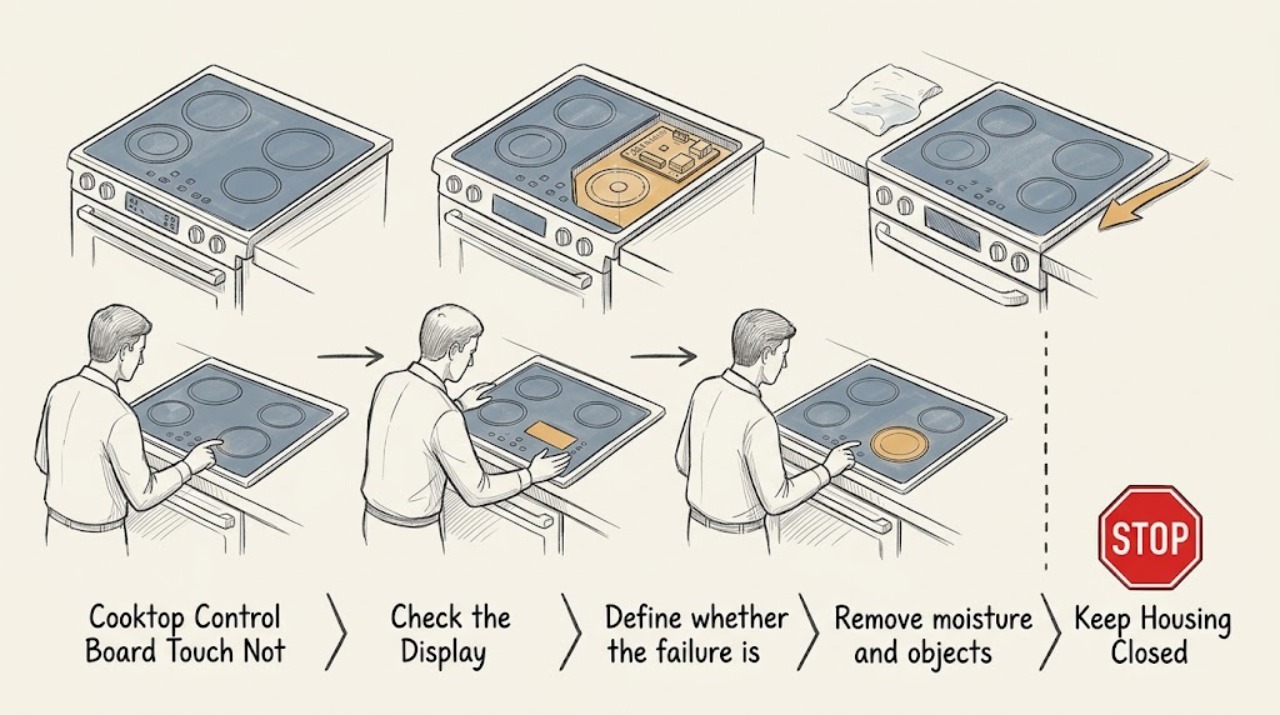
Work through in order
Diagnostic checks
Use only checks that match the exact appliance or system and its official guide.
-
Make the cooktop safe before testing touch controls
Stop cooking and keep hands away from hot glass. From a safe, dry position, look for smoke, a burning or electrical odor, arcing, a hot plug or connection, a cracked surface, liquid near electrical equipment, or a cooking zone that remains energized while the controls do not respond. Do not keep touching the panel to test it during a hazard.
Expected result: There is smoke, arcing, an electrical odor, a hot connection, a crack, liquid near electrics, or a zone that cannot be turned off safely.
Next step: Stop immediately, keep clear, and isolate power only from a safe, dry location if that can be done without approaching the hazard. Arrange qualified appliance or electrical service; use emergency help for smoke or fire.
Stop if: Do not touch hot glass, reach behind the cooktop, pour water on it, or restart it after a hazardous symptom.
Why this matters
Why: This is a fire, shock, burn, or uncontrolled-heating hazard rather than a routine touch-panel check.
-
Define whether the failure is one key or the whole panel
Once the cooktop is safe to observe, identify the Bosch E-Nr. and whether the appliance is induction, radiant electric, or gas. Note whether every touch key is ignored, only one key is ignored, the display is dark, the display is lit but locked, or an error appears. Record the exact characters and any indicator light without guessing their meaning.
Expected result: Only one key fails, all keys fail with a lit display, all indicators flash, the display is dark, or a complete code is present.
Next step: Use the exact Bosch model documentation for the observed control layout and code. Continue with only the matching checks below, and provide the model and evidence if service is needed.
Stop if: Do not apply an induction gesture to a gas or different-generation Bosch model, or substitute a remembered code for the display's exact code.
Why this matters
Why: A localized key issue, a lock or surface issue, an input-voltage or electronics issue, and a model-specific error require different diagnostic paths; the symptom alone does not prove a failed control board.
-
Remove moisture and objects from the touch area
After the surface has cooled, turn the cooktop off if its controls allow it and wipe the touch area with a soft, slightly damp cloth followed by a dry cloth. Remove cookware, utensils, towels, and food residue from the control strip. Do not spray cleaner onto the panel or scrape the glass while it is hot.
Expected result: The panel was wet, dirty, or covered and the indicators were flashing or the touch response returns after the area is dry and clear; or the panel remains unresponsive.
Next step: If response returns, monitor the cooktop and prevent spills from remaining on the control area. If no response returns, continue to the lock and display checks without opening the appliance.
Stop if: Do not clean a hot surface, use ammonia-containing window cleaner, or continue if liquid has entered the control area or a hazard is present.
Why this matters
Why: Bosch identifies moisture or an object covering the control panel as a cause of flashing indicators and unavailable controls. A dry, unobstructed panel that still fails points to lock, power, interface, or electronics diagnosis.
-
Check the control lock using the exact model instruction
Look for a key, padlock, or clean-lock indicator. If the Bosch manual for this exact E-Nr. documents a lock-release gesture, use only that gesture with the cooktop in the required off state; do not guess if the icon or sequence differs. On Bosch guidance that applies to the shown lock key, touching and holding it for four seconds releases the child lock.
Expected result: The lock indicator clears and the controls respond, the lock indicator remains, or there is no lock indicator and the whole panel still ignores touch.
Next step: If unlocked, verify one normal control response without starting a hot cooking cycle. If the exact manual's unlock procedure does not work, record the indicator and arrange model-specific service.
Stop if: Do not bypass a lock, force a key, or operate a hot zone while the panel cannot reliably display and accept an off command.
Why this matters
Why: A cleared lock explains the symptom. A persistent lock may reflect the wrong sequence or a control-interface fault; no lock indication shifts attention to moisture, power, code, or electronics.
-
Read the display and match any error exactly
With the appliance safe and stationary, photograph or write down the complete code, symbols, flashing segments, and whether a cooking-zone indicator is active. Match it to the Bosch support page or owner manual for the exact model and appliance type. Do not infer that every F, E, U, dash, or key symbol has the same meaning across Bosch cooktops.
Expected result: The code identifies a wet or covered panel, lock, overheating condition, input-voltage problem, demo mode, or an unlisted electronics fault; or there is no code.
Next step: Follow only the listed, low-risk response for that exact model. Keep the exact code and recurrence pattern for service if it persists or the page directs support.
Stop if: Do not disconnect wiring, change supply connections, or continue cooking when a code indicates voltage, overheating, or an electronics fault.
Why this matters
Why: Bosch's published entries distinguish these conditions and often give a model-dependent response. An unlisted or returning fault is evidence for professional diagnosis, not for selecting a control board by symptom.
-
Check the external power state without opening the cooktop
If the display is dark or the appliance has no response, check from a dry, unobstructed position whether the cooktop is supplied through an accessible plug or dedicated breaker. Look for a tripped breaker or a clearly failed receptacle only if checking it is safe; do not remove covers, touch terminals, or perform live voltage tests. Do not assume a gas cooktop has the same supply arrangement as an induction or electric model.
Expected result: The breaker is tripped, the accessible supply is absent, the display returns after a safe supply correction, or the breaker and supply appear normal but the panel remains dark.
Next step: If safe and permitted by the home's electrical instructions, restore a tripped breaker once and observe. If it trips again, the supply is absent, or the panel stays dark, leave the cooktop off and request qualified service or electrical diagnosis.
Stop if: Do not repeatedly reset a breaker, open the cooktop, remove a junction-box cover, or test energized conductors.
Why this matters
Why: A lost supply can make the entire interface appear dead. A normal external supply with a dark panel makes an internal power, wiring, interface, or control fault more likely.
-
Allow documented cooling before retrying an overheated interface
If Bosch shows an overheating code or the control panel was exposed to hot cookware, move cookware away only when it can be handled safely and allow the cooktop and electronics to cool completely. Keep hot cookware off the control area and do not cover ventilation openings. Retry a control only after the exact model's cooling condition is met.
Expected result: The code clears and touch response returns after cooling, the controls remain unavailable, or the code returns quickly.
Next step: If normal response returns, use the cooktop only as the model permits and keep cookware away from the control strip. If it does not, leave it off and arrange service with the code and timing recorded.
Stop if: Do not touch hot glass, force a restart, or continue operating through repeated overheating or a returning code.
Why this matters
Why: Bosch describes overheated electronics and hot cookware near controls as protective shutoff conditions. A persistent or rapidly recurring condition may indicate airflow, installation, sensor, or electronics trouble.
-
Use one model-authorized reset only when no hazard remains
After the panel is cool and dry, no zone is uncontrolled, and the exact Bosch instructions permit a power reset, switch the cooktop off from a safe position and disconnect power only by the documented accessible method. Wait the model-specified interval, restore power once, and observe the display without starting a cooking cycle. Do not reset a cooktop that has smoke, water near electrics, a hot connection, or a repeatedly tripping breaker.
Expected result: The panel returns to normal and stays responsive, the same code or dead panel returns, or power cannot be safely interrupted and restored.
Next step: If the symptom returns, leave the appliance off and provide the exact code, model, reset result, and affected keys to qualified Bosch service. Do not repeat resets as a substitute for repair.
Stop if: Do not remove the appliance, access live wiring, or perform a reset in a wet or hazardous area.
Why this matters
Why: A one-time recovery supports a temporary electronics state but does not prove the control board is healthy. A repeat fault or inability to safely reset requires diagnosis of the user interface, power board, wiring, and control board as applicable to the model.
-
Separate a single failed key from a panel-wide failure
Only when the cooktop is cool, dry, unlocked, and safe, test the minimum number of controls needed to confirm the pattern. Compare the affected key with adjacent keys and note whether the display acknowledges any touch. Do not start a cooking zone merely to prove a key works, and do not press harder or use a sharp object.
Expected result: One key remains dead while others respond, multiple keys in one area fail, all keys fail, or the display responds inconsistently.
Next step: Stop using the affected control and arrange qualified service if the fault remains after the safe checks. Give the technician the key pattern, display state, model, and any code rather than ordering a part by description.
Stop if: Do not use a partially responsive panel when an off command may not be recognized, and do not open the control area.
Why this matters
Why: A localized touch-surface or interface fault is more likely when one key or region fails; a panel-wide failure is more consistent with lock, moisture, power, communication, or control electronics. Neither pattern alone identifies a replaceable board.
Use your observations
Decision map
Find the observation that best matches what you see, then follow the next safe action.
-
PATH 01Next step
What you see
A lock or key symbol is present, the surface is dry and clear, and the controls respond after the exact model's documented unlock gesture.
Do this next
Use the cooktop normally only after confirming the display and off controls respond. Prevent spills and objects from remaining over the lock key.
Why this path and its safety boundary
Why it matters: The panel lock or an accidental activation caused the apparent touch failure; a control-board failure is less likely from this event alone.
-
PATH 02Next step
What you see
All indicators flash while the panel is wet or covered, then response returns after the cool panel is dried and cleared.
Do this next
Monitor the dry panel. If flashing or unresponsiveness returns without a spill or obstruction, leave it off and request service.
Why this path and its safety boundary
Why it matters: Bosch identifies moisture or an object over the control panel as the more likely trigger than a failed board.
-
PATH 03Next step
What you see
The display is dark, an accessible breaker or supply was lost, and the panel returns after one safe supply correction without another trip.
Do this next
Observe for recurrence. A second trip, absent supply, or dark panel with normal external power requires electrical or qualified appliance diagnosis.
Why this path and its safety boundary
Why it matters: Loss of external power was a plausible cause, but the appliance should not be considered repaired until it remains stable through normal use.
-
PATH 04Next step
What you see
The display is lit but one key or one region remains dead while other controls respond after cleaning and unlocking.
Do this next
Avoid relying on the partially responsive panel and arrange model-specific service. Do not select a replacement board without diagnosis and exact E-Nr. fitment.
Why this path and its safety boundary
Why it matters: A localized touch interface or control-panel fault is more likely than a whole-appliance power failure; the control board is only one possible component.
-
PATH 05Next step
What you see
All touch controls remain unresponsive after the surface is cool, dry, clear, unlocked, supplied with power, and one permitted reset does not help.
Do this next
Leave the cooktop off and request qualified Bosch appliance service with the model, display state, codes, and completed checks.
Why this path and its safety boundary
Why it matters: A persistent interface, power-board, wiring, communication, or control-board fault is possible and cannot be safely separated by external checks.
-
PATH 06Next step
What you see
A code returns, identifies incorrect supply voltage, or is not listed for the exact Bosch model.
Do this next
Record the exact code and arrange qualified service or electrical diagnosis as directed by Bosch. Do not change wiring or continue cooking through the fault.
Why this path and its safety boundary
Why it matters: The code requires model-specific interpretation or professional diagnosis; repeated resets can conceal an electrical or electronics problem.
-
PATH 07Next step
What you see
A cooking zone remains hot or appears on while the touch panel cannot reliably accept an off command, or smoke, arcing, burning odor, hot connection, liquid near electrics, or cracked glass is present.
Do this next
Keep clear, isolate power only from a safe, dry location if possible, and obtain qualified emergency or appliance/electrical help. Do not restart or touch the cooktop.
Why this path and its safety boundary
Why it matters: Immediate burn, shock, fire, or uncontrolled-heating risk overrides all troubleshooting.
Helpful context
Understand the symptom
Do not assume the control board is the first failure
Touch controls can appear dead when the panel lock is on, moisture or an object is covering the touch area, the electronics are temporarily overheated, or the cooktop has lost its supply. A single nonresponsive key points to a different path than a dark display and a whole panel that ignores every touch. Bosch electric, induction, and gas models also use different controls and error behavior, so use the E-Nr. and the model's manual before applying a gesture or reset.
Clean only after the surface is cool and safe
For Bosch induction and electric glass cooktops, Bosch says to wait for complete cooling before cleaning, use a soft cloth, and finish with a dry cloth. Do not spray into the controls, use a window cleaner containing ammonia, or scrape a hot surface. If liquid has entered the control area or the panel remains erratic after it is dry, leave the appliance off and arrange service.
A reset is a diagnostic step, not proof of a failed or repaired board
A single reset performed exactly as the model documentation permits can distinguish a temporary electronic state from a repeatable fault. If the same code or symptom returns, record it and stop repeating resets. A technician may need to distinguish the touch user interface, wiring, power board, and control board; those parts are not interchangeable by appearance or by a generic Bosch label.
Safety boundary
Stop conditions
- Stop immediately for smoke, arcing, burning or electrical odor, a hot plug or connection, a cracked glass surface, a significant spill near electrical controls, or a cooking zone that cannot be turned off safely. Keep clear and isolate power only from a safe, dry location.
- Do not open the cooktop, remove covers, touch terminals, make live voltage measurements, bypass a lock or safety control, or choose a control board by symptom alone.
- Do not continue operating through a returning code, repeated breaker trip, rapidly recurring overheating, a partially responsive panel, or a full-panel failure after safe external checks.
- Use the exact Bosch E-Nr. manual for lock gestures, error meanings, power-reset timing, appliance type, and any serviceable access. A gas cooktop's ignition controls and an induction or radiant cooktop's touch electronics are not interchangeable assumptions.
Only after diagnosis
Potential parts
- touch control panel or user interface
Consider this only when a qualified diagnosis confirms that one key, one region, or the user interface is defective after lock, moisture, power, and code checks.
Bosch touch panels vary by E-Nr., appliance type, generation, and control layout. Confirm the exact model and diagnosis before selecting a part. - cooktop control board or power module
Consider this only when qualified service distinguishes a control or power-module fault from the touch surface, wiring, supply, lock state, or an overheating condition.
Control and power modules are model-specific and may be unsafe to access without appliance electrical training. Confirm the exact E-Nr., revision, and diagnosis before any replacement. - control-panel gasket or moisture barrier
Consider this only when inspection finds a damaged model-specific seal that allows moisture into the control area and the technician confirms it is the cause or contributing repair.
A gasket is not a substitute for diagnosing liquid damage or a failed interface. Confirm model fitment and repair procedure with qualified service.
When checks do not resolve it
Need a professional?
Request service for a persistent touch failure, a returning or unlisted error, a dead display with normal external supply, a single failed key or region, repeated overheating, a breaker that trips again, or controls that cannot reliably turn a zone off.
Safety scope: Keep the cooktop off for smoke, arcing, electrical odor, a hot connection, cracked glass, water near electrics, a returning voltage fault, a repeated breaker trip, or a zone that cannot be turned off safely. Do not open the appliance or bypass its controls.
Common questions
FAQ
Does a nonresponsive Bosch cooktop touch panel prove the control board failed?
No. A lock, moisture or an object over the controls, loss of power, overheating, a user-interface fault, and a control-board fault can look similar. Classify the affected keys, display state, lock indicator, and exact code before service.
What should I do when all Bosch cooktop indicators are flashing?
If the cooktop is cool and safe, remove objects from the control panel and dry it. Bosch identifies a wet panel or an object covering it as a cause. If flashing continues after the panel is clear and dry, follow the exact model instructions and arrange service rather than repeatedly testing it.
Can I unlock a Bosch cooktop by holding the lock key?
Only when the exact Bosch model uses that control and documents the gesture. Bosch's published induction and cooktop error guidance shows a four-second hold for the displayed lock key, while other models may differ. Do not bypass or force the lock.
When should I stop using the Bosch cooktop and call a professional?
Stop for smoke, arcing, an electrical or burning odor, a hot connection, cracked glass, liquid near electrical controls, repeated breaker trips, a returning or unlisted code, a dead panel after safe external checks, or a zone that cannot be turned off safely. Keep clear and arrange qualified appliance or electrical service.
Read the exact guide
Official sources
- Bosch Cooktop & Rangetop Error CodesBosch Home Appliances · Bosch electric, induction, and gas cooktops/rangetops; exact model and displayed code still control
- Bosch Electric Cooktop TroubleshootingBosch Home Appliances · Bosch electric cooktops; use the exact model manual for controls and appliance-type differences
- Bosch Induction Cooktop Error CodesBosch Home Appliances · Bosch induction cooktops; code and control behavior must be checked against the exact model
- How to Clean Bosch Induction & Electric CooktopsBosch Home Appliances · Bosch induction and electric glass cooktops; gas cooktop cleaning follows different instructions
Community feedback
Share a repair observation
Share a plain-text repair observation. Accepted observations are published automatically; this page may take a moment to update.