
On this page
Start here
Quick answer
When a cooktop has power but its touch controls do not respond, the most common safe-to-check possibilities are a control lock or wipe-protection state, moisture or an object on the panel, an overheated surface or electronics, incorrect touch technique, or an induction-pan condition that affects a zone rather than the whole panel. Turn all controls off, remove cookware and objects from the control area, let the surface cool, and clean and dry the panel as the owner manual permits. Confirm the exact model instructions for unlocking and for any reset; do not assume a code or gesture from another cooktop applies. If the full panel remains unresponsive, the code returns, the surface is cracked or wet internally, a breaker trips, or there is smoke, sparking, burning odor, gas odor, or uncontrolled heating, stop using the appliance and arrange qualified appliance or electrical service.
Before you begin
Safety first
- A qualified technician should diagnose the touch membrane, control board, sensors, heating or induction zones, cooling and thermal protection, wiring, and appliance supply. A qualified electrician should handle branch-circuit, breaker, voltage, and connection concerns. Keep homeowner work to controls-off, clear-and-dry, cool-down, model lookup, cookware positioning, documentation, and a single manual-authorized reset.
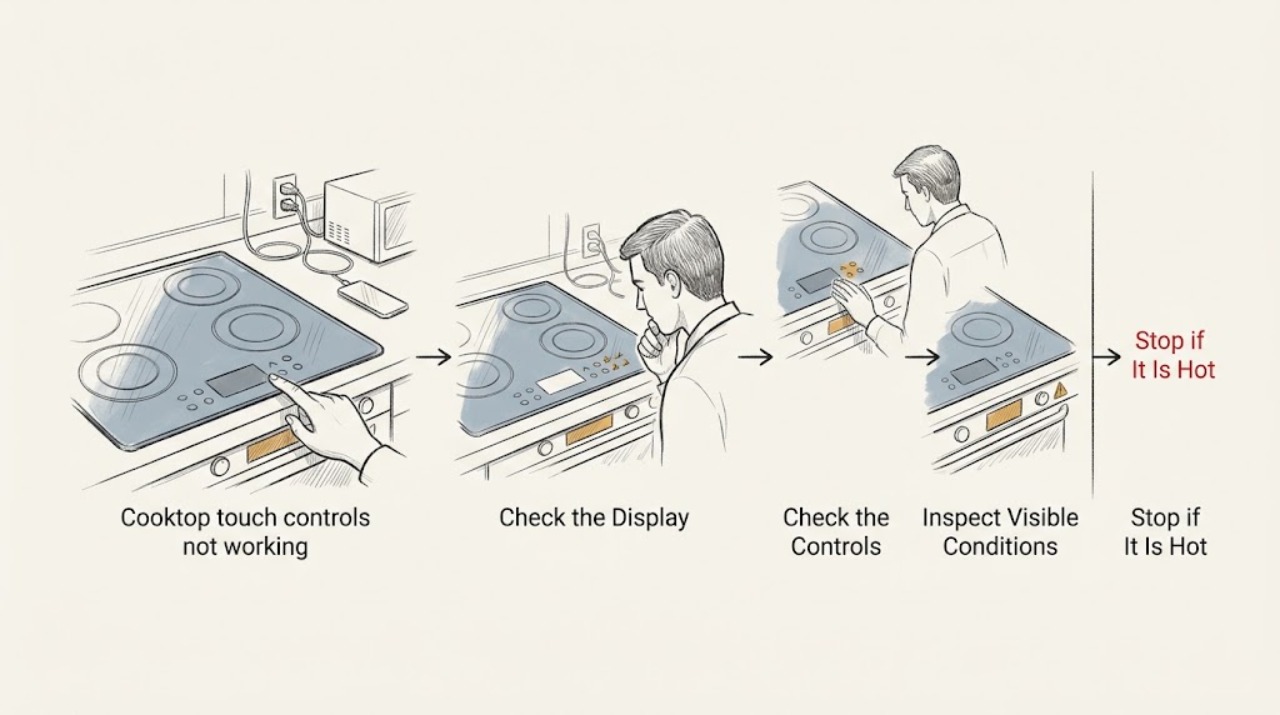
Work through in order
Diagnostic checks
Use only checks that match the exact appliance or system and its official guide.
-
Check 1
Turn all controls off and stop using the cooktop for smoke, sparking, a burning smell, gas odor, a cracked glass surface, water entering the controls, or a zone that heats without a valid command.
Expected result: A physical, electrical, gas, moisture, or uncontrolled-heating hazard is present, or the panel is simply not responding with no hazard sign.
Next step: For any hazard, leave the appliance off, avoid switching electrical equipment if gas odor is present, leave the area as appropriate, and arrange qualified appliance or electrical help. Otherwise continue with surface and setting checks.
Why this matters
Why: A touch-control symptom can coexist with a shock, burn, fire, or gas hazard. A hazard is not a routine lock or cleaning problem and should not be tested by repeated key presses or power cycles.
-
Check 2
Remove cookware, utensils, cloths, and other objects from the touch-control area, then clean and dry the panel using the method allowed by the owner manual.
Expected result: The panel begins responding after it is clear and dry, an indicator shows a pressed key or lock state, or the panel remains unresponsive.
Next step: If it responds, keep the panel clear and continue with the model-specific control sequence. If it does not, do not force keys or insert liquid around the glass; record the display and continue to the lock and temperature checks.
Why this matters
Why: An object, spill, grease, or a continuously pressed key is more likely when clearing the panel changes its response. Continued nonresponse points toward lock, power-state, heat, or control trouble.
-
Check 3
Look for a lock, key, child-lock, wipe-protection, hot-surface, or residual-heat indication and use only the exact model manual's unlock or control sequence.
Expected result: A lock or wipe indicator is visible, a hot-surface indication remains after cooking, the display is otherwise ready, or no such indication appears.
Next step: Follow the manual's unlock or cool-down instruction without guessing a long-press duration from another model. If the indication will not clear after the documented sequence and safe cooling, stop using the cooktop and arrange service.
Why this matters
Why: A safety lock or wipe state can intentionally block touch commands. A hot-surface or overheat state may require cooling before controls accept input. No indicator makes a shared control or electronics fault more likely but does not prove it.
-
Check 4
If the main control responds but a cooking zone does not, identify whether the cooktop is induction and place a correctly sized, centered, flat, induction-compatible pan on the selected zone only as the manual directs.
Expected result: The zone responds when the pan is centered and detected, a power level flashes or the zone switches off, or the main controls and zone remain unresponsive.
Next step: If the zone works normally, use compatible cookware and the documented sequence. If it remains unavailable or shows an error, stop testing and arrange model-specific appliance service; do not replace an element or board from the symptom alone.
Why this matters
Why: Induction pan detection, pan position, or a zone-selection sequence can mimic a failed touch control. A flashing level or automatic shutoff can be a detection or protection response. Persistent failure with a detected pan points toward a zone or control fault.
-
Check 5
Record the exact display, icons, beeps, affected controls or zones, model label, recent spill or cleaning, heat level and duration before failure, and whether the display stayed lit after the controls stopped responding.
Expected result: The whole panel is dead, the display is lit but ignores every key, only one zone is affected, or an alphanumeric code or flashing indicator appears.
Next step: Use the exact model manual or official support page to interpret the display. Do not use a generic code list or open the cooktop to inspect the membrane or circuit board.
Why this matters
Why: A lit but nonresponsive panel supports lock, moisture, overheat, or touch/control-electronics possibilities; a single-zone problem points more toward zone selection, pan detection, or a local zone circuit. A blank or code display broadens the concern to power, wiring, or a model-specific fault.
-
Check 6
If the owner manual authorizes a reset for a nonresponsive panel, confirm all controls are off and the cooktop is cool, then perform that one reset using the documented disconnect method; do not remove covers or touch wiring.
Expected result: The panel returns to normal and responds to the manual's test, or it stays unresponsive, the fault returns, or the breaker trips.
Next step: If it works normally, monitor for recurrence and retain the recorded symptom. If it fails again or the breaker trips, leave the cooktop off and arrange qualified service rather than repeating resets.
Why this matters
Why: A single successful reset can indicate a transient control state, but it does not prove the underlying issue is gone. A repeated failure or breaker event indicates persistent control, supply, or safety trouble.
-
Check 7
Prepare the appliance for service with the model and serial information, display photos, exact touch sequence attempted, affected zones, reset result, and any temperature, moisture, power, or cookware conditions.
Expected result: The issue is intermittent, returns after cleaning or reset, affects all zones, affects one zone, or coincides with a breaker or supply symptom.
Next step: Arrange qualified appliance service, and use a qualified electrician for circuit, breaker, supply-voltage, or connection concerns. Keep the appliance off if the control cannot reliably stop or select heat.
Why this matters
Why: The pattern helps separate a shared touch interface or control problem from a local zone, pan-detection, supply, or wiring issue, but it does not identify a replaceable part without testing.
Use your observations
Decision map
Find the observation that best matches what you see, then follow the next safe action.
-
PATH 01Next step
What you see
The touch panel responds after objects are removed and the surface is cleaned and dried, with no code, heat, or abnormal operation.
Do this next
Keep the control area clear and dry and use the model's normal sequence. Stop using the cooktop if nonresponse or a fault returns.
Why this path and its safety boundary
Why it matters: A pressed key, spill, grease, or wipe-protection condition is more likely than a failed panel.
-
PATH 02Next step
What you see
The display shows a lock, hot-surface, or overheat state and controls return after the exact unlock or cool-down instruction.
Do this next
Use the cooktop only if the manual's normal-operation check succeeds. If the state returns without the same trigger, arrange service and do not defeat the lock or thermal protection.
Why this path and its safety boundary
Why it matters: A deliberate safety or control state is more likely than a failed touch membrane, although repeated overheating can indicate a ventilation or electronics problem.
-
PATH 03Next step
What you see
The main touch controls work but one induction zone does not respond until a compatible pan is centered, or the zone flashes and switches off without pan detection.
Do this next
Use the documented cookware and control sequence. If a detected pan still leaves the zone unavailable or an error appears, arrange appliance service for the local zone and control circuit.
Why this path and its safety boundary
Why it matters: Cookware detection, pan position, or the model's zone-selection sequence is more likely than a whole-panel failure.
-
PATH 04Next step
What you see
The display is lit but every touch key remains unresponsive after the panel is clean, dry, cool, and unlocked, or the issue returns after a single documented reset.
Do this next
Keep the cooktop off and arrange model-specific appliance service. Do not open the glass or control housing, substitute a board, or bypass a safety input.
Why this path and its safety boundary
Why it matters: A shared touch interface, control board, sensor, or persistent safety fault is more likely than a simple setting or pan issue.
-
PATH 05Next step
What you see
The display is blank, a breaker trips or will not stay on, the surface is cracked or wet internally, controls select heat unpredictably, or smoke, arcing, burning odor, or gas odor occurs.
Do this next
Do not reset repeatedly or open the appliance. Leave it off and obtain qualified electrical or appliance service; for gas odor, follow local emergency gas-safety guidance and leave the area as appropriate.
Why this path and its safety boundary
Why it matters: The symptom may involve the supply circuit, damaged insulation or glass, moisture ingress, or an electrical or gas safety hazard rather than a user-interface setting.
Helpful context
Understand the symptom
Power available does not mean the panel is ready
A lit display or available breaker only establishes that some power reaches the appliance. The touch interface may still be locked, in wipe protection, wet, covered by an object, in an overheat protection state, or waiting for the model-specific sequence that selects a zone before a heat level. On induction models, a pan that is not detected can look like an unresponsive zone even when the main panel works.
Start with the surface and panel
Turn every control off, remove pans and utensils from the control strip, and clean and dry the panel with the manual-approved method. Spills, grease, and a pressed key can make a touch panel reject input or show flashing indicators. Do not spray cleaner directly into seams or use a scraper on the control area.
Separate a panel problem from a zone problem
If no key responds, investigate lock, moisture, overheating, power-state, or shared control causes. If the main power key responds but one zone does not, check the zone-selection sequence, pan detection on induction models, and any zone-specific code or hot-surface indication. The distinction changes whether the next step is a manual setting check or professional diagnosis.
A reset is a limited test, not a repair
Only use a power reset when the owner manual for the exact cooktop authorizes it and all controls are off. If the panel works afterward, monitor it for recurrence; if it remains unresponsive or fails again, do not repeat the reset or open the appliance. Control boards, touch membranes, sensors, heating zones, and supply connections require model-specific testing.
Safety boundary
Stop conditions
- Stop using the cooktop for smoke, sparking, arcing, burning odor, gas odor, a cracked or internally wet surface, uncontrolled heating, or a breaker that trips again; arrange qualified appliance or electrical help.
- Do not remove the glass, touch-control panel, junction box, terminal cover, or service-panel cover, test live voltage, bypass a lock or thermal safety, or replace a board, sensor, or element from the symptom alone.
- Do not repeatedly cycle power when the panel remains unresponsive, an error returns, a zone remains disabled, the display is blank, or the breaker will not stay on.
- Use only the exact model manual for unlock, zone-selection, pan-detection, cleaning, and reset instructions; do not pour liquid into seams or use a generic control sequence from another cooktop.
Only after diagnosis
Potential parts
- cooktop touch-control panel or membrane
Consider this only after model-specific testing confirms the touch interface is faulty once moisture, lock, overheat, power, and control-board causes are excluded.
Confirm the exact cooktop model, panel revision, connector arrangement, glass layout, and manufacturer service procedure before ordering or installing. - cooktop electronic control board
Consider this only when qualified diagnosis confirms a shared control failure; a lit display with no response can also come from the touch panel, sensor, moisture, or supply circuit.
Match the exact model and revision, connectors, software or configuration requirements, electrical ratings, and manufacturer fit information. - cooktop temperature or pan-detection sensor
Consider this only when testing confirms a failed sensor or detection circuit after the surface and cookware conditions are correct; a zone that does not respond does not identify the sensor.
Confirm the cooktop technology, model, sensor location, connector, sensing characteristics, and service instructions before replacement. - cooktop heating element or induction zone component
Consider this only when one zone fails with correctly positioned compatible cookware and professional testing identifies the zone component; a whole-panel symptom points elsewhere.
Confirm the exact model, zone position, electrical ratings, mounting, and manufacturer instructions before any replacement.
When checks do not resolve it
Need a professional?
Safety scope: A qualified technician should diagnose the touch membrane, control board, sensors, heating or induction zones, cooling and thermal protection, wiring, and appliance supply. A qualified electrician should handle branch-circuit, breaker, voltage, and connection concerns. Keep homeowner work to controls-off, clear-and-dry, cool-down, model lookup, cookware positioning, documentation, and a single manual-authorized reset.
Common questions
FAQ
Why are my cooktop touch controls not working when power is on?
The panel may be locked, wet, covered, overheated, or waiting for a model-specific control sequence. On induction models, a single zone may also reject a pan that is not compatible, centered, flat, or large enough. Clear and dry the panel, let it cool, check the manual's lock state, and distinguish a whole-panel failure from a single-zone detection problem.
How do I unlock cooktop touch controls?
Use the exact owner manual for the model's lock or wipe-protection control and sequence. A lock indicator can intentionally block most keys, and the gesture or hold time varies by product. Do not guess a sequence from another cooktop; if the lock will not clear or the panel remains erratic, arrange service.
Can a wet cooktop touch panel stop responding?
Yes. Water, grease, or an object over a key can make a touch interface reject input or show a flashing indicator. Turn controls off, remove the object, and clean and dry the panel using the manual-approved method. If moisture entered a seam or nonresponse continues, keep the appliance off and obtain qualified service.
Why does only one induction cooktop zone ignore touch commands?
The zone may not detect the pan, or the pan may be off-center, too small, nonmagnetic, or not flat. The zone may also need an On or zone-selection step before a power level is chosen. If a correctly positioned compatible pan still leaves the zone unavailable or an error appears, the zone or control circuit needs model-specific diagnosis.
Should I reset a cooktop whose touch controls do not work?
Only once and only if the exact owner manual authorizes that reset, with all controls off and the surface cool and dry. A successful reset can clear a transient state, but a returning fault, blank display, breaker trip, disabled zone, or continuing nonresponse is a service issue. Do not open the appliance or repeat resets to keep cooking.
Read the exact guide
Official sources
- Indicator or Display Flashing - Electric and Induction CooktopWhirlpool Corporation · Directly covers permanently pressed keys, water or utensils over controls, induction pan detection and positioning, overheating behavior, and a documented power reset followed by operation verification.
- Cooktop - Error, Fault, or Function CodesGE Appliances · States that fault codes are model-programmed diagnostic information, a brief breaker shutdown may clear some codes, and recurring faults generally require trained service.
- How do I use my display or controls?Frigidaire · Confirms that controls vary by model and owners should use the exact manual for display, settings, and child-lock procedures rather than a generic gesture.
- Bosch Electric Cooktop TroubleshootingBSH Home Appliances Corporation · Supports checking power and lock states, allowing an overheated cooktop to cool, consulting model error guidance, and seeking service for persistent faults or a cracked surface.
- Bosch Cooktop & Rangetop Error CodesBSH Home Appliances Corporation · Shows that wet controls, objects over keys, lockout, hot cookware, overheating, supply voltage, and operational faults can create different cooktop display or control symptoms.
- Electric Range & Cooktop - Induction Burners Not Working or Flashing Power LevelGE Appliances · Explains that wrong or small cookware, off-center or non-flat pans, absent-pan detection, improper control sequence, and power conditions can stop an induction zone from operating.
Community feedback
Share a repair observation
Share a plain-text repair observation. Accepted observations are published automatically; this page may take a moment to update.