
On this page
Start here
Quick answer
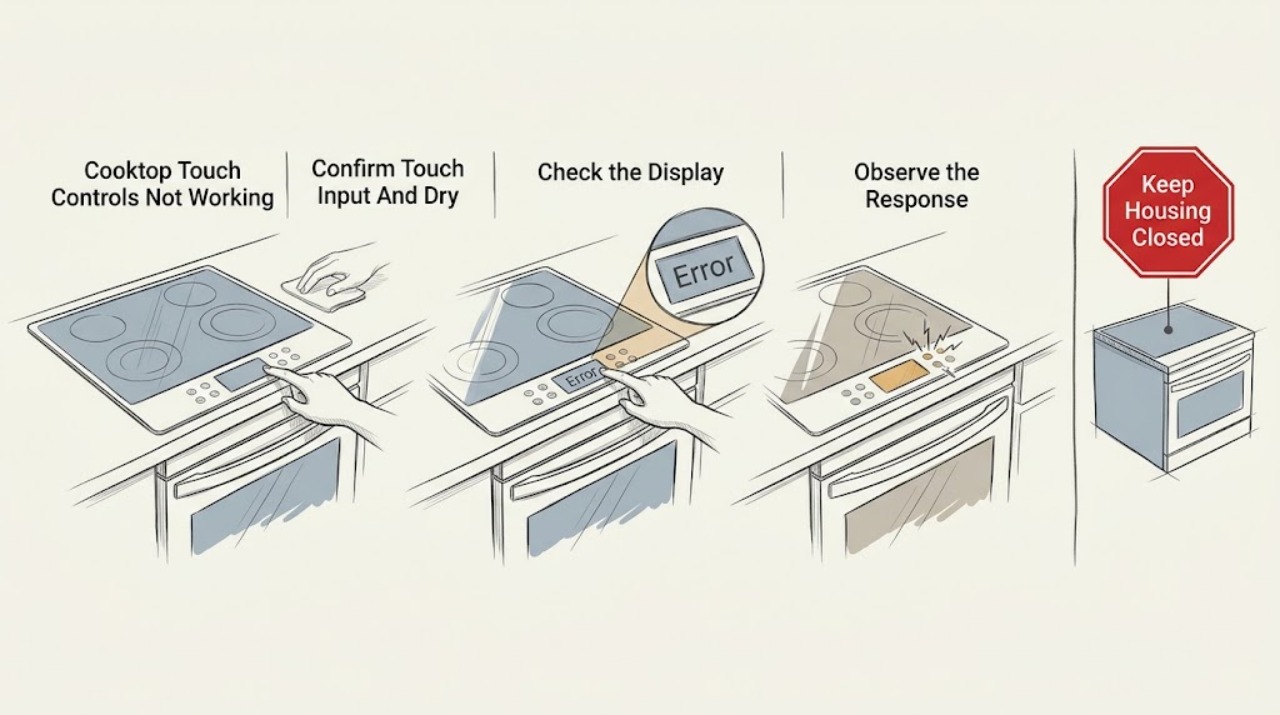
If a cooktop's touch controls do not respond even though the surface is dry, first separate a locked or unavailable control state from a power or touch-panel failure. Use a bare, dry finger on the marked control area, remove any pan, utensil, food, or residue near the controls, and check for a lock symbol or message using the exact model manual. Confirm the display has power and check the dedicated breaker only from a safe, dry position; do not open the cooktop. If the display responds to Power but not zone keys, a control lock, unavailable function, touch-sensor condition, or user-interface fault is possible. If the entire display is blank, a shared power or internal control fault is more likely. One model-authorized power cycle may clear a temporary state, but a panel that remains unresponsive, responds by itself, returns to lock, shows a code, or has smoke, heat, arcing, or damaged glass requires the cooktop to remain off and qualified service. Do not assume a dry surface proves the control board is bad.
Before you begin
Safety first
- Keep the cooktop off for smoke, burning or electrical odor, arcing, unexpected heating, cracked glass, water near controls, damaged wiring, or repeated breaker trips. Do not open the appliance or bypass a lock or safety input.
Work through in order
Diagnostic checks
Use only checks that match the exact appliance or system and its official guide.
-
Check 1
With the cooktop off and surface temperature known to be safe, remove cookware and objects from the control area. Use a bare, dry finger directly on Power or the marked touch key; do not use gloves, a utensil, or excessive force.
Expected result: Power responds, no key responds, only one key or zone is ignored, the panel beeps without acting, or the surface is dry but has residue, a film, or an object nearby.
Next step: Wipe only the accessible panel with the model-approved soft cloth and leave it fully dry, then try once. If response remains abnormal, continue with lock and power checks rather than pressing harder.
Stop if: Do not spray cleaner into the controls, scrape the glass near a damaged display, or touch the surface if it may still be hot.
Why this matters
Why: Direct dry contact and a clear panel rule out a simple input technique or obstruction only when response is still absent. A single failed key suggests a localized interface issue; total nonresponse shifts attention to lock, power, or shared controls.
-
Check 2
Look for a padlock, LOC, child-lock, timer, or other status indicator. Read the exact model manual and use its documented unlock or cancel command; do not assume the same hold time or key applies to another cooktop.
Expected result: A lock indicator is present, Power or Off is the only key responding, a function is unavailable by design, or no lock or state indicator explains the nonresponse.
Next step: Unlock or cancel once using the matching manual, then test one zone. If the lock will not clear, returns immediately, or the panel stays unresponsive without a lock, arrange service.
Stop if: Do not bypass the lock, hold random keys, or continue testing a hot or damaged glass panel.
Why this matters
Why: Control Lock can intentionally disable the cooking-area touch keys while leaving limited power controls available. An unavailable function or protective state can also make a key appear dead. No such state keeps power, touch electronics, or controls in focus.
-
Check 3
From a dry, safe position, determine whether the display and indicators are fully blank, partly lit, or normal. Check the dedicated breaker or supply once without opening the appliance; do not touch wiring or use a live electrical tester.
Expected result: The display is blank, the breaker is tripped, the breaker trips again, Power is lit but cooking keys fail, or the panel is normal except for one key.
Next step: Restore a tripped breaker only once if no damage or hazard is visible. If power is present but the display remains blank, the breaker trips again, or the panel remains unresponsive, leave the cooktop off and arrange qualified service.
Stop if: Stop for scorch marks, a hot panel, smoke, sparks, arcing, damaged cord or wiring, or water near electrical parts; do not reset again.
Why this matters
Why: A blank panel or repeated trip points to shared power or an internal electrical fault. A lit panel with failed cooking keys makes lock, touch input, interface, or control communication more likely. One-key failure is localized evidence, not proof of a board fault.
-
Check 4
Confirm the cooktop type and make sure the surface and control area are cool enough for the model's controls to operate. For induction, remove the pan and do not test with an empty pan; for radiant or electric glass, treat the surface as hot until the model's indicator and manual permit contact.
Expected result: A hot-surface indicator remains on, the panel shows a heat or protective message, a pan is covering controls, the cooktop is induction, or the controls remain dead when cool and clear.
Next step: Allow normal cooling, remove the pan or object, and follow the exact manual once. If the panel still does not respond or the hot indication behaves unexpectedly, keep the cooktop off and request service.
Stop if: Do not touch hot glass, pour water on it to cool it, or continue if the surface is cracked or a control stays active unexpectedly.
Why this matters
Why: Heat-protection or a pan or object covering the touch area can restrict operation on some models. A cool, clear panel that remains dead makes a lock, power, interface, harness, or board issue more plausible.
-
Check 5
Only when the cooktop is cool and no electrical, fire, or glass hazard exists, perform at most one power cycle exactly as the model manual directs. Restore power from a safe dry location and record whether all keys, one key, or no keys respond; do not repeatedly reset.
Expected result: The panel works normally once, only one key or zone remains unavailable, the panel stays blank, or the same nonresponse or lock returns.
Next step: Stop after the single documented attempt if the symptom returns. Give service the exact model, display state, lock indicators, failed keys or zones, surface condition, breaker result, and reset result.
Stop if: Do not open the console, test capacitors or wiring, bypass a lock, or restart after smoke, arcing, abnormal heat, or a breaker trip.
Why this matters
Why: A one-time recovery can clear a temporary control state but does not identify a failed part. A persistent localized fault and a persistent whole-panel fault require different technician checks.
Use your observations
Decision map
Find the observation that best matches what you see, then follow the next safe action.
-
PATH 01Safety boundary
What you see
The entire display and indicators are blank, or the dedicated breaker trips again after one safe reset.
Do this next
Leave the cooktop off and arrange qualified electrical or appliance service. Do not open the appliance or keep resetting the breaker.
Why this path and its safety boundary
Why it matters: A supply, wiring, fuse, power module, or shared control fault is more likely than a single touch-key issue.
Safety stop: Stop for heat, scorch marks, smoke, sparks, arcing, a damaged cord, or water near electrical parts.
-
PATH 02Safety boundary
What you see
Power or Off responds, but the cooking-area keys do not and a padlock, LOC, or child-lock indicator is present.
Do this next
Use the exact model unlock command once. If the indicator will not clear or returns, arrange service and do not bypass it.
Why this path and its safety boundary
Why it matters: The control lock is intentionally blocking cooking commands, not necessarily indicating a failed panel or board.
Safety stop: Do not press random key combinations or operate the cooktop while the lock behavior is unexplained.
-
PATH 03Safety boundary
What you see
The display and most touch keys respond, but one key, slider area, or zone command does not respond on a clean, dry, unlocked panel.
Do this next
Stop using the failed command and arrange service. Do not substitute repeated presses, a pan, or a different key to force that zone on.
Why this path and its safety boundary
Why it matters: A localized touch sensor, interface trace, zone-control input, or connection issue is more likely than a total power failure.
Safety stop: Stop immediately if a zone activates by itself, cannot turn off, overheats, or the glass is cracked.
-
PATH 04Safety boundary
What you see
The panel begins responding after an accessible film, object, or residue is removed and the user touches it directly with a bare dry finger.
Do this next
Keep the controls clear and dry and use the model's cleaning instructions. If nonresponse recurs on a clean, dry surface, arrange service.
Why this path and its safety boundary
Why it matters: The earlier issue was consistent with touch detection or unintended input conditions rather than proof of an internal board failure.
Safety stop: Do not spray cleaner directly on the panel or use abrasive tools that could damage the touch surface.
-
PATH 05Safety boundary
What you see
The surface is cool, the controls are dry and clear, no lock is active, power is present, and the touch panel remains unresponsive after one documented reset.
Do this next
Keep the cooktop off and arrange qualified appliance service with the exact model, display state, failed keys, and reset result.
Why this path and its safety boundary
Why it matters: A user-interface, harness, power-supply, sensor, or control-board fault is possible, but the observed pattern cannot select one component.
Safety stop: Do not lift the glass, open the console, probe wiring, or order a board from the symptom alone.
-
PATH 06Safety boundary
What you see
A control remains active unexpectedly, the hot-surface indication behaves abnormally, the glass is cracked, or the cooktop smokes, arcs, sparks, or smells electrical.
Do this next
Turn controls off if they respond without touching a hazard and isolate power only from a safe dry location. Keep clear and obtain qualified service without restarting.
Why this path and its safety boundary
Why it matters: The condition could create burn, fire, or shock risk and is beyond a touch-response adjustment.
Safety stop: Do not pour water on hot glass, touch the active zone, operate switches near smoke or arcing, or test the panel again.
Helpful context
Understand the symptom
A dry surface still needs a touch-input check
Dry glass does not guarantee that a capacitive panel can detect input. Use a bare, dry finger directly on the marked key, not a glove, utensil, or fingernail, and remove anything resting over the controls. A clean, dry surface with no response is useful evidence, but it does not distinguish a lock, power, user-interface, connector, or control-board fault.
Check lock and function availability before hardware
A padlock, LOC, child-lock, or similar indicator can intentionally disable touch keys. Some cooktops also ignore certain keys while another function is active or while a protective hot-surface state remains. Follow only the exact model manual for unlocking or cancelling a state; do not copy a button sequence from another brand.
The display pattern changes the likely path
If Power works but zone keys do not, a lock, touch-area condition, unavailable function, or interface path is more likely than a total power loss. If the entire display is blank, check safe household power and the dedicated breaker once. If one key or zone alone fails while the rest of the panel responds, a localized touch or interface fault needs diagnosis.
Keep internal electrical work out of the homeowner check
The glass surface and touch panel can be adjacent to energized controls and hot elements. Do not lift the glass, remove the console, probe wiring, bypass a lock, or keep resetting the breaker. A technician should confirm the user interface, control board, connectors, power supply, and safety inputs before replacing any component.
Safety boundary
Stop conditions
- Stop immediately for smoke, burning or electrical odor, sparks, arcing, a hot or scorched receptacle or wiring, a control that will not turn off, or a breaker that trips again. Isolate power only from a safe dry location.
- Stop for cracked glass, unexpected heating, a hot-surface indicator that behaves abnormally, water near electrical controls, or any need to remove the glass or access energized parts.
- Do not open the cooktop, probe wiring, lift the glass, bypass Control Lock, force a touch key, or use an empty pan or utensil to test a zone.
- Use one model-authorized reset at most. If the dry, clear, unlocked panel remains unresponsive or the symptom returns, arrange qualified service rather than replacing a board by guesswork.
Only after diagnosis
Potential parts
- touch-control or user-interface panel
Consider this only when a qualified diagnosis confirms a localized or whole-panel touch-input fault after power, lock, surface, and function conditions are ruled out.
Touch panels and display assemblies are model- and revision-specific. Do not select one by appearance or symptom. - main control board or power-control module
Consider this only when service testing confirms a shared control, communication, or power-module fault; nonresponsive touch alone does not prove it.
Control modules can be energized and model-specific. Confirm the exact model and diagnosis before any replacement. - touch harness, connector, or power-path component
Consider this category only when inspection finds a damaged connector, harness, fuse, or power path that explains the documented symptom.
Electrical components require de-energized, model-specific service procedures; no generic fit is implied. - zone control, sensor, or thermal-protection component
Consider this only when one zone or a returning heat or safety indication is traced to that component by qualified testing.
Zone and thermal components vary by cooktop type and position. Do not bypass protection or order by code alone.
When checks do not resolve it
Need a professional?
Arrange qualified appliance service when a clean, dry, unlocked cooktop panel remains unresponsive, the whole display is blank, one key or zone fails persistently, a lock will not clear, an error or hot-surface condition returns, or a breaker trips. Provide the exact model, cooktop type, display and lock indicators, failed keys or zones, surface temperature state, power observations, and the result of one documented reset. Treat smoke, arcing, unexpected heating, cracked glass, burning odor, and water near electrics as immediate safety issues.
Safety scope: Keep the cooktop off for smoke, burning or electrical odor, arcing, unexpected heating, cracked glass, water near controls, damaged wiring, or repeated breaker trips. Do not open the appliance or bypass a lock or safety input.
Common questions
FAQ
Why are my cooktop touch controls not working when the surface is dry?
A dry surface rules out only obvious moisture, not a Control Lock, unavailable function, power problem, touch-input issue, user-interface fault, wiring problem, or control-board fault. Use a bare dry finger, clear the controls, check the lock and display state, and follow the exact model manual. Persistent nonresponse needs service.
Why does the Power button work but the cooktop zone buttons do not?
That pattern commonly keeps Control Lock, a restricted function, or a touch-interface problem in consideration. Check for a lock indicator and use the model-specific unlock command. If the panel is cool, clear, and unlocked but zone keys remain dead, arrange diagnosis instead of pressing harder or bypassing the lock.
Should I turn off the breaker to fix cooktop touch controls?
Only perform one power cycle if the exact manual permits it and there is no heat, smoke, water, glass, or electrical hazard. Restore power from a safe dry position and observe the panel. If the issue returns or the breaker trips again, keep the cooktop off and arrange qualified service.
What if only one touch key or cooking zone is not responding?
A single failed key or zone with an otherwise responsive, clean, dry, unlocked panel suggests a localized touch or zone-control path, but it does not identify the part. Stop using that command and arrange service, especially if the zone activates by itself, overheats, or will not turn off.
Read the exact guide
Official sources
- Clean and care for your Samsung electric cooktopSamsung Electronics · Samsung electric and induction cooktop care guidance; exact glass and cleaning instructions remain model-specific.
- Lock - Electric and Induction CooktopWhirlpool · Whirlpool support example; lock behavior and reset details vary by model.
- Samsung Cooktop FAQsSamsung Electronics · Samsung FAQ guidance; exact settings and procedures vary by cooktop model and type.
- Electric cooktop panel isn't responsiveSamsung Electronics · Samsung support page surfaced for this issue; the opened URL currently redirects to Samsung Support Home, so the exact model manual takes precedence.
- Panel controls do not respond or are lockedSamsung Electronics · Samsung range and oven support used for general capacitive-panel behavior; a cooktop's exact manual controls.
Community feedback
Share a repair observation
Share a plain-text repair observation. Accepted observations are published automatically; this page may take a moment to update.