
On this page
Start here
Quick answer
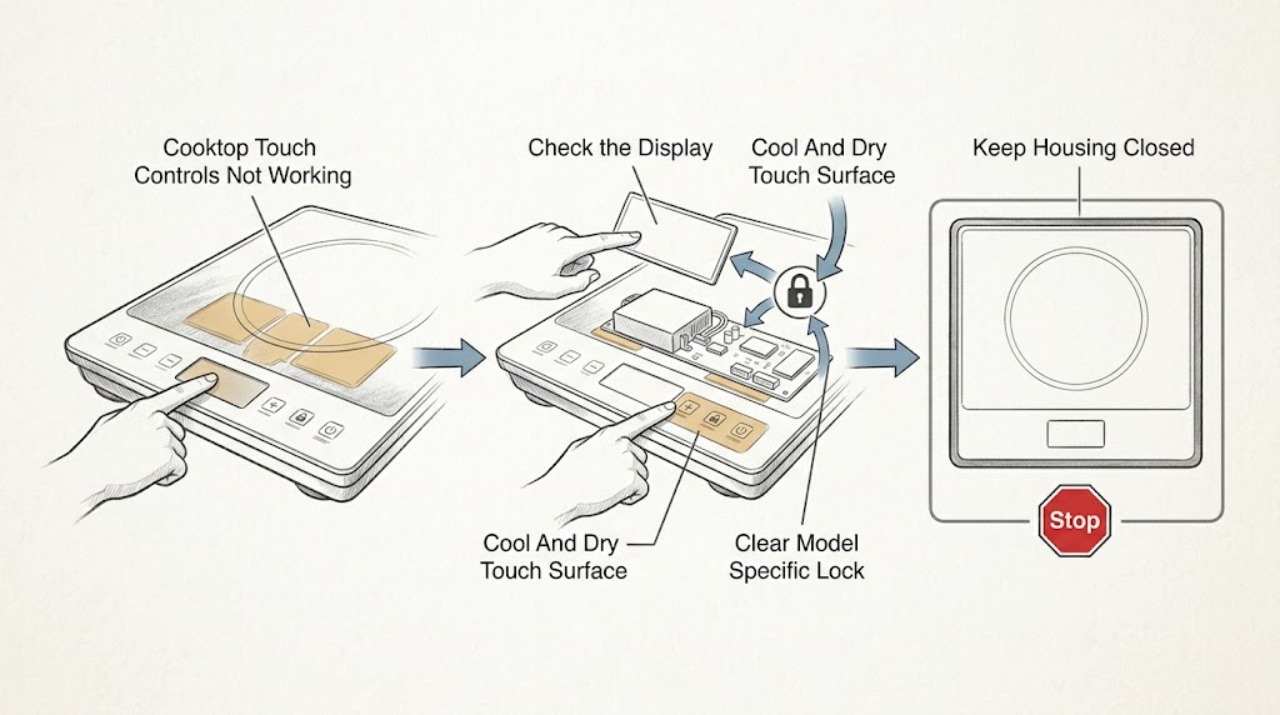
When a Frigidaire cooktop touch panel does not respond, first make the cool, dry surface and control display safe to inspect. Check whether the panel shows a lock or child-lock indicator, whether any touch produces a beep or display change, and whether the appliance has power. Frigidaire says controls vary by model, so use the exact Owner's Manual for the touch sequence, lock release, and reset. On applicable electric or induction models, select the cooktop's On/Off control before selecting a zone; a wet, greasy, hot, or obstructed panel can also reject touches. If the panel remains dead, shows a recurring error, one control is stuck, the appliance will not switch off, or there is heat, odor, smoke, or sparking, stop using the cooktop and arrange qualified Frigidaire or appliance service. Do not open the control panel, bypass a lock, or test live wiring.
Work through in order
Diagnostic checks
Use only checks that match the exact appliance or system and its official guide.
-
Check 1
From a dry position, observe the Frigidaire cooktop display, indicator lights, and touch panel. Confirm the appliance has power, then touch the normal On/Off control once and note whether there is a beep, display change, lock symbol, dash, error, or no response. Do not repeatedly tap a control that is hot, cracked, wet, or acting erratically.
Expected result: The display is dark, the panel beeps but will not select a zone, a lock indicator appears, an error is shown, or no control responds at all.
Next step: Record the display exactly and continue with the model-specific lock, surface, and power checks. If the panel remains dead or will not switch off, leave the cooktop unused and arrange qualified service.
Stop if: Do not open the panel, repeatedly reset a dead control, or continue operation when a control remains energized or erratic.
Why this matters
Why: A dark panel points toward power or control supply. A beeping panel with no zone selection can indicate a lock or sequence issue, while an error directs attention to the model's error procedure. No response from any control makes a panel or power problem more likely than a single zone sensor issue.
-
Check 2
After the cooktop is fully cool and switched off, inspect the touch area for water, grease, food residue, a utensil, foil, or another item resting over the controls. Wipe only the accessible surface with a soft, dry cloth consistent with the Owner's Manual, then retry the normal On/Off touch once. Do not use abrasive tools or spray liquid onto the panel.
Expected result: The panel responds after drying or clearing it, residue or liquid was present, the surface is cracked or swollen, or the controls remain unresponsive while clean and dry.
Next step: Use the cooktop only if the clean, dry panel operates normally and the manual permits it. Keep a damaged or persistently unresponsive panel off and arrange service; do not remove the overlay or control glass.
Stop if: Do not clean a hot surface, pour cleaner into touch seams, scrape the panel, or use the cooktop with visible liquid intrusion or cracked glass.
Why this matters
Why: Moisture, residue, or an object can interfere with capacitive touch sensing or create unintended input. A cracked, swollen, or persistently unresponsive panel is not a cleaning problem and may require control or surface service.
-
Check 3
Check the display for a key, padlock, dash, or other lock indicator. Use the exact Frigidaire Owner's Manual to identify the designated lock or child-lock touch control and hold or press it only as instructed. Note whether the indicator clears and whether the panel then accepts On/Off and zone selections.
Expected result: The lock indicator clears, the lock remains active, no lock indicator is shown, or the panel still ignores touches after the documented unlock sequence.
Next step: Retry the normal model-specific On/Off and zone sequence once after the lock clears. If the lock cannot be cleared or returns immediately, arrange qualified service rather than bypassing it.
Stop if: Do not guess lock combinations, hold random controls indefinitely, or defeat a child-lock or safety function.
Why this matters
Why: A lock feature can intentionally disable touch commands while the cooktop still has power. If the indicator clears but the panel remains dead, the lock was not the underlying fault; a control, power, or communication issue remains possible.
-
Check 4
For a Frigidaire electric or induction cooktop whose manual uses separate On/Off and zone controls, press On/Off first, then select one zone and its heat setting using the model's documented touch sequence. Keep cookware and fingers off other controls while testing. Observe whether one zone responds, all zones respond, or the display shows a cookware, lock, or error message.
Expected result: The panel works after On/Off is pressed first, only one zone responds, no zone responds, or the display shows a warning.
Next step: Use the model manual's operating sequence if the panel responds normally. If one or all zones remain unresponsive, record the pattern and move to a reset or professional diagnosis; do not heat cookware to force a response.
Stop if: Do not place cookware on a zone to test a dead panel, bridge touch areas, or continue if a zone activates without a deliberate command.
Why this matters
Why: An out-of-order sequence can make a functioning panel appear dead. One responsive zone points toward a zone-specific sensor or touch area; no zones responding after a correct sequence points toward lock, power, control, or communication trouble.
-
Check 5
If the cooktop is cool, unused, and shows no active hazard, follow the exact Frigidaire model procedure for a power reset. This may involve the normal plug or dedicated circuit disconnect only when the manual and local electrical setup make that safe. Restore power once and observe whether the display, lock, and touch commands return; do not open the electrical enclosure.
Expected result: The panel works after the documented reset, the same error returns, the panel remains dark, or a breaker trips again.
Next step: Stop testing and arrange qualified appliance or electrical service for a repeated error, dark panel, or tripping circuit. Provide the model, display message, lock result, and reset result.
Stop if: Do not repeatedly cycle power, reset a tripping breaker, remove an electrical cover, or probe the control circuit.
Why this matters
Why: A reset can clear a temporary communication or control state but cannot repair a failed touch panel, sensor, wiring, or power supply. A returning error or tripping breaker requires diagnosis rather than repeated resets.
-
Check 6
Document whether the failure affects the entire touch panel, only one zone key, only the On/Off key, or the display and indicators as well. Note recent spills, cleaning, overheating, installation, or power events, and keep the cooktop unused if any zone activates unexpectedly. Do not remove the glass or control housing to compare circuits.
Expected result: Only one touch area fails, all touch areas fail, the display is normal but commands are ignored, a zone activates unexpectedly, or the fault began after heat, liquid, or an electrical event.
Next step: Leave the cooktop off and arrange qualified Frigidaire or appliance service. Give the technician the model, affected controls, display state, error, reset result, and event history instead of ordering a generic touch board.
Stop if: Do not use a zone that activates unexpectedly, bridge a failed touch key, or open the control housing.
Why this matters
Why: A single failed touch area can involve a local sensor or overlay, while a total failure can involve power, control lock, user interface, or the main control. Unexpected activation or a fault after liquid, heat, or electrical stress increases the safety concern and cannot be narrowed by user-level tests.
Use your observations
Decision map
Find the observation that best matches what you see, then follow the next safe action.
-
PATH 01Next step
What you see
A lock indicator is present, the model-specific unlock sequence clears it, and On/Off and zone touches work normally afterward.
Do this next
Use the documented lock controls and keep the panel clean and dry. Arrange service if the lock returns without being selected or the controls become intermittent.
Why this path and its safety boundary
Why it matters: The cooktop was likely responding to an intentional lock feature rather than a failed touch panel.
-
PATH 02Next step
What you see
The touch panel was wet or dirty, and it begins responding after the cool surface is dried and cleared according to the manual.
Do this next
Keep liquids and utensils off the control area and use only the model-approved care method. If the symptom returns on a clean, dry surface, stop use and arrange service.
Why this path and its safety boundary
Why it matters: Surface interference was more likely than an internal control failure.
-
PATH 03Next step
What you see
The panel responds after the documented On/Off-first sequence, or the display works while only one zone touch area remains unresponsive.
Do this next
Use the exact manual sequence if all controls are normal. Have a technician inspect a single failed zone or touch area; do not heat cookware as a workaround.
Why this path and its safety boundary
Why it matters: An operating-sequence issue or a localized touch or zone sensor problem is more likely than a total power failure.
-
PATH 04Next step
What you see
The panel has power, the surface is cool and dry, no lock is active, the correct sequence fails, and a documented reset does not restore touch input.
Do this next
Keep the cooktop off and arrange qualified appliance service with the model, display state, error, affected zones, and reset result. Do not replace a control board from symptoms alone.
Why this path and its safety boundary
Why it matters: A user-interface, control, sensor, communication, or power-supply fault is more likely and cannot be identified safely by appearance.
-
PATH 05Next step
What you see
A zone activates without a deliberate touch, the cooktop will not switch off, a breaker trips, or there is smoke, burning odor, heat, sparking, or visible damage.
Do this next
Stop using the cooktop and obtain qualified appliance or electrical help; use local emergency guidance for smoke, fire, or active sparking. Do not restore power to test it.
Why this path and its safety boundary
Why it matters: This is an immediate electrical or appliance safety condition, not a touch-sensitivity adjustment.
Helpful context
Understand the symptom
A touch panel can be powered without accepting commands
A dark panel, an active lock, a wet or dirty surface, a sequence entered out of order, and a failed control circuit can all look like the same no-response problem. Frigidaire notes that controls vary by model and points owners to the manual for display, temperature, and child-lock instructions. On applicable induction controls, the cooktop may also require the On/Off control before a cooking zone is selected.
Keep the test cool, dry, and external
Do not wipe or press the panel while a zone is hot, and do not pour cleaner over the controls. Let the surface cool, use a soft dry cloth for only accessible residue, and stop if the panel is cracked, wet inside, hot without a selected zone, or acting erratically. A reset can clear a temporary control state but cannot make damaged wiring or a failed touch board safe.
Only after diagnosis
Potential parts
- model-specific Frigidaire touch-control or user-interface assembly
Consider this only after qualified testing confirms the touch panel or user interface is faulty after the surface, lock, sequence, and power checks.
Touch overlays, control boards, connectors, and software differ by Frigidaire model and revision. Confirm the exact model and diagnosis before selection or installation. - model-specific Frigidaire main control or sensor component
Consider this only if service diagnosis finds a main control, communication, or zone sensor fault rather than a surface or lock setting.
Control and sensor components are model-specific and may involve energized circuits. Do not select a generic replacement from a no-response symptom.
When checks do not resolve it
Need a professional?
Arrange qualified Frigidaire or appliance service when the touch panel remains unresponsive after the cool, dry surface, model-specific lock, correct operating sequence, and documented reset checks; when one zone is stuck or activates unexpectedly; when an error returns; or when control-board, sensor, wiring, or power work is required. Use qualified electrical help for a tripping circuit, damaged cord or supply, smoke, burning odor, heat, or sparking. Keep the cooktop off for cracked glass, liquid intrusion, unexpected activation, or any electrical warning. Do not open the panel, bypass a lock, probe live wiring, or place cookware on a dead or erratic zone to test it.
Common questions
FAQ
Why are my Frigidaire cooktop touch controls not working?
The panel may be locked, wet or dirty, used in the wrong On/Off and zone sequence, affected by a power or communication state, or have a failed touch interface or control. Check the cool, dry surface, display, lock indicator, model instructions, and power before requesting service.
How do I unlock Frigidaire cooktop touch controls?
Look for the key, padlock, dash, or other lock indication and follow the exact Frigidaire Owner's Manual for that model. Frigidaire notes that controls vary by model. If the lock will not clear or returns immediately, arrange service rather than bypassing it.
Can a wet or dirty glass panel stop Frigidaire touch controls?
Surface residue or liquid can interfere with touch input. Let the cooktop cool, switch it off, and wipe only with the model-approved soft-cloth method. Do not spray into seams or clean a hot panel. Persistent no-response on a clean, dry surface needs service.
Why does my Frigidaire cooktop display work but the burners will not respond?
A control lock, incorrect On/Off-first sequence, one-zone touch fault, cookware or zone-sensing condition on an induction model, or an internal control issue can leave the display lit while heating does not begin. Follow the exact model operating sequence and do not heat cookware as a test.
When should I call a professional for Frigidaire touch controls?
Arrange service when controls remain unresponsive after the surface, lock, correct sequence, and documented reset checks; a zone activates unexpectedly; an error returns; the cooktop will not switch off; or control, sensor, wiring, or power work is needed. Keep it off for smoke, burning odor, heat, sparking, liquid intrusion, or cracked glass.
Read the exact guide
Official sources
- How To Use Burners & Display On Your Induction CooktopFrigidaire · Frigidaire induction-cooktop burner and display operation
- Ranges - How do I clean my range?Frigidaire · Frigidaire cooktop and control-surface cleaning limitations
- Troubleshoot Your Induction Range: Not StartingFrigidaire · Frigidaire induction appliance no-start troubleshooting and model-specific service routing
- What does it mean if my display shows a – (dash)?Frigidaire · Frigidaire cooktop lock indication and model-specific control unlock behavior
- Range Error Code F3 / F20 - Communication ErrorFrigidaire · Frigidaire electric-cooktop power reset and service boundary for unresolved communication faults
- How do I use my display or controls?Frigidaire · Frigidaire cooktop display, control, child-lock, and model-specific Owner's Manual guidance
Community feedback
Share a repair observation
Share a plain-text repair observation. Accepted observations are published automatically; this page may take a moment to update.