
On this page
Start here
Quick answer
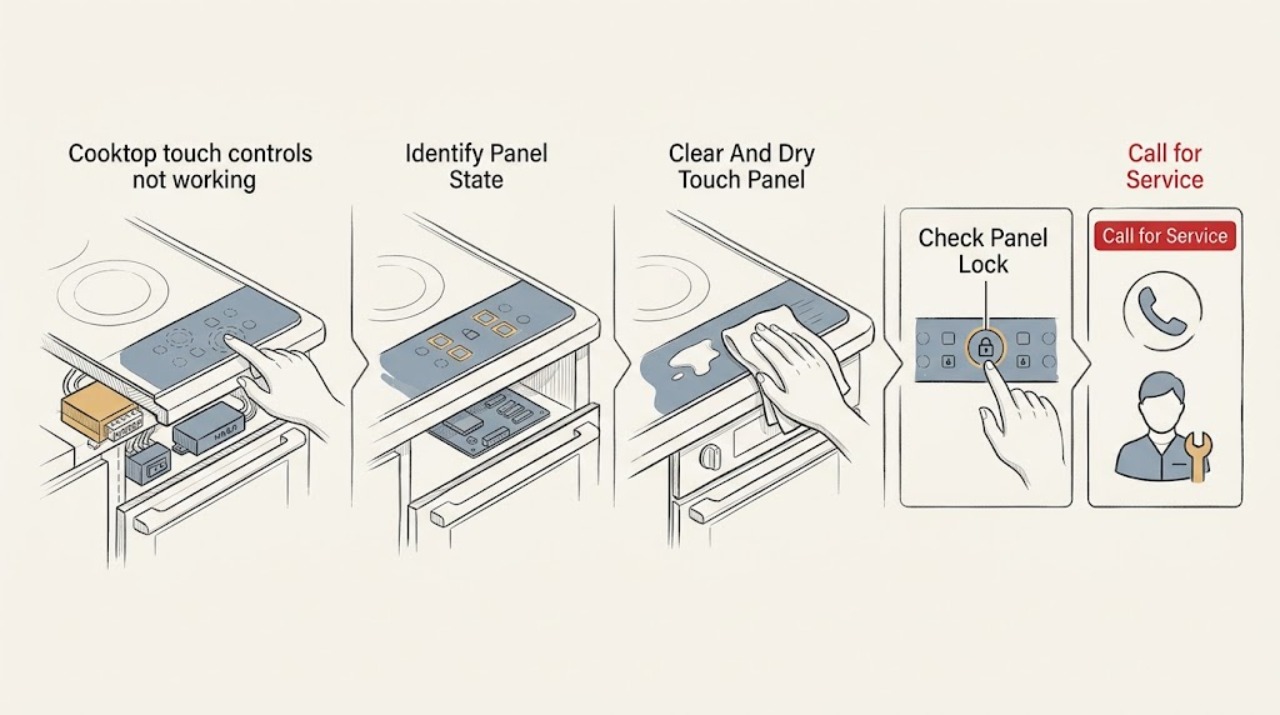
When Bosch cooktop touch controls do not respond, first note whether the whole panel is dark, locked, flashing, wet, or showing an error, then turn controls off and remove liquid, food, cookware, and objects from the touch-control area. Allow a hot surface or overheated electronics to cool. If the lock indicator is on, use the exact model instructions to unlock it; if the display indicates a power or operational fault, follow only the Bosch code-specific reset permitted for that model. Do not open the cooktop or test wiring. Leave it off and arrange qualified appliance or electrical service if the panel stays unresponsive after a clean, cool surface and the documented checks, an error returns, a breaker trips, a zone cannot be turned off, or there is smoke, sparking, burning odor, cracked glass, or exposed wiring.
Before you begin
Safety first
- This article supports recording the display, cool and dry surface checks, model-specific lock observations, accessible power-state checks, and only the reset documented for the exact Bosch code. Internal controls, elements, sensors, wiring, junction boxes, and damaged glass belong to qualified service.
Work through in order
Diagnostic checks
Use only checks that match the exact appliance or system and its official guide.
-
Check 1
From a safe position, turn all controls off and record whether the display is completely dark, shows a lock symbol, flashes all indicators, shows a letter or number, beeps without responding, or responds on some zones but not others; photograph the exact display before clearing it.
Expected result: The panel is dark, locked, wet or flashing, shows a code, responds only intermittently, or has no visible indicator but the appliance has power elsewhere.
Next step: Keep the code and symptom with the Bosch model number and locate the matching owner-support or code entry. Do not guess at a part from a blank panel or generic touch-control symptom.
Stop if: Stop immediately for uncontrolled heating, smoke, sparking, burning odor, cracked glass, exposed wiring, water entering the appliance, or a breaker that trips.
Why this matters
Why: These states lead to different Bosch paths: no display suggests supply or electronics, a lock suggests a deliberate control restriction, a wet or covered panel suggests false input, and a code must be matched to the exact cooktop type and model.
-
Check 2
With the cooktop off and safe to touch, remove utensils, cookware, spills, and residue from the touch-control area; dry it using the exact model's care instructions and keep hot cookware away from the control panel.
Expected result: The panel starts responding after it is dry and unobstructed, all indicators were flashing, a hot object was near the controls, or the panel remains unresponsive when clean and cool.
Next step: If the controls recover, test only the basic operation allowed by the manual. If they do not, continue to the lock and power observations without opening the cooktop.
Stop if: Do not scrape hot glass, pour cleaner onto the panel, use abrasive tools, or continue if controls activate by themselves or heat cannot be turned off.
Why this matters
Why: Bosch identifies a wet panel or an object covering it as a cause of all-indicator flashing, and identifies hot cookware near the panel as a possible electronics-protection condition. Continued failure on a clean, cool panel makes a lock, power, or internal control fault more likely.
-
Check 3
If a key, padlock, or lock indicator is present, use the exact Bosch owner manual or code guidance to check whether the panel lock or child lock is active; touch and hold the identified lock key only for the model-specified duration, with the surface clean and dry.
Expected result: The lock indicator clears and touch controls work, the lock indicator remains, the model has no lock control, or the controls stay dead even though the lock appears off.
Next step: Use the cooktop only if the lock clears and normal operation returns. If the lock cannot be cleared using the exact instructions, record the indicator and arrange service rather than forcing the controls.
Stop if: Do not bypass the lock, remove the control panel, force keys, or operate a cooktop whose controls change state without a touch.
Why this matters
Why: An active lock can intentionally disable the panel and may be triggered accidentally after a spill or object presses a key. If the lock is off but the panel is still unresponsive, the issue is not resolved by repeatedly pressing the lock key.
-
Check 4
If the display is dark or shows a documented operational or power code, check only the accessible power state described by the Bosch manual and whether the household breaker has tripped; use a power reset only when the exact code entry permits it and the disconnect is safe to operate.
Expected result: The breaker is off, power returns but the panel remains dark, a one-time code clears after the documented reset, the same code returns, or the breaker trips again.
Next step: Restore only a plainly tripped breaker if it can be done safely and it does not trip again. If the cooktop remains dark, the code recurs, or the breaker trips, leave it off and arrange qualified appliance or electrical service.
Stop if: Do not remove wiring covers, reconnect a hardwired cooktop, measure live voltage, repeatedly reset a tripping breaker, or work inside the appliance.
Why this matters
Why: Loss of supply can make the panel appear dead, while a recurring operational or supply code can indicate an unresolved electrical or control condition. A breaker that trips again is not a normal touch-panel reset result.
-
Check 5
After the panel is clean, the lock is off, and any heat condition has cleared, perform one brief supervised operation exactly as the model manual permits; on induction models, use correctly placed compatible cookware and observe the panel without touching damaged glass or moving parts.
Expected result: The panel and zone operate normally, the code returns immediately, the code returns only after heating, the controls remain intermittent, a zone will not turn off, or the display changes without touch.
Next step: Stop at the first abnormal response, leave the cooktop off, and arrange qualified service with the model, exact code, affected zone, timing, and reset result. Do not repeat the test to force a pattern.
Stop if: Do not continue cooking with a returning code, uncontrolled heat, smoke, sparking, burning odor, cracked glass, or a breaker that trips.
Why this matters
Why: A successful single retest supports a temporary lock, obstruction, cookware, heat, or power state but does not prove an internal control is sound. Recurrence or uncontrolled response makes a touch interface, sensor, power module, element, supply, or wiring fault more likely.
Use your observations
Decision map
Find the observation that best matches what you see, then follow the next safe action.
-
PATH 01Safety boundary
What you see
All indicators flash or touch keys stop responding while liquid, food, cookware, or another object is on or near the control area, and the panel responds after a safe dry and clear check.
Do this next
Keep the panel dry and clear and use the cooktop only if normal operation remains stable. If the display returns on a clean surface, follow the exact code entry and arrange service if it persists.
Why this path and its safety boundary
Why it matters: A wet or obstructed touch area is more likely than a failed control module for this episode.
Safety stop: Do not operate a wet panel, scrape the surface, or continue if the controls activate without being touched.
-
PATH 02Safety boundary
What you see
A lock indicator is present, the surface is clean and dry, and the controls begin working after the model-specific lock procedure.
Do this next
Use the manual's lock procedure for future locking and keep the control area clear. If the lock will not clear or reappears without a touch, request service.
Why this path and its safety boundary
Why it matters: The panel was intentionally locked or had entered its lock state; the touch hardware is responding to the permitted unlock input.
Safety stop: Do not bypass or dismantle the lock, force the touch key, or operate if the panel changes state on its own.
-
PATH 03Safety boundary
What you see
An applicable Bosch code appears after extended or high-heat operation, hot cookware is near the panel, or the zone shuts down for protection, then the display clears after cooling and the obstruction is removed.
Do this next
Allow the electronics to cool and keep the control area and required ventilation clear. If the code returns or the cooktop repeatedly shuts down, leave it off and arrange service.
Why this path and its safety boundary
Why it matters: Heat protection is more likely than a permanent touch-control failure for that event, but recurrence during ordinary use can indicate ventilation or an internal fault.
Safety stop: Do not continue heating during an overtemperature condition, cover ventilation, or use a cooktop with smoke, burning odor, or uncontrolled heat.
-
PATH 04Safety boundary
What you see
The display is dark or shows a power or operational code, the accessible supply state is corrected safely, but the panel remains dark or the code returns.
Do this next
Leave the cooktop off and arrange qualified appliance or electrical service. Give the technician the exact code, whether any indicators worked, and whether the breaker stayed on.
Why this path and its safety boundary
Why it matters: An unresolved electrical supply, power module, user interface, or other electronics fault is possible; a reset cannot identify which part is responsible.
Safety stop: Do not open a hardwired connection, measure live voltage, or repeatedly reset a breaker that trips.
-
PATH 05Safety boundary
What you see
The controls respond but an induction zone does not heat or displays a pan-related indication, and operation changes when suitable cookware is centered on the zone.
Do this next
Use only cookware and placement permitted by the exact Bosch model. If the panel itself remains unresponsive or the indication persists with correct cookware, stop using the zone and request service.
Why this path and its safety boundary
Why it matters: Cookware detection or placement is more likely than a dead touch panel; the panel's ability to respond is an important distinction.
Safety stop: Do not heat an empty pan, place metal objects on the controls, or continue if the cooktop overheats or glass is damaged.
-
PATH 06Safety boundary
What you see
The clean, dry, unlocked panel remains unresponsive, touch response is intermittent, a zone cannot be turned off, a code returns after its permitted steps, or smoke, sparking, cracked glass, or a repeated breaker trip occurs.
Do this next
Leave the cooktop off and arrange qualified appliance or electrical service. Report the exact model, display, affected zone, timing, surface condition, power observations, and any hazard.
Why this path and its safety boundary
Why it matters: A touch interface, control electronics, sensor, element, wiring, supply, or physical-safety fault is possible and cannot be isolated safely with user checks.
Safety stop: Do not keep cooking, bypass a lock or interlock, repeatedly cycle power, remove covers, or touch exposed wiring or damaged glass.
Helpful context
Understand the symptom
A dead panel is not one diagnosis
A Bosch cooktop can appear not to respond because the panel is locked, a touch key is covered or wet, the appliance has overheated, power is absent, cookware is not detected on an induction model, or an operational fault is displayed. Before assuming that the touch interface has failed, identify whether any indicator or display is alive and record the exact characters. Bosch separates electric, induction, and gas-cooktop guidance, so the exact model and cooktop type matter.
Make the surface readable and safe
Turn all controls off, remove objects and cookware from the control area when they are safe to handle, and dry the panel after the surface cools. Hot cookware near a control area can cause an electronics-protection response on applicable models. A clean, cool panel that still does not respond is a different branch from a panel that becomes usable as soon as a spill or lock is removed.
Reset only what Bosch documents
Some Bosch code entries permit a brief power interruption or an off-and-on cycle, while others call for cooling or service. A reset can clear a one-time state but cannot prove that the touch interface, power module, sensor, element, or wiring is healthy. If the code returns or the breaker trips again, stop repeating resets and give the exact code and behavior to qualified service.
Safety boundary
Stop conditions
- Leave the cooktop off for uncontrolled heating, smoke, sparking, burning odor, cracked glass, exposed wiring, water entering electrical areas, or a breaker that trips again.
- Do not touch hot glass or cookware, and do not use an empty pan to provoke an induction response.
- Do not bypass a panel lock, remove cabinet or junction-box covers, measure live voltage, reconnect hardwired conductors, or work inside the cooktop as an ordinary user check.
- Stop after the model-authorized surface, lock, cooling, power, or code check if the panel remains unresponsive, the code returns, controls behave erratically, or a zone will not turn off.
- Do not order or replace a touch panel, power module, sensor, element, or glass based only on a blank panel or error display; confirm the exact model-specific diagnosis first.
Only after diagnosis
Potential parts
- cooktop touch-control interface
Consider this part class only after qualified diagnosis confirms that the clean, dry, unlocked panel or its user interface is causing the persistent nonresponse or false input.
Confirm the exact Bosch model, control layout, revision, connectors, and manufacturer fit information before ordering. - cooktop power-control module
Consider this part class only when qualified diagnosis connects a recurring code or dead panel to the power electronics rather than the household supply, lock, surface, or touch interface.
Confirm the exact model and diagnostic result; power-electronic replacement and wiring work require qualified service. - cooktop temperature sensor
Consider this part class only after qualified testing confirms an inaccurate temperature signal or recurring heat-protection condition with correct use and cooling.
Confirm the exact model, sensor location, connector, and manufacturer fit information; a hot indicator alone is not proof of sensor failure. - cooktop heating element or induction coil
Consider this part class only when qualified diagnosis identifies an affected zone or coil as the source of the code or nonoperation and the touch panel and supply are sound.
Confirm the exact model, element or coil geometry, electrical rating, and manufacturer fit information before replacement.
When checks do not resolve it
Need a professional?
Arrange qualified Bosch appliance service when the clean, dry, unlocked touch panel remains unresponsive, the exact code is unknown or returns after the documented steps, the display is dark after safe power checks, the failure affects multiple zones, or a control works intermittently. Seek prompt electrical or appliance help for uncontrolled heating, a breaker that trips again, smoke, sparking, burning odor, cracked glass, water near electrical parts, exposed wiring, or controls that activate without being touched.
Safety scope: This article supports recording the display, cool and dry surface checks, model-specific lock observations, accessible power-state checks, and only the reset documented for the exact Bosch code. Internal controls, elements, sensors, wiring, junction boxes, and damaged glass belong to qualified service.
Common questions
FAQ
Why are my Bosch cooktop touch controls not responding?
The panel may be locked, wet or covered, overheated, without power, or reporting an operational fault. Record the display, clear and dry the panel when cool, check the model-specific lock state, and use only the Bosch code instructions for any reset.
Can a spill make a Bosch cooktop appear not to work?
Yes, a wet or obstructed control area can cause flashing indicators or prevent touch input on applicable models. Turn controls off, wait until the surface is safe, remove the object, and dry the panel using the model's care instructions. If the controls remain erratic or dead, stop and arrange service.
How do I know whether the Bosch panel lock is on?
Look for a key or padlock indicator and check the exact owner manual. Bosch provides model-dependent lock controls; use only the specified lock key and duration on a clean, dry panel. Do not bypass or dismantle the lock if it will not clear.
Should I reset the breaker when Bosch cooktop touch controls stop working?
Only when the exact Bosch code or model guidance permits a power reset and the disconnect is safe to operate. A reset is a limited test. If the panel remains dark, the error returns, or the breaker trips again, leave the cooktop off and arrange qualified service.
When should I stop troubleshooting a Bosch cooktop?
Stop for uncontrolled heating, a zone that will not turn off, smoke, sparking, burning odor, cracked glass, water near electrical parts, exposed wiring, a repeated error code, or a breaker that trips again. Do not open the cooktop or replace a touch panel, sensor, element, or module based only on a display symptom.
Read the exact guide
Official sources
- Bosch Cooktop Owner SupportBosch Home Appliances · Official Bosch owner-support hub; use it to choose the electric, induction, or gas path and then follow the exact model documentation.
- Bosch Electric Cooktop Troubleshooting & Repair | Bosch – Fix Cooktop Not Heating, Not Turning on & Other ProblemsBosch Home Appliances · Official Bosch electric-cooktop troubleshooting; use the exact model instructions for a specific control layout or electrical installation.
- Bosch Cooktop & Rangetop Error CodesBosch Home Appliances · Official Bosch error-code guide; code meanings and controls vary by cooktop type and model, so the exact owner manual takes precedence.
Community feedback
Share a repair observation
Share a plain-text repair observation. Accepted observations are published automatically; this page may take a moment to update.