
On this page
Start here
Quick answer
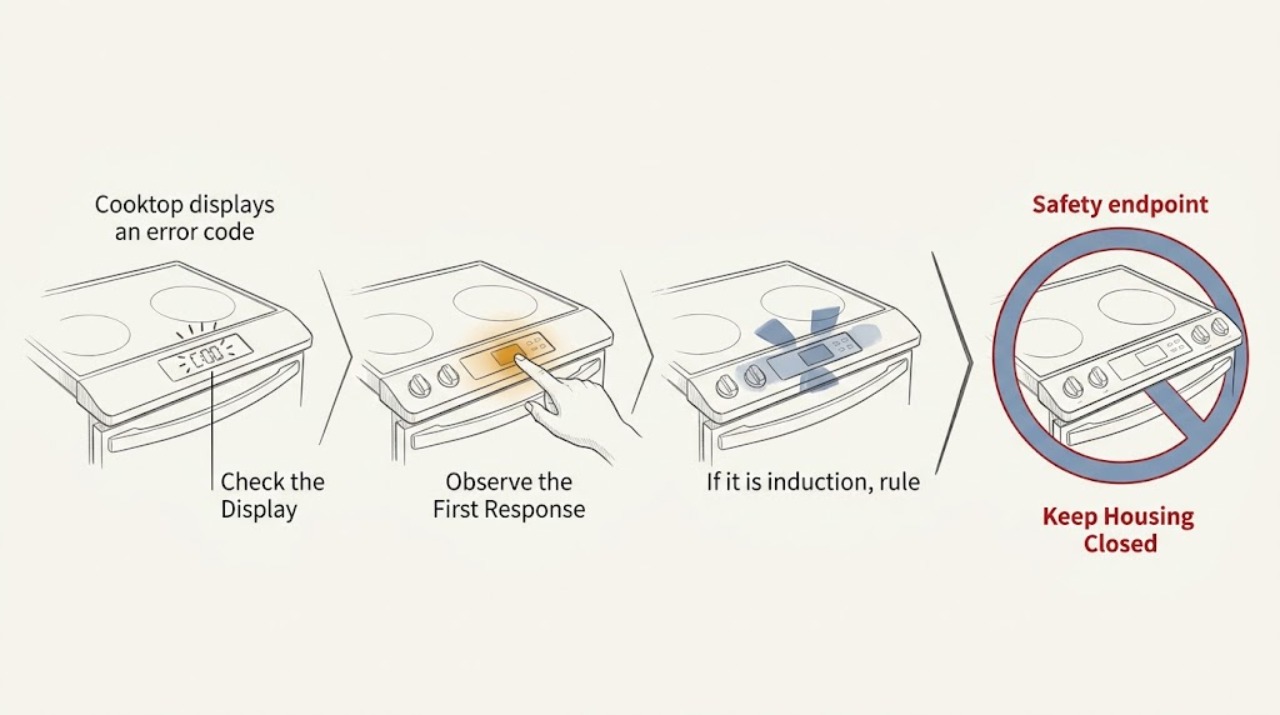
A cooktop error code is a model-specific diagnostic message, so do not assume that a code has the same meaning on every brand. First record every character exactly, then clear and dry the touch controls and remove anything resting on them. If the cooktop is induction, also check the pan and its position. Use the owner's manual for the exact code; if the code remains after the manufacturer's permitted power reset, returns immediately, or the cooktop is hot, damaged, or behaves unusually, stop using it and arrange professional service.
Work through in order
Diagnostic checks
Use only checks that match the exact appliance or system and its official guide.
-
Capture the complete code and the conditions
With the controls off and the surface safe to approach, write down or photograph every character, including a leading letter, a dash, an underline, or a flashing pattern. Note whether the message appears on one cooking zone or across the whole panel, and whether a burner was hot or a pan was in use.
Expected result: You have a complete, repeatable code and a record of when it appears.
Next step: Keep this record for the next checks and for any service call; do not substitute a similar-looking code.
Why this matters
Why: The exact display and context are what let the owner's manual or a technician distinguish a normal pan notification from a control, sensor, communication, or power fault.
-
Clear the touch panel and check for a stuck control
Turn the cooktop controls off. Remove pans, utensils, packaging, and other objects from the control area, then wipe away spills or droplets with the care method allowed by the owner's manual.
Expected result: After the panel is clear and dry, the display returns to normal, or the same code remains or comes back.
Next step: If it clears, keep the controls dry and unobstructed. If it returns, continue with the code-specific manual check rather than repeatedly touching the panel.
Why this matters
Why: A clear panel that restores normal operation points toward a covered, wet, or continuously touched key. A returning code means the panel condition did not explain the fault.
-
If it is induction, rule out a pan-detection message
Remove the pan and let it cool if it is hot. For an induction zone, try a cookware piece that the owner's manual identifies as compatible, place it centrally on the selected zone, and switch that zone off and on once.
Expected result: The message is an underlined U or another pan-related indicator, the zone recognizes the pan, or the same fault code remains with no pan present.
Next step: Use the matching cookware guidance in the manual. If the exact error persists without a pan, record that result and move to the model-specific service path.
Why this matters
Why: Recognition after repositioning or changing cookware points to size, position, magnetic compatibility, or heat at the pan. A persistent code with no pan is not explained by cookware alone.
-
Perform only the manufacturer's permitted power reset
Use the cooktop Power control to turn it off. If the surface is cool, intact, and the owner's manual permits a reset, disconnect power using the appliance's normal plug or circuit breaker, wait for the manual's stated interval, and restore power without opening the cooktop or touching wiring.
Expected result: The code disappears and the controls work normally, or it returns during startup or the first use.
Next step: Manufacturer examples differ: Samsung describes 30 seconds for several cooktop codes, while Whirlpool describes one minute for a persistent flashing indicator. Follow the interval for your exact model, then monitor the display before cooking.
Why this matters
Why: A one-time code that clears can have been a temporary control or communication state. A code that returns after a reset is evidence that the underlying condition still needs model-specific diagnosis.
Use your observations
Decision map
Find the observation that best matches what you see, then follow the next safe action.
-
PATH 01Next step
What you see
The code clears after the panel is cleared and dried
Do this next
Keep the control area dry and free of objects; if the message returns, treat it as a recurring fault and use the model manual.
-
PATH 02Next step
What you see
An induction pan indicator clears with compatible, centered cookware
Do this next
Continue using the cookware and zone combination specified by the manual; no control-board diagnosis is justified from this observation alone.
-
PATH 03Next step
What you see
The exact code returns after the permitted power reset or appears with no pan
Do this next
Stop using the affected cooktop and arrange service with the code and model information ready.
Helpful context
Understand the symptom
Why the code matters
The display may be reporting a stuck touch key, a pan-detection condition, overheated electronics, a communication fault, or another model-specific fault. The same letter or number can mean something different on another cooktop. Treat the code as information to match to the exact owner's manual, not as permission to replace a part based on a generic list.
When to stop troubleshooting
Do not remove the glass, access the control board, test wiring, or try to defeat a safety feature. Stop using the cooktop if the code returns, the controls do not respond, a zone switches off unexpectedly, the surface is cracked, there is a burning smell, or the display indicates a power or sensor fault. A qualified appliance technician can use the exact code, model number, affected zone, and the results of the panel, pan, and reset checks to choose the next safe test.
Only after diagnosis
Potential parts
- cooktop control board
Consider only if the exact model documentation or a technician links the recurring code to the control electronics.
Match the complete model number and revision before considering any part; a generic control board is not assumed compatible. - cooktop temperature sensor
Consider only for a model-specific sensor code or a technician's diagnosis.
Do not infer a failed sensor from an unspecified error display. - induction coil
Relevant only when an induction model's documentation or service diagnosis identifies a coil or zone fault.
The zone layout and electrical design are model-specific; verify compatibility before purchase or repair.
When checks do not resolve it
Need a professional?
Call a qualified appliance technician when the code is not listed for the exact model, returns after the manufacturer's reset, indicates a sensor, communication, or power fault, or is accompanied by unresponsive controls, unexpected heating, a burning smell, or visible damage.
Have this ready
- The complete displayed code and whether it flashes
- Cooktop brand and exact model number
- Whether the message affects one zone or the whole panel
- Whether the panel was wet or covered, whether a pan was present, and what happened after the manual-approved reset
Common questions
FAQ
Can I use a generic cooktop error-code list?
Use generic lists only to recognize the type of message. Match the exact code to the owner's manual for the cooktop's brand and model because code meanings and reset instructions vary.
Why does an induction cooktop show a U or pan symbol?
It can indicate that the zone is not detecting the cookware. Check the manual's compatibility guidance, center the pan, and try a different compatible pan after it cools.
How long should I turn the cooktop's power off?
Use the interval specified for the exact model. Manufacturer guidance is not universal: examples include 30 seconds for several Samsung cooktop codes and one minute for a Whirlpool persistent flashing indicator.
What should I do if the error code comes back?
Stop using the cooktop if the code returns after the permitted reset, record the exact display and affected zone, and arrange qualified service. Do not open the appliance or replace a part based only on a generic code.
Read the exact guide
Official sources
- Meaning of the error codes displayed on your Samsung cooktopSamsung Canada · Official examples of stuck-button, sensor, communication, pan-detection, and power-cycle guidance; code meanings remain model and market specific.
- Indicator or Display Flashing - Electric and Induction CooktopWhirlpool Product Help · Official guidance for clearing a covered or wet control area, induction pan detection, and resetting power when an indicator continues to flash.
Community feedback
Share a repair observation
Share a plain-text repair observation. Accepted observations are published automatically; this page may take a moment to update.