
On this page
Start here
Quick answer
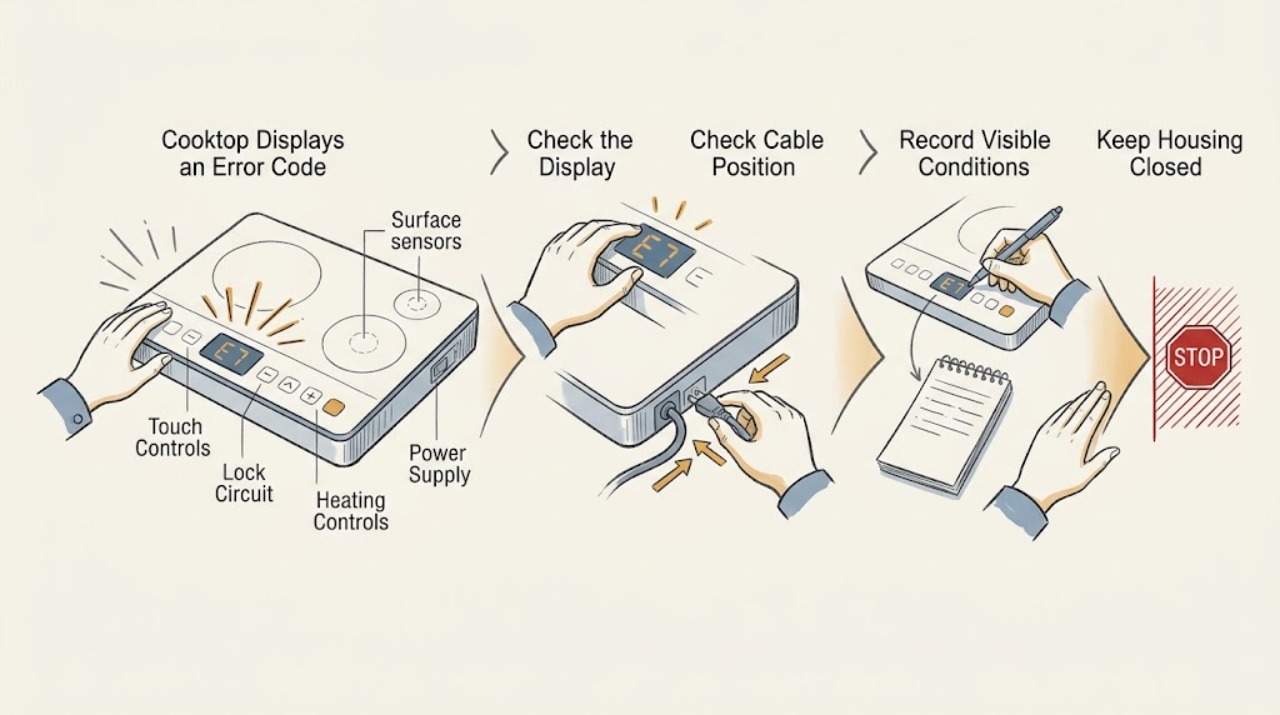
A Frigidaire cooktop error display must be matched to the exact model, cooktop type, and complete code before anyone interprets it. Photograph or copy every character, including a dash, letter, or number, and record whether the surface is hot, locked, wet, or actively heating. Frigidaire's official error guide lists F40/F41 as a cooktop lockout for applicable electric ranges and electric cooktops, but codes from a range or oven guide must not be assumed to apply to every standalone cooktop. Follow the matching owner's manual, dry and clear the controls only when the surface is cool, and perform at most one model-authorized reset when no safety symptom exists. Stop for gas odor, an abnormal flame, smoke, arcing, a damaged cord, a hot connection, uncontrolled heating, or a glass surface that is cracked; keep the appliance off and arrange qualified service. A code that returns after the documented check or reset needs service rather than repeated resets or panel removal.
Before you begin
Safety first
- Keep the cooktop off for gas odor, abnormal flame, smoke, arcing, hot or damaged electrical connections, uncontrolled heating, a cracked glass surface, or repeated breaker trips. Do not open the appliance, bypass a lock, adjust gas, or make live electrical tests.
Work through in order
Diagnostic checks
Use only checks that match the exact appliance or system and its official guide.
-
Check 1
Stop using the cooktop and record the complete display exactly as shown, including a dash, every letter, number, decimal, or flashing pattern. Note the model, whether it is gas, electric, or induction, which zone was selected, whether the surface is hot, and whether any zone continues heating.
Expected result: The code is clear and repeatable, the display changes, the appliance type or model is uncertain, the cooktop is hot, or a zone remains on after being turned off.
Next step: Use the exact model manual for a stable code and cool appliance. Keep the cooktop off and arrange qualified service for uncertain identity, persistent heat, or a code that cannot be recorded safely.
Why this matters
Why: An exact code and appliance identity are needed because Frigidaire codes and controls are model-specific. An active zone, uncertain identity, or uncontrolled heat is a safety and service concern rather than a code lookup exercise.
-
Check 2
With the cooking surface cool and power left off, check the accessible control area for moisture, food residue, a pan or object resting on touch controls, or an active lock indicator. Wipe only with the method allowed by the manual; do not pry, scrape, or remove the glass or control panel.
Expected result: The control area is wet or obstructed, a lock indicator is active, the display responds after the area is dry and clear, or the code remains with a clean, cool control area.
Next step: Allow the accessible surface to dry and clear the lock only by the exact manual procedure. If the code returns or controls remain unresponsive, stop and request service.
Why this matters
Why: Moisture, residue, an object, or a lock state can interfere with touch controls. A recurring code on a dry and unobstructed panel points toward a model-specific control, sensor, or power issue.
-
Check 3
Compare the exact code with the Frigidaire support article or owner's manual for the cooktop's model and appliance type. Treat the published F40/F41 cooktop-lockout entry as applicable only where the guide identifies the same electric cooktop or range context; do not transfer oven or range codes to a different cooktop.
Expected result: The code is listed for the exact appliance, is listed only for a different range or oven function, is not listed, or the model manual gives a different meaning.
Next step: Follow only the matching manual step. Save a photo and the code for service when it is unlisted, returns, or conflicts with the displayed appliance type.
Why this matters
Why: A listed exact-model code may have a limited user check. A code from another product type, an unlisted code, or conflicting documentation requires model-specific diagnosis rather than a guessed repair.
-
Check 4
If the exact manual authorizes clearing a lock or performing a brief power reset, make only that single attempt after the surface is cool, no zone is heating, and power can be disconnected from a safe dry location. Do not repeatedly cycle the breaker or reset a code that signals overheating or electrical trouble.
Expected result: The display clears and controls work normally, the same code returns, the display remains blank, or a zone heats or remains hot unexpectedly.
Next step: Keep the cooktop off and arrange qualified service for recurrence, blank controls, or abnormal heating. For F40/F41, Frigidaire's official guidance directs service when the documented reset does not resolve the lockout.
Why this matters
Why: A one-time recovery can indicate a temporary control state. A returning code, blank display, or uncontrolled heat indicates a fault that a reset cannot repair.
-
Check 5
For an electric or induction cooktop, inspect only visible power-cord, receptacle, and surrounding cabinet conditions from a safe dry position. For a gas cooktop, observe only from a safe distance whether a burner is lit, uneven, delayed, or producing an abnormal flame; do not relight, adjust gas, or open panels.
Expected result: A cord or receptacle is hot or damaged, a breaker trips, gas odor is present, a flame is abnormal, or the visible power and flame conditions appear normal.
Next step: Stop immediately for gas odor, abnormal flame, smoke, arcing, heat damage, or repeated trips and obtain qualified or emergency help. Otherwise continue only with the exact manual and service boundary.
Why this matters
Why: Heat, damage, gas odor, abnormal combustion, or repeated power trips can make continued operation unsafe. Normal visible conditions do not clear a recurring code or rule out an internal control fault.
-
Check 6
After the documented code check or single reset, verify from a safe distance that the display, lock indicator, surface-heating indicator, and selected zone behave normally without a recurring code. Record the result and stop rather than repeating high-heat or control tests.
Expected result: The code stays cleared and all zones respond normally, the code returns, indicators disagree with the surface state, or the cooktop cannot be controlled.
Next step: Keep the cooktop off and provide the technician the exact code, model, appliance type, reset result, zone, and heat or indicator observations. Do not open the appliance or continue testing.
Why this matters
Why: A stable return to normal supports a temporary control or lock state. A returning code or disagreement between indicators and actual heat suggests a sensor, control, relay, wiring, or power problem.
Use your observations
Decision map
Find the observation that best matches what you see, then follow the next safe action.
-
PATH 01Next step
What you see
The display shows F40 or F41 on an applicable Frigidaire electric cooktop or electric range, and no zone is heating abnormally.
Do this next
Follow the exact model's lockout instruction and make at most the documented brief power reset from a safe dry location. If the code remains or returns, keep the unit off and arrange service.
Why this path and its safety boundary
Why it matters: Frigidaire identifies these codes as cooktop lockout in its official guide.
-
PATH 02Next step
What you see
The display is a dash or lock indicator, the surface is cool, and controls respond to the exact lock procedure.
Do this next
Clear the lock only using the matching owner's manual. Do not force controls or transfer an oven lock sequence to another model; service a lock that returns or will not clear.
Why this path and its safety boundary
Why it matters: A control-lock state is more likely than a failed heating component.
-
PATH 03Next step
What you see
The code is listed only in a range or oven section, the appliance is a different cooktop type, or the model manual gives another meaning.
Do this next
Use the exact model manual and preserve a photo of the display. Do not guess at a sensor, board, or lock repair; request model-specific service if the code persists.
Why this path and its safety boundary
Why it matters: The public code list is not sufficient to identify the fault for this appliance.
-
PATH 04Next step
What you see
The code returns after the documented check or one reset, the display stays blank, or controls remain unresponsive.
Do this next
Keep the cooktop off and arrange qualified service. Provide the model, complete code, appliance type, zone, temperature or lock state, and reset result; do not remove the glass or control panel.
Why this path and its safety boundary
Why it matters: A control, sensor, power, wiring, or lock fault is possible and cannot be confirmed safely from the user interface.
-
PATH 05Next step
What you see
A zone remains on, the hot-surface indication conflicts with actual heating, the glass is cracked, or the unit shows smoke, arcing, heat damage, or repeated breaker trips.
Do this next
Stop using it, keep clear, and isolate power only from a safe dry location if possible. Arrange qualified or emergency help; do not touch the hot surface, open the appliance, or restart it to test.
Why this path and its safety boundary
Why it matters: The cooktop may have an uncontrolled heating, glass, or electrical hazard.
-
PATH 06Next step
What you see
A gas cooktop has gas odor, delayed ignition, an abnormal flame, or symptoms while the code is displayed.
Do this next
Stop using the cooktop, leave the area if gas is suspected, and obtain emergency or qualified gas service from a safe location. Do not relight, operate switches, adjust gas, or search for a leak.
Why this path and its safety boundary
Why it matters: Combustion or gas-supply safety takes priority over code interpretation.
Helpful context
Understand the symptom
Record the code before trying to clear it
A single dash, an F-code, and a temperature or sensor message can represent different functions. Write down the complete display exactly as shown, whether it flashes, and whether any burner or cooking zone is active. Take a photo if the display changes. Frigidaire's published ranges guide includes both cooktop lockout codes and range or oven codes, so its list is a starting point—not permission to apply a code meaning to another model.
Lock and surface-state messages are not always failed parts
A control lock, child lock, hot-surface indicator, or a damp touch panel can make controls appear unavailable. Wait for the surface to cool, wipe only accessible moisture with power safely off, remove objects from the control area, and use the exact manual to clear a lock. Do not touch a hot glass surface, scrape a touch panel with metal, or bypass a lock.
Use a reset only when the code and manual support it
Frigidaire documents a brief power disconnect for the F40/F41 cooktop-lockout article, but that instruction applies to the listed electric range and electric cooktop context. A reset can clear a temporary control state; it cannot diagnose a sensor, control board, wiring, heating, or power fault. Disconnect power only from a safe, dry location and never reset an appliance that is smoking, arcing, overheating, or heating without control.
Persistent or safety-related codes need service
If the code returns, the cooktop will not respond, a zone remains on, or the display and surface behavior disagree, stop user-level troubleshooting. Have the model, serial information, complete code, appliance type, recent event, and any heat or electrical symptom ready for a qualified technician. Do not remove the glass, lift the control panel, or make live electrical tests.
Safety boundary
Stop conditions
- Stop immediately for gas odor, abnormal flame, smoke, arcing, a hot or damaged cord, a hot receptacle, uncontrolled heating, a cracked glass surface, or repeated breaker trips. Keep clear and obtain qualified or emergency help.
- Do not touch a hot glass surface, force or bypass a lock, open the cooktop or control panel, make live electrical measurements, adjust gas, relight a suspect burner, or restart a unit with an electrical or heating warning.
- Do not apply a code meaning, reset sequence, sensor diagnosis, or lock procedure from another Frigidaire model, range, oven, or cooktop type. Preserve the exact code and manual context.
- Stop user-level troubleshooting when the code returns after its documented check or one reset, the display is blank, controls are unresponsive, or indicators disagree with actual surface heat.
Only after diagnosis
Potential parts
- user-interface or control-panel assembly
Consider this category only after qualified diagnosis links a returning code or unresponsive controls to the interface or control panel rather than a lock state or moisture.
Controls differ by cooktop type and exact model. Confirm the model and service diagnosis before any part decision. - surface-temperature or heating sensor
Consider this category only when qualified testing identifies a sensor fault associated with the exact code or disagreement between indicated and actual heat.
Sensor location and fit are model-specific and may involve hot or energized components. Do not select a sensor from a code alone. - power relay or control board
Consider this category only after qualified diagnosis confirms a relay, control-board, power, or communication fault after safe external checks.
Control and relay parts vary by model, voltage, and cooktop type; qualified installation and exact fit confirmation are required.
When checks do not resolve it
Need a professional?
Arrange qualified appliance service when a Frigidaire cooktop code is unlisted or returns after the exact model check or one authorized reset, when the display stays blank or controls remain unresponsive, when a lockout will not clear, when indicators disagree with actual heating, or when a sensor, relay, control, wiring, or power fault is possible. Treat gas odor, abnormal flame, smoke, arcing, a hot connection, uncontrolled heating, a cracked glass surface, and repeated breaker trips as immediate safety issues.
Safety scope: Keep the cooktop off for gas odor, abnormal flame, smoke, arcing, hot or damaged electrical connections, uncontrolled heating, a cracked glass surface, or repeated breaker trips. Do not open the appliance, bypass a lock, adjust gas, or make live electrical tests.
Common questions
FAQ
What should I do first when my Frigidaire cooktop shows an error code?
Copy or photograph the complete code, record the exact model and whether the cooktop is gas, electric, or induction, and note whether the surface is hot, locked, or still heating. Use only the matching owner's manual or Frigidaire guide before attempting a reset.
What do F40 and F41 mean on a Frigidaire cooktop?
Frigidaire identifies F40/F41 as cooktop lockout for applicable electric ranges and electric cooktops. Follow the exact model instruction and make at most the documented power reset; request service if the code remains or returns.
Can I use a Frigidaire range error-code list for a standalone cooktop?
Not automatically. The published guide includes range and oven codes as well as a cooktop-lockout entry, and Frigidaire says controls vary by model. Match the appliance type and exact model before interpreting a code.
Why does my Frigidaire cooktop show a dash or lock symbol?
Frigidaire's error guide describes a dash as a locked cooktop or lock feature state in the applicable range context. Use the exact manual to clear the lock only when the surface is cool; service a lock that will not clear or returns.
Should I reset my Frigidaire cooktop after an error code?
Only if the exact model guide authorizes it, the surface is cool, no zone is heating unexpectedly, and power can be disconnected safely. Try once at most. A returning code, blank display, or uncontrolled heating needs qualified service.
When is a Frigidaire cooktop error code an emergency?
Stop immediately for gas odor, abnormal flame, smoke, arcing, a hot or damaged electrical connection, uncontrolled heating, a cracked glass surface, or repeated breaker trips. Keep clear and obtain qualified or emergency help; do not restart the cooktop to test.
Read the exact guide
Official sources
- Ranges - What do the indicator lights on my range mean?Frigidaire · Frigidaire range indicator guidance; indicator layout and behavior can vary by model.
- How do I use my display or controls?Frigidaire · Frigidaire support page covering ranges, cooktops, and ovens; it directs users to the owner's manual because controls vary by model.
- Ranges - Error Code GuideFrigidaire · Frigidaire guide marked for electric ranges; use it only for matching appliance and model context, not as a universal cooktop code list.
- Range Error Code F40 / F41 - Cooktop Lock OutFrigidaire · Frigidaire article explicitly marked for electric ranges and electric cooktops; exact model instructions control.
Community feedback
Share a repair observation
Share a plain-text repair observation. Accepted observations are published automatically; this page may take a moment to update.