
On this page
Start here
Quick answer
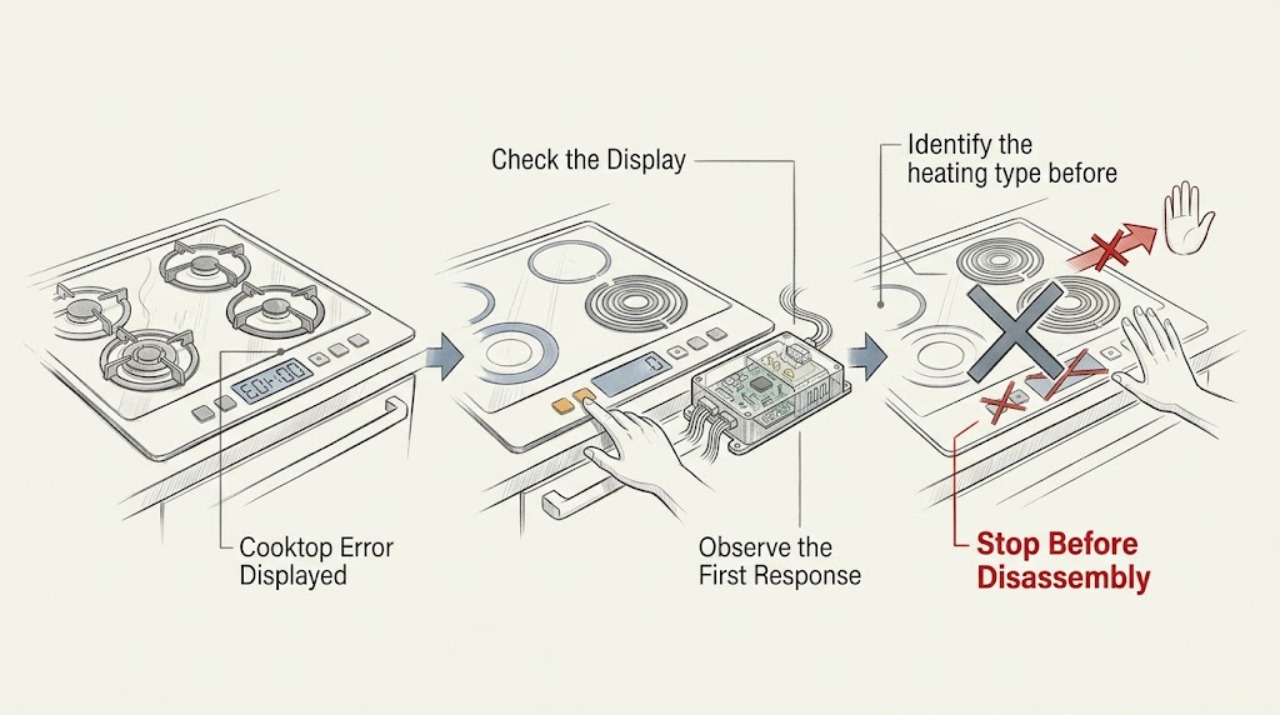
A cooktop error display is not a universal code: record every character exactly, the appliance model, whether it is gas, electric radiant, or induction, and what was happening when the message appeared. Use that model's instructions to interpret it. A wet or obstructed control area, an overheated surface or cookware, a power interruption, and an electronic fault can look similar across different products, so do not apply another brand's code chart. After the surface is cool and there is no immediate hazard, perform one reset only if the model instructions document it, then watch for the message to return. A gas odor, smoke, arcing, a cracked glass surface, uncontrolled heat, or a repeated fault is a stop-use condition.
Work through in order
Diagnostic checks
Use only checks that match the exact appliance or system and its official guide.
-
Capture the complete display and appliance identity
With the cooktop in a safe, stable state, photograph the entire display and write down every letter, number, dash, and flashing symbol. Record the model number, the fuel or heating type, the affected zone, and whether the message appeared at startup, while heating, after a spill, or after a power interruption.
Expected result: The code and the appliance identity are complete, or the display is only a generic light or flashing pattern with no readable code.
Next step: Use the exact model instructions or manufacturer support page. If the model or code is still unknown, continue only with the type and safety observations below and do not assign a code meaning.
Why this matters
Why: A complete code and model are needed because gas, electric radiant, and induction controls use different diagnostics; a partial code cannot support a reliable interpretation.
-
Check the cool, dry control area
After all zones and nearby cookware are cool, look at the external touch controls for moisture, cleaner residue, food, or an object resting on the panel. Wipe and remove only what is safely accessible from the outside; do not open the cooktop or disturb its wiring.
Expected result: The message or flashing indicators clear after the panel is dry and unobstructed, or they remain with a clean, dry panel.
Next step: If the display clears, follow the model instructions for a cautious return to use. If it remains, record the unchanged code and continue to the heating-type branch; do not keep pressing controls to force a response.
Why this matters
Why: Some cooktop controls can flash or reject input when the panel is wet or obstructed. Persistence after a dry-panel check points back to the model-specific diagnostic path rather than proving a spill caused the fault.
-
Identify the heating type before interpreting behavior
Confirm whether the unit is gas, electric radiant, or induction from its model documentation and visible cooking surface. For gas, note whether a burner is clicking or producing a flame; for electric radiant, note whether a surface indicator remains after use; for induction, note whether the message appears only with one pan or zone. Do not test a suspected gas problem if there is an odor.
Expected result: Only one zone or one pan is involved, the whole control panel is affected, or the symptom involves gas ignition or odor.
Next step: Apply only the section of the exact model instructions for the confirmed heating type. Never transfer an error definition from another brand or from gas to electric or induction equipment.
Why this matters
Why: The affected scope changes the next path: a cookware or zone recognition issue is different from a whole-panel power or control issue, and gas odor is an emergency condition rather than a code-lookup exercise.
-
Look for an overheating or cookware-related trigger
When the unit is fully cool, note whether the message followed an unusually hot zone, an empty pan, a pan that was not centered, or heavy use of several induction zones. Check only the accessible external space and cookware condition; do not remove panels or attempt internal inspection.
Expected result: The message occurs only after high heat or a particular pan, or it returns while the cooktop is cool with suitable cookware and clear external space.
Next step: Let the unit cool and correct only the documented external or cookware condition. If the same message returns under normal conditions, stop troubleshooting and arrange qualified service.
Why this matters
Why: Some manufacturer guidance associates indicators with overheating, unsuitable cookware, or restricted ventilation, but those examples do not establish the meaning of an unconfirmed code on this cooktop.
-
Perform one documented power reset
Only after the cooktop is cool, the area is dry, and no gas, smoke, sparks, cracked glass, or uncontrolled heat is present, use the exact model instructions for one power reset. If those instructions specify a safe breaker reset, follow that one-time sequence and observe the display before starting a cooking cycle.
Expected result: The display clears and stays clear, or the same message returns immediately or during the next permitted observation.
Next step: If the message returns or the controls behave abnormally, leave the cooktop out of service and provide the technician with the photo, model, heating type, trigger stage, and reset result.
Why this matters
Why: A one-time reset can clear a transient control state, but a returning message is evidence that the fault needs model-specific diagnosis rather than more resets.
-
Check for stop-use symptoms
From a safe position, look for smoke, a burning or gas odor, visible arcing, a cracked or shattered glass surface, a zone heating with its control Off, repeated breaker trips, or heat that does not stop. Do not touch damaged glass, relight a questionable burner, or retry a fault to see whether it clears.
Expected result: No stop-use symptom is present and the message remains a documented, non-hazardous code, or any stop-use symptom is present.
Next step: For a persistent non-hazardous fault, stop using the cooktop and arrange qualified service. For gas odor, leave the area and contact emergency or gas assistance from a safe location; for smoke, arcing, fire, or severe electrical damage, use the appropriate emergency response.
Why this matters
Why: A persistent code without a hazard can be handed to qualified appliance service with good diagnostic records; a gas, fire, glass, or electrical hazard is not suitable for further home testing.
Use your observations
Decision map
Find the observation that best matches what you see, then follow the next safe action.
-
PATH 01Next step
What you see
The code, model, heating type, and trigger stage are known.
Do this next
Use only the exact model instructions for that heating type; record the prescribed check and its result before deciding whether service is needed.
-
PATH 02Next step
What you see
The panel was wet or externally obstructed and the display clears once the cooktop is cool and dry.
Do this next
Follow the model's normal-use guidance and monitor one cautious use. If the message returns, stop and arrange service.
-
PATH 03Next step
What you see
The message follows overheating or an induction cookware condition but does not return after cooling and the model-approved check.
Do this next
Resume only within the model instructions, using suitable cookware where applicable. A repeat fault requires qualified diagnosis.
-
PATH 04Next step
What you see
The code is unknown, incomplete, or borrowed from another brand's chart.
Do this next
Do not guess its meaning. Obtain the model instructions or qualified service using a photo of the display and the appliance identity.
-
PATH 05Next step
What you see
There is a gas odor or suspected gas release.
Do this next
Do not operate switches or continue tests. If it is safe without delay, shut the appliance off, leave the area, and contact emergency or gas assistance from a safe location.
-
PATH 06Next step
What you see
There is smoke, arcing, a cracked glass surface, uncontrolled heat, repeated tripping, or a burner or zone active with its control Off.
Do this next
Stop use immediately, keep clear of the damaged appliance, and arrange appropriate emergency or qualified service. Do not bypass a safety device or open the appliance.
Helpful context
Understand the symptom
Why the exact code matters
The same letter or number can mean different things on different cooktops. Even manufacturer support is divided by appliance type, and its reset advice is tied to a particular model family. Treat the display as a clue to identify, not as a diagnosis by itself. Before searching for a meaning, photograph the panel and record the full model information from the rating label or the owner's paperwork.
A safe troubleshooting sequence
Start with observation while the unit is cool and dry. Separate gas, electric radiant, and induction behavior before you interpret the message. A single documented reset can distinguish a transient control state from a returning fault, but repeated resets can hide a problem. Any sign of gas, fire, electrical damage, or uncontrolled heat ends the home checks.
Safety boundary
Stop conditions
- Stop immediately for a gas odor, suspected gas release, smoke, flame that cannot be controlled, or any sign of fire.
- Stop and keep clear for arcing, a burning odor, repeated breaker trips, a cracked or shattered glass surface, or heat that continues with the control Off.
- Stop after one model-documented reset if the error returns or the controls behave abnormally.
- Do not open the cooktop, disturb internal wiring, bypass an interlock, or continue testing a wet or damaged appliance.
Only after diagnosis
Potential parts
- control interface or control module
Consider only if the exact model diagnostic points to a persistent panel or control fault after safe external checks.
Confirm the complete model and manufacturer fit information before ordering any component. - temperature sensor or thermal protection component
Consider only when the model service information links a recurring temperature-related error to this component.
Do not infer fit or failure from a generic code; model-specific diagnosis is required. - burner ignition or gas control component
Relevant only for a confirmed gas model when qualified diagnosis identifies an ignition or burner-control fault and there is no active gas emergency.
Gas-system work requires qualified service and exact model confirmation. - induction power or zone module
Relevant only when a qualified diagnosis ties a persistent zone-specific induction error to the module.
Confirm the exact model and service documentation; do not attempt internal electrical work.
When checks do not resolve it
Need a professional?
Arrange qualified appliance service when the code returns after the single model-documented reset, the code cannot be identified from the exact model instructions, a zone heats with its control Off, the whole panel remains abnormal, or the fault is associated with repeated tripping. For gas odor, smoke, arcing, fire, or severe glass or heat damage, leave the area when appropriate and use the relevant emergency or gas-safety response from a safe location.
Common questions
FAQ
What does a cooktop error code mean?
It depends on the exact model and whether the cooktop is gas, electric radiant, or induction. Record the complete display and use the matching model instructions; do not apply a code chart from another brand.
Can I reset a cooktop error?
Only after the cooktop is cool, dry, and free of immediate hazards, and only when the model instructions document a reset. Use that sequence once and monitor the display; a returning error needs qualified service.
Why are the cooktop controls flashing?
A wet or obstructed panel, a control state, overheating, or a model-specific fault can produce flashing indicators. Dry and clear the external panel only when safe, then use the exact model guidance rather than guessing from the light pattern.
What should I do if a cooktop error appears with a gas smell?
Treat the odor as an emergency, not as a code to troubleshoot. Avoid electrical switches and flames, leave the area, and contact emergency or gas assistance from a safe location.
What if the cooktop is sparking or the glass is cracked?
Stop using it and keep clear. Do not touch damaged glass, keep the appliance out of service, and arrange appropriate emergency or qualified appliance assistance.
Read the exact guide
Official sources
- Indicator Flashing- Electric RangeWhirlpool · Electric and induction cooktop indicator behavior, wet or obstructed controls, one-time power reset, and model-manual guidance
- Bosch Cooktop & Rangetop Error CodesBosch · Manufacturer-specific examples showing separate electric, induction, and gas cooktop error handling; not a universal code chart
- Recognizing and Responding to Pipeline EmergenciesU.S. Department of Transportation, Pipeline and Hazardous Materials Safety Administration · Gas-odor emergency response: avoid electrical switches, leave the area, and seek help from a safe location
- Error Codes for Cooking Appliances - Product Help | WhirlpoolWhirlpool · Model-specific cooking-appliance error and power-reset guidance; used here for the requirement to identify the exact model and monitor a returning fault
Community feedback
Share a repair observation
Share a plain-text repair observation. Accepted observations are published automatically; this page may take a moment to update.