
On this page
Start here
Quick answer
Treat a GE cooktop error display as model-specific: photograph the exact characters, note whether the cooktop is otherwise responsive, and record the model before trying a reset. GE says an electronic FXX fault should be diagnosed by a trained service technician; switching the cooktop circuit off for 30 seconds may clear a code sometimes, but service is required in most cases. If the display says WAIT, use that procedure only when it applies to the exact model: turn power off at the breaker, clean the keypad area, and restore power once; if WAIT returns, service is required. For an induction cooktop showing a flashing F or power level, check a suitable magnetic pan and its position. Stop immediately for repeated breaker trips, a cracked surface, smoke, arcing, burning odor, water near controls, or exposed damage.
Before you begin
Safety first
- This article covers external observation, model-specific normal controls, the documented single power interruption, keypad cleaning for an applicable WAIT message, and an external cookware check for induction models. Do not remove covers, access wiring, bypass a lock, bridge terminals, or replace internal components.
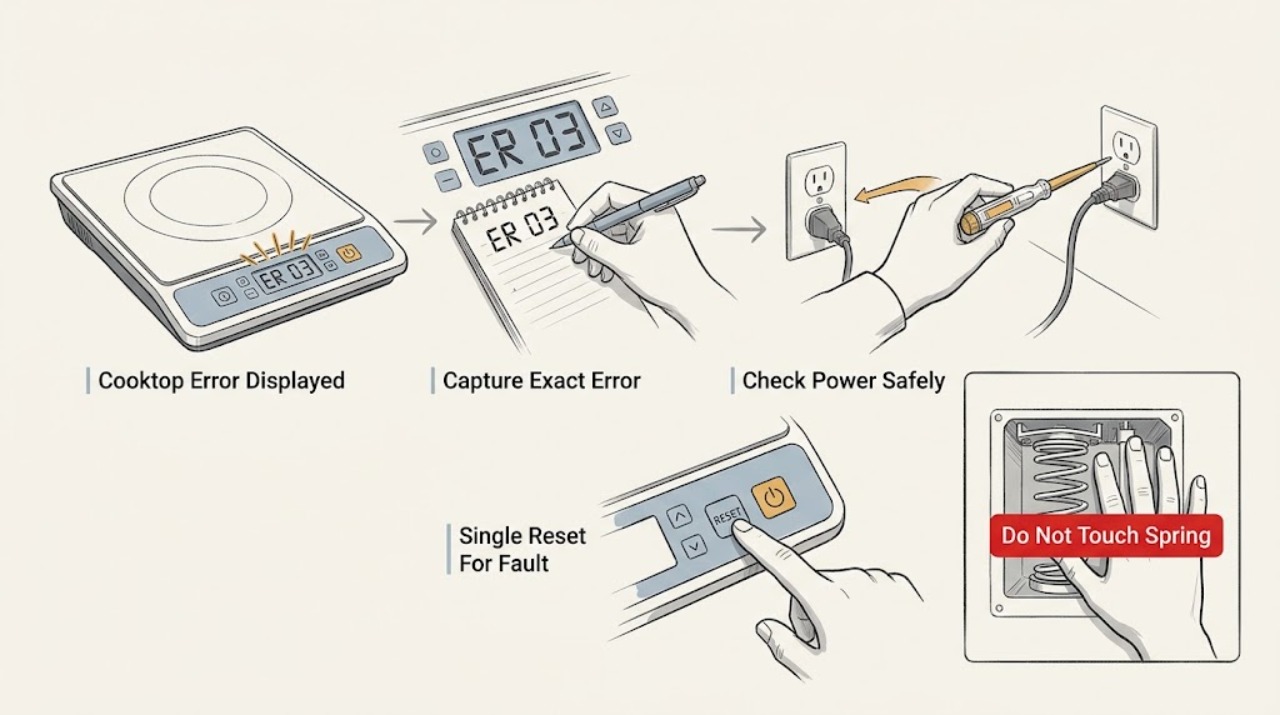
Work through in order
Diagnostic checks
Use only checks that match the exact appliance or system and its official guide.
-
Check 1
From a dry, stable position, photograph the cooktop display and write down every visible letter, number, dash, symbol, and the order in which it appeared; record the model from the appliance label or manual without removing panels.
Expected result: The display is an FXX-style code, WAIT, a single flashing letter or level, a lock symbol, or an unreadable/intermittent message; note whether any burner or touch control still responds.
Next step: Keep the photograph, model, time, preceding event, and response behavior together. Continue only with the branch that matches the exact display and appliance type.
Stop if: Do not guess a code meaning from a different GE model or attempt to open the cooktop to read a board.
Why this matters
Why: An FXX display is an electronic fault path that GE directs to trained service. WAIT is a model-dependent initialization message. A flashing F or level on an induction model can be cookware detection, while a lock symbol can be an intentional control state; the exact model determines which interpretation applies.
-
Check 2
With the cooktop off, check the accessible dedicated circuit breaker and whether the display is blank, lit, or showing the same error; do not remove a fuse, cover, terminal panel, or wiring.
Expected result: The breaker is tripped; the display is blank with the breaker on; the display is lit with the code; or the breaker trips again when power is restored.
Next step: If there is no hazardous symptom and the breaker has not repeatedly tripped, the GE code guidance permits one 30-second circuit interruption as a possible clearing step. Otherwise leave the cooktop off and arrange qualified service.
Stop if: Stop for repeated tripping, smoke, arcing, burning odor, water near the cooktop, heat from controls, or visible damage.
Why this matters
Why: A tripped breaker or blank display changes the concern toward the supply or shared power path. A recurring trip is an electrical stop condition, not permission to reset repeatedly. A lit code means the control has power and the exact message should guide the next step.
-
Check 3
Only for a stable cooktop with no damage or hazardous symptom, switch the cooktop's accessible circuit off for 30 seconds and restore it once, following the GE error-code guidance; do not touch internal parts.
Expected result: The code clears and normal controls return; the same code returns; a different code appears; or the cooktop remains blank or unusable.
Next step: Record the before-and-after display and arrange a trained appliance technician for any returning code, new code, blank display, or continuing loss of function.
Stop if: Do not repeat the reset, bypass a control, or restore power after a new electrical symptom.
Why this matters
Why: A cleared code may indicate a temporary control state, but it does not establish that the underlying fault is repaired. A returning, changed, or persistent error keeps the issue in the service path because the code is model-specific.
-
Check 4
If the exact model supports GE's WAIT message procedure, turn power off at the breaker, clean and dry the keypad area with a suitable cloth, then restore power once; do not press keys during the initialization period.
Expected result: WAIT clears and the controls return; WAIT stays on; or WAIT returns after the keypad area is clean and power is restored.
Next step: Confirm the model against its support information, keep the display photograph, and request qualified service if WAIT persists or returns.
Stop if: Do not scrape the glass, flood the keypad, remove the touch panel, or use this model-specific procedure as a universal code reset.
Why this matters
Why: WAIT can be an initialization state on specific glass touch-button models. If it remains or returns, GE says the cooktop is unusable and service is required; the procedure does not apply automatically to every GE cooktop.
-
Check 5
If the GE appliance is an induction cooktop and the display is a flashing F or power level rather than an FXX fault, place a flat pan centered on the marked zone and check the pan base from outside with a magnet.
Expected result: The pan attracts the magnet and sits flat and centered; the pan is nonmagnetic, too small, warped, or off-center; or a suitable pan still leaves the display flashing.
Next step: Correct the cookware or position once when indicated. If the message persists with suitable cookware, stop and give service the exact display, model, zone, and pan result.
Stop if: Do not heat an empty pan, use a damaged pan, cover the controls, or open the cooktop to test the induction coil.
Why this matters
Why: GE identifies magnetic material, adequate size, centered position, and flat contact as conditions for an induction burner to operate. A flashing display that persists with suitable cookware points away from a simple pan-detection correction, but does not identify an internal component by itself.
-
Check 6
If the display is a lock indicator or the code clears but the cooktop will not operate, check the model instructions for control lock and then try the normal On followed by the desired setting sequence without forcing a touch key.
Expected result: The lock clears and controls work; the controls remain locked or unresponsive; or the code returns as soon as a zone is selected.
Next step: Stop user troubleshooting for persistent lock, unresponsive controls, or returning error and arrange qualified service with the recorded display behavior.
Stop if: Do not bypass the lock, repeatedly press a stuck key, or operate the cooktop with cracked glass or exposed damage.
Why this matters
Why: A lock state can prevent activation without proving a component failure. Persistent unresponsiveness or a returning code after the documented control sequence supports a control or service assessment.
Use your observations
Decision map
Find the observation that best matches what you see, then follow the next safe action.
-
PATH 01Safety boundary
What you see
Is there smoke, arcing, a burning odor, water near the controls, a cracked surface, exposed damage, unusual heat, or a breaker that trips again?
Do this next
Leave the cooktop off, keep clear of the area, and arrange prompt qualified appliance or electrical service as appropriate.
Why this path and its safety boundary
Safety stop: Do not restore power repeatedly or remove covers.
-
PATH 02Safety boundary
What you see
Does the display show an FXX-style fault code?
Do this next
Record the exact code and model. A single 30-second power interruption may clear it when the appliance is otherwise stable, but arrange trained service if it returns, changes, or leaves the cooktop unusable.
Why this path and its safety boundary
Safety stop: Follow the WAIT, lock, induction flashing-display, or other exact model instruction that matches the observed message.
-
PATH 03Safety boundary
What you see
Does the display say WAIT and does the exact model support that message?
Do this next
Use the model-specific breaker-off, keypad-cleaning, and restore sequence once. If WAIT returns, stop and arrange service.
Why this path and its safety boundary
Safety stop: Do not apply the WAIT procedure; continue with the message-specific instructions or service path.
-
PATH 04Safety boundary
What you see
Is the message a flashing F or power level on an induction cooktop rather than an FXX fault?
Do this next
Check magnetic, flat, correctly sized, centered cookware once. If a suitable pan still produces the message, request service.
Why this path and its safety boundary
Safety stop: Treat a persistent or unexplained message as model-specific and give the exact display and model to a trained technician.
-
PATH 05Safety boundary
What you see
Does the display return or remain after the applicable safe external check?
Do this next
Stop troubleshooting and arrange qualified appliance service; the observation can narrow the path but cannot identify an internal part safely.
Why this path and its safety boundary
Safety stop: Use the cooktop only under normal instructions and monitor for a returning message, loss of control, or electrical symptom.
Helpful context
Understand the symptom
Record the exact display before interpreting it
A cooktop may show a fault, error, function message, lock indication, or a normal operating symbol, and the meaning depends on the model and control design. Photograph the display while it is present and record punctuation, dashes, letters, and numbers exactly. A generic guess can send the repair down the wrong path, while the model and sequence of events let a technician match the message to the correct instructions.
A reset is a diagnostic step, not a repair
GE says a circuit interruption for 30 seconds sometimes clears a cooktop error, but most electronic fault-code cases still require service. Use the accessible dedicated breaker only once when there is no smoke, water, damage, or repeated tripping. If the same code returns, the display stays unusable, or the breaker trips again, leave the cooktop off rather than repeating resets.
Do not confuse an induction cookware message with an internal fault
On a GE induction cooktop, a flashing F or power level can result from missing, nonmagnetic, too-small, off-center, or non-flat cookware. A magnet check and careful centering are external observations, not proof that an internal part is good or bad. If a suitable pan still produces the message, capture the display and request service.
Only after diagnosis
Potential parts
- touch-control interface
Consider this component category only if the display has power but controls remain unresponsive or intermittent after the surface is clean and the exact model's reset path has been exhausted, and service testing identifies the interface.
Confirm the exact GE model and manufacturer's fit information; do not order or replace a control from the displayed code alone. - cooktop power-control board
Consider this category only when a returning FXX or persistent all-zone failure is confirmed by qualified testing after the external checks.
Confirm exact model-specific fit and electrical requirements with qualified service; the article does not establish a board failure. - induction zone sensor or module
Consider this category only for an induction model where a suitable centered magnetic pan still produces a flashing display on one zone and qualified diagnosis confirms a zone-side fault.
Confirm the exact model and affected zone with the manufacturer or technician before any repair; do not access the module as an ordinary user check.
When checks do not resolve it
Need a professional?
Stop and arrange qualified appliance service for any returning or unexplained error, persistent WAIT, blank or unusable display, unresponsive or intermittent controls, a flashing induction message that remains with suitable cookware, repeated breaker trips, a cracked glass surface, water near controls, smoke, arcing, burning odor, unusual heat, or any need to access wiring, the underside, or internal controls. A code alone does not identify a replaceable part; a trained technician must match the exact model, display, and operating history.
Safety scope: This article covers external observation, model-specific normal controls, the documented single power interruption, keypad cleaning for an applicable WAIT message, and an external cookware check for induction models. Do not remove covers, access wiring, bypass a lock, bridge terminals, or replace internal components.
Common questions
FAQ
What does an FXX code mean on a GE cooktop?
GE treats an FXX display as an electronic fault-code path that should be diagnosed by a trained service technician. Record the exact code and model; a single 30-second power interruption may clear it, but a returning or persistent code needs service.
Can I reset a GE cooktop error at the breaker?
GE says switching the cooktop circuit off for 30 seconds sometimes clears a fault. Do this only once when there is no damage, water, odor, smoke, or repeated trip. If the code returns or the cooktop remains unusable, leave it off and request service.
What should I do when a GE cooktop displays WAIT?
WAIT is model-specific. For models covered by GE's guidance, switch power off at the breaker, clean and dry the keypad area, restore power, and see whether the message clears. If WAIT returns, service is required.
Why is my GE induction cooktop flashing F instead of heating?
GE identifies missing, nonmagnetic, too-small, off-center, or non-flat cookware as possible causes. Check the pan with a magnet and center a suitable flat pan once. If the display still flashes, record it and arrange service.
When should I stop troubleshooting a GE cooktop error?
Stop for a returning code, blank or unusable display, repeated breaker trip, cracked glass, smoke, arcing, burning odor, water near controls, unusual heat, exposed damage, or any need to access wiring or internal parts.
Read the exact guide
Official sources
- Electric Range & Cooktop - Induction Burners Not Working or Flashing Power LevelGE Appliances · GE Appliances induction cooktop and range burner detection, controls, and power troubleshooting
- Electric Cooktop "Wait" MessageGE Appliances · Specific GE glass touch-button cooktops with WAIT initialization message
- Cooktop - Error, Fault, or Function CodesGE Appliances · GE Appliances cooktop digital controls and FXX fault-code guidance
- Electric Range & Cooktop - Induction Cooktop FAQsGE Appliances · GE Appliances induction cooktop cookware, control lockout, and flashing F behavior
- Electric Range & Cooktop - Glass Smooth Top Surface Seems Too HotGE Appliances · GE Appliances radiant and induction cooktop hot-surface and cleaning safety guidance
Community feedback
Share a repair observation
Share a plain-text repair observation. Accepted observations are published automatically; this page may take a moment to update.