
On this page
Start here
Quick answer
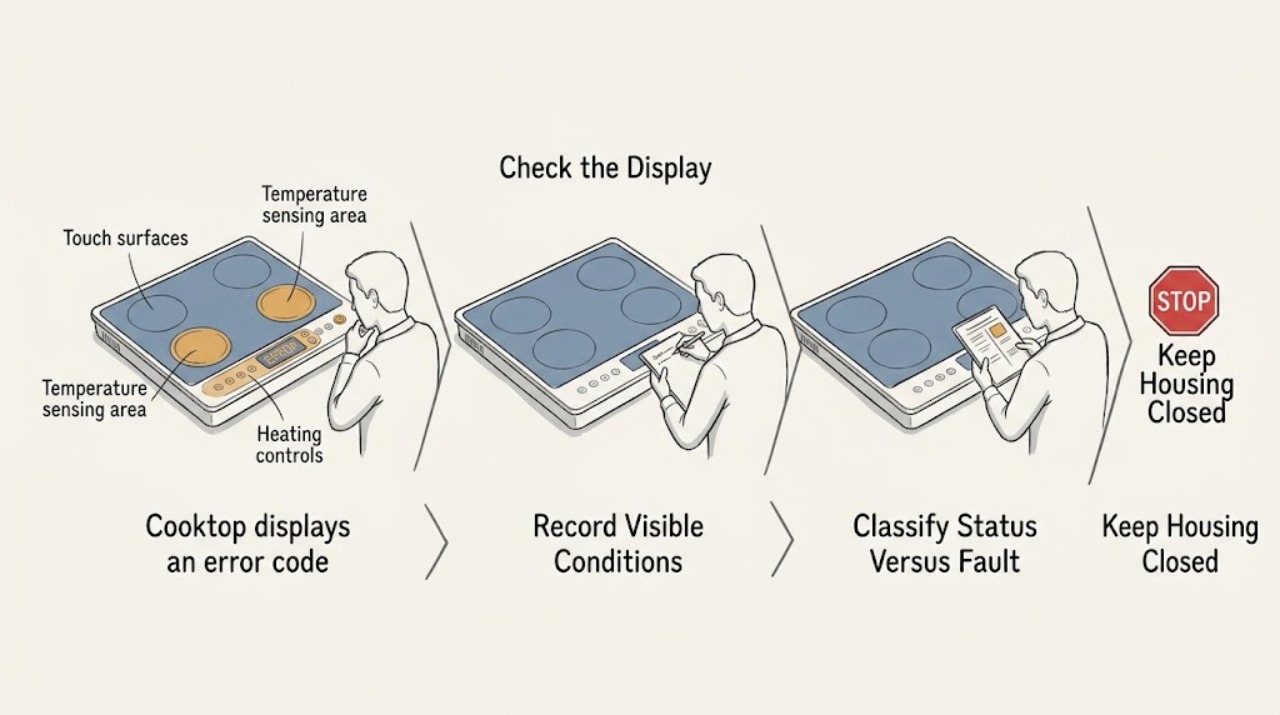
A GE cooktop display can show a true fault code, a normal hot-surface or pan-detection message, or an initialization message that is specific to some models. Photograph or write down the exact letters, numbers, and symbols before clearing anything, and use the model's owner manual because GE does not use one universal code list for every cooktop. With the surface cool and the controls dry, remove any pan or spill and check whether the message is an expected status indication. If the manual permits a reset, switch the cooktop's dedicated breaker off for about 30 seconds and restore it once; a fault that returns, a persistent WAIT message, a control that will not respond, or a burner that heats incorrectly needs qualified service. Do not remove the glass or control panel or test a cooktop circuit while energized.
Before you begin
Safety first
- This article covers recording the message, model-specific status checks, a cool and dry surface check, cookware positioning for induction, and one documented breaker reset when safe. It does not authorize opening the cooktop or electrical panel, testing live parts, bypassing controls, touching hot or cracked glass, or replacing components.
Work through in order
Diagnostic checks
Use only checks that match the exact appliance or system and its official guide.
-
Check 1
Stop cooking and record the complete display exactly as shown, including letters, numbers, dashes, flashing segments, beeps, affected burner, and whether the cooktop is electric, induction, or gas; locate the model number from the appliance label or manual.
Expected result: The display shows an FXX-style code, WAIT, a flashing power level, a hot-surface or similar status message, or an unfamiliar text with no clear model match.
Next step: Use the exact model manual or GE support article for the recorded message. Do not infer a component from a partial code or from a different GE cooktop.
Stop if: Stop immediately for smoke, sparks, a burning odor, a cracked glass surface, an element that will not turn off, or uncontrolled heat.
Why this matters
Why: The message class determines the check: GE treats digital fault codes as technician diagnostic information, while WAIT, pan-detection, and hot-surface messages can be model-specific operating states.
-
Check 2
With the surface cool and the cooktop off, compare the display with the model manual; check whether the message appears only after power-up, only with a pan on one zone, only while the glass is hot, or continuously with no pan and no active zone.
Expected result: The message clears when the glass cools, changes with pan placement, appears only during startup, or remains continuously as an FXX or unknown code.
Next step: Follow only the model-specific user action for a status message. For a persistent fault or an unclear message, keep the cooktop off and continue only with the safe documentation and reset boundary.
Stop if: Do not touch the glass or cookware to test temperature, scrape a hot surface, or continue cooking while the control behaves unexpectedly.
Why this matters
Why: A heat indicator, pan-detection display, or startup WAIT message may be an expected or model-limited state. A persistent FXX or unknown code is more consistent with a control or monitored-system fault and needs service guidance.
-
Check 3
Once the glass is cool, remove cookware, wipe the touch-control area with the method in the manual, and inspect the glass for cracks or a control area that is wet or held down; for induction, verify one flat, centered, magnetic pan of the required size on the affected zone.
Expected result: The message is caused by a wet or obstructed touch area, a pan that is absent, too small, off-center, or not induction-compatible, a cracked glass surface, or none of these conditions.
Next step: Dry and clear only the user-accessible surface, or reposition compatible induction cookware as the manual permits. If the display remains or the glass is damaged, do not energize the affected zone and arrange service.
Stop if: Do not pour cleaner into controls, use metal tools on the glass, operate with cracked glass, or open the cooktop to inspect wiring.
Why this matters
Why: A wet control can interfere with touch input, and GE says induction detection can flash for pan type, size, position, or contact. A cracked surface or a clear control and cookware path points to a service issue rather than a cleaning or pan correction.
-
Check 4
If the model guidance allows a reset and there is no heat, smoke, glass, or electrical hazard, switch the dedicated cooktop circuit breaker off for about 30 seconds, restore it once, and keep clear while the controls initialize.
Expected result: The display clears, the same code returns immediately, WAIT returns after initialization, or the control remains blank or unresponsive.
Next step: Record the reset result and exact timing. If the code returns or the control is unresponsive, leave the cooktop off and arrange qualified service; do not repeat resets as a workaround.
Stop if: Do not remove the cover of the breaker panel, work on wiring, reset a breaker that trips again, or reset while the cooktop is hot, wet, smoking, or sparking.
Why this matters
Why: A cleared display may have been a transient control state, but a returning code or persistent WAIT message indicates that the reset did not resolve the underlying condition. A blank or unresponsive control may involve power or control service.
-
Check 5
Only after a cleared display and a cool, intact surface, use one model-documented low-risk control test with an appropriate pan if required; observe whether the affected zone responds normally, the code returns, the zone does not heat, or heat does not stop when commanded.
Expected result: The test is normal, the code returns on one zone, the zone fails to heat, the display flashes only with cookware, or the zone continues heating after it is turned off.
Next step: Stop the test at the first abnormal response. Record the zone, pan condition, display, and control response for the technician and leave the affected function off.
Stop if: Do not test with exposed wiring, bypass controls, place hands on hot glass, or continue if the burner will not turn off, overheats, smokes, or smells burnt.
Why this matters
Why: A normal test supports a transient message or cookware condition but does not prove internal components are sound. A zone-specific repeat, no heat with normal controls, or a zone that will not turn off needs service; cookware-only flashing may be induction detection.
-
Check 6
After the safe checks, compare the recorded display and behavior with the model documentation and decide whether the message is gone, a normal status repeats under its documented condition, or a fault returns without that condition.
Expected result: The code is gone and operation is normal, the status appears only with heat or cookware as documented, or the fault returns, spreads to other controls, or prevents safe operation.
Next step: Keep the full code, model, zone, reset result, cookware condition, and symptoms for qualified GE appliance service. Keep the cooktop off when the fault returns or operation is unsafe.
Stop if: Do not order or install a control, sensor, element, or board from the code alone and do not continue cooking through a recurring fault.
Why this matters
Why: A cleared transient or documented status may be monitored, but a recurring fault or unrelated control behavior is evidence for a control, sensor, power, element, or wiring diagnosis rather than another user reset.
Use your observations
Decision map
Find the observation that best matches what you see, then follow the next safe action.
-
PATH 01Safety boundary
What you see
The display is a hot-surface indicator, a pan-detection flash that changes with cookware, or a startup message that clears under the model's documented condition.
Do this next
Let the surface cool, clear or reposition cookware as the manual directs, and monitor one normal operation. Arrange service if the message persists outside its documented condition.
Why this path and its safety boundary
Why it matters: The display is more likely an operating status than a failed component. GE notes that hot-surface indications can remain after heating and induction displays can flash for pan type, size, position, or contact.
Safety stop: Do not touch hot glass, use a cracked surface, or continue if heat cannot be controlled.
-
PATH 02Safety boundary
What you see
WAIT remains after the touch area is clean and dry and one model-permitted breaker reset, or the cooktop remains unusable during initialization.
Do this next
Leave the cooktop off, record the model and the reset result, and arrange qualified GE appliance service. Do not open the touch board or cabinet.
Why this path and its safety boundary
Why it matters: On GE models that use this message, failed initialization is more likely than cookware trouble and requires service if it returns after the documented reset.
Safety stop: Do not repeat resets, remove the glass, or operate an unusable control.
-
PATH 03Safety boundary
What you see
The display shows a persistent FXX-style or other model-defined fault code, returns after a single permitted reset, or appears with no pan or heat condition that explains it.
Do this next
Keep the full code visible or recorded and arrange trained appliance service. Include the affected zone, operating state, and whether a reset changed the display.
Why this path and its safety boundary
Why it matters: GE describes digital fault codes as technician diagnostic information; the code alone does not establish which part has failed.
Safety stop: Do not guess a part, bypass the control, test live circuits, or keep cooking through a recurring fault.
-
PATH 04Safety boundary
What you see
The code is accompanied by a cracked glass surface, smoke, sparks, burning odor, uncontrolled heat, repeated breaker trips, exposed damage, or a burner that will not turn off.
Do this next
Stop using the cooktop. From a dry, safely accessible point, disconnect the dedicated supply only if doing so does not require contact with wet or damaged equipment, then arrange urgent qualified service.
Why this path and its safety boundary
Why it matters: This is a safety and service boundary, not a display-clearing problem. Electrical, heating, glass, sensor, or control failure may be involved.
Safety stop: Do not touch damaged glass or energized equipment, remove panels, or attempt a component test or repair.
Helpful context
Understand the symptom
Identify the message before trying to clear it
An FXX-style fault, WAIT, a flashing power level, and a hot-surface indicator have different meanings. The exact model, cooktop type, and full display text determine the next safe check. A partial code or a guessed meaning can send you toward the wrong repair, so capture the display and locate the model manual first.
A reset is a diagnostic step, not a repair
A breaker reset can clear a transient control state, but it does not prove that the control, sensor, heating element, or wiring is healthy. Reset only from a safely accessible, dry electrical panel and only once. If the same code returns, record the result and stop using the affected function until service determines the cause.
Some displays describe normal cooktop behavior
GE documentation distinguishes an expected hot-surface light from a fault and explains that some induction displays flash when a pan is absent, too small, off-center, or not compatible. Confirm the cookware and surface conditions before treating every flashing display as an electronic failure, while still following the model manual for the exact message.
Safety boundary
Stop conditions
- Stop using the cooktop for smoke, sparks, burning odor, cracked glass, uncontrolled heat, a burner that will not turn off, repeated breaker trips, or water near electrical parts.
- Do not remove the glass, cabinet, touch-control panel, wiring cover, or breaker-panel cover; do not test live circuits or bypass a safety control.
- Do not touch hot glass or cookware to identify a message, operate with cracked glass, pour liquid into controls, or use metal tools on the surface.
- Do not repeat breaker resets, keep cooking through a recurring code, or restart a cooktop that remains unresponsive or behaves unexpectedly.
- Do not order a control board, sensor, element, power module, or glass panel until the exact model and qualified diagnosis identify the failed component and fit.
Only after diagnosis
Potential parts
- touch-control or user-interface assembly
Consider this category only when a recurring code or failed initialization persists after the documented surface and reset checks and qualified diagnosis identifies the control assembly.
Confirm the exact GE model, control layout, revision, connector arrangement, and manufacturer fit information before ordering. - temperature sensor or limiter
Consider this category only when a qualified technician links a recurring heat or hot-surface fault to a failed sensor or limiter after control and power checks.
Confirm the exact GE model, heating technology, sensor specification, wiring, and technician diagnosis before ordering. - heating element or power-control module
Consider this category only when one zone fails or remains energized and qualified diagnosis identifies the element or power-control module rather than cookware or a normal status message.
Confirm the exact GE model, zone design, electrical rating, connector arrangement, and repair diagnosis; do not choose a module or element from a similar-looking cooktop.
When checks do not resolve it
Need a professional?
Arrange qualified GE appliance service when an FXX or other fault code returns after one model-permitted reset, WAIT persists on a model that uses it, the control is unresponsive, a burner will not heat or will not turn off, or a code appears without a documented cookware or hot-surface explanation. Seek urgent service for smoke, sparks, burning odor, cracked glass, uncontrolled heat, repeated breaker trips, or water near electrical parts.
Safety scope: This article covers recording the message, model-specific status checks, a cool and dry surface check, cookware positioning for induction, and one documented breaker reset when safe. It does not authorize opening the cooktop or electrical panel, testing live parts, bypassing controls, touching hot or cracked glass, or replacing components.
Common questions
FAQ
What does a GE cooktop error code mean?
It depends on the exact model and display. GE says digital fault codes are technician diagnostic information, while some displays are normal hot-surface, induction pan-detection, or startup messages. Record the complete code and check the model manual before choosing a repair path.
Can I reset a GE cooktop error code at the breaker?
GE says a breaker reset for about 30 seconds may clear a fault or function code. Do this only once, only when the appliance and electrical panel are safely accessible and there is no heat, smoke, water, or electrical hazard. If the code returns, service is usually required.
Why does my GE induction cooktop flash a power level?
GE documents flashing when cookware is absent, too small, off-center, not flat, or not induction-compatible. Let the surface cool, use the model-required cookware, and center it. A display that flashes without a cookware explanation or that accompanies a fault needs service.
Why does WAIT stay on my GE cooktop?
On some GE glass touch-button models, WAIT appears during control initialization. GE advises turning power off at the breaker and cleaning the keypad area; if WAIT returns, the cooktop needs service. The message is not universal, so confirm the model first.
When should I stop using a GE cooktop with a code?
Stop for smoke, sparks, burning odor, cracked glass, uncontrolled heat, a burner that will not turn off, repeated breaker trips, water near electrical parts, or a recurring fault. Keep the cooktop off and arrange qualified service rather than opening the cabinet or testing live parts.
Read the exact guide
Official sources
- FAQs | Ranges & OvensGE Appliances · Official GE Appliances FAQ used to reinforce that electronic fault codes differ across products and need trained service; the assigned article remains specific to cooktops.
- Electric Range & Cooktop - Induction Burners Not Working or Flashing Power LevelGE Appliances · Official GE Appliances guidance used to distinguish induction pan-detection behavior from a general electronic fault; it applies to induction zones and not every cooktop design.
- Cooktop - Error, Fault, or Function CodesGE Appliances · Official GE Appliances support article used for the general code and reset boundary; it states that individual cooktop models can differ and that recurring fault codes generally need trained service.
- Electric Cooktop "Wait" MessageGE Appliances · Official GE Appliances model-specific guidance used for the WAIT branch; it lists the models where this feature applies, so the owner's manual controls other models.
- Electric Range - Hot Surface IndicatorGE Appliances · Official GE Appliances guidance used to distinguish a normal hot-surface display from an error code; model-specific indicators and timing vary.
Community feedback
Share a repair observation
Share a plain-text repair observation. Accepted observations are published automatically; this page may take a moment to update.