
On this page
Start here
Quick answer
Record the exact Bosch display code and whether the freezer is cooling, warm, frosted, or alarming before clearing anything. For a generic E or D indication, Bosch's refrigeration guidance is to switch the appliance off, disconnect it by unplugging it or using the circuit breaker, reconnect it after five minutes, and arrange service if the indication returns. If the freezer is warm, check the setting, door closure, seal, and frost while protecting the food; use the model manual for code-specific meaning and do not guess at a replacement part.
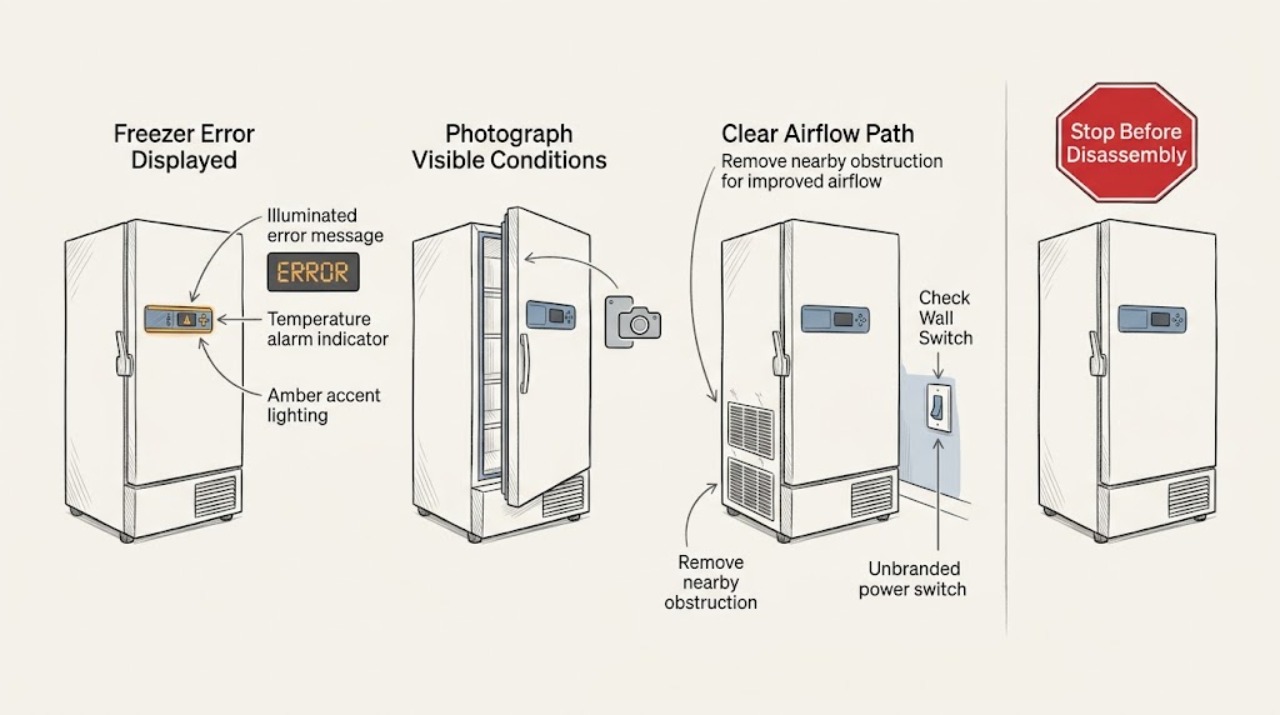
Work through in order
Diagnostic checks
Use only checks that match the exact appliance or system and its official guide.
-
Check 1
Photograph or transcribe the full display, including letters, numbers, icons, and the alarm pattern, before switching the freezer off.
Expected result: The exact code remains visible, and you can separately describe cooling, fan or compressor activity, cabinet warmth, frost, and recent power interruption.
Next step: Compare the exact code with the manual for the freezer's model or E-Nr, then continue with the temperature and door checks below.
Stop if: Stop if the display, cord, outlet, or cabinet shows scorching, melting, smoke, or liquid near electrical parts.
Why this matters
Why: The code and the physical symptom can point to different paths; an error without a cooling symptom is not proof that a specific component has failed.
-
Check 2
Check the setpoint, whether the door closes fully, the gasket contact around the frame, and whether frost is obstructing the drawer or air path; avoid dismantling the liner.
Expected result: The freezer is either holding its normal temperature with a clean seal, or it is warm, has a poor door seal, or has substantial frost.
Next step: Correct only an obvious setting or obstruction that can be handled safely, close the door, and monitor once; if it remains warm or the seal is damaged, arrange service.
Stop if: Stop if frost is heavy enough to block operation, the gasket or hinge is damaged, or removing it would require tools or heating equipment.
Why this matters
Why: A warm cabinet, door leak, or frost condition changes the priority from interpreting a display to protecting food and restoring airflow or obtaining service.
-
Check 3
For a generic E or D indication, switch the freezer off, disconnect it by unplugging it or switching off its circuit breaker, wait five minutes, reconnect it, and switch it back on once.
Expected result: After the restart, the display returns to normal, the same indication returns, or a different alarm appears.
Next step: Allow the freezer to resume operation and recheck the display once; if the indication returns, record it and arrange service using the model details.
Stop if: Do not use the plug or breaker if the outlet, cord, or surrounding area is wet or damaged; isolate the hazard and obtain qualified help.
Why this matters
Why: A cleared indication may have been a temporary control or communication state; a recurring indication needs model-specific diagnosis rather than repeated power cycling.
-
Check 4
Check the display and cooling behavior after the single reset, then match the remaining indication to the freezer's exact model manual rather than to a generic code list.
Expected result: The indication stays cleared, returns unchanged, or the freezer is now warming even though the display looks normal.
Next step: If it returns or the freezer is warm, give the technician the model or E-Nr, the recorded code, and what happened before and after the reset.
Stop if: Stop before opening panels, probing live wiring, or attempting sealed-system or refrigerant work.
Why this matters
Why: A clear display does not by itself prove that cooling has recovered; a returning code or warming cabinet requires a different level of diagnosis.
-
Check 5
Arrange Bosch or qualified appliance service when the code persists, cooling is not restored, the alarm repeats, or the fault involves a sealed refrigeration or electrical system; provide the code record and model details.
Expected result: The technician can reproduce the indication or has a complete record of the code, temperature symptom, door or frost condition, and reset result.
Next step: Follow the model-specific diagnosis and repair recommendation; do not order a component solely from the generic display symptom.
Stop if: Stop using the freezer if it cannot cool, has a damaged cord or outlet, shows smoke or scorching, or presents a risk of electric shock.
Why this matters
Why: This evidence distinguishes a transient display state from a persistent control, sensor, door, or refrigeration fault without guessing at compatibility or parts.
Use your observations
Decision map
Find the observation that best matches what you see, then follow the next safe action.
-
PATH 01Next step
What you see
The display shows a generic E or D indication and the appliance is otherwise safe to disconnect.
Do this next
Arrange qualified service and follow the exact model guidance.
Why this path and its safety boundary
Why it matters: Use Bosch's one-time five-minute power reset procedure; if the indication returns, arrange service rather than repeatedly cycling power.
-
PATH 02Next step
What you see
The freezer is too warm, regardless of whether the display clears.
Do this next
Arrange qualified service and follow the exact model guidance.
Why this path and its safety boundary
Why it matters: Check the setting, door closure, gasket, and frost externally, protect food, and arrange service if it remains warm.
-
PATH 03Next step
What you see
There is substantial frost or the door gasket does not seal evenly.
Do this next
Arrange qualified service and follow the exact model guidance.
Why this path and its safety boundary
Why it matters: Do not dismantle the liner; stop if the condition blocks operation or the gasket or hinge is damaged, and obtain qualified service.
-
PATH 04Next step
What you see
The indication clears after the single reset and the freezer resumes normal cooling.
Do this next
Arrange qualified service and follow the exact model guidance.
Why this path and its safety boundary
Why it matters: Monitor operation, retain the code record, and follow the exact model manual if the indication returns.
-
PATH 05Next step
What you see
The code is not legible or is not listed for the exact freezer model.
Do this next
Arrange qualified service and follow the exact model guidance.
Why this path and its safety boundary
Why it matters: Do not guess its meaning or a replacement part; provide the model or E-Nr and the display record to qualified service.
-
PATH 06Next step
What you see
The freezer is not running at all when the display indicates a problem.
Do this next
Arrange qualified service and follow the exact model guidance.
Why this path and its safety boundary
Why it matters: Check the plug and outlet only if dry and safe; if the appliance remains off or the electrical point is damaged, stop and arrange service.
Helpful context
Understand the symptom
Start with the exact symptom
An error display is a symptom, not enough information to identify a part. Write down every letter, number, icon, and alarm pattern, then note whether the compressor or fan appears to run, whether the freezer is warming, and whether frost is building. A code that returns after a reset is more useful to a technician than a code that was erased without a record. Use the manual for the exact model because display meanings and available functions vary by model.
Separate a display fault from a cooling problem
A freezer can show an error while still maintaining temperature, or it can show an alarm because the cabinet is warming. Check the setpoint, closing action, door gasket, and visible frost without removing covers. If it is not cooling or a reset does not clear a recurring indication, stop repeated cycling and arrange qualified appliance service; sealed refrigeration work and electrical diagnosis require appropriate training and tools.
Safety boundary
Stop conditions
- The freezer is not cooling or continues warming after the safe external checks.
- The cord, plug, outlet, or cabinet shows scorching, melting, smoke, liquid exposure, or other electrical danger.
- Heavy frost blocks the door, drawer, or airflow, or the gasket or hinge is damaged.
- Diagnosis would require opening electrical panels, handling refrigerant, or working on a sealed refrigeration system.
- Food safety is uncertain because the freezer has been warm; follow local food-safety guidance and obtain help.
- The display code persists or returns after the one-time reset.
Only after diagnosis
Potential parts
Only if the exact model manual or a qualified diagnosis links the recurring code or temperature symptom to that control circuit.
Only if external inspection confirms a damaged gasket, misalignment, or incomplete closure associated with frost or warming.
Only when the exact model supports that feature and the manual maps the displayed code to that subsystem.
When checks do not resolve it
Need a professional?
A Bosch error indication persists or returns after the documented five-minute reset., The freezer is warm, repeatedly alarming, or not running., A damaged door seal, hinge, heavy frost condition, or airflow obstruction cannot be safely resolved externally., The fault may involve wiring, the control system, or sealed refrigeration equipment., The code is unknown for the exact model or the food-safety condition is uncertain.
Common questions
FAQ
What does a Bosch freezer error display mean?
It indicates that the freezer has detected a condition, but the visible symptom alone does not identify a universal failed part. Record the exact code and use the manual for the model or E-Nr.
Can I reset a Bosch freezer error display?
For Bosch's generic E or D refrigeration indication, switch off, disconnect by unplugging or using the breaker, wait five minutes, reconnect, and test once. If the indication returns, arrange service.
What if the error clears but the freezer is still warm?
Treat the warming as the main fault. Check the setting, door closure, gasket, and visible frost externally, protect food, and obtain service if normal cooling does not return.
Should I replace a part based on the displayed code?
No. Use the exact model manual and qualified diagnosis before selecting a component; a generic display symptom is not enough to establish fit or failure.
Read the exact guide
Official sources
- Freezer problems | Common Freezer Problems | Bosch Home AppliancesBosch Home Appliances · Supports external checks for a Bosch freezer that is not running, frosted, or too warm; it does not identify every model-specific error code.
- Refrigeration | Error Codes | BoschBosch Home Appliances · Supports the generic E or D power-reset and service boundary; the page also shows that some codes are subsystem-specific, so the exact model manual remains necessary.
Community feedback
Share a repair observation
Share a plain-text repair observation. Accepted observations are published automatically; this page may take a moment to update.