
On this page
Start here
Quick answer
A Frigidaire freezer error or alarm cannot be interpreted safely without the exact model and the complete display. Common display states can indicate a power event, high temperature, an open door, a mode such as Sabbath or demo, or a model-specific fault. Record the code or letters exactly, check whether the door closes and seals, confirm visible power and normal cooling, and use the owner's manual for that model's meaning and reset procedure. Stop for smoke, burning odor, damaged wiring, repeated electrical trips, a warm freezer with food at risk, water near electrical parts, or a display that returns after the manual-approved reset; arrange qualified Frigidaire service rather than opening the cabinet or testing live circuits.
Before you begin
Safety first
- This article covers recording the display, model-manual lookup, ordinary user controls, visible door, gasket, frost, airflow, power, and ice-path observations only. A qualified technician must handle panels, wiring, live measurements, sensors, control boards, fans, defrost systems, sealed systems, and internal ice-maker or dispenser work.
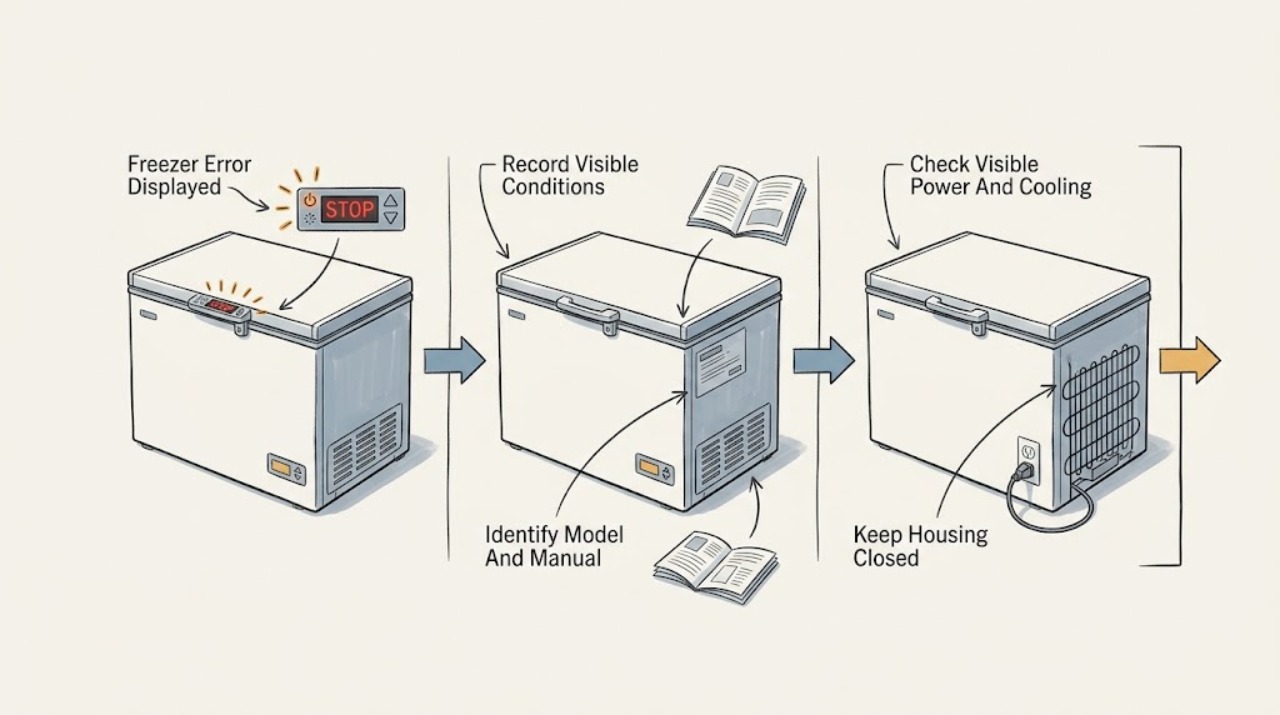
Work through in order
Diagnostic checks
Use only checks that match the exact appliance or system and its official guide.
-
Check 1
Read and record every visible character, punctuation mark, flashing segment, alarm label, and audible pattern before pressing an acknowledge or reset control; note whether the display is on the freezer itself or on a connected refrigerator panel.
Expected result: Record a power-failure indication, high-temperature label, door-ajar indication, mode label, ice-jam indication, a service code, or an unreadable or blank display.
Next step: Use the exact model's owner's manual to map the recorded state. If the display cannot be read or immediately returns, continue only with visible safety and cooling checks, then arrange service.
Stop if: Do not enter undocumented service codes, bridge display contacts, remove a control panel, or keep operating to reproduce an alarming code.
Why this matters
Why: Frigidaire lists different meanings for these categories and warns that codes and controls vary by model. A partial code or a generic guess is not enough to select a repair.
-
Check 2
Locate the model information from the normal visible label location described by Frigidaire and open the matching owner's manual or support article; do not remove trim, panels, or the freezer door to find it.
Expected result: Record a matching manual and model, a label that is not readable, or a display code that is not listed for that model.
Next step: Follow only the model-specific meaning and normal reset or acknowledge procedure. If no matching guidance exists or the code remains, request qualified diagnosis.
Stop if: Do not substitute a reset sequence from another model, alter firmware, or remove a display or sensor cover.
Why this matters
Why: Frigidaire's display functions and alarm meanings are model-dependent. An unlisted code should be treated as unresolved rather than translated from a different freezer family.
-
Check 3
Check ordinary indicators such as interior light, control response, normal cooling sound, and whether food remains solidly frozen; inspect the accessible plug and outlet area without probing or opening anything.
Expected result: Record normal power and cooling, no light or response, a recent outage indication, repeated protection trip, unusual silence, or food warming with a high-temperature alarm.
Next step: If power is absent or protection trips again, stop and arrange qualified service. If the freezer is warming, minimize door opening and follow food-safety guidance while arranging diagnosis; if cooling is normal, continue with the door and airflow check.
Stop if: Do not probe the outlet, open an electrical cover, repeatedly reset a tripping circuit, or touch damaged wiring.
Why this matters
Why: Frigidaire identifies power failure and high temperature as distinct alarm paths and says indicator lights and cooling behavior help determine whether the freezer is running. A warm freezer is a cooling and food-safety concern, not just a display problem.
-
Check 4
Confirm that the freezer door or lid closes freely and that packages do not obstruct the seal or visible air vents; inspect the gasket for a visible gap or damage without removing it.
Expected result: Record a fully closed door and clear vents, an open-door alarm, a package preventing closure, a loose gasket, or frost that prevents sealing or blocks an airflow path.
Next step: Move only an accessible package that clearly blocks closure and close the door normally. Follow the manual's approved frost procedure or arrange service for a damaged seal, recurring frost, or a door that will not align.
Stop if: Do not scrape frost with a sharp tool, use a heater, remove the gasket, or force the door against a blockage.
Why this matters
Why: Frigidaire links door-ajar and high-temperature conditions with an open or poorly sealed door and notes that frost can interfere with door closure or airflow. A damaged gasket or heavy frost may require service rather than a code reset.
-
Check 5
If the display shows a mode label or ice-dispenser indication, compare it with the exact manual and inspect only the ordinary-access dispenser or ice-bin area for a visible, loose obstruction; do not reach into the mechanism.
Expected result: Record Sabbath or demo mode, a door or temperature alarm, an ice-jam indication, a clear bin or chute, or a jam that cannot be cleared from ordinary access.
Next step: Use only the model manual to leave a mode or acknowledge an alarm. For a visible loose obstruction, use the manual's ordinary-access method; if the jam is fixed, the code returns, or the mechanism is damaged, arrange service.
Stop if: Do not force an ice auger, insert tools into the chute, bypass a door or sensor, or dismantle the ice maker or dispenser.
Why this matters
Why: Frigidaire identifies Sabbath and demo modes as configuration states and DI SP or DISP as an ice-chute jam indication on applicable models. A mode can suppress normal functions, while a stuck or inaccessible ice path needs service.
-
Check 6
Only when no hazard is present and the manual identifies the displayed state as a user-acknowledge or reset condition, perform that normal control sequence once and observe the display and cooling behavior.
Expected result: Record the display clearing with normal cooling, the same code returning, a high-temperature alarm remaining active, a blank panel, or a new warning or protection trip.
Next step: If the display clears and cooling remains normal, monitor without repeated resets. If the code returns, cooling is abnormal, or another warning appears, stop and arrange qualified service.
Stop if: Do not repeatedly unplug, flip protection, enter service mode, or operate a warm freezer to see whether the code returns.
Why this matters
Why: Frigidaire describes acknowledging some alarms and resetting some model-specific states, but a cleared display does not prove that the underlying temperature, door, power, or component issue is fixed.
-
Check 7
Make one final written record of the code, door state, power event, cooling result, frost or airflow condition, mode or ice-path observation, and the exact manual procedure used; do not remove covers to gather more information.
Expected result: Record a stable normal display, an intermittent return, a persistent code, worsening temperature, water or electrical damage, or a service message.
Next step: Arrange qualified Frigidaire service for any persistent or returning error, unresolved warm condition, or unlisted code and provide the record and model information.
Stop if: Stop immediately for smoke, burning odor, exposed wiring, water near electrical parts, repeated trips, or food-safety concerns from a warm freezer.
Why this matters
Why: The pattern over time helps a technician separate a transient power or door alarm from a persistent control, sensor, fan, defrost, or power fault. It does not authorize component replacement by code alone.
Use your observations
Decision map
Find the observation that best matches what you see, then follow the next safe action.
-
PATH 01Safety boundary
What you see
The display shows PF or a power-failure indication, or the freezer has no ordinary power response after an outage.
Do this next
Acknowledge the indication only as the exact manual permits and verify normal cooling. Arrange service if power does not return, protection trips, or the freezer stays warm.
Why this path and its safety boundary
Why it matters: Frigidaire treats this as a power-event path that may also be followed by a high-temperature alarm.
Safety stop: Do not probe circuits, repeatedly reset protection, or open electrical covers.
-
PATH 02Safety boundary
What you see
H, HI, high-temperature, or door-ajar information appears, or the alarm continues with the door closed.
Do this next
Close the door, clear only a visible obstruction, keep the door closed, and check normal cooling and seal condition. Request service for continued warmth, a damaged gasket, or a returning alarm.
Why this path and its safety boundary
Why it matters: Frigidaire links these conditions with a warm compartment or a door that remained open or does not seal correctly.
Safety stop: Do not force the door, scrape frost, remove the gasket, or ignore food warming.
-
PATH 03Safety boundary
What you see
The display shows SB, Sb, demo, or another mode label listed by the exact model manual.
Do this next
Use only the manual's normal control sequence to leave the mode, then verify cooling and the display.
Why this path and its safety boundary
Why it matters: Frigidaire identifies Sabbath and demo modes as configuration states that change normal operation or display behavior.
Safety stop: Do not use undocumented key combinations, alter firmware, or open the control panel.
-
PATH 04Safety boundary
What you see
DI SP, DISP, or an equivalent ice-jam indication appears on an applicable model.
Do this next
Inspect only the ordinary-access chute or bin and follow the exact manual for a loose obstruction. Arrange service for a fixed jam, damaged mechanism, or returning indication.
Why this path and its safety boundary
Why it matters: Frigidaire describes this state as an ice cube jam in the chute or dispenser path, not as proof of a freezer control failure.
Safety stop: Do not force the auger, reach into the mechanism, or remove the ice maker or dispenser housing.
-
PATH 05Safety boundary
What you see
A code is not listed for the exact model, a service message appears, or the same code returns after the manual-approved acknowledge or reset.
Do this next
Stop user troubleshooting and arrange qualified Frigidaire diagnosis with the exact code, model, timing, and cooling observations.
Why this path and its safety boundary
Why it matters: The display remains an unresolved fault report; the code alone cannot identify a sensor, control, fan, defrost, or power component.
Safety stop: Do not select a part from the code, enter service mode, remove panels, or test live wiring.
-
PATH 06Safety boundary
What you see
The alarm clears but the freezer remains warm, frost blocks airflow, the door does not seal, or normal cooling does not return.
Do this next
Keep the door closed, protect food according to food-safety guidance, and arrange service for persistent warmth, frost, or seal failure.
Why this path and its safety boundary
Why it matters: A cleared alarm does not establish that the underlying cooling, seal, airflow, or power condition is resolved.
Safety stop: Do not keep resetting the display or operate a warm freezer as a prolonged test.
-
PATH 07Safety boundary
What you see
Smoke, burning odor, damaged wiring, water near electrical parts, repeated protection trips, severe physical damage, or a rapidly warming freezer is present.
Do this next
Stop using the freezer, keep clear, and contact qualified appliance or electrical service; leave and contact local emergency services if there is fire or immediate danger.
Why this path and its safety boundary
Why it matters: These signs indicate a potential electrical, fire, water, or food-safety hazard outside ordinary display troubleshooting.
Safety stop: Do not restart the appliance, touch damaged wiring, pour liquid into it, or investigate behind covers.
Helpful context
Understand the symptom
Do not treat every freezer display as the same fault
A display that says PF or shows a power-failure light has a different path from a high-temperature alarm, a door-ajar indication, a mode label, or a service code. Frigidaire says alarm and error behavior varies by model, so the exact characters, flashing pattern, audible alert, and appliance type matter. Photograph or write down the display before acknowledging it, and avoid guessing from a code seen on another refrigerator.
Use ordinary observations before considering service
Check only visible, user-accessible conditions: whether the freezer has indicator lights, whether the door or lid closes fully, whether packages obstruct airflow, whether frost prevents closure, and whether the unit is making normal cooling sounds. Frigidaire treats temperature and door alarms as signals to correct the condition and consult the model manual, not as permission to remove panels or test sensors.
A recurring code needs model-specific diagnosis
If the same code returns after the manual's normal acknowledge or reset procedure, or if the freezer remains warm, the display is reporting a condition that has not been resolved. The cause may involve a sensor, control, fan, door switch, defrost system, or power component. A code alone does not identify a replacement part; give a technician the exact model, code, timing, temperature behavior, and any door or power history.
Safety boundary
Stop conditions
- Stop immediately for smoke, burning odor, exposed or damaged wiring, water near electrical parts, repeated electrical trips, severe physical damage, or a freezer warming food.
- Do not remove display, control, evaporator, fan, or electrical covers; do not test live circuits or bypass a door, sensor, or safety control.
- Do not scrape frost with sharp tools, use a heater, force an ice chute or auger, or pry a door or lid against a blockage.
- Do not repeatedly reset, unplug, or enter undocumented service modes after the same code returns or cooling remains abnormal.
- Do not choose a replacement sensor, control, fan, defrost part, or ice-maker component from the display code alone; use exact model diagnosis.
Only after diagnosis
Potential parts
- temperature sensor or thermistor
Consider this category only if qualified testing links a returning temperature code or abnormal cooling to the model's sensor after door, airflow, and power conditions are ruled out.
Confirm the exact Frigidaire model and technician diagnosis; do not replace a sensor from the displayed code alone. - display or electronic control assembly
Consider this category only after service diagnosis finds that a persistent or blank display results from the control or display assembly rather than power supply or configuration.
Confirm exact model fit and professional diagnosis; control-panel access and live testing are service work. - door switch or gasket
Consider this category only when qualified inspection links a returning door or high-temperature alarm to a failed switch or non-sealing gasket.
Confirm the exact model and diagnosis; do not bypass the switch or remove the gasket as a first check. - fan or defrost assembly
Consider this category only when service diagnosis confirms an airflow, frost, fan, or defrost fault after visible vents and door sealing are checked.
Confirm the exact model and technician diagnosis; evaporator and fan access are not user troubleshooting.
When checks do not resolve it
Need a professional?
Arrange qualified Frigidaire service when a code is unlisted or returns after the model-specific procedure, the display remains active with abnormal cooling, the door or lid will not seal, frost blocks airflow, the freezer has a power fault, or any electrical, water, fire, or food-safety hazard is present.
Safety scope: This article covers recording the display, model-manual lookup, ordinary user controls, visible door, gasket, frost, airflow, power, and ice-path observations only. A qualified technician must handle panels, wiring, live measurements, sensors, control boards, fans, defrost systems, sealed systems, and internal ice-maker or dispenser work.
Common questions
FAQ
What should I do first when my Frigidaire freezer shows an error?
Record every character and the flashing or alarm pattern, identify the exact model, and use that model's owner's manual. Do not translate a code from another freezer or enter an undocumented reset sequence.
What does PF mean on a Frigidaire freezer display?
Frigidaire uses PF or a power-failure indication for a power event on applicable models. Acknowledge it only as the manual permits, then verify normal cooling; arrange service if power is absent, the code returns, or the freezer remains warm.
Can an open door cause a Frigidaire freezer alarm?
Yes. Frigidaire links door-ajar and high-temperature alarms with an open or poorly sealed door. Check only visible closure, gasket contact, frost, and package obstruction; service is needed for a damaged seal or recurring alarm.
What do SB or 77 77 mean on a Frigidaire freezer display?
Frigidaire identifies SB or Sb as Sabbath mode and 77 77 as demo mode on applicable models. Use the exact owner's manual to leave the mode; do not use a key sequence from another model or open the controls.
What does DI SP or DISP mean on a Frigidaire freezer?
Frigidaire describes DI SP or DISP as an ice-chute jam indication on applicable models. Inspect only the ordinary-access chute or bin using the manual; do not force the auger or dismantle the dispenser.
When does a Frigidaire freezer error require service?
Arrange service when the code is unlisted, returns after the manual-approved procedure, or accompanies abnormal cooling, heavy frost, door-seal failure, power loss, smoke, odor, water near electrical parts, or repeated protection trips. A code alone does not identify a replacement part.
Read the exact guide
Official sources
- Refrigerator Error Codes and Alarms GuideFrigidaire · Frigidaire support guidance for refrigerators and freezer sections; exact codes, controls, and procedures vary by model.
- Freezer - Not Freezing or Not CoolingFrigidaire · Frigidaire support guidance for freezers and refrigerator freezer sections; exact model manual controls settings and installation requirements.
- What does the alarm or “buzzer sound” mean?Frigidaire · Frigidaire support guidance for applicable freezers and refrigerators; alarm thresholds and controls are model-dependent.
- What should I do if my freezer isn’t running?Frigidaire · Frigidaire support guidance for freezers and refrigerators; the model's electrical installation and control instructions remain authoritative.
- Refrigerators - How do I use the features and functions on my Side-by-Side refrigerator display?Frigidaire · Frigidaire support guidance for applicable refrigerator families with freezer display controls; display features vary by model.
Community feedback
Share a repair observation
Share a plain-text repair observation. Accepted observations are published automatically; this page may take a moment to update.