
On this page
Start here
Quick answer
If a Bosch induction cooktop will not turn on, first note whether the display is completely dark or the display is lit but the controls do not respond. With the appliance off and dry, check only safe visible conditions: a child lock or panel lock, moisture or an object on the touch panel, and whether a household protective device has visibly tripped. If the panel wakes but a zone will not start, confirm the selected zone and induction-compatible cookware. If the display stays dark, a protective device trips again, an error returns, the glass is cracked, or electrical access is needed, stop and arrange qualified Bosch appliance or electrical service; do not open the cooktop or perform energized testing.
Before you begin
Safety first
- This article supports ordinary-access display, lock, panel, visible supply, zone, and cookware checks only. Do not open the appliance, access wiring or coils, perform energized testing, bypass protection, or replace internal parts.
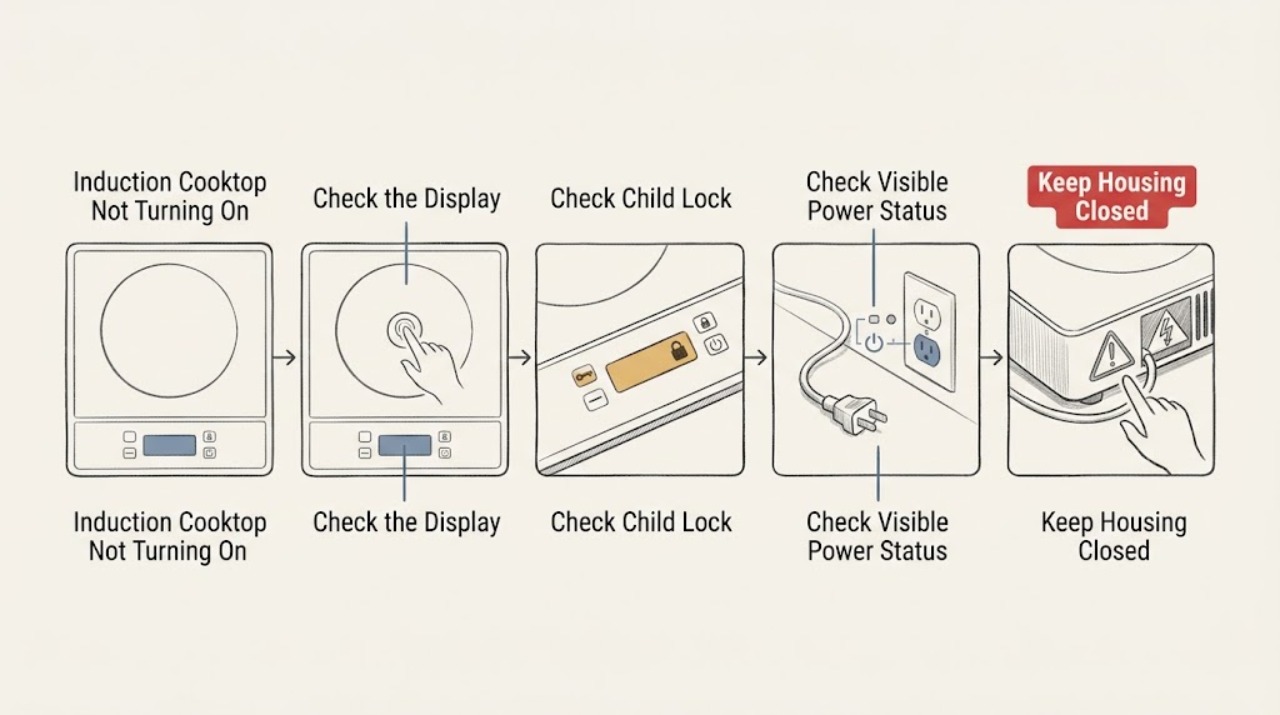
Work through in order
Diagnostic checks
Use only checks that match the exact appliance or system and its official guide.
-
Check 1
Observe the cooktop from the surface without opening it: touch the normal power control once with a dry finger and note whether the display is dark, lights briefly, stays lit but ignores input, or shows a symbol or code.
Expected result: Record whether all controls are unresponsive, only one zone is unavailable, the panel beeps or flashes, a lock symbol appears, or the cooktop has no display at all.
Next step: Use the display pattern to choose the visible power, lock, panel, zone, or error check below. Stop using the appliance for smoke, burning odor, cracked glass, exposed damage, or liquid inside the unit.
Stop if: Do not repeatedly press the control, remove the glass, or probe the cooktop to find the cause.
Why this matters
Why: A dark display suggests a power or control-supply path. A lit but unresponsive panel supports a lock, moisture, object, or control-fault check. A single-zone issue after the panel wakes is a different branch from a complete no-start condition.
-
Check 2
Inspect the display for a key or lock symbol and use only the exact Bosch model manual's child-lock procedure, with the cooktop off and the panel dry.
Expected result: Record whether the lock symbol clears, the panel accepts normal input, or the symbol remains or returns immediately.
Next step: After the lock clears, select a zone and use the normal controls. If the lock cannot be cleared with the model procedure or returns, stop and arrange Bosch service.
Stop if: Do not bypass the lock, use improvised codes, or disconnect control wiring.
Why this matters
Why: Bosch says the child lock can make an otherwise powered induction hob unresponsive. If the lock clears and controls work, the no-start condition was a user-accessible setting; a persistent lock indication may be model-specific or a control fault.
-
Check 3
If the display remains dark, make only a safe visual check that the appliance's accessible supply connection is seated as designed and whether the household fuse or protective device for the cooktop is visibly tripped. Do not remove a cover or touch wiring.
Expected result: Record whether other appliances have power, the cooktop remains dark, a protective device is off, or the device trips again when the cooktop is used.
Next step: If a protective device is visibly tripped and you are competent to follow the home's safe reset procedure, use it only once; if it trips again or the display remains dark, leave the cooktop off and arrange qualified electrical or appliance service.
Stop if: Do not open the cooktop, remove fuse carriers, touch conductors, use extension equipment, or reset a device repeatedly.
Why this matters
Why: Bosch notes that a lost power source or blown or tripped fuse can make an induction hob unresponsive. A repeated trip or uncertain installation is an electrical fault path, not permission to test the cooktop internally.
-
Check 4
With the cooktop off, inspect the touch panel for spilled liquid, food residue, a utensil, or another object covering a control. Dry or remove only what is visibly on the surface, using the cleaning method in the exact model manual.
Expected result: Note whether the panel was wet or covered, all indicators were flashing or beeping, and whether normal controls respond after the surface is dry and clear.
Next step: Retry the normal power control once only when the surface and hands are dry. If the panel remains unresponsive or liquid entered a gap, stop using the cooktop and arrange service.
Stop if: Do not pour cleaner over the panel, use sharp tools, scrape touch keys, or operate with liquid inside the appliance.
Why this matters
Why: Bosch identifies a wet panel or an object covering it as a cause of flashing indicators and unresponsive behavior. If the panel remains dead or erratic after a dry, clear surface, a control fault remains possible.
-
Check 5
If the display wakes but the selected zone will not start, confirm that a zone is selected, the pan is induction-compatible, and the pan is centered and stable. When the pan is cool, use a magnet on its bottom as Bosch describes.
Expected result: Record whether the panel responds, the power level flashes, a known suitable pan works, the pan is too small or misplaced, or every zone refuses to activate.
Next step: Use suitable cookware centered on the selected zone and set the power level through the normal controls. If no suitable pan works or all zones remain unavailable, stop and arrange Bosch service.
Stop if: Do not heat an empty pan to test it, place loose metal on the surface, or alter the zone or internal controls.
Why this matters
Why: Bosch says suitable ferromagnetic cookware is required and that an unresponsive zone can result when the lock is active or the pan is unsuitable. If a known suitable pan works, the original pan or placement is the likely branch; if all zones fail, continue to service escalation.
-
Check 6
If the cooktop still will not start, record the exact display code or symbol, affected zone, panel state, visible power status, cookware result, and any overheating, odor, crack, or unexpected shutdown. Consult the exact Bosch manual without opening the appliance.
Expected result: Classify the result as restored after unlocking or drying, restored with suitable cookware, dark display, persistent code, all zones unavailable, repeated power trip, cracked glass, smoke, burning odor, or visible electrical damage.
Next step: Stop using the cooktop and arrange qualified Bosch appliance or electrical service for any unresolved or hazardous result. Provide the model and the recorded observations.
Stop if: Do not bypass a shutdown, open panels, perform energized testing, or guess at an internal replacement.
Why this matters
Why: A restored lock, panel, power, or cookware condition supports normal use with the correct setup. A persistent code, all-zone failure, repeated trip, damage, smoke, or odor indicates a fault or safety condition that cannot be diagnosed from the surface.
Use your observations
Decision map
Find the observation that best matches what you see, then follow the next safe action.
-
PATH 01Safety boundary
What you see
A lock symbol is present and the exact model unlock procedure restores normal control response.
Do this next
Select the intended zone and use the normal power-setting sequence, keeping the panel dry and clear.
Why this path and its safety boundary
Why it matters: The child lock was preventing normal activation rather than proving a power failure.
Safety stop: Arrange service if the lock remains, returns immediately, or controls remain unresponsive.
-
PATH 02Safety boundary
What you see
The display is dark and the accessible household protective device is off or trips again.
Do this next
Leave the cooktop off and arrange qualified electrical or appliance service after a safe visual check.
Why this path and its safety boundary
Why it matters: The supply or installation path is implicated; the cooktop itself cannot be safely diagnosed from the surface.
Safety stop: Do not reset repeatedly, touch wiring, remove a fuse carrier, or open the appliance.
-
PATH 03Safety boundary
What you see
The panel was wet or covered and responds after visible moisture and objects are removed.
Do this next
Keep the controls dry and clear and use the cooktop normally while monitoring for recurrence.
Why this path and its safety boundary
Why it matters: The control surface condition was preventing normal touch input.
Safety stop: Stop if liquid entered a gap or the panel becomes unresponsive again when dry.
-
PATH 04Safety boundary
What you see
The display responds and a known induction-compatible, centered pan activates a zone while another pan does not.
Do this next
Use suitable cookware on the correctly selected zone and follow the model's power-setting guidance.
Why this path and its safety boundary
Why it matters: The no-start symptom is more consistent with cookware detection, size, or placement than a complete cooktop failure.
Safety stop: Stop if a suitable pan fails on every zone, the display errors, or heating causes overheating or damage.
-
PATH 05Safety boundary
What you see
The panel is awake and unlocked, the surface is dry, suitable cookware is centered, but one zone remains unavailable without a clear user-setting cause.
Do this next
Stop using the affected zone and arrange qualified Bosch appliance service with the model and test observations.
Why this path and its safety boundary
Why it matters: A zone, sensor, control, or power fault remains possible and cannot be selected safely from observation alone.
Safety stop: Do not open the glass, access the zone electronics, or replace a coil or board from symptoms alone.
-
PATH 06Safety boundary
What you see
All zones remain unavailable, an error returns, the display stays dark, the protective device trips, or the glass is cracked or there is smoke, burning odor, or visible damage.
Do this next
Stop using the cooktop and arrange qualified Bosch appliance or electrical service; provide the exact code and visible symptoms.
Why this path and its safety boundary
Why it matters: This is a whole-appliance or safety-service condition, not a cookware or lock adjustment.
Safety stop: Do not bypass a safety state, restore use on cracked glass, open panels, or perform energized electrical testing.
Helpful context
Understand the symptom
Separate a dead display from an unresponsive control panel
A completely dark display points toward power, installation, or control electronics. A lit display that ignores touches can instead be locked, wet, obstructed, or reporting a fault. If the panel responds but a zone will not activate, cookware detection and zone selection become relevant. Make the checks in that order so a safe setting issue is not confused with an electrical failure.
Check only the visible user controls
Bosch identifies the child lock, a wet or covered panel, and a blown or tripped supply device as possible causes of an unresponsive induction hob. Clear visible moisture or objects and use the exact model instructions for the lock. Do not remove glass, trim, or underside covers to reach the control electronics.
A persistent no-start condition is a service boundary
If a clear, dry panel and the model-approved checks do not restore operation, record the model, display state, any symbol or code, and whether the supply device trips again. Bosch advises professional repair for major electrical faults or an unresolved appliance problem. Do not bypass a lock, defeat a protection circuit, or guess at a board, sensor, or power-part replacement.
Safety boundary
Stop conditions
- Do not open the cooktop, remove the glass or underside cover, or access coils, controls, wiring, or power electronics.
- Do not perform energized electrical testing, bypass a child lock or safety shutdown, alter wiring, or guess at internal replacement parts.
- Stop for a cracked or chipped surface, smoke, burning odor, visible scorching, liquid inside the appliance, exposed damage, or repeated protective-device trips.
- Stop and arrange service for a persistent error, dark display, all zones unavailable with suitable cookware, or a panel that remains unresponsive when dry and clear.
- Keep hands, controls, cookware, and the glass surface dry during the user-level checks.
When checks do not resolve it
Need a professional?
Arrange qualified Bosch appliance or electrical service when the display remains dark, a protective device trips again, the panel stays unresponsive after the lock and moisture checks, suitable cookware cannot activate any zone, an error returns, overheating or shutdown recurs, the glass is damaged, smoke or burning odor appears, or diagnosis would require access to wiring, coils, controls, or power electronics.
Safety scope: This article supports ordinary-access display, lock, panel, visible supply, zone, and cookware checks only. Do not open the appliance, access wiring or coils, perform energized testing, bypass protection, or replace internal parts.
Common questions
FAQ
Why is my Bosch induction cooktop completely dark?
A lost supply or tripped protective device can make the cooktop appear dead. Make only a safe visual check; if the display remains dark, the device trips again, or the installation is uncertain, leave the cooktop off and arrange qualified electrical or appliance service.
How do I unlock a Bosch induction cooktop that will not turn on?
Look for a key or lock symbol and follow the exact model manual's child-lock procedure with the cooktop off and the panel dry. If the symbol remains or returns, do not bypass it; arrange Bosch service.
Why does my Bosch induction cooktop show power but not start a zone?
Confirm the panel is unlocked and dry, the correct zone is selected, and the pan is induction-compatible, centered, and stable. Bosch suggests a magnet check for cookware compatibility. If a known suitable pan fails on every zone, request service.
Can a wet control panel stop a Bosch induction cooktop from turning on?
Yes. Bosch lists a wet panel or an object covering the controls as a cause of flashing indicators and unresponsive behavior. Switch the cooktop off, remove only visible moisture or objects, and stop if liquid entered a gap or the panel remains unresponsive when dry.
When should I call for Bosch induction-cooktop service?
Arrange service when the display remains dark, a protective device trips again, the lock or fault indication returns, all zones stay unavailable with suitable cookware, overheating or shutdown recurs, the glass is cracked, smoke or burning odor appears, or internal electrical access would be required.
Read the exact guide
Official sources
- Induction hob not working | Bosch UKBosch · Bosch UK induction-hob support guidance; the installed model's manual controls exact lock and reset procedures.
- Induction hob not working | BoschBosch Home Appliances · Bosch Singapore induction-hob support guidance; exact controls and service steps depend on the installed model.
- Bosch Induction Cooktop Error Codes | Bosch - Troubleshooting Error Codes, Beeping & Other ProblemsBosch · Bosch US induction-cooktop error guidance; exact code meanings and reset procedures depend on the model manual.
Community feedback
Share a repair observation
Share a plain-text repair observation. Accepted observations are published automatically; this page may take a moment to update.