
On this page
Start here
Quick answer
If a Kitchenaid induction cooktop will not turn on, first separate a blank control panel from a zone that powers up but will not heat. With the glass cool and dry, remove objects from the controls, press the power key deliberately, and check whether the control lock is active. If the panel responds but a zone flashes or stays cold, center a cool, flat, induction-compatible pan and check it with a magnet. If the entire cooktop remains dead, check for a tripped breaker or fuse and reset the breaker once only if the installation and electrical panel are safe to access; do not open the cooktop or test live wiring. KitchenAid documents a one-minute breaker reset for an unresponsive cooktop, but recurring trips, a burning smell, cracked glass, heat or smoke, a fault code that returns, or a panel that remains blank requires qualified appliance service or an electrician.
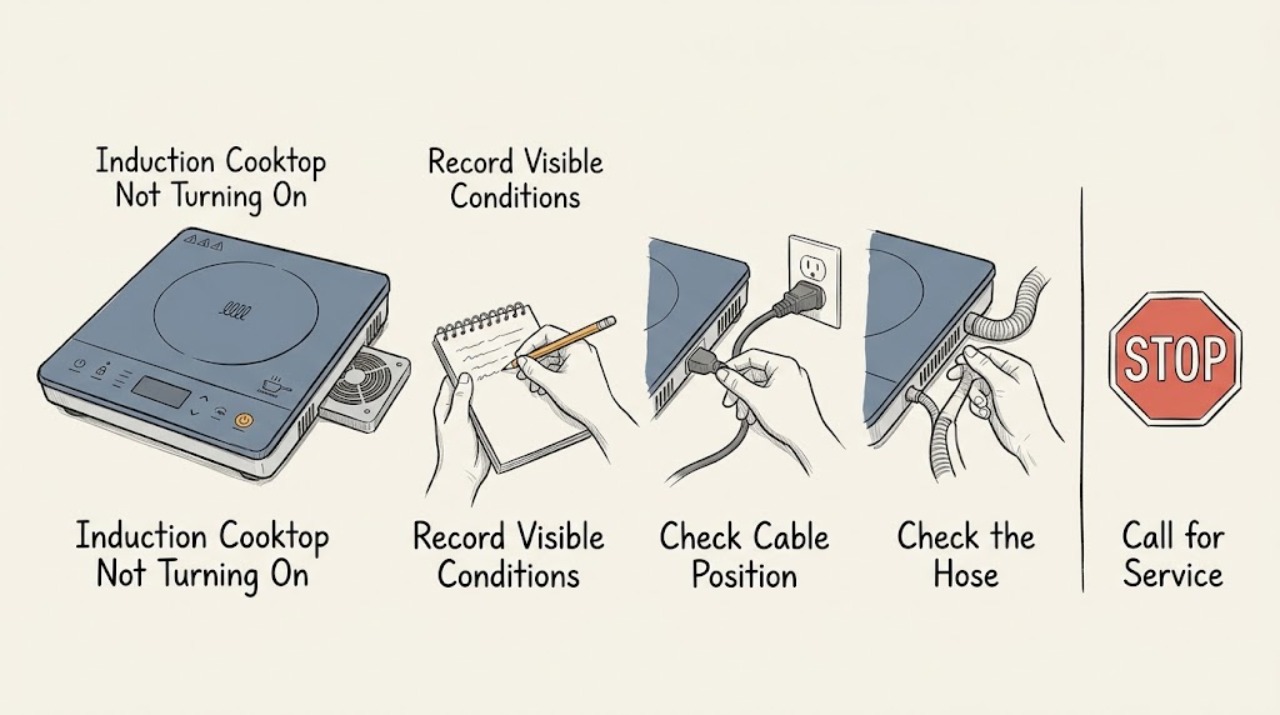
Work through in order
Diagnostic checks
Use only checks that match the exact appliance or system and its official guide.
-
Check 1
With the cooktop cool and dry, record whether the entire display is blank, whether any indicator or error code appears, and whether a single zone or every zone is affected. Remove cookware, utensils, water, and cleaning residue from the control area before trying the power key with a centered fingertip.
Expected result: The display wakes and accepts input, only one zone stays inactive, or no indicator or touch key responds at all. A flashing symbol or code should be recorded exactly rather than guessed.
Next step: If the panel responds, continue to the lock and cookware checks. If it stays blank, continue only with the safe household breaker observation below; do not remove a panel.
Stop if: Stop if the glass is cracked, the control area is scorched, there is smoke or a burning smell, or the surface is abnormally hot away from a cooking zone.
Why this matters
Why: A responding panel points toward a lock, input, cookware, or zone-specific condition. A completely blank panel points first toward power, wiring, or control electronics, while an unknown recurring code needs the model manual.
-
Check 2
If the touch controls do not respond or a lock indicator is present, make sure all cooking zones are off and hold the Key Lock or Control Lock key for the duration specified by the exact Owner's Manual; on applicable KitchenAid induction models the support guidance specifies three seconds. Keep a finger centered on the key and keep the surface clean and dry.
Expected result: The lock indication clears and the power or zone keys respond, or the lock remains and the panel is still unresponsive.
Next step: If controls respond, select one zone and continue to the pan check. If they remain unresponsive, leave the cooktop off and record the model and display state for service.
Stop if: Do not spray liquid into the controls, pry the glass, or bypass a lock by opening the cooktop.
Why this matters
Why: An active lock can intentionally prevent zones from being turned on. Continued lock behavior after the model-specific unlock procedure is not resolved by repeatedly pressing random keys and may indicate an input or control fault.
-
Check 3
For a zone whose level flashes or remains cold after the panel turns on, place one cool, flat-bottomed pan in the center of the matching cooking area. Check the pan bottom with a magnet while the pan is stable and cool; the magnet should cling to a ferromagnetic base. Use cookware that is not visibly warped or damaged.
Expected result: The zone recognizes the pan and begins responding, or the level continues flashing / the zone remains inactive with a centered magnetic pan. The display may indicate no pan or an incompatible pan.
Next step: Try the exact pan-size and placement guidance in the model manual once. If a suitable pan is still not detected, turn the zone off and escalate rather than repeatedly cycling the control.
Stop if: Stop if the glass is cracked, the pan is unstable, or the surface becomes abnormally hot outside the intended cooking area.
Why this matters
Why: Induction heating depends on cookware detection. Material, base size, flatness, and placement can prevent a zone from activating even when the cooktop has power.
-
Check 4
If the whole cooktop is blank, inspect the household electrical panel without removing its cover. Look for a tripped cooktop breaker or blown fuse, and note whether other appliances on the same supply are also without power. Do not touch exposed conductors or reset a breaker that trips immediately, smells hot, or shows damage.
Expected result: The cooktop breaker is tripped or the household supply is interrupted, or the breaker appears on but the cooktop remains blank. A breaker that trips again is a separate electrical warning.
Next step: If the panel and breaker are safe, reset the cooktop breaker once. If it trips again, will not reset, or the cooktop remains blank, leave the circuit off as appropriate and call a qualified electrician or appliance technician.
Stop if: Stop before touching the panel for heat, smoke, arcing, burning smell, water, damaged hardware, or exposed wiring; use qualified electrical help.
Why this matters
Why: KitchenAid identifies wiring and household fuse or breaker conditions when nothing operates. A recurring trip can indicate a fault or unsafe circuit and is not fixed by repeated resets.
-
Check 5
Only after a safe breaker reset and with no damage or warning, wait the full one-minute power-down interval described by KitchenAid, restore the breaker, and observe the cooktop without immediately starting multiple zones. Record whether the display returns normally or the same code or blank state comes back.
Expected result: The display and controls return, the cooktop remains blank, or an error indication reappears shortly after power is restored.
Next step: If operation returns, test one suitable pan on one zone and monitor it. If the fault returns or the display stays blank, stop resetting and arrange qualified service or electrical diagnosis.
Stop if: Do not perform a reset if there is smoke, a burning smell, visible damage, water near electrical parts, or a breaker that trips repeatedly.
Why this matters
Why: A one-minute reset can clear a transient control state, but a recurring indication or no response suggests a supply, wiring, control-board, or user-interface issue that cannot be confirmed from the outside.
-
Check 6
If the cooktop turns itself off or refuses to start after heavy use, allow the glass and controls to cool naturally with ventilation unobstructed. Record whether the symptom clears, whether a hot-surface or temperature indicator remains, and whether airflow from the cooling system is present on the applicable model.
Expected result: The cooktop resumes after cooling, or it remains unavailable, flashes a code, or becomes hot around the controls. KitchenAid notes that poor ventilation can cause overheating and shutdown and that internal-temperature indications require cooling on applicable models.
Next step: Keep the installation ventilation clear and follow the model manual. If the cooktop does not recover, the code returns, or abnormal heat remains, stop use and arrange service.
Stop if: Stop immediately for smoke, burning smell, glass damage, scorching, or abnormal heat away from the intended cooking zone.
Why this matters
Why: Thermal protection or blocked ventilation can inhibit operation; continuing to force power or covering vents can worsen the condition. A failure to recover after cooling is not explained by normal thermal protection alone.
-
Check 7
Prepare the full model number, product or serial information, exact display state, breaker behavior, control-lock result, cookware used, zone affected, and whether cooling resolved the problem. Do not remove the cooktop or open its electrical enclosure to identify a board, sensor, coil, or wiring fault.
Expected result: The record shows a repeatable lock, pan-detection, power, thermal, or error-code path, or it shows a blank panel with no safe user-level recovery.
Next step: Arrange qualified KitchenAid appliance service for persistent no-power, recurring codes, a zone that remains inactive with suitable cookware, or any internal diagnosis. Use an electrician when the breaker, wiring, or household supply is implicated.
Stop if: Stop all user testing when an internal electrical part, hardwired connection, cracked glass, or thermal safety barrier would need access.
Why this matters
Why: Model-specific manuals and service procedures determine whether a control, power, sensor, or induction assembly can be tested; those components are not safely identified by external symptoms alone.
Use your observations
Decision map
Find the observation that best matches what you see, then follow the next safe action.
-
PATH 01Next step
What you see
The display is blank and the cooktop breaker or household supply is interrupted.
Do this next
If the electrical panel is safe, reset the cooktop breaker once as KitchenAid describes. If it trips again or the cooktop remains blank, use qualified electrical or appliance service.
-
PATH 02Next step
What you see
The panel responds but controls do not accept input and a lock state is present.
Do this next
Clean and dry the control area and follow the exact model's unlock procedure. If the lock or unresponsive panel persists, stop and arrange service.
-
PATH 03Next step
What you see
The control panel works but one zone flashes or does not heat with no pan indication.
Do this next
Use a cool, flat, magnetic pan centered on the matching zone and follow model-specific size guidance. If detection still fails, turn the zone off and arrange service.
-
PATH 04Next step
What you see
The cooktop shuts down after heavy use or shows a heat or internal-temperature indication.
Do this next
Allow it to cool naturally with ventilation clear. If it does not recover, the indication returns, or abnormal heat remains, stop use and arrange service.
-
PATH 05Next step
What you see
The breaker trips again, the display fault returns after reset, or there is smoke, burning smell, scorching, exposed wiring, water near electrics, or cracked glass.
Do this next
Stop immediately, do not open the cooktop or reset repeatedly, and arrange qualified appliance service or an electrician as appropriate.
Helpful context
Understand the symptom
Blank panel and cold cooking zone are different failures
If no display, indicator, or touch key responds, begin with the household supply and the cooktop's control state. If the panel lights but one zone will not heat, induction detection and pan placement are more likely than a total power failure. Record any steady or flashing symbols before clearing them; the exact Kitchenaid model determines the meaning of codes and indicators.
Start with cool, dry controls and safe cookware
Food, water, or another object on the touch area can keep controls from responding. Once the surface is cool, remove objects and clean and dry the control panel. Use a cool, flat pan with a magnetic base, centered on the matching zone. Do not use the pan test to justify cooking on cracked glass or on a surface that is abnormally hot away from the zone.
Do not open an induction cooktop to chase a power fault
A hardwired induction cooktop can contain hazardous electrical energy even when its display is blank. A single breaker reset is a user-level recovery step in KitchenAid guidance; repeated trips, visible damage, smoke, a burning smell, or a return of the fault is a stop condition. Do not remove the glass, disconnect wiring, or perform live voltage tests.
Safety boundary
Stop conditions
- Do not use or repeatedly reset the cooktop for smoke, burning smell, scorching, arcing, exposed wiring, water near electrical parts, abnormal heat, or a breaker that trips again.
- Do not use the cooktop if the glass is cracked or damaged.
- Do not remove the glass, open the electrical enclosure, bypass a control lock, or perform live voltage tests.
- Stop testing when a zone remains inactive with suitable centered cookware or an internal control, sensor, coil, or wiring part would need access.
When checks do not resolve it
Need a professional?
Professional diagnosis is appropriate for persistent no-power, recurring breaker trips, returning error indications, a nonresponsive control system, failed pan detection with suitable cookware, repeated thermal shutdown, or any symptom requiring access to the hardwired cooktop or internal electrical assembly.
Common questions
FAQ
Why is my Kitchenaid induction cooktop completely blank?
A blank panel can result from a household fuse, tripped breaker, wiring issue, or cooktop control fault. Inspect only a safe household panel, reset the cooktop breaker once as KitchenAid describes, and use qualified electrical or appliance service if it trips again or the display remains blank.
Can the control lock stop a Kitchenaid induction cooktop from turning on?
Yes. KitchenAid says the induction lockout can prevent cooking zones from being turned on. Clean and dry the controls and follow the exact model's unlock procedure; applicable guidance specifies holding Key Lock for three seconds.
Why does one Kitchenaid induction zone stay off while the display works?
A zone may not detect a pan that is nonmagnetic, too small, warped, or off-center. Use a cool flat pan with a magnetic base, center it on the matching area, and follow the model manual. Persistent failure with suitable cookware needs service.
Should I keep resetting the breaker if the Kitchenaid cooktop will not start?
No. KitchenAid documents a one-minute power reset, but a breaker that trips again, a returning fault, smoke, burning smell, heat, or visible damage is a stop condition. Leave electrical diagnosis to a qualified electrician or appliance technician.
When should I stop using a Kitchenaid induction cooktop?
Stop for smoke, a burning smell, scorching, arcing, exposed wiring, water near electrical parts, abnormal heat, a repeated breaker trip, or cracked glass. Do not open the cooktop or perform live tests; arrange qualified service.
Read the exact guide
Official sources
- Controls Not Responding - InductionKitchenAid Product Help · Official KitchenAid support article for applicable induction touch controls; lock timing and layout can vary by model.
- KitchenAid Induction Cooktop Owner's ManualKitchenAid · Official KitchenAid owner manual covering specified induction models; use only the controls and timings that match the appliance.
- KitchenAid 36-inch Sensor Induction Cooktops Quick Start GuideKitchenAid · Official KitchenAid quick-start guide for a 36-inch sensor induction family; indicator names and layouts are model-specific.
- Not Operating Correctly - Induction CooktopKitchenAid Product Help · Official KitchenAid support guidance for induction cooktop families; use exact control and cookware details only when they match the model.
- Nothing Will Operate - Induction CooktopKitchenAid Product Help · Official KitchenAid support guidance for a cooktop with no operation; household wiring and breaker work remains an electrical professional boundary.
Community feedback
Share a repair observation
Share a plain-text repair observation. Accepted observations are published automatically; this page may take a moment to update.