
On this page
Start here
Quick answer
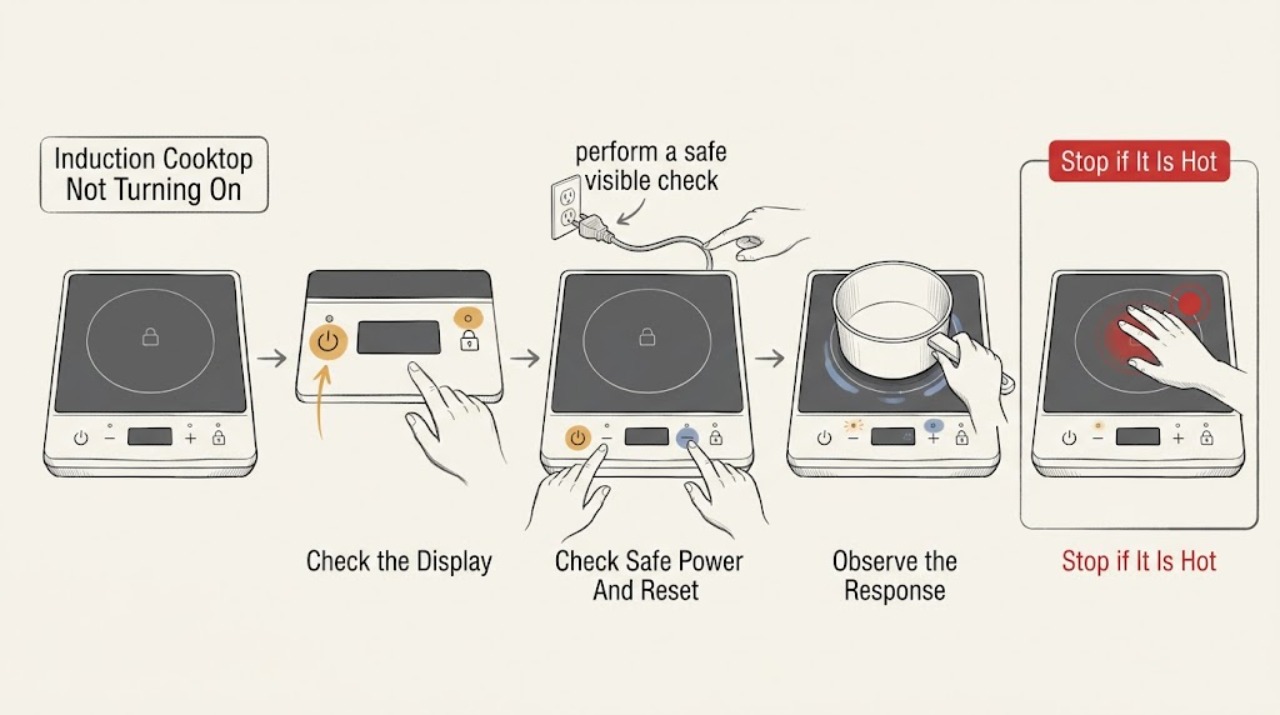
First separate a completely dark Frigidaire induction cooktop from one whose display responds but will not heat a zone. From a safe, dry position, check the dedicated power supply and any visible lock or dash indication, then follow the exact model’s control sequence. If a zone responds but does not heat, use a clean, flat pan suitable for induction; Frigidaire says a magnet sticking to the pan base is a useful material check, but a suitable pan that fails on one zone still points to service. If the cooktop has a cooktop-lock indication, use only the model-approved unlock or reset procedure. For a lock-out or control issue, Frigidaire provides a power disconnect of up to 30 seconds for applicable models. Do not probe live terminals, lift the glass, bypass a lock, or keep resetting a tripping circuit. Stop and arrange qualified appliance or electrical service for a cracked surface, burning odor, sparking, repeated trips, a newly installed unit with suspected wiring or voltage trouble, or a cooktop that remains unresponsive after safe external checks.
Work through in order
Diagnostic checks
Use only checks that match the exact appliance or system and its official guide.
-
Check 1
Observe the Frigidaire induction cooktop from above with the surface clear and dry, then identify whether the display and indicators are dark, locked, responsive but not heating, or showing a model-specific symbol.
Expected result: Record whether every zone and control is inactive, the display shows a dash or lock indication, one zone responds while another does not, or the selected zone responds only when a pan is present.
Next step: Follow the power and control checks below without opening the unit, and use the exact owner’s manual for the displayed symbol or touch sequence.
Stop if: Stop for smoke, burning odor, sparking, a hot control area, a cracked or shattered glass surface, water under the control area, or exposed wiring.
Why this matters
Why: A dark whole cooktop points toward power or main-control checks. A lock indication can prevent operation even when power is present. A single-zone response with a suitable pan is a zone or control path; no response only with one pan supports cookware detection rather than a dead appliance.
-
Check 2
From a safe position, verify that the cooktop’s supply is available and that the protective device has not tripped; for an applicable lock-out condition, disconnect power for up to 30 seconds only as Frigidaire directs and only when the installation makes that safe.
Expected result: The display returns after a single model-approved reset, the supply is absent, the protective device trips again, or the display stays dark with stable household power.
Next step: Restore only a plainly tripped device using normal household procedure; if it trips again, the supply is uncertain, or the unit remains dark, stop and arrange qualified service.
Stop if: Do not probe the junction box, change a breaker rating, use improvised wiring, repeatedly reset a protective device, or disconnect power with wet hands or a damaged connection.
Why this matters
Why: A return after the approved reset supports a temporary lock-out or control state. A dead or repeatedly tripping supply requires electrical assessment. Stable supply with a dark display points toward the cooktop input or control path, not a cookware problem.
-
Check 3
Check the display for a lock, dash, or child-lock indication and use only the model-specific unlock or control sequence in the owner’s manual; keep the touch area clean and dry without spraying cleaner onto it.
Expected result: The lock clears and controls respond, the display continues to show a lock or dash, touch controls remain unresponsive, or the controls work for some zones only.
Next step: Use the documented unlock sequence once and then select one zone normally. Arrange service for a persistent lock indication, unresponsive touch area, or partial control response.
Stop if: Do not hold random keys, insert tools into the control area, bypass the lock, lift the glass, or open the control panel.
Why this matters
Why: A lock indication can intentionally prevent heating. Frigidaire says model controls and lock procedures vary, so an unresponsive control after the correct sequence may indicate the interface, control board, or power path rather than a pan problem.
-
Check 4
Place one clean, flat, appropriately sized pan centered on the affected induction zone and follow the normal zone-selection and power-setting sequence; if needed, hold a magnet to the pan base without sliding rough cookware over the glass.
Expected result: The pan is detected and heats, the magnet does not stick, the pan is detected but the zone does not heat, or the pan is uneven, too small, or off-center.
Next step: Try one known suitable pan and the model’s normal control sequence. If it still does not heat while other zones work, stop cookware experiments and arrange service.
Stop if: Do not slide rough cast iron, use a pan as a test on cracked glass, strike the surface, or remove the cooktop glass to inspect the induction coil.
Why this matters
Why: Frigidaire says induction cookware should be suitable and that a magnet sticking to the base indicates the correct material. A pan that fails the material or placement check can explain no heat; a suitable centered pan that fails on one zone supports a zone, sensor, or control fault.
-
Check 5
With the same suitable pan, compare the affected zone with another zone using the normal controls, and inspect the glass surface and visible control area for cracks, impact marks, residue, or moisture; do not remove trim.
Expected result: The pan heats on another zone, no zone heats, the surface is cracked or chipped, the controls respond intermittently, or the same zone fails consistently with a suitable pan.
Next step: Stop using a damaged or wet cooktop, dry only accessible external moisture, and arrange qualified service for a failed zone, unstable controls, or surface damage.
Stop if: Do not operate with cracked glass, wipe liquid into the controls, lift the surface, or touch the underside of the cooktop.
Why this matters
Why: A pan that works on another zone makes cookware suitability less likely and isolates the issue to the zone or its control path. No zones working points back to power, lock, or main control. Damaged glass or moisture changes the problem to a safety and service condition.
-
Check 6
After one model-approved reset, unlock, pan correction, or surface clean-up, select one zone for a single supervised test and record whether the display responds and the pan heats consistently.
Expected result: The cooktop starts normally, it responds but still does not heat, only one zone remains inactive, the display goes dark again, or the protective device trips.
Next step: Stop owner troubleshooting and arrange qualified appliance or electrical service; provide the model and serial information, display symbols, zone and pan comparison, reset result, installation history, and any protective-device behavior.
Stop if: Do not keep running a failed zone to reproduce the symptom or continue after smoke, odor, sparking, overheating, cracked glass, or repeated trips.
Why this matters
Why: A repeatable recovery after a correct external correction supports that limited cause. Persistent single-zone failure, a recurring dark display, or another protective trip indicates an internal zone, sensor, control, or supply fault.
Use your observations
Decision map
Find the observation that best matches what you see, then follow the next safe action.
-
PATH 01Safety boundary
What you see
The display and every zone are dark after a safe supply check and one applicable reset.
Do this next
Arrange qualified electrical or appliance service, especially for a recent installation or uncertain voltage; provide the supply observations without opening the unit.
Why this path and its safety boundary
Why it matters: A supply, wiring, input, or main control issue is more likely than pan detection.
Safety stop: Do not probe live terminals, open the junction box, change a protective-device rating, or repeatedly reset the circuit.
-
PATH 02Safety boundary
What you see
The display shows a lock, dash, or other model-specific locked state while the cooktop has power.
Do this next
Use only the exact owner’s-manual unlock procedure or applicable 30-second power disconnect; arrange service if the lock indication persists.
Why this path and its safety boundary
Why it matters: The safety lock or control state can intentionally block zone operation.
Safety stop: Do not bypass the lock, hold a key down with an object, or open the control panel.
-
PATH 03Safety boundary
What you see
The display responds, but a zone does not heat with one pan and the pan is not magnetic, is off-center, uneven, or too small.
Do this next
Use one clean, flat, suitable pan centered on the zone and follow the model control sequence; stop if a suitable pan still fails on that zone.
Why this path and its safety boundary
Why it matters: Cookware material, flatness, size, or placement can prevent induction energy from being applied.
Safety stop: Do not slide rough cast iron across the glass or treat a cookware mismatch as permission to open the cooktop.
-
PATH 04Safety boundary
What you see
A suitable centered pan heats on another zone but the affected zone remains inactive.
Do this next
Stop swapping cookware and arrange qualified appliance service with the zone comparison and display behavior.
Why this path and its safety boundary
Why it matters: The pan is less likely to be the cause; a zone sensor, control, or power component may be at fault.
Safety stop: Do not remove the glass, test the induction coil, or substitute an internal part by appearance.
-
PATH 05Safety boundary
What you see
The glass is cracked or chipped, the control area is wet, or the surface has impact damage.
Do this next
Stop using the cooktop, keep people away from the damage, and arrange qualified appliance service.
Why this path and its safety boundary
Why it matters: The cooktop may present shock, burn, glass, or further-damage risk and is not a normal no-start setting issue.
Safety stop: Do not cover a crack, pour cleaner onto the controls, operate a damaged zone, or reach under the glass.
-
PATH 06Safety boundary
What you see
Power is stable, the lock sequence and suitable-pan test are correct, but the display or one or more zones remains unresponsive.
Do this next
Stop owner troubleshooting and arrange qualified appliance service with the model, affected zone, display symbol, pan test, and reset history.
Why this path and its safety boundary
Why it matters: An internal interface, sensor, zone control, wiring, or main electronic fault needs model-specific diagnosis.
Safety stop: Do not probe live wiring, bypass a safety device, lift the cooktop, or replace internal electronics as a trial.
Helpful context
Understand the symptom
Identify whether the cooktop is dead, locked, or simply not detecting a pan
No display or indicator on any zone is a power or control-path symptom. A lit display with a dash, lock symbol, or controls that ignore touch is a lock or interface path. A zone that responds but does not heat with one pan can be a cookware-detection issue, not a failed induction coil. Frigidaire notes that controls vary by model, so use the model’s owner’s manual for the exact touch sequence and displayed symbols.
Induction heating depends on the pan as well as the cooktop
Induction transfers heat into suitable cookware, so a pan that is not magnetic, is too small, is badly positioned, or has an unsuitable base can make a working zone appear inactive. Frigidaire recommends suitable heavy cookware and says a magnet sticking to the pan base indicates a suitable material, while also warning not to slide rough cast iron over the ceramic surface. Test with one clean, flat, suitable pan before assuming the electronics have failed.
Keep high-voltage and glass work outside the owner checks
A power reset or control unlock is an external procedure only when the model instructions permit it. It does not authorize opening the cooktop, testing the junction box, bypassing a safety lock, or lifting the glass. A failed zone with suitable cookware, a whole-unit no-power condition, a damaged surface, or a protective device that trips again needs qualified appliance or electrical diagnosis.
Safety boundary
Stop conditions
- Stop immediately for smoke, burning odor, sparking, a hot or damaged cord or connection, water near controls, a cracked or shattered glass surface, or repeated protective trips.
- Do not repeatedly reset a breaker, change its rating, probe the junction box, use improvised wiring, or continue operation after an electrical fault.
- Do not bypass the cooktop lock, hold a key down with an object, open the control panel, or lift the glass assembly.
- Do not test the induction coil, touch the underside, replace a power module by appearance, or work on high-voltage components.
- Do not keep running a zone with a suitable pan when it remains unresponsive, overheats, or shows abnormal surface or control behavior; arrange qualified service.
Only after diagnosis
Potential parts
- induction zone sensor or control
Consider this only when stable power, the lock state, and a suitable centered pan are verified but a qualified diagnosis identifies one zone’s sensor or control fault.
Confirm the exact model and manufacturer fit information before ordering; induction electronics require qualified service. - cooktop touch control or interface
Consider this only when the display or touch area remains unresponsive after the model-approved unlock and reset procedures and a qualified diagnosis confirms an interface fault.
Use the exact model and service information; do not bypass the lock or open the control panel as an owner check. - induction power module
Consider this only when the whole cooktop or multiple zones fail with stable external power and a qualified technician identifies an internal power-module fault.
Confirm model-specific fit and electrical specifications before replacement; internal power work should be performed by qualified service.
When checks do not resolve it
Need a professional?
Arrange qualified appliance or electrical service when the induction cooktop remains dark after safe supply checks, a lock or control indication persists after the model-approved procedure, a suitable pan fails on one or more zones, the glass is damaged, or wiring, a zone sensor, control, or power module is suspected. Stop immediately for smoke, burning odor, sparking, a hot or damaged connection, water near controls, a cracked surface, or repeated protective trips.
Common questions
FAQ
Why is my Frigidaire induction cooktop completely dark?
Check the supply and protective device from a safe position, then use only the applicable model-approved reset. If the display and every zone remain dark, the problem is more likely in the supply, input, or main control and needs qualified service.
Why does my Frigidaire induction cooktop show a lock or dash?
A lock state can prevent the cooktop from operating. Frigidaire says controls vary by model, so use the owner’s manual for the exact unlock sequence; applicable lock-out guidance includes a power disconnect of up to 30 seconds before service if the issue persists.
Why does my Frigidaire induction cooktop not recognize my pan?
The pan may not be magnetic, flat, centered, or appropriately sized. Frigidaire says a magnet sticking to the pan base indicates a suitable induction material. Try one clean, flat, suitable pan; a suitable pan that fails on one zone needs service assessment.
Why does one Frigidaire induction zone not work while another does?
If the same suitable pan heats on another zone but not the affected one, cookware is less likely to be the cause and a zone sensor, control, or power component may need diagnosis. Do not remove the glass or test the coil yourself.
Can I reset a Frigidaire induction cooktop that will not turn on?
For an applicable electric-cooktop lock-out, Frigidaire describes disconnecting power for up to 30 seconds. Use the exact model instructions and only a safe external disconnect; if the unit remains unresponsive or the circuit trips again, arrange service.
When should I stop troubleshooting a Frigidaire induction cooktop?
Stop for smoke, burning odor, sparking, repeated trips, water near controls, a cracked glass surface, or any need to open the cooktop, probe live terminals, bypass a lock, or test the induction coil. Persistent failure after safe external checks belongs with qualified service.
Read the exact guide
Official sources
- How do I use my display or controls?Frigidaire · Frigidaire induction cooktop controls and lock or setting confusion
- Ranges - What type of cookware do I use with Induction?Frigidaire · Frigidaire induction cooking zones with no-heat or pan-detection symptoms
- Troubleshoot Your Induction Range: Not StartingFrigidaire · Frigidaire induction ranges and closely related induction cooktop start symptoms
- Ranges - No HeatingFrigidaire · Frigidaire glass or electric surface zones, including related induction surface observations
- Range Error Code F40 / F41 - Cooktop Lock OutFrigidaire · Frigidaire electric cooktops or ranges showing the applicable cooktop lock-out condition
Community feedback
Share a repair observation
Share a plain-text repair observation. Accepted observations are published automatically; this page may take a moment to update.