
On this page
Start here
Quick answer
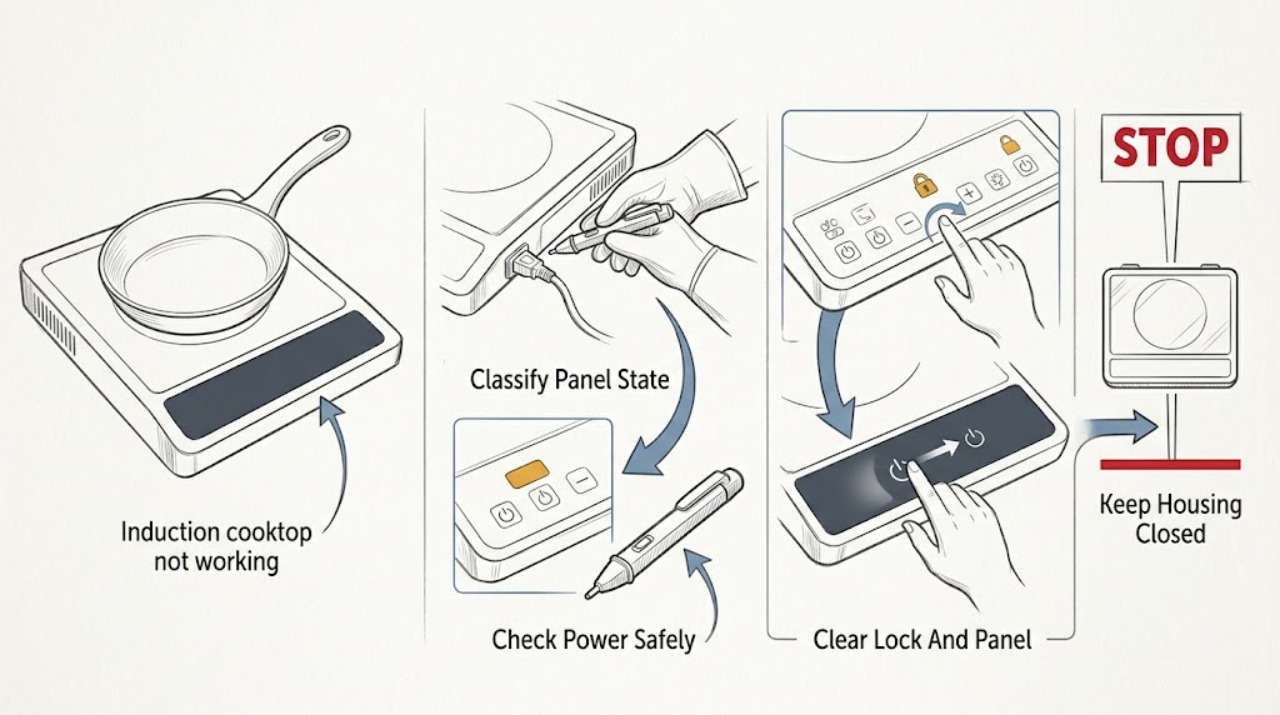
Start by separating no power from no induction heating. From a dry, safe position, check whether the display is blank, locked, wet, flashing, or showing an error. Confirm the cooktop has power, the child or panel lock and pause or demo state are not active, the correct zone and power level are selected, and the control panel is dry and unobstructed. For a zone that will not heat, test only cookware that the manual identifies as induction-compatible, center it on the zone, and use the correct size. If the electronics have overheated, remove hot cookware from the controls and allow the cooktop to cool before one normal retry. Do not open the cooktop, touch internal wiring, test supply voltage, bypass a lock, or repeatedly reset a breaker. A cracked glass surface, recurring error, incorrect supply indication, persistent no-heat condition, burning smell, sparking, or tripping power requires qualified Bosch appliance or electrical service.
Before you begin
Safety first
- This article covers ordinary-access display, control, cookware, cooling, and safe power observations only. Supply wiring, induction coils, electronics, internal fuses, sensors, glass removal, and live testing belong to a qualified professional.
Work through in order
Diagnostic checks
Use only checks that match the exact appliance or system and its official guide.
-
Check 1
With no hands or objects on the controls, observe the Bosch induction cooktop display and note whether it is completely blank, all indicators flash, a lock symbol appears, a zone shows a heat level, or a letter or number error is displayed.
Expected result: Record the exact visible symbol or code, which zones are affected, whether the panel responds to a light touch, and whether the glass is wet or an object is covering a control.
Next step: Photograph or write down the display before changing anything, then follow the matching control, cookware, cooling, power, or error branch.
Stop if: Stop for a cracked glass surface, smoke, burning or electrical smell, sparking, water entering the appliance, exposed wiring, or any need to remove the cooktop from the counter.
Why this matters
Why: A blank display points first to power or an electronics issue. A lock symbol, wet panel, object, overheating indication, demo indication, or listed error has a different model-specific path. A lit panel with one cold zone directs the next check toward cookware and zone selection.
-
Check 2
From a dry, safe position, confirm the cooktop's accessible plug or isolator arrangement is connected as the installation manual requires and check whether the labeled circuit breaker or fuse has tripped; do not remove covers or touch terminals.
Expected result: The display returns with stable power, remains blank, the breaker or fuse is off, or power trips again when the cooktop is used.
Next step: If the installation makes a safe, single reset appropriate and power remains stable, continue to the panel and zone checks; otherwise leave the cooktop off and arrange qualified appliance or electrical service.
Stop if: Do not repeatedly reset a breaker, replace a fuse with an incorrect type, test live voltage, bypass an isolator, or use the cooktop with a damaged cord or connection.
Why this matters
Why: A recovered display supports a supply interruption. A persistently blank display may indicate an electronics or connection fault. A breaker that trips again is an unresolved electrical or appliance fault, not an invitation to keep resetting it.
-
Check 3
Check that the glass control panel is dry and free of cookware, cloths, food, or other objects; if a key or padlock symbol is shown, use the exact model manual's child-lock or panel-lock control without forcing the glass.
Expected result: The flashing indicators stop, the lock symbol clears, controls respond, or the panel remains locked or unresponsive after the documented control action.
Next step: Select one cooking zone and a low, ordinary power setting only after the panel responds; if it remains unresponsive, record the state and arrange service.
Stop if: Do not pour liquid onto the panel, use sharp tools, pry the controls, bypass the child lock, or open the control housing.
Why this matters
Why: Bosch identifies a wet or covered panel as a reason for flashing indicators and a lock as a condition that prevents normal operation. A lock or wet-panel condition that clears explains the no-start symptom; a persistent lock or unresponsive panel suggests a control or electronics issue.
-
Check 4
For a powered panel and a zone that does not heat, use a clean, dry pan that the exact Bosch manual identifies as induction-compatible; if suitable, check that a magnet is attracted to the pan base, then place the pan centrally on the selected zone.
Expected result: The zone detects the pan and shows a heat level, displays a missing-pan or equivalent indication, works with a different compatible pan, or remains inactive with more than one suitable pan.
Next step: Use the compatible pan only as a controlled check and stop if the zone remains cold, an error appears, or the glass or controls behave abnormally.
Stop if: Do not use damaged, warped, wet, or overheated cookware for testing, slide heavy pans across the glass, or remove the cooktop to inspect the induction coil.
Why this matters
Why: A pan that is nonmagnetic, too small, off-center, or otherwise outside the manual's cookware requirements can prevent detection without a cooktop fault. A second known-compatible pan working on the zone points to the original pan; multiple suitable pans failing points toward zone control, power, or service.
-
Check 5
With compatible cookware centered, select the intended cooking zone and set a normal power level using the documented controls; confirm that pause, timer-only, demo, or another zone-selection state is not preventing the heat request.
Expected result: The selected zone heats, the wrong zone responds, the power level flashes without heating, the zone remains cold, or a demo, pause, lock, or error indication returns.
Next step: Use the model manual to correct only the documented selection or demo state; if one zone remains cold after one controlled test, stop and arrange service.
Stop if: Do not repeatedly cycle controls, bridge or bypass a zone, alter wiring, or continue cooking if the glass, pan, or panel overheats unexpectedly.
Why this matters
Why: A wrong zone or inactive control state can look like no heating. A zone that accepts a setting but stays cold with suitable cookware and no lock points toward a zone-specific or electronic fault rather than pan detection alone.
-
Check 6
If a zone or electronics-overheat indication appears, remove cookware from the control area, stop using high power, and allow the cooktop to cool completely as the exact manual directs before one normal restart.
Expected result: The error or indicator clears after cooling, the affected zone resumes normal operation, or the cooktop continues to shut down, displays the error again, or remains cold.
Next step: Use the cooktop only if the indication clears and the manual permits continued use; otherwise leave it off and arrange qualified service.
Stop if: Do not touch hot glass or cookware with bare hands, pour water onto hot glass, block ventilation, use a heat source to cool or thaw the appliance, or keep restarting a unit that overheats.
Why this matters
Why: Bosch identifies overheating protection and hot cookware near controls as conditions that can switch off a zone or electronics. A cleared one-off protection state differs from an error that returns or a cooktop that cannot restart.
-
Check 7
After the safe checks, record the exact model, affected zone, cookware result, panel symbol or error, power behavior, and whether the issue repeats; do not remove the cooktop or attempt internal measurements.
Expected result: The code or no-heat symptom clears once, returns with the same or a different code, affects every zone, or is accompanied by a cracked surface, smell, spark, leak, or repeated power trip.
Next step: Leave the cooktop off and arrange qualified Bosch appliance or electrical service with the model and recorded evidence.
Stop if: Stop immediately for smoke, burning or electrical smell, sparking, exposed conductors, a cracked glass surface, water entering the appliance, or repeated breaker trips.
Why this matters
Why: A recurring error, persistent no-heat condition, or whole-appliance failure cannot be identified safely from user observations. Bosch directs users to support for unresolved or unlisted faults and incorrect supply conditions.
Use your observations
Decision map
Find the observation that best matches what you see, then follow the next safe action.
-
PATH 01Safety boundary
What you see
The display is blank or the cooktop has no stable response.
Do this next
Check the accessible plug or isolator and labeled breaker or fuse once when safe; arrange qualified service if the display stays blank or power trips again.
Why this path and its safety boundary
Why it matters: The cooktop may have lost supply power or have an electronics or connection fault.
Safety stop: Do not test live terminals, open the cooktop, bypass protection, or repeatedly reset a breaker.
-
PATH 02Safety boundary
What you see
A lock symbol appears, indicators flash with a wet or covered panel, or controls do not respond while the display is active.
Do this next
Dry and clear the panel, then use the exact manual's lock control; arrange service if the panel remains unresponsive.
Why this path and its safety boundary
Why it matters: The panel may be locked or unable to recognize touches because of moisture or an object.
Safety stop: Do not pry controls, flood the panel, bypass a lock, or open the control housing.
-
PATH 03Safety boundary
What you see
The panel works but a zone does not heat with a pan that is nonmagnetic, too small, off-center, or not confirmed as induction-compatible.
Do this next
Use one clean, dry, compatible pan and center it on the selected zone according to the manual; stop if a suitable pan is also rejected.
Why this path and its safety boundary
Why it matters: The zone may be operating normally and declining to energize cookware it cannot detect.
Safety stop: Do not remove internal components or use cookware that is cracked, unstable, or damaging the glass.
-
PATH 04Safety boundary
What you see
The wrong zone or power setting is selected, or a pause, demo, timer-only, or similar documented control state is active.
Do this next
Use the exact model instructions to select the intended zone and exit the documented state, then make one normal test.
Why this path and its safety boundary
Why it matters: The cooktop may not be receiving a valid heat request.
Safety stop: Do not alter wiring, repeatedly cycle controls, or bypass a control state that will not clear.
-
PATH 05Safety boundary
What you see
The cooktop shows an overheat code or has switched a zone or electronics off after hot cookware or prolonged high-power operation.
Do this next
Remove cookware from the control area, let the appliance cool as directed, and retry only once if the indication clears.
Why this path and its safety boundary
Why it matters: Protective electronics may have interrupted heating until the appliance cools.
Safety stop: Do not pour water on hot glass, block ventilation, touch hot surfaces, or continue restarting an appliance that overheats.
-
PATH 06Safety boundary
What you see
Correct power, panel, cookware, and zone checks pass but one or more zones remain cold, an error returns, the supply indication is incorrect, or the cooktop trips power.
Do this next
Leave the cooktop off and arrange qualified Bosch appliance or electrical service with the model, code, affected zone, and observations.
Why this path and its safety boundary
Why it matters: An internal electronics, induction, supply, or model-specific fault is possible, but the failed component cannot be identified safely from the outside.
Safety stop: Do not open the cooktop, access live wiring, replace an internal board or coil, bypass a breaker or safety control, or continue operating with damage or abnormal smell.
Helpful context
Understand the symptom
First identify what ‘not working’ means
A blank cooktop is a power or electronics symptom; a lit panel with one cold zone can be cookware detection, placement, zone selection, a lock or pause state, overheating protection, or a fault. Bosch's induction guidance specifically separates a cooktop that does not power on from cooking zones that do not heat. Record the display state, affected zones, cookware, and any code before trying a reset.
Induction heating depends on the pan and its position
An induction zone will not heat a pan it cannot detect. Use the exact Bosch manual for the model, check the pan's magnetic suitability with a magnet if appropriate, and center cookware of a suitable size on the selected zone. A pan that works on one zone but not another changes the decision toward placement, zone control, or a zone-specific fault rather than a whole-appliance power loss.
Protect the glass and electronics while checking
Bosch documents panel locks, wet controls, hot cookware near the control panel, overheated electronics, demo mode, and incorrect supply conditions as distinct states. Dry or clear the panel, remove cookware from the controls, and let a hot appliance cool only when the manual permits a retry. Internal power and electronics work is not an ordinary user check; leave recurring or unexplained faults to qualified service.
Safety boundary
Stop conditions
- Do not open the cooktop, remove the glass, touch internal wiring, test live voltage, replace an induction coil or electronics board, or bypass a lock or safety control.
- Stop immediately for a cracked glass surface, smoke, burning or electrical smell, sparking, exposed conductors, water entering the appliance, or repeated breaker trips.
- Do not repeatedly reset a breaker or cooktop, use an incorrect fuse, or continue operating after a recurring error, incorrect supply indication, or protective shutdown.
- Do not pour water on hot glass, touch hot cookware bare-handed, block appliance ventilation, drag heavy cookware across the surface, or use damaged or unstable cookware for testing.
- If the cooktop is hard-wired or the fault concerns supply voltage, installation, or circuit protection, leave electrical work to a qualified electrician or appliance technician.
Only after diagnosis
Potential parts
- induction cookware
Consider new cookware only if a magnet and the exact Bosch manual indicate that the current pan is not suitable or is too small or warped for the selected zone; cookware is not a substitute for diagnosing a zone that rejects known-compatible pans.
Confirm the pan base, size, stability, and the Bosch model's cookware guidance before use; do not assume every magnetic pan is suitable for every zone. - induction cooktop control or power module
Consider this internal component category only after a qualified technician confirms an electronics or supply fault on the exact model following the safe external checks.
Confirm the complete Bosch model and manufacturer fit information with the technician; do not order, access, or replace an internal module from a no-heat symptom alone.
When checks do not resolve it
Need a professional?
Arrange qualified Bosch appliance or electrical service when the display stays blank after a safe supply check, a compatible pan fails on a correctly selected zone, an error returns or is not listed for the exact model, the power supply indication is incorrect, one or more zones remain cold, the cooktop overheats or trips power, or the glass, cord, controls, or installation is damaged. Stop immediately for smoke, burning or electrical smell, sparking, water entering the appliance, exposed wiring, or a cracked glass surface.
Safety scope: This article covers ordinary-access display, control, cookware, cooling, and safe power observations only. Supply wiring, induction coils, electronics, internal fuses, sensors, glass removal, and live testing belong to a qualified professional.
Common questions
FAQ
Why does my Bosch induction cooktop turn on but not heat?
Check that the intended zone and power level are selected, the panel is unlocked and dry, and the pan is induction-compatible, correctly sized, and centered. If more than one known-compatible pan remains cold, stop and arrange service.
How can I tell whether a pan works on induction?
Bosch says induction cookware needs ferromagnetic properties. If suitable for the cookware and model, a magnet attracted to the pan base supports compatibility, but the pan must still be a suitable size and centered on the selected zone.
What does a lock symbol mean on a Bosch induction cooktop?
The panel lock or child lock is active and can prevent normal operation. Use the exact model manual's documented lock control; do not pry the controls or bypass the lock.
What should I do if all Bosch induction cooktop indicators are flashing?
Bosch identifies a wet control panel or an object covering it as a possible cause. Turn off ordinary use, dry and clear the panel, and retry only as the exact manual allows. If flashing continues, arrange service.
Can overheating make an induction cooktop stop heating?
Yes. Bosch documents protective shutdowns for overheated zones or electronics and hot cookware near the controls. Remove cookware from the control area, let the cooktop cool, and retry only if the indication clears; recurring shutdown needs service.
Should I open a Bosch induction cooktop to test the coil or voltage?
No. Do not open the cooktop, access internal wiring, test live voltage, or replace an induction component based on the symptom alone. A persistent no-work or no-heat condition belongs with qualified Bosch appliance or electrical service.
Read the exact guide
Official sources
- Bosch Cooktop & Rangetop Error CodesBosch Home Appliances · Bosch official error-code guidance for induction and other cooktops; codes and controls can vary by exact model.
- Bosch Induction Cooktop Error CodesBosch Home Appliances · Bosch official induction-cooktop error page; use the exact model manual when a code or control differs.
- Bosch Induction Cooktop TroubleshootingBosch Home Appliances · Bosch's official cooktop troubleshooting page with an induction-cooktop section; exact model manuals control variations in controls and installation.
Community feedback
Share a repair observation
Share a plain-text repair observation. Accepted observations are published automatically; this page may take a moment to update.