
On this page
Start here
Quick answer
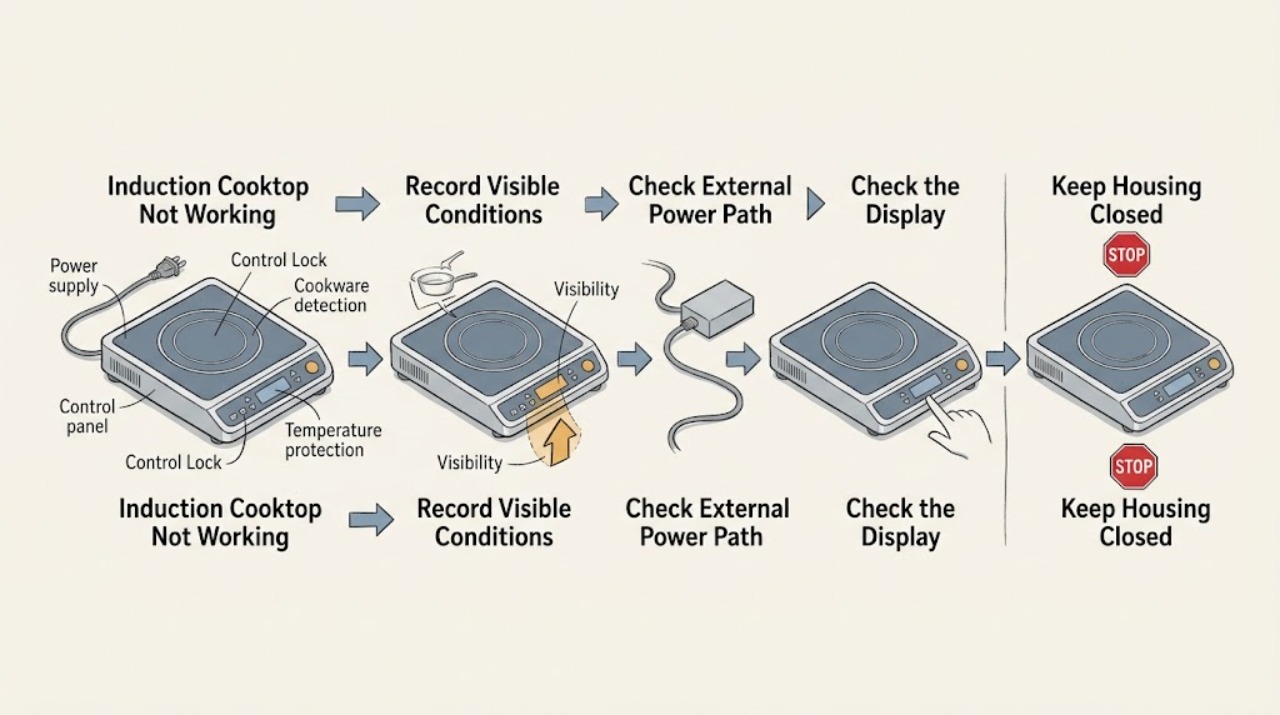
A Thermador induction cooktop that is not working may have no incoming power, a locked or wet control panel, cookware that the zone cannot detect, an overheat condition, or a model-specific fault. First classify whether the whole cooktop is blank, the controls are lit but locked or unresponsive, or only one zone fails. Check the external power switch and breaker without opening the appliance, dry the cool control area, check the lock indicator and the model manual, and center a flat induction-compatible pan on the selected zone. Thermador says an element that does not heat or flashes can indicate that it is off or that cookware is too small or unsuitable; use a magnet to check compatibility. If the glass is cracked, or there is smoke, burning smell, arcing, a hot or damaged cord, water near electrical parts, or a breaker trips again, stop using the cooktop and arrange qualified service.
Work through in order
Diagnostic checks
Use only checks that match the exact appliance or system and its official guide.
-
Check 1
With the cooktop cool and no pan on the controls, observe whether the entire display is blank, the display is lit but does not respond, or the display works while one cooking zone will not activate; record any letter-and-number code and the exact model.
Expected result: The whole unit is blank; the panel is lit but locked or unresponsive; one zone flashes or will not heat; or an F, E, U, or dE-style code is shown.
Next step: Use the matching branch below. If the display reports smoke, burning, arcing, a cracked surface, or another electrical hazard, stop immediately and do not continue testing.
Why this matters
Why: A blank unit follows the power branch, a lit but locked panel follows the control branch, and a single zone with a flashing setting follows the cookware-detection branch. A code must be matched to the exact model manual rather than inferred.
-
Check 2
From outside the appliance, confirm that the dedicated wall switch or isolator is on, look for a building power interruption, and check the labeled cooktop breaker or fuse position without opening the panel or touching wiring.
Expected result: The switch is off, power to the home is interrupted, or the breaker or fuse is visibly open; alternatively, the external supply appears normal but the cooktop remains blank.
Next step: Restore an intentionally switched-off isolator only if it is safe and the interruption is understood. Do not repeatedly reset a breaker: if it trips again, smells hot, shows damage, or the cooktop stays blank, stop and arrange an electrician or qualified appliance service.
Why this matters
Why: Thermador lists the main switch, power failure, outlet, fuse, and breaker among causes of a cooktop that does not turn on. A normal-looking external supply with a blank display can indicate an appliance, connection, or service fault.
-
Check 3
Inspect the cool, dry control surface for a lock indicator, spilled liquid, condensation, or a hot pan near the controls; remove nearby cookware, wipe the panel with a soft damp cloth followed by a dry cloth, and use only the exact model manual's Control Lock release.
Expected result: A lock icon or lock message is present, the touch area is wet or dirty, a hot pan was near the panel, or the dry unlocked panel still does not respond.
Next step: After the surface is cool and dry, follow the model-specific unlock instruction once. If the panel remains unresponsive, becomes unusually hot, or shows a fault, stop using the cooktop and arrange service rather than removing controls.
Why this matters
Why: A control lock or moisture can make a working cooktop appear dead. Thermador also documents hot control-panel conditions and says cookware should not be placed near the panel; persistent non-response after a dry, unlocked surface is a control or service branch.
-
Check 4
Select one zone, place a flat, dry induction-compatible pan in its center, and use a magnet on the pan base; compare with the zone size and keep the pan away from the control panel.
Expected result: The magnet attracts to the base and the zone starts normally; the pan is too small, off-center, nonmagnetic, wet, or the heat setting continues to flash and no heat begins.
Next step: Use a suitable centered pan and retest once at a normal setting. If the known suitable pan fails on one zone but works on another, stop troubleshooting that zone and arrange service; do not lift the glass or attempt coil access.
Why this matters
Why: Thermador identifies cookware that is too small or unsuitable as a reason an element does not heat or a setting flashes. If a known suitable pan is centered and still not detected on only one zone, the zone or its control path needs diagnosis.
-
Check 5
If the display shows dE, F1, F2, F4, F5, F6, F8, E7015, E8207, E8208, E9000, E9010, E9011, or U400, remove cookware from the controls, let the electronics cool, and read the exact Thermador manual for that model before taking any further action.
Expected result: The code clears after cooling or removing hot cookware; the code returns; the display indicates demo mode or automatic time limitation; or it indicates incorrect supply voltage or connection.
Next step: For a one-time cleared heat-protection code, use the manual's normal restart instruction and monitor. For a returning code, a voltage or connection code, or an unexplained code, stop and use an electrician or authorized appliance servicer.
Why this matters
Why: Thermador maps these code families to demo mode, overheating or hot cookware, automatic time limitation, and incorrect supply voltage or connection. A returning code is evidence for service, not a reason to keep cycling power.
-
Check 6
Stop immediately if the glass is cracked or fractured, smoke or a burning smell appears, arcing or visible sparking occurs, the control area or cord is abnormally hot or damaged, water reaches electrical parts, or the breaker trips again.
Expected result: A crack, smoke, odor, arc, heat, water exposure, damaged power part, or repeated trip is present, or the fault cannot be isolated without opening the appliance.
Next step: Stop using the cooktop and keep people away. If it is safe and dry to do so, isolate power at the normal switch or breaker; do not touch water, damaged wiring, or the glass. Contact an electrician or qualified Thermador servicer from a safe location.
Stop if: Stop and call qualified service; do not restore power until the appliance has been assessed.
Why this matters
Why: A fractured cooktop can present electric-shock risk, and smoke, arcing, overheating, water, or repeated trips can indicate fire or electrical danger. These conditions are outside safe user-level troubleshooting.
Use your observations
Decision map
Find the observation that best matches what you see, then follow the next safe action.
-
PATH 01Next step
What you see
The entire display is blank and the cooktop gives no response.
Do this next
Check only the external switch, known power interruption, and labeled breaker or fuse position. A repeat trip or persistent blank display requires an electrician or qualified appliance service.
-
PATH 02Next step
What you see
The display is lit but touch controls do not respond, or a lock indicator or moisture is visible.
Do this next
Remove nearby cookware, cool and dry the surface, and use the exact model manual's Control Lock release. Persistent non-response requires service; do not remove the control panel.
-
PATH 03Next step
What you see
The panel works but one zone flashes, will not activate, or will not heat.
Do this next
Center a flat induction-compatible pan, check the base with a magnet, and compare its size with the zone. If a known suitable pan fails only on that zone, arrange service.
-
PATH 04Next step
What you see
The panel is hot, a hot pan was near it, or a documented overheating or time-limitation code appears.
Do this next
Remove cookware from the controls and let the electronics cool. Follow the model manual once; a returning code or persistent heat requires qualified service.
-
PATH 05Next step
What you see
The display shows an incorrect supply-voltage or connection code such as E9000, E9010, E9011, or U400.
Do this next
Stop user testing and arrange an electrician or authorized servicer. Do not open the junction box or attempt to change the connection.
-
PATH 06Next step
What you see
The glass is cracked, or smoke, burning smell, arcing, abnormal heat, water near electrical parts, or a repeat breaker trip is present.
Do this next
Stop immediately, keep clear, isolate power only if safe and dry, and contact qualified service. Do not use the cooktop again until assessed.
Helpful context
Understand the symptom
Separate a blank cooktop from a failed cooking zone
Observe the symptom before changing settings. A completely dark display points toward the external power path, while a lit display with no response points toward a lock, wet controls, an active mode, or a control fault. If the panel works but one zone will not start or the heat setting flashes, focus on the pan, zone selection, and cookware detection. Record any displayed letter-and-number code and the exact model before looking up a remedy.
Use only cool, external checks
Keep this diagnosis at the user-accessible surface. Do not remove the cooktop, open a junction box, or work on energized wiring. Thermador's troubleshooting guidance starts with the plug, main switch, power failure, outlet, and fuse or breaker; an incorrect main connection is an electrician or service condition. Clean only after the glass and controls have cooled, then dry the surface completely.
Induction heat depends on pan detection
An induction zone can appear not to work when it cannot detect the pan. Use a flat pan intended for induction, place it in the center of the chosen zone, and use a magnet on the pan base as a simple compatibility check. Thermador identifies cookware that is too small or unsuitable as a cause when a zone does not heat or the setting flashes. Do not infer a failed coil until the pan and zone branches have been separated.
Treat error codes and heat protection as branches
Thermador's error-code guidance distinguishes demo mode, supply-voltage faults, overheating, hot cookware near the control panel, and automatic time limitation. Some conditions clear only after the electronics cool, while voltage or connection codes require an electrician or service. Follow the exact model manual for a code rather than guessing from a similar cooktop, and do not repeatedly reset a breaker to keep testing.
Only after diagnosis
Potential parts
- control panel or user-interface assembly
Consider only after qualified diagnosis confirms that the external power path is sound and the dry, unlocked controls remain unresponsive.
Confirm the complete model and manufacturer fit information; a lock or moisture symptom does not establish a failed panel. - induction power module or cooking-zone assembly
Consider only when a known suitable pan is detected on other zones but one zone remains inoperative and a technician confirms an internal zone or power fault.
Induction power and coil work involves hazardous internal electrical parts; use model-specific diagnosis and qualified service. - temperature sensor or cooling fan component
Consider only after a returning overheating or hot-control code is confirmed and the technician rules out cookware placement, blocked ventilation, and operating conditions.
Do not infer a sensor or fan failure from a single heat-protection event; confirm the exact model and service diagnosis.
When checks do not resolve it
Need a professional?
Arrange an electrician or authorized Thermador servicer when the cooktop stays blank after the external power check, the control panel remains unresponsive after it is cool, dry, and unlocked, a known suitable pan is not detected on one zone, an error code returns, a supply-voltage or connection code appears, or diagnosis would require opening the appliance.
Common questions
FAQ
Why is my Thermador induction cooktop completely blank?
Check only the external switch or isolator, a known power interruption, and the labeled breaker or fuse position. Thermador lists these among causes of a cooktop that does not turn on. A repeat trip or a blank display after the external check needs an electrician or qualified appliance servicer.
Why does my Thermador induction cooktop show a setting but not heat?
The zone may not be detecting the cookware. Center a flat induction-compatible pan, check its base with a magnet, and compare its size with the zone. Thermador says cookware that is too small or unsuitable can leave a heating setting flashing. If a known suitable pan works elsewhere but not on one zone, arrange service.
How do I handle a locked or wet Thermador touch panel?
Remove cookware from the controls, let the surface cool, and wipe it dry with the model-approved method. Check the lock indicator and use only the exact model manual's Control Lock release. Persistent non-response, abnormal heat, or a fault code requires service; do not remove the panel.
What should I do when a Thermador induction cooktop displays an error code?
Record the complete code and model, then use the Thermador error-code page and the exact owner manual. Heat-related codes may clear after the electronics cool or hot cookware is removed, while supply-voltage or connection codes need an electrician or service. Do not repeatedly reset the breaker to keep testing.
Can I use a Thermador induction cooktop with cracked glass?
No. Thermador says a fractured or cracked cooktop is no longer usable and should be isolated at the fuse to prevent electric shock. Stop using it and arrange qualified service; if smoke, burning smell, arcing, water near electrical parts, or a repeat breaker trip is present, keep clear and isolate power only if safe.
Read the exact guide
Official sources
- Induction Cooktops - Cleaning and CareThermador · Thermador induction cooktop cool-surface cleaning and cracked or fractured glass safety guidance
- Induction Cooktops - Error CodesThermador · Thermador induction cooktop demo mode, overheating, hot-control, time-limitation, and supply-voltage error codes
- Induction Cooktops - TroubleshootingThermador · Thermador induction cooktop power, cookware detection, control-panel heat, operating sounds, and service troubleshooting
Community feedback
Share a repair observation
Share a plain-text repair observation. Accepted observations are published automatically; this page may take a moment to update.