
On this page
Start here
Quick answer
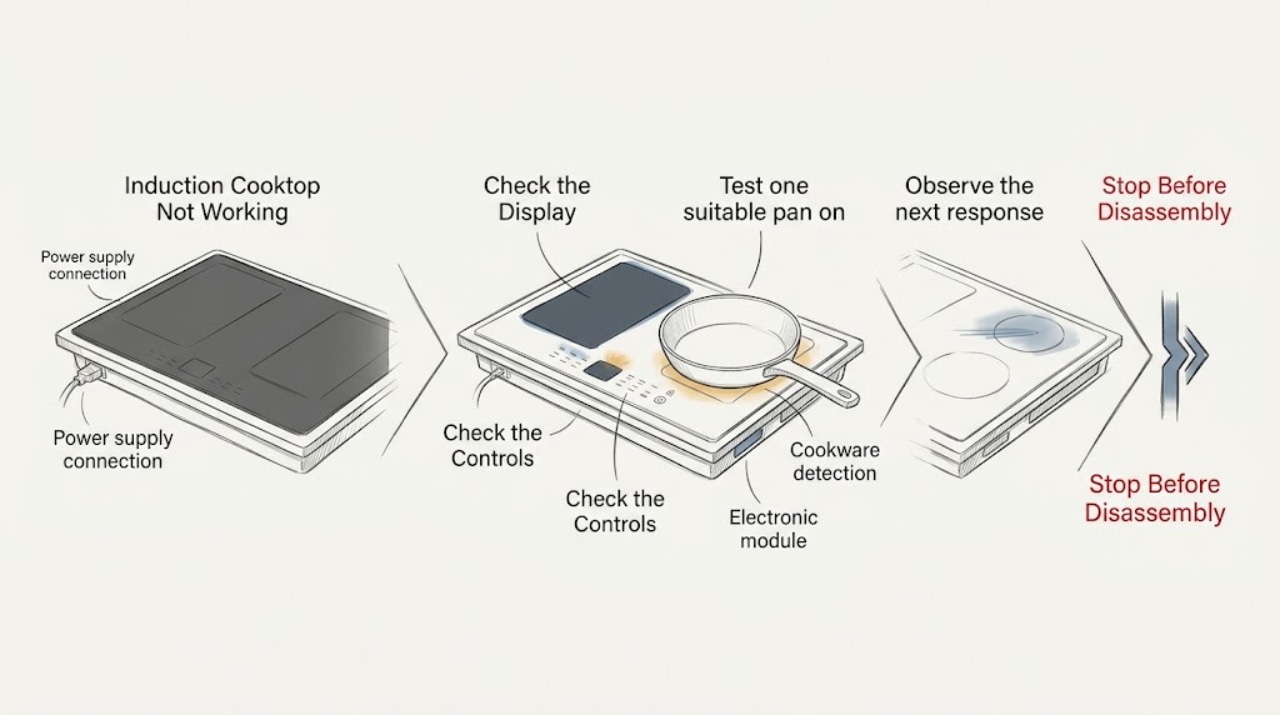
First separate a completely dead cooktop from a zone that is powered but does not detect cookware. If nothing operates, KitchenAid directs you to check the household fuse or circuit breaker and the installation wiring; continuing trouble needs an electrician or service. If the display works, remove objects or liquid from the touch-control area, confirm the control lock is off, and use a suitable magnetic pan centered on the selected zone. A flashing indicator can mean the pan is unsuitable, too small, off-center, hot, or the controls are set incorrectly; an overheat indication calls for cooling before reuse. Stop for cracked glass, smoke, sparking, a hot connection, repeated breaker trips, or any damaged wiring, and never open the cooktop. [Source: kitchenaid-induction-nothing; kitchenaid-induction-flashing; kitchenaid-induction-hot; kitchenaid-cooktop-guide]
Work through in order
Diagnostic checks
Use only checks that match the exact appliance or system and its official guide.
-
Classify dead controls, a dead zone, or pan detection
With the surface clear and no hands near hot cookware, observe whether the main display responds, whether one or all zones are affected, whether a zone shows a flashing symbol, and whether the control lock or residual-heat indicator is visible. Do not touch a surface that may still be hot.
Expected result: Nothing operates, the main display works but one zone does not, a pan indicator flashes, the controls are locked, or an overheat/error indication appears.
Next step: Follow the matching power, control-surface, lock, cookware, cooling, or service branch rather than repeatedly activating the zone.
Why this matters
Why: No operation points toward power, wiring, or an electronic fault; one-zone or pan-indicator behavior points toward cookware, positioning, controls, or zone-specific diagnosis; a hot-surface or error indication changes the safe next step.
-
Clear and dry the touch-control area
Turn all cooktop controls OFF and, only when the surface is safe to touch, remove utensils or objects from the control area and wipe away liquid, grease, or debris with the model-approved method. Do not pour cleaner into controls or operate a wet touch panel.
Expected result: The controls respond after the surface is clear and dry, a warning or flashing indicator remains, or the panel stays unresponsive.
Next step: Continue to the control-lock and cookware checks if the panel responds. If it remains unresponsive or the indicator returns, stop using the cooktop and arrange qualified service.
Why this matters
Why: KitchenAid identifies objects, liquids, or soil pressing on the control area as a reason for an indicator or error. A clean, dry surface that remains unresponsive needs a control or service assessment.
-
Test one suitable pan on one zone
Use one clean, dry pan that the exact model manual identifies as induction-compatible; a magnet can help confirm a magnetic base. Center it on the selected cooking area, select that zone, and watch the display without leaving an empty pan heating.
Expected result: The pan is detected and the zone heats, a pan symbol or selected level flashes, the pan is off-center or too small, or no suitable pan is detected.
Next step: Try one correctly sized, centered pan only. If the zone still does not detect it, stop switching pans and request service for the zone or control system.
Why this matters
Why: KitchenAid explains that induction needs suitable magnetic cookware and that pan size, material, and positioning affect detection; a zone can switch off when cookware is removed. A suitable centered pan that is not detected points away from ordinary cookware mismatch.
-
Check the control lock and selected setting
Confirm that the control-lock indicator is not active and that a cooking area and a heat level have both been selected as shown by the exact owner's manual. Do not defeat the lock, hold a key indefinitely, or use a setting that the model does not provide.
Expected result: The lock indicator clears and the zone operates, the display flashes because a pan or setting is not accepted, or the controls remain locked or unresponsive.
Next step: Use the model manual's normal unlock and zone-selection sequence once. If the panel remains locked or the zone will not accept a valid selection, keep the cooktop off and arrange service.
Why this matters
Why: KitchenAid's guide documents a control-lock state and notes that controls or cookware may be set incorrectly when an indicator flashes. A lock or control state that cannot be cleared through the normal manual procedure needs service.
-
Let an overheated zone cool before another check
If an overheat indication appears or the surface and cookware are unusually hot, turn the zone OFF, move the pan only when safe, and allow the cooktop to cool fully. Do not test with an empty pan, cover the controls, or place hands on a surface marked hot.
Expected result: The indication clears after cooling and a suitable pan works, it returns during ordinary cooking, or the cooktop remains unavailable after cooling.
Next step: Perform one supervised test with food or liquid in the correct pan only after the manual permits it. If the indication returns or operation does not recover, stop and request service.
Why this matters
Why: KitchenAid identifies an over-temperature condition and an empty pan as causes of an overheat indication. A returning indication during normal use or a cooktop that remains unavailable after cooling requires diagnosis rather than repeated heating.
-
Check the household supply and arrange service
If nothing operates, observe the accessible household fuse or circuit-breaker state and whether other kitchen power is affected. Do not open the cooktop or wiring, change a breaker rating, or repeat a reset if it trips again. Record any displayed code, affected zone, pan used, and surface temperature symptom for service.
Expected result: A fuse or breaker is tripped, power is absent more broadly, the breaker trips again, the cooktop is the only affected appliance, or the power appears normal but the cooktop remains dead.
Next step: Leave the cooktop off and contact a qualified electrician or KitchenAid service. For smoke, sparking, a hot connection, damaged wiring, or cracked glass, isolate the area from a safe location and use the appropriate emergency service channel.
Why this matters
Why: KitchenAid links total non-operation to wiring, a blown fuse, or a tripped breaker and directs electrician or service escalation when the problem continues. A repeat trip or appliance-specific failure can indicate an electrical or internal module fault.
Use your observations
Decision map
Find the observation that best matches what you see, then follow the next safe action.
-
PATH 01Safety boundary
What you see
Nothing on the KitchenAid induction cooktop operates.
Do this next
Check the accessible fuse or circuit-breaker indication and wider outage once. If power is present but the cooktop remains dead, arrange qualified electrician or service diagnosis.
Why this path and its safety boundary
Safety stop: Continue with control-surface, pan-detection, lock, and heat checks.
-
PATH 02Safety boundary
What you see
The touch panel is lit but a control flashes or will not respond.
Do this next
Clear and dry the control area, confirm the lock is off, and use the exact manual's normal setting sequence. Persistent flashing needs service.
Why this path and its safety boundary
Safety stop: Continue with suitable-pan detection.
-
PATH 03Safety boundary
What you see
A suitable magnetic pan is centered but the selected zone still does not detect it.
Do this next
Stop switching cookware and arrange service for the zone or control system.
Why this path and its safety boundary
Safety stop: Use one correctly sized, centered pan and monitor normal heating.
-
PATH 04Safety boundary
What you see
An overheat indication appears or the pan was empty.
Do this next
Turn the zone off, remove the pan only when safe, allow the cooktop to cool, and perform one manual-approved check with food or liquid.
Why this path and its safety boundary
Safety stop: Continue with power, lock, and zone-specific diagnosis.
-
PATH 05Safety boundary
What you see
Smoke, sparking, hot wiring, a repeated breaker trip, cracked glass, or a persistent fault is present.
Do this next
Stop immediately, isolate power only from a safe location, keep the cooktop out of service, and contact appropriate emergency, electrical, or KitchenAid service.
Why this path and its safety boundary
Safety stop: Monitor one normal cooking check after the applicable safe correction; escalate if the symptom returns.
Helpful context
Understand the symptom
Induction heat is created in compatible cookware, so a zone can appear not to work when the pan is not detected. A dark panel is a power path; a lit panel with a flashing indicator is usually a control, cookware, surface, or temperature clue. KitchenAid models vary, so use the exact owner's manual for symbols and controls.
The safe checks below stay on the cool or visibly safe glass, cookware, touch controls, and household supply indicators. Do not remove the glass, open the electrical box, test live voltage, bypass control lock or temperature protection, or work on the induction module or wiring.
A residual-heat indicator can remain after a zone is turned off, and an induction surface can stop heating when cookware is removed. Those behaviors are different from a cooktop that stays dark, repeatedly faults, or cannot detect a suitable pan.
Safety boundary
Stop conditions
- Stop immediately for smoke, sparking, a hot or scorched connection, damaged wiring, repeated breaker trips, cracked glass, burning odor, or an uncontrolled electrical symptom.
- Do not touch a marked hot surface, test live voltage, open the cooktop, remove the glass, change breaker or fuse ratings, or work on wiring or the induction module.
- Do not bypass control lock or temperature protection, heat an empty pan to test the zone, or operate a wet touch-control panel.
- Do not repeat resets or pan-swapping tests after a valid suitable pan is not detected; arrange qualified service for persistent or zone-specific failure.
When checks do not resolve it
Need a professional?
Request qualified KitchenAid service or an electrician when no zone operates with normal household power, a suitable centered pan is not detected, controls remain locked or flashing after the manual-approved check, an overheat indication returns during ordinary use, a breaker trips again, or a zone remains cold. Use the appropriate emergency electrical channel for smoke, sparking, hot wiring, burning odor, or cracked glass.
Have this ready
- Exact KitchenAid model and serial details
- Whether the main display and all zones are affected or only one zone
- Any flashing symbol, error code, control-lock indicator, or residual-heat indication
- Pan material, approximate size relative to the zone, and whether it was centered and detected
- Whether the surface was hot, an empty pan was used, or the fault followed a spill or cleaning
- Fuse or breaker state, any repeat trip, and smoke, sparking, heat, burning odor, cracked glass, or damaged wiring
Common questions
FAQ
Why is my KitchenAid induction cooktop on but not heating?
Use one suitable magnetic pan centered on the selected zone, confirm the control lock is off, and clear and dry the touch-control area. If the pan is not detected or the zone stays cold after one manual-approved check, arrange service.
Why is a pan symbol flashing on my KitchenAid induction cooktop?
The zone may not detect the pan because its material, size, or position is unsuitable. Center a compatible magnetic pan and select the zone and heat level; persistent flashing with a suitable pan needs service.
When should I stop using a KitchenAid induction cooktop?
Stop for smoke, sparking, burning odor, hot or damaged wiring, repeated breaker trips, cracked glass, or a persistent fault. Isolate power only from a safe location and use qualified electrical or KitchenAid service.
Read the exact guide
Official sources
- Indicator or Display Flashing - Electric and Induction CooktopKitchenAid · KitchenAid electric and induction cooktops; manufacturer guidance for pan detection, control surface objects or liquid, control settings, overheating behavior, reset, and service
- KitchenAid Cooktop Use Product GuideKitchenAid · KitchenAid induction cooktop product guide; manufacturer guidance for pan detection, cookware material and position, control lock, residual heat, and operation
- E2 - Induction CooktopKitchenAid · KitchenAid induction cooktops; manufacturer guidance for over-temperature indication, empty cookware, cooling, reset, and service
- Nothing Will Operate - Induction CooktopKitchenAid · KitchenAid induction cooktops; manufacturer guidance for total non-operation, wiring, fuses, circuit breakers, electrician, and service
Community feedback
Share a repair observation
Share a plain-text repair observation. Accepted observations are published automatically; this page may take a moment to update.