
On this page
Start here
Quick answer
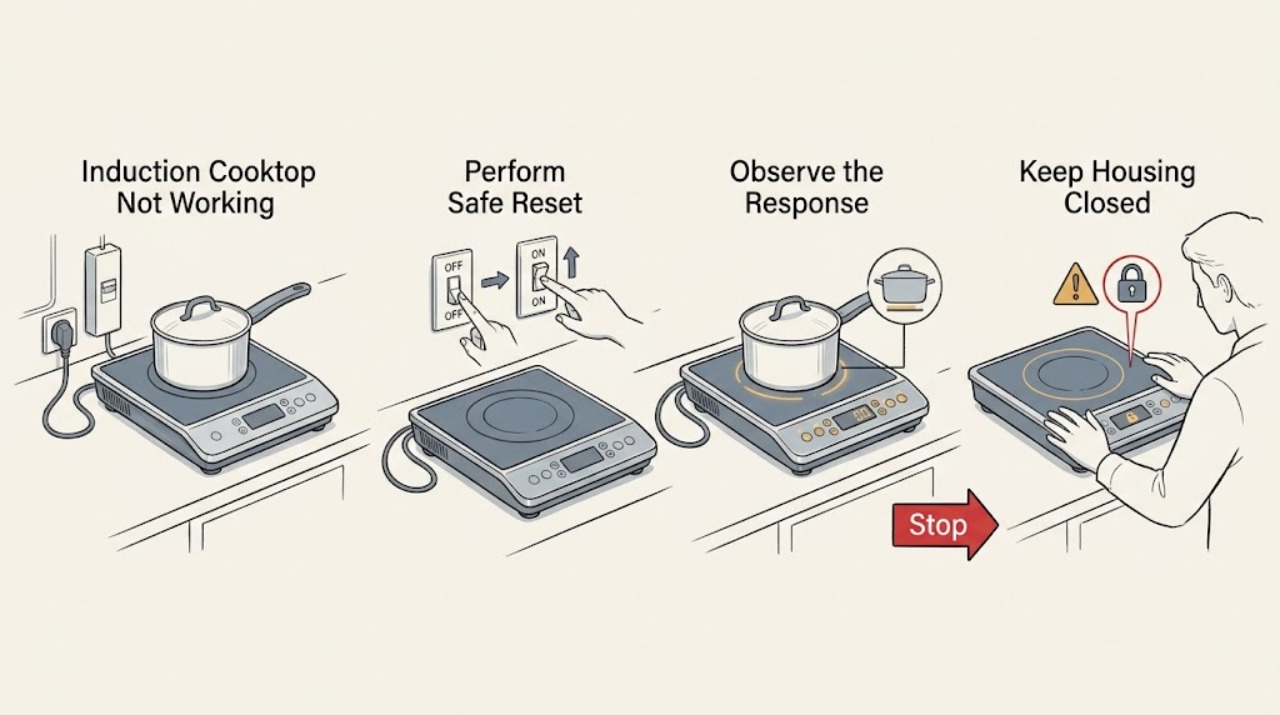
First decide whether the Frigidaire induction cooktop is completely blank, responds but will not start a zone, or heats one zone but not another. With no smoke, sparks, gas odor, burning smell, cracked glass, or water around the controls, check the accessible household supply, perform the manufacturer's simple 30-second power reset for a glass cooktop, and use a flat induction-compatible pan centered on the selected zone. Frigidaire says control functions vary by model, so use the Owner's Manual for the lock, display, and start sequence. If the display remains dead, all zones stay cold with a suitable pan, a breaker trips again, an error returns, or the glass or controls are damaged, stop and arrange qualified appliance service rather than opening the cooktop.
Work through in order
Diagnostic checks
Use only checks that match the exact appliance or system and its official guide.
-
Check 1
With every control set to off and the surface cool enough to approach safely, observe the cooktop from the front without removing anything. Check whether the display, touch keys, and any surface indicator respond; if safe and accessible, look at the household breaker or fuse serving the appliance. Do not open an electrical compartment or touch wiring.
Expected result: The display is completely blank; the display is lit but touch controls do not respond; the display responds normally; or the household breaker or fuse is open.
Next step: If the breaker opens again, the connection is uncertain, or the controls are wet, damaged, or intermittently activating, stop and arrange qualified electrical or appliance help. If the appliance is safely powered and the controls respond, continue to the model-specific control and pan checks.
Stop if: There is smoke, sparking, a burning smell, a hot or damaged connection, exposed wiring, or repeated breaker operation.
Why this matters
Why: A blank display or open supply can prevent every zone from starting, while a lit display with no touch response points more toward a locked, wet, or failed control interface. A normal display makes a zone-selection or cookware-detection check more useful, but it does not prove the heating circuit is healthy.
-
Check 2
If there is no hazard and the unit can be safely disconnected according to its installation, turn all surface controls off and remove power for 30 seconds, then restore power once. For a permanently connected model, use only the model's documented disconnect method; do not remove covers or improvise a connection change.
Expected result: The display and controls return to normal and a zone can start; the symptom is unchanged; or the breaker trips when power is restored.
Next step: If normal operation returns, run one supervised test with a suitable pan and stop if the symptom returns. If the cooktop remains unresponsive or the breaker trips, leave it off and arrange service.
Stop if: Power cannot be disconnected safely, the unit has visible damage or moisture, or power restoration causes smoke, noise, heat, or a repeated trip.
Why this matters
Why: A one-time reset can clear a transient control state, but it cannot prove that an internal component is good. An unchanged symptom or a returning trip indicates that further cycling is not a repair and may worsen an electrical fault.
-
Check 3
Read the display for a lock, child-lock, or other mode indication and compare the symbols with the Frigidaire Owner's Manual for the exact model. Cancel a lock or special mode only with the documented touch sequence; do not guess at a button combination or open the control area.
Expected result: A lock or special mode is shown; the display accepts some keys but not the zone command; or the display shows a normal ready state with no lock indication.
Next step: Exit the mode using the manual, then select one zone and start it once. If no lock is shown or the manual sequence does not restore response, stop changing settings and continue with the pan test or service branch.
Stop if: The touch surface is cracked, wet, swollen, unusually hot, or activating by itself.
Why this matters
Why: A locked or model-specific control state can make a working cooktop appear dead because the heating command has not been accepted. If the display is ready and the selected zone still will not start, cookware detection or a fault becomes more likely.
-
Check 4
Place one clean, dry, flat-bottomed pan known to be suitable for induction in the center of one marked cooking area. With the display in a normal ready state, select that zone and use the model's normal start or power-level control; keep hands and loose items away from the glass.
Expected result: The zone recognizes the pan and begins heating; the display indicates that a pan is missing or unsuitable; the pan is recognized but the surface stays cold; or a different zone behaves differently with the same pan.
Next step: If the pan is not recognized, try one other known suitable flat pan only once and re-center it; if it is still not recognized, stop using the zone and arrange service. If the pan is recognized but no heat occurs, do not increase testing or remove panels; use the all-zone or single-zone branch.
Stop if: The glass is cracked, shifts, becomes unusually hot outside the cooking area, or there is smoke, arcing, or an abnormal odor.
Why this matters
Why: Induction heating depends on the cookware being detected at the zone. A missing-pan indication or a result that changes with pan placement points first to cookware, centering, or the zone's detection path. Recognition without heat, or the same failure across zones with the same suitable pan, is not enough to identify a replaceable part.
-
Check 5
Using the same suitable pan and the same normal start sequence, compare one affected zone with one unaffected zone if the cooktop has more than one zone. Watch the element-on or hot-surface indication and stop the test after a brief supervised response; do not touch the glass to judge heat.
Expected result: No zone responds; every zone recognizes the pan but remains cold; one zone alone fails; or a hot-surface indication remains after the control is turned off.
Next step: Record which zones respond and any indicator or error exactly as shown. If the result is not corrected by the external checks, leave the cooktop out of service and arrange model-specific appliance diagnosis rather than swapping a part based on the symptom alone.
Stop if: The indicator behaves erratically, the surface remains hot unexpectedly, an error returns, or the appliance cannot be turned off normally.
Why this matters
Why: A whole-cooktop failure after a valid display and pan test makes supply or shared control and power electronics more important. A single-zone difference makes that zone's control, sensor, or power path more relevant. A hot-surface light can remain until the glass cools, so it is not by itself proof that a new heat cycle is running.
-
Check 6
Stop self-troubleshooting and prepare an appliance-service handoff if the cooktop is still not working after the safe external checks. Provide the exact model, whether the display is blank or active, lock or error symbols, affected zones, pan-recognition result, recent installation or electrical work, and whether the reset changed anything.
Expected result: The symptom persists, returns intermittently, affects all zones, affects one zone, or is accompanied by a damaged surface, abnormal sound, odor, heat, or electrical trip.
Next step: Keep power off when the fault is persistent or hazardous and have a qualified appliance technician diagnose the model. If the issue began immediately after installation, include that fact because Frigidaire identifies recent-installation no-heating cases as potentially related to voltage or wiring.
Stop if: Any internal access, live measurement, safety-control bypass, or glass/control replacement would be required.
Why this matters
Why: The remaining possibilities include the supply connection, user interface, sensing, or internal induction power electronics. These cannot be safely distinguished from the outside and a no-working symptom does not establish which component should be replaced.
Use your observations
Decision map
Find the observation that best matches what you see, then follow the next safe action.
-
PATH 01Next step
What you see
Smoke, sparks, burning odor, a hot or damaged connection, exposed wiring, water around the controls, or a breaker that opens again is present.
Do this next
Stop using the cooktop, do not reset the breaker repeatedly, keep clear of damaged parts, and arrange qualified electrical or appliance service.
Why this path and its safety boundary
Why it matters: The problem may involve an electrical or moisture hazard rather than a user setting.
-
PATH 02Next step
What you see
The display remains blank after the safe supply check and one 30-second reset.
Do this next
Leave the appliance off and arrange model-specific service; do not remove the control panel or test the wiring.
Why this path and its safety boundary
Why it matters: A supply, connection, or shared control fault is more likely than a pan-specific problem.
-
PATH 03Next step
What you see
A lock or special mode is shown, or the display accepts no zone command while the manual identifies a lock state.
Do this next
Use the exact Owner's Manual sequence once, then perform one normal zone start. If the control still will not respond, use the service branch.
Why this path and its safety boundary
Why it matters: The cooktop may be waiting for the documented unlock or mode-exit sequence.
-
PATH 04Next step
What you see
A suitable pan is not recognized, or the result changes with centering or with a different known suitable pan.
Do this next
Re-center one suitable pan and try one alternative once. If detection still fails, stop using that zone and arrange service rather than modifying the pan or cooktop.
Why this path and its safety boundary
Why it matters: Cookware selection, placement, or a zone-detection problem should be separated before any internal diagnosis.
-
PATH 05Next step
What you see
The display and pan work on one zone but one other zone remains cold or does not recognize the same pan.
Do this next
Record the affected zone and indicator behavior, keep the failed zone out of use, and arrange appliance diagnosis.
Why this path and its safety boundary
Why it matters: A zone-specific control, sensor, or power path is more relevant than a whole-appliance supply failure, but the failing component cannot be named from this comparison.
-
PATH 06Next step
What you see
All zones remain cold with a normal display and a suitable pan after the reset and correct start sequence.
Do this next
Stop testing and arrange qualified service; do not open the cooktop or order a component based only on the symptom.
Why this path and its safety boundary
Why it matters: A shared supply, control, or induction power fault is more likely than a single pan issue.
-
PATH 07Next step
What you see
The glass is cracked, loose, chipped through the cooking surface, or water has entered a crack or control area.
Do this next
Stop using the cooktop and arrange qualified appliance service; do not tape, seal, remove, or replace the glass yourself.
Why this path and its safety boundary
Why it matters: Further operation can create a cut, heat, or electrical hazard and the surface is not a safe DIY repair boundary.
Helpful context
Understand the symptom
Separate a blank display from a no-heat zone
“Not working” can describe three different states: no display or touch response, a display that accepts input but will not energize a zone, or a cooktop where one zone fails while another works. That distinction changes the next check. A blank display points first to supply or controls; a single-zone failure makes pan placement, zone controls, or that zone's hardware more relevant; all zones staying cold after a valid start needs service if the external checks do not restore operation. Frigidaire identifies its induction material as applying to induction cooktops and notes that display and burner behavior is model-specific.
Keep the checks external
Do not remove the glass, control panel, terminal cover, or wiring, and do not probe live parts or bypass a safety control. Do not keep testing after smoke, sparking, a burning smell, repeated breaker operation, a cracked or loose glass surface, or water has reached the controls. A cooktop may retain heat after a cycle; wait for the model's hot-surface indication to clear and keep hands away from the surface while diagnosing.
Record the result before arranging service
Write down whether the display is blank, whether any lock or error appears, which zones respond, the pan used, whether the 30-second reset changed the symptom, and whether the unit was recently installed or moved. This is more useful than guessing at an induction module or control-board replacement because the same symptom can come from supply, user-interface state, cookware detection, or internal power electronics.
Safety boundary
Stop conditions
- Smoke, sparks, burning odor, or an abnormal electrical sound
- A breaker opens again or the connection is hot, damaged, or exposed
- Water has reached the controls or a crack in the glass
- The glass is cracked, loose, chipped through, or shifts
- The display or zone controls activate erratically or the cooktop cannot be turned off
- An error returns after a single documented reset
- Diagnosis would require removing panels, probing live parts, or bypassing a safety control
Only after diagnosis
Potential parts
- induction power module
Consider this only after a qualified diagnosis confirms an internal power-electronics fault; an all-zone or no-heat symptom alone does not identify this part.
Confirm the exact model, revision, electrical requirements, and manufacturer fit information before any part is selected. - touch control panel
Consider this only when diagnosis confirms a failed or damaged user-interface assembly after supply and lock-state checks.
Use the exact model documentation and qualified service guidance; do not open a wet, cracked, or energized control area. - surface temperature sensor
Consider this only if a technician's testing identifies a sensor fault or an associated zone-control error.
Fitment and calibration are model-specific and must be confirmed before ordering or installing.
When checks do not resolve it
Need a professional?
Arrange service for a blank display, repeated breaker operation, recurring error, no heat on all zones with a recognized pan, a single zone that stays cold, damaged glass or controls, abnormal noise or odor, or any need to open the appliance.
Have this ready
- Provide the exact model, display and error behavior, lock status, affected zones, pan-recognition result, reset result, installation history, and photographs of any visible damage.
Common questions
FAQ
Why is my Frigidaire induction cooktop on but not heating?
A lit display does not prove that a zone has accepted a valid start command or detected suitable cookware. Check the model's lock state and start sequence, center one suitable flat pan, and compare one zone with another. If the pan is recognized but all zones stay cold, arrange service instead of opening the cooktop.
Can I reset a Frigidaire induction cooktop that is not working?
Frigidaire's glass-cooktop guidance describes removing power for 30 seconds and restoring it. Do this only once when there is no hazard and the model can be safely disconnected. A repeated breaker trip, unchanged symptom, smoke, or damaged glass means stop and arrange service.
Why does one induction zone work while another does not?
Use the same known suitable pan and normal start sequence on both zones, then record which zone recognizes it and whether any indicator or error appears. A consistent one-zone difference supports a zone-specific control, sensor, or power-path diagnosis, but it does not identify a replacement part without model-specific testing.
Should I keep resetting the breaker if my cooktop stops working?
No. Look at the accessible breaker or fuse only when safe, and do not repeatedly reset one that opens again. Repeated operation, a hot connection, smoke, odor, or exposed wiring is a stop condition for qualified electrical or appliance help.
Read the exact guide
Official sources
- Ranges - What do the indicator lights on my range mean?Frigidaire · Applies to Frigidaire range surface indicators and is used here only to explain why an element-on or hot-surface light is an observation rather than proof of a specific internal failure.
- How do I use my display or controls?Frigidaire · Applies to Frigidaire ranges and cooktops; supports treating lock, timer, and control behavior as model-dependent and following the Owner's Manual.
- Ranges - No HeatingFrigidaire · The page's Glass cooktop section supports a one-time 30-second reset, notes flat cookware, and directs recent-installation no-heating cases toward voltage or wiring attention; apply it to an induction cooktop only for these external glass-cooktop checks.
- How To Use Burners & Display On Your Induction CooktopFrigidaire · Directly applies to Frigidaire induction cooktops and supports using the model's burner/display behavior when diagnosing a no-working symptom.
Community feedback
Share a repair observation
Share a plain-text repair observation. Accepted observations are published automatically; this page may take a moment to update.