
On this page
Start here
Quick answer
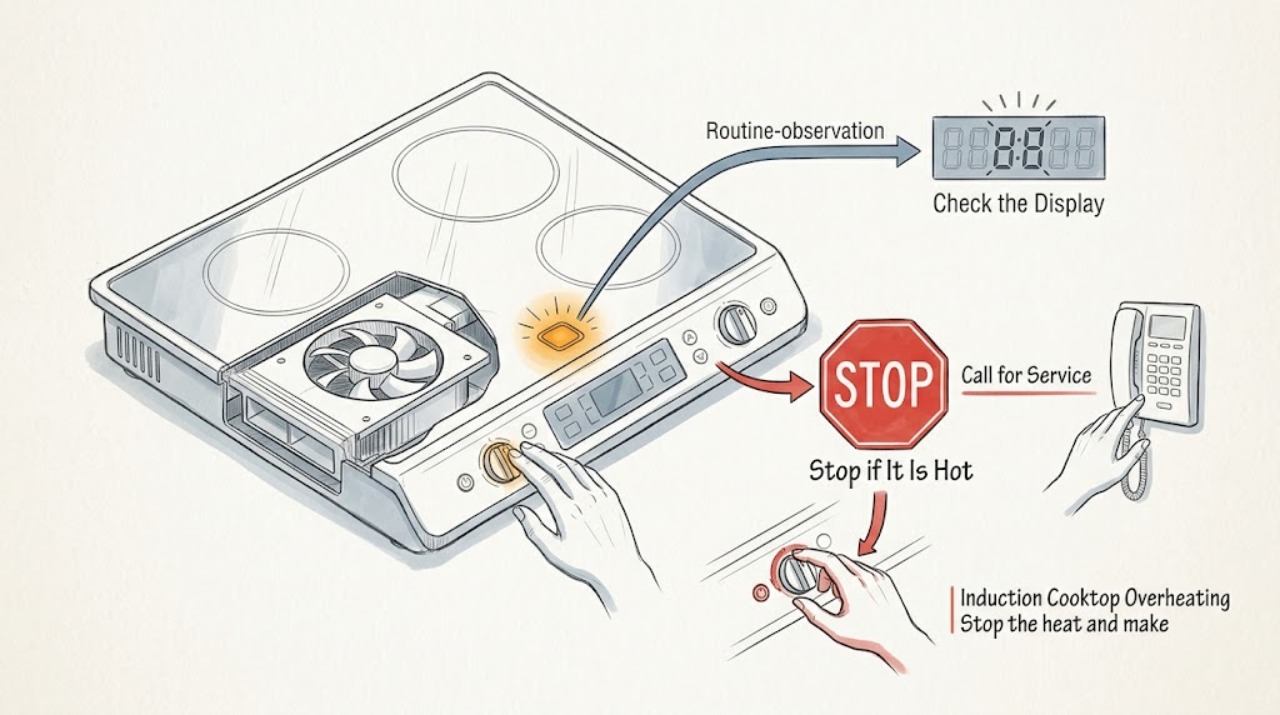
If a Bosch induction cooktop is overheating, stop or lower the active cooking zone, move hot cookware away from the control area only if it is safe to do so, and let the appliance cool. Check whether the control panel is wet or covered, whether cookware is sitting near the controls, whether high or boost power was used for a long time, and whether visible ventilation openings are blocked. A cooling fan that continues after shutdown can be normal while the appliance is still hot. Do not touch a hot glass surface, lift a built-in cooktop, remove covers, work on wiring, or repeatedly cycle the breaker. If the cooktop remains abnormally hot, shuts off again after cooling, shows a recurring error, has a cracked surface, or has smoke, odor, sparking, or damaged wiring, stop using it and arrange Bosch or qualified appliance service.
Work through in order
Diagnostic checks
Use only checks that match the exact appliance or system and its official guide.
-
Stop the heat and make the area safe
Use the normal touch control to switch off the active cooking zone or lower it to a safe setting. If cookware is hot, leave it in place or move it away from the control panel only with appropriate heat protection and only when the path is clear; do not touch the glass or control area.
Expected result: The zone stops heating, the control does not respond, the surface remains visibly or intensely hot, or cookware is resting over or next to the controls.
Next step: Keep the cooktop clear and allow it to cool without testing another zone. Record which zone, cookware position, and power setting were involved.
Stop if: Stop immediately for smoke, burning odor, sparking, visible damage, melting material, or a hot cord or plug; isolate use only through a safe, accessible control and arrange urgent service.
Why this matters
Why: A normal stop followed by gradual cooling is consistent with heat retention or a protection cycle. A nonresponsive control, persistent abnormal heat, or cookware heating the control area requires the appliance to remain out of use until the cause is assessed.
-
Check the surface and control panel when cool
After the surface has cooled enough to touch safely, look for moisture, food residue, an object, or cookware covering the touch controls. Wipe the control area with a suitable soft cloth as the model manual directs; do not use a sharp tool or abrasive pad.
Expected result: The controls were wet or covered, the panel is dry and clear, or the displays continue flashing or ignoring input after the area is clear.
Next step: Clear only the visible surface, then try the normal control once. If the fault remains or returns with a dry panel, record the display and arrange model-specific service.
Stop if: Stop if the glass is cracked, the panel is delaminating, liquid has entered a gap, or cleaning would require lifting the appliance or removing a cover.
Why this matters
Why: Bosch manuals identify moisture or objects on the controls as a cause of flashing displays or input problems. A clear, dry panel with continuing faults points beyond a simple surface obstruction.
-
Check for cookware near the controls
When the cooktop is cool, inspect the position and size of the cookware used during the event. Keep a hot pan, lid, utensil, or other object away from the touch controls and do not cover the control area during a later normal use.
Expected result: Hot cookware was near the control panel, cookware covered a touch area, or the controls were clear and the overheating occurred without that condition.
Next step: Let the appliance cool fully and, only if no alert or damage remains, use a suitable pan positioned away from the controls at a lower setting. Stop if the condition repeats.
Stop if: Do not touch a hot pan, drag cookware across hot glass, or continue cooking when an alert, abnormal heat, or surface damage remains.
Why this matters
Why: Bosch identifies hot cookware near the control panel as a condition that can put electronics at risk and switch a zone off. If the controls were clear, look next at power duration, airflow, and any displayed fault rather than assuming cookware was the cause.
-
Review the power setting and cooking duration
Record whether boost or maximum power was used, how long the zone ran continuously, how many zones were active, and whether the overheat occurred during a long cooking task. Do not reproduce the event at maximum power.
Expected result: The event followed extended high power, occurred during ordinary medium power, or happened with no active cooking zone.
Next step: After complete cooling, use lower or medium power for a normal task only if the appliance has no alert or damage. If it overheats again, stop using it and provide the timeline to service.
Stop if: Do not keep cycling the appliance to reproduce overheating, and stop all use if an overheat occurs with no cooking load.
Why this matters
Why: Bosch notes that extended high heat can overwork the appliance and recommends lower settings for longer tasks. Overheating at ordinary use or while idle is not explained by cooking intensity alone and deserves service review.
-
Inspect visible ventilation clearance
From outside the cabinet and without lifting or opening the cooktop, look for visible items blocking the appliance's designed airflow path or a drawer or liner pressed against a marked clearance area. Remove only a loose, reachable item that can be moved without touching the appliance or wiring.
Expected result: The visible airflow path is blocked, clearance is unobstructed, or the installation layout cannot be seen safely.
Next step: Keep the visible airflow area clear and allow full cooling. If the fault returns or clearance cannot be confirmed, arrange Bosch or qualified appliance service.
Stop if: Do not remove trim, disconnect the cooktop, enter the cabinet near wiring, or change the installation opening as a homeowner test.
Why this matters
Why: Blocked ventilation can contribute to overheating, while clear visible space does not rule out an internal fan, installation, or electronics problem. A built-in clearance issue needs model and installation guidance rather than guesswork.
-
Record the exact display or indicator
After the cooktop is cool, read the complete display, light, or error message and photograph it if possible. Match it only to the manual for the exact model; do not substitute a code meaning from another Bosch cooktop.
Expected result: The alert clears after cooling, the same alert returns, a different code appears, or there is no alert despite repeated overheating.
Next step: Save the exact code, model number, and event sequence for Bosch or qualified appliance service. Follow a manual's ordinary cool-down or single restart instruction only once and only when no hazard is present.
Stop if: Stop if the manual calls for electrical access, a fault returns after the permitted step, or the display remains in a fault state.
Why this matters
Why: Bosch manuals distinguish an overheated zone, overheated electronics, hot cookware near controls, incorrect supply voltage, and other faults. A recurring or unlisted alert is a service clue, not permission to open the appliance.
-
Check cooling behavior without touching hot parts
After switching the cooktop off, observe from a safe position whether the fan runs and whether the residual-heat indicator remains lit. Do not touch the cooking zones to decide whether they are safe.
Expected result: The fan runs and later stops as the appliance cools, the fan never runs when an overheat alert is present, the indicator remains lit, or the appliance becomes hot again while idle.
Next step: Leave the cooktop off until fully cool. If the fan or indicators behave unexpectedly, record the timing and keep the appliance out of use pending professional diagnosis.
Stop if: Do not reach under the cooktop, remove covers, or continue using it while cooling behavior is abnormal or a safety warning remains.
Why this matters
Why: Bosch states that the fan may continue after shutdown while the measured temperature is still high, and a residual-heat indicator means the zone should not be touched. No cooling response with a recurring overheat, or heat returning while idle, warrants service.
Use your observations
Decision map
Find the observation that best matches what you see, then follow the next safe action.
-
PATH 01Safety boundary
What you see
The overheating followed boost or maximum power for an extended cooking period and the appliance cools normally.
Do this next
Allow complete cooling, then use a lower setting for a normal task and keep hot cookware away from the controls. Stop if the symptom returns.
Why this path and its safety boundary
Safety stop: Do not reproduce the event at maximum power or ignore an alert that returns after cooling.
-
PATH 02Safety boundary
What you see
Hot cookware or an object was on or near the control panel.
Do this next
Remove the condition only when safe, let the electronics cool, and keep the control area clear during later use.
Why this path and its safety boundary
Safety stop: Do not touch hot cookware or continue cooking while the control panel remains hot, unresponsive, or damaged.
-
PATH 03Safety boundary
What you see
The controls were wet or covered and the warning clears after the surface is dry and clear.
Do this next
Use the cooktop only after the surface is dry and the normal controls respond. Monitor for recurrence without changing wiring or opening the appliance.
Why this path and its safety boundary
Safety stop: Stop if displays continue flashing, input remains unreliable, or liquid entered a gap.
-
PATH 04Safety boundary
What you see
The cooktop shuts a zone or all zones off, but the same overheat alert returns after complete cooling.
Do this next
Keep the appliance out of use and arrange Bosch or qualified appliance service with the exact model, alert, zone, cookware, and timing.
Why this path and its safety boundary
Safety stop: Do not repeatedly restart, cycle the breaker, or remove the cooktop to inspect electronics.
-
PATH 05Safety boundary
What you see
Visible airflow is blocked or the built-in installation clearance cannot be confirmed.
Do this next
Clear only a loose external obstruction if safe; otherwise stop using the cooktop and have the installation and ventilation checked by a qualified professional.
Why this path and its safety boundary
Safety stop: Do not alter cabinetry, remove trim, or access wiring to create airflow as a test.
-
PATH 06Safety boundary
What you see
The cooktop is hot or the fan runs while the appliance is cooling, with no recurring alert or damage.
Do this next
Treat the fan and residual heat as a cool-down state, leave the surface untouched until the indicator clears, and reassess only after it is cool.
Why this path and its safety boundary
Safety stop: Do not touch the zone or cover ventilation openings while the residual-heat indicator is lit.
-
PATH 07Safety boundary
What you see
There is a cracked glass surface, smoke, burning odor, sparking, melted material, hot wiring, or abnormal heat while idle.
Do this next
Stop using the cooktop, keep people away from the appliance, and arrange urgent qualified appliance or electrical service; follow local emergency guidance for fire or smoke.
Why this path and its safety boundary
Safety stop: Do not touch the damaged surface, open the appliance, or attempt an internal electrical repair.
Helpful context
Understand the symptom
Overheating is not one single symptom
Bosch induction cooktops can protect the cooking zone or electronics by reducing heat or switching a zone off. The trigger may be extended high power, cookware near the control panel, blocked ventilation, a wet or covered control panel, or a fault that needs service. A warm surface and a fan that runs after shutdown can be part of normal cooling; an appliance that repeatedly shuts down after it has cooled is a different result.
Keep the appliance closed
The useful homeowner checks are limited to normal controls, visible cookware position, a dry control surface, visible airflow clearance, and the exact display message. Do not lift a built-in cooktop, remove a cover, probe the underside, or work on the supply circuit. Bosch manuals are model-specific, so use the manual for the exact E-Nr. before interpreting a code or attempting any restart.
Protect the glass and controls
Do not touch a hot cooking surface or move heavy cookware across it. Keep cookware handles and hot vessels away from the control panel when possible, and do not cover visible ventilation openings. If the glass is cracked, stop using the cooktop rather than testing whether the crack affects heating.
When checks do not resolve it
Need a professional?
Arrange Bosch or qualified appliance service when overheating returns after complete cooling, occurs during ordinary use or while idle, produces a recurring or unlisted alert, leaves a zone or control panel unresponsive, or involves unclear ventilation, a cracked surface, or suspected electrical damage. Seek urgent local help for smoke, fire, sparking, burning odor, or a hot or damaged supply connection.
Have this ready
- Provide the exact Bosch model number, display or error message, affected zone, power setting and duration, cookware position and type if known, whether controls were wet or covered, ventilation observations, fan and residual-heat behavior, and photos taken only after the appliance is safe and cool.
Common questions
FAQ
Why does my Bosch induction cooktop get hot and shut off?
Bosch identifies prolonged high power, blocked ventilation, hot cookware near the controls, and cooking-zone or electronics protection as possible causes. Let it cool, record the display and conditions, and arrange service if the shutdown returns.
Is it normal for the Bosch cooktop fan to run after I turn it off?
It can be normal while the appliance is still hot. Bosch states that the cooling fan may continue after shutdown until the measured temperature is sufficiently low. Do not touch a zone while its residual-heat indicator is lit.
Can cookware make an induction cooktop overheat?
Hot cookware near the control panel can put the electronics at risk, and extended boost or maximum power can contribute to overheating. Keep hot cookware away from the controls, use lower settings for long tasks, and do not repeat a high-power test.
What should I do if the overheat message returns after cooling?
Stop using the cooktop and save the exact alert, affected zone, power setting, cookware position, and timing. A recurring alert after cooling needs Bosch or qualified appliance service; do not open the unit or keep cycling the breaker.
Is a cracked Bosch induction cooktop safe to keep using?
No. Stop using a cooktop with cracked glass and arrange qualified service. Do not touch the damaged area, lift the built-in appliance, or test whether the crack changes heating.
Read the exact guide
Official sources
- SIR_Induction_IU_en-us_fr-caBosch Home Appliances · Official Bosch model-family manual used for the distinctions among overheated electronics, overheated cooking zones, hot cookware near controls, error-code recording, and model-specific service. Confirm the exact manual for the appliance before applying a code or restart step.
- Use and Care Manual NITP660SUC, NITP660UC, Bosch, Manuel d'utilisation NITP660SUC, NITP660UCBosch Home Appliances · Official Bosch use-and-care manual used for the general explanation that a cooling fan can continue after shutdown, that residual-heat indicators mean the zone remains hot, and that wet or covered controls need attention. The model manual must be checked for a specific appliance.
- Bosch Induction Cooktop TroubleshootingBosch Home Appliances · Official Bosch support page used for the topic-specific overheating causes and safe user-level steps. It is a general support page; exact behavior and alerts still depend on the cooktop model.
Community feedback
Share a repair observation
Share a plain-text repair observation. Accepted observations are published automatically; this page may take a moment to update.