
On this page
Start here
Quick answer
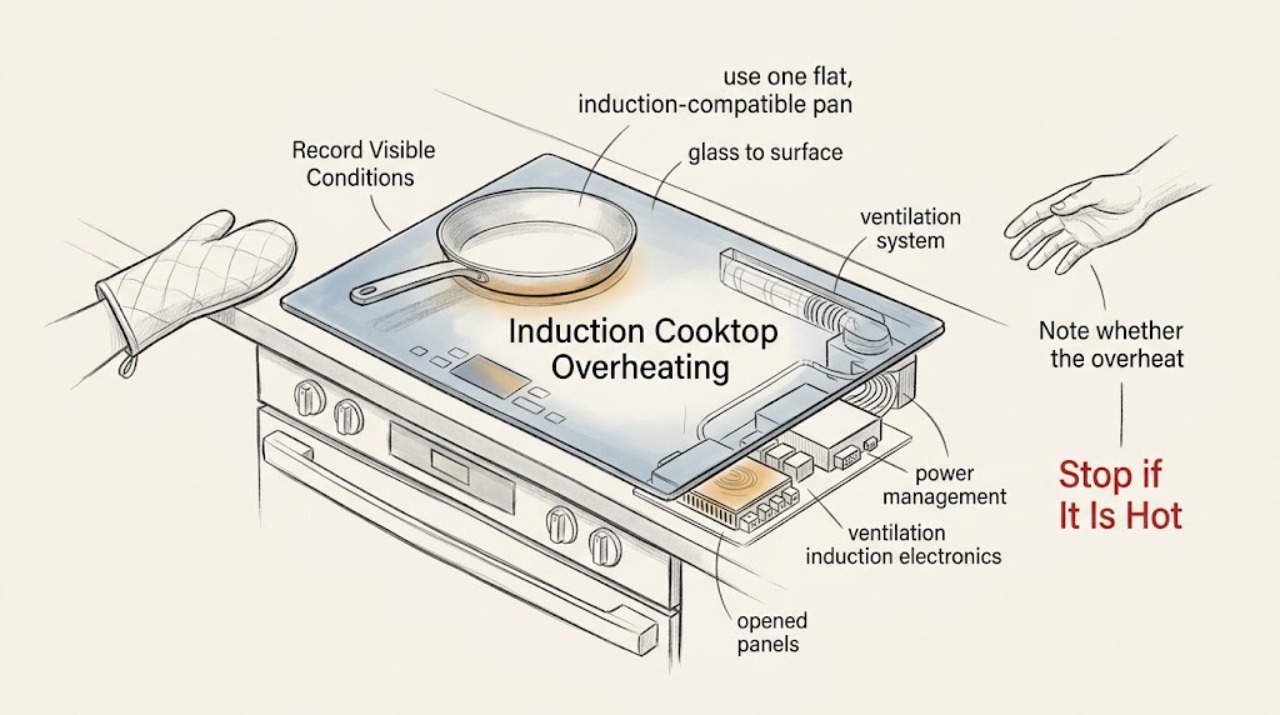
First separate ordinary heat from the pan or glass from an electronic overheat event. A hot surface after cooking can be residual heat, while a warning, automatic shutdown, reduced power, hot control area, repeated shutdown, smoke, or a burning odor needs attention. Remove cookware from the control area, turn the affected zone Off, allow the cooktop to cool, and check only the model manual's ventilation clearance. Use a flat, compatible pan of suitable size, avoid empty cookware, keep the touch panel dry, and reduce combined zone demand if the model limits output. If the glass is cracked, smoke or arcing appears, the breaker trips, or the cooktop overheats again after cooling, stop using it and arrange qualified appliance or electrical service.
Work through in order
Diagnostic checks
Use only checks that match the exact appliance or system and its official guide.
-
Check 1
Record whether the heat is limited to the pan and nearby glass after cooking, or whether the control panel, cabinet area, power connection, or a whole zone becomes unusually hot; also record any warning, fan behavior, shutdown, smoke, or odor.
Expected result: Only the pan or nearby glass is hot and the cooktop behaves normally, or the controls/electronics are hot, a warning appears, the zone shuts down, or the symptom returns.
Next step: If the event is abnormal, turn the cooktop Off and let it cool before any external check. Use the matching branch below and do not keep restarting the zone.
Stop if: Stop immediately for smoke, burning odor, visible arcing, cracked glass, a hot connection, or uncontrolled heat.
Why this matters
Why: Heat transferred from cookware can be expected, while control-area heat, repeated protection, or an odor suggests an abnormal condition that should not be tested by repeated cooking.
-
Check 2
With the cooktop cool, use one flat, induction-compatible pan containing food or liquid, center it on the selected zone, and avoid a pan that is empty, warped, too small, or partly outside the marked area.
Expected result: The zone heats normally with the suitable pan, the pan is not detected, the pan is empty or poorly matched, or the same zone overheats with a suitable load.
Next step: Use only the pan and zone combination permitted by the exact manual. If a suitable pan still causes an overheat warning or the zone shuts down, stop using that zone and arrange service.
Stop if: Stop for a pan bonded to the glass, melted cookware, smoke, a burning odor, uncontrolled heating, or cracked glass.
Why this matters
Why: Cookware material, size, contact, and placement affect induction detection and heat transfer; an empty pan can heat rapidly and make a protection event more likely.
-
Check 3
Note whether the overheat or reduced-output event occurs only when several zones, a linked zone, or a boost function is active; then compare the combination with the model manual's power-management guidance.
Expected result: One zone works alone but output drops or heat builds when several zones share demand, or one zone overheats even when all other zones are Off.
Next step: Use only the zone combinations and power levels permitted by the manual. If the event occurs with one zone alone, stop using that zone and arrange qualified service.
Stop if: Stop for a breaker trip, smoke, arcing, a hot electrical connection, or a zone that keeps heating after its control is Off.
Why this matters
Why: Some cooktops limit combined output to stay within their configured capacity; a single-zone event with no sharing is more suggestive of a zone, sensor, ventilation, or electronics issue.
-
Check 4
After the cooktop is cool and Off, inspect only the accessible ventilation openings and the clearance around the installation described by the exact manual; keep objects, cookware, and stored items away from those openings.
Expected result: An opening is blocked, the installation clearance is restricted, a fan is unusually loud or never settles, or the ventilation path appears clear.
Next step: Restore only the manual's required external clearance. If the cooktop overheats again with clear ventilation, stop using it and arrange service.
Stop if: Stop for smoke, burning odor, abnormal cabinet heat, a fan contacting an object, or any need to dismantle the installation.
Why this matters
Why: Poor ventilation can increase electronics temperature, lengthen heating, and trigger protective shutdown; a clear external path does not rule out an internal fan or electronics fault.
-
Check 5
With the surface cool, remove cookware or objects from the touch area, wipe away liquid, and record the complete warning or error symbol before following the exact model manual's low-risk acknowledgement or cool-down procedure.
Expected result: The panel is wet or covered, a hot-pan or overheat symbol appears, an error clears after cooling, or the same error returns.
Next step: Keep the panel dry and perform no more than the manual's permitted external acknowledgement. If the error returns, stop use and arrange qualified service.
Stop if: Stop for liquid entering a panel edge, smoke, arcing, cracked glass, a control that activates by itself, or repeated thermal warnings.
Why this matters
Why: Liquid or objects can affect touch controls, while a thermal or error indication can reflect protective operation; a recurring indication needs model-specific diagnosis.
-
Check 6
From a dry, safe position, check only the accessible breaker, plug, cord, outlet or isolator, and installation information; do not remove covers, probe conductors, or alter the circuit.
Expected result: The breaker opens, the display is dark, the cord or connection is hot or damaged, the cooktop was recently installed, or the accessible supply looks normal while overheating continues.
Next step: Do not repeatedly reset a breaker. Arrange qualified electrical inspection for a supply or connection warning and appliance service for continued overheating or shutdown.
Stop if: Stop for smoke, visible arcing, a hot or melted plug, exposed conductors, water at the connection, or a repeated breaker trip.
Why this matters
Why: A supply or connection fault can create heat or partial operation, while a normal-looking exterior cannot clear internal power electronics or a zone fault.
Use your observations
Decision map
Find the observation that best matches what you see, then follow the next safe action.
-
PATH 01Next step
What you see
Only the pan or nearby glass is warm after cooking, with no warning, odor, control heat, or unexpected shutdown.
Do this next
If the glass remains unusually hot long after use or another symptom appears, stop and reassess the thermal and electrical branches.
Why this path and its safety boundary
Why it matters: Treat it as residual cooking heat, keep hands away until cool, and continue normal use within the manual's cookware guidance.
-
PATH 02Next step
What you see
A zone overheats with an empty, unsuitable, undersized, warped, or off-center pan.
Do this next
If the event repeats with suitable cookware, stop using that zone and arrange appliance service.
Why this path and its safety boundary
Why it matters: Turn the zone Off, allow it to cool, and use a suitable filled pan centered on the zone as the model manual directs.
-
PATH 03Next step
What you see
Reduced output or high heat appears only when several zones or a boost function share demand.
Do this next
If a single zone still overheats alone, stop using it and arrange qualified diagnosis.
Why this path and its safety boundary
Why it matters: Follow the model's power-management limits and lower the combined demand; do not change the circuit or installation settings.
-
PATH 04Next step
What you see
Ventilation openings or required clearance are blocked, or the cooktop overheats during sustained use.
Do this next
If overheating or shutdown returns with clear ventilation, stop using the cooktop and arrange service.
Why this path and its safety boundary
Why it matters: Turn the cooktop Off, allow cooling, and restore only safe external clearance specified by the manual.
-
PATH 05Next step
What you see
The touch panel is wet or covered, or a thermal/error symbol appears.
Do this next
If the indication returns or controls act unpredictably, stop use and arrange qualified service.
Why this path and its safety boundary
Why it matters: Remove objects, dry the panel when cool, record the symbol, and follow the exact manual's limited external procedure.
-
PATH 06Next step
What you see
Smoke, burning odor, arcing, cracked glass, a hot or damaged connection, uncontrolled heat, or a repeated breaker trip is present.
Do this next
Use the local emergency route for an active fire or immediate danger, and arrange qualified electrical or appliance inspection.
Why this path and its safety boundary
Why it matters: Stop using the cooktop and keep clear of the hazard. Do not reset repeatedly, bypass protection, or open the appliance.
Helpful context
Understand the symptom
What counts as normal heat
The pan and nearby glass can remain hot after cooking because heat has moved from the cookware into the surface. A cooling fan may also run after a zone is turned off. That is different from a control panel that becomes unusually hot, a warning that returns, repeated automatic shutdown, smoke, or a burning odor. Treat those signs as a stop point rather than trying to force the zone back on.
Why an induction cooktop can overheat
High combined demand, an empty or poorly matched pan, blocked ventilation, liquid or objects over the touch controls, and a genuine electronics fault can produce different symptoms. Use the model manual to identify the control symbols and clearance requirements. This is an induction-only guide: do not apply gas burner or flame troubleshooting to it.
Safety boundary
Stop conditions
- Stop immediately for smoke, burning odor, visible arcing, a cracked or shattered glass surface, uncontrolled heating, or a hot or melted power connection.
- Stop for repeated thermal shutdown, a warning that returns after cooling, or a zone that continues heating after its control is Off.
- Do not open the cooktop, remove the glass, probe wiring, alter the circuit, bypass thermal protection, or repeatedly reset a breaker.
- Stop if water reaches the touch panel edge, outlet, isolator, ventilation opening, or another electrical connection.
- Stop ordinary troubleshooting when suitable cookware, clear ventilation, and correct settings do not prevent overheating; arrange qualified service.
Only after diagnosis
Potential parts
- induction temperature sensor
Consider this category only after qualified diagnosis links a repeated thermal indication to sensing hardware rather than cookware, ventilation, controls, or supply.
Confirm the exact cooktop model and approved service information before selecting a component. - cooling fan assembly
Consider this category only when qualified service confirms a fan or airflow fault after the installation clearance is verified.
Do not dismantle the cooktop or infer fit from fan appearance; use model-specific data. - induction power module
Consider this category only when qualified diagnosis identifies an internal power-electronics fault after pan, setting, ventilation, and supply checks.
Internal power work requires qualified personnel and exact model fit information.
When checks do not resolve it
Need a professional?
Arrange qualified appliance service when overheating or protective shutdown repeats after the cooktop has cooled and the accessible ventilation, cookware, panel, and settings checks are complete. Arrange qualified electrical inspection for a breaker trip, hot or damaged connection, dark display, or supply concern. Use the local emergency route for smoke, fire, active arcing, or another immediate hazard.
Have this ready
- model and installation information
- affected zone or all-zone pattern
- pan type, size, and placement
- power setting and number of zones in use
- ventilation observations
- warning symbols and any smoke, odor, heat, or breaker event
Common questions
FAQ
Is a hot induction cooktop always overheating?
No. The pan and nearby glass can remain hot after cooking, while a fan may continue to run. Treat control-area heat, warnings, repeated shutdown, smoke, or burning odor as abnormal and stop use.
Can an empty pan make an induction cooktop overheat?
Yes, an empty pan can heat very quickly. Turn the zone Off, allow it to cool, and use a suitable filled pan according to the exact model manual.
Why does an induction zone lose power when several zones are on?
Some cooktops limit combined output when multiple zones or boost functions share available power. Follow the model's power-management guidance; a zone that overheats or fails alone needs service.
Can poor ventilation cause an induction cooktop to shut down?
Yes. Manufacturer guidance links poor ventilation with higher electronics temperature, longer heating, and protective shutdown. Restore only the clearance specified by the installation manual.
When should I stop using an induction cooktop?
Stop for smoke, burning odor, arcing, cracked glass, uncontrolled heat, a hot or damaged connection, water near electrical parts, or a repeated thermal shutdown or breaker trip. Arrange qualified appliance or electrical service.
Read the exact guide
Official sources
- Bosch Induction Cooktop TroubleshootingBosch Home Appliances · Manufacturer examples of induction cookware, controls, power, heating, overheating, and cracked-surface guidance
- Appliance and Electrical Fire SafetyU.S. Fire Administration · Major-appliance cord, outlet, direct connection, and electrical fire safety
- Performance Boost Flashing - Power Level Changes - Induction Cooktop - Product HelpWhirlpool · Induction boost and output changes when multiple cooking areas share available power
- Bosch Induction Cooktop Error CodesBosch Home Appliances · Induction control-panel moisture, lock, supply, overheat, thermal shutoff, and recurring-error examples
- Burner Turns Off During Cooking - Induction - Product HelpWhirlpool · Induction overheating, ventilation, empty cookware, control-panel liquid, and automatic shutoff
- Not Operating Correctly - Induction Cooktop - Product HelpWhirlpool · Induction key lock, power sharing, pan material, size, placement, ventilation, and power reset examples
- Register yourBosch Home Appliances · Manufacturer manual example of induction power management and automatic zone output reduction
Community feedback
Share a repair observation
Share a plain-text repair observation. Accepted observations are published automatically; this page may take a moment to update.