
On this page
Start here
Quick answer
If a Bosch microwave runs but does not heat, or will not start, begin with safe external checks: confirm power, make sure the door closes fully, look for packing material or visible door damage at the seal, and clear the control state only as the exact model manual directs. Bosch's specific no-heat support page sends an unresolved microwave-not-heating problem to Bosch Customer Support. If the display counts down while the cavity stays cold, an error code appears, the door or cord is damaged, or the oven sparks, smokes, smells burnt, or trips protection, stop using it and arrange professional service. Do not remove the cover, bypass a door interlock, or test the magnetron, capacitor, transformer, diode, or other high-voltage parts.
Before you begin
Safety first
- The user may check the accessible plug/outlet condition, the visible door and seal, and documented controls. Door-interlock, control-board, magnetron, capacitor, transformer, diode, fuse, relay, wiring, and other internal or high-voltage work is for qualified service personnel.
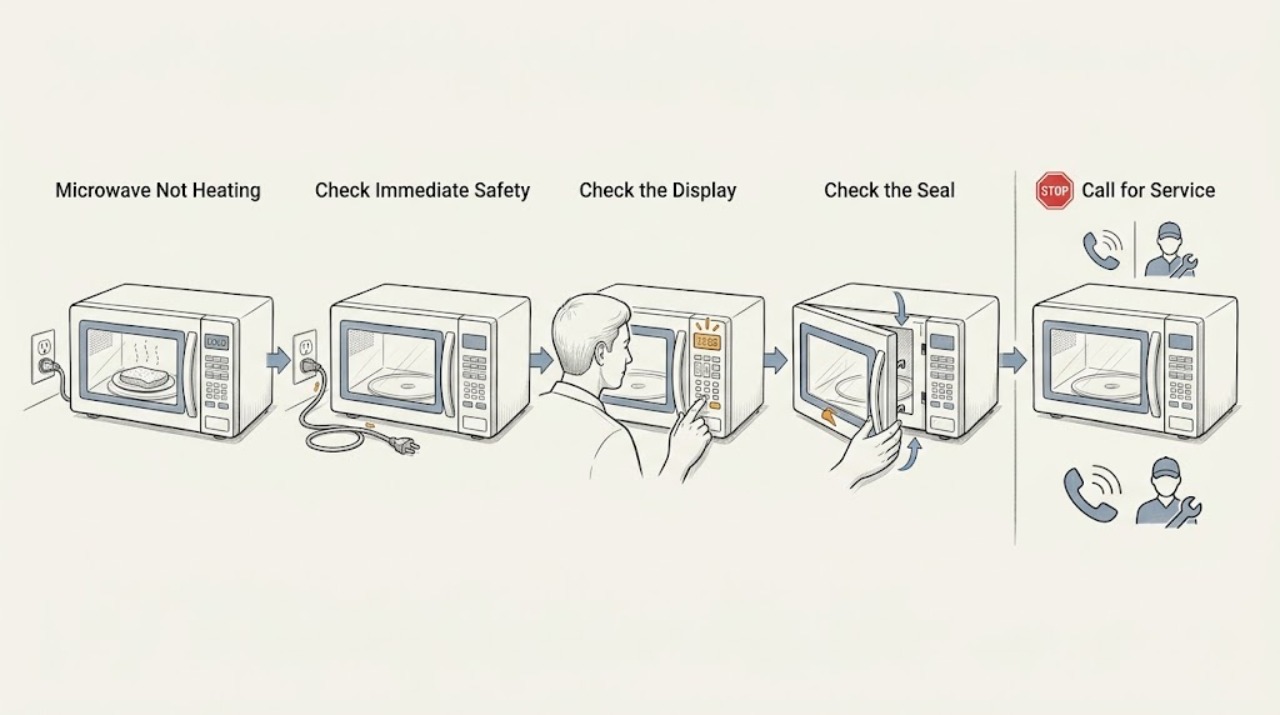
Work through in order
Diagnostic checks
Use only checks that match the exact appliance or system and its official guide.
-
Check 1
Stop the microwave and look from outside for smoke, sparks or arcing, a burning smell, a hot or damaged cord, a damaged door, liquid near the controls, or a breaker that trips again. If any is present, disconnect power only from a safe, dry location and keep the oven out of use.
Expected result: There is no immediate hazard, or one of the listed smoke, spark, odor, heat, damage, liquid, or repeated-trip symptoms is present.
Next step: For a hazard symptom, arrange professional service and do not re-energize the microwave to repeat the test. If none is present, continue with the power and door checks.
Stop if: Do not touch smoke, flames, exposed conductors, a hot casing, or a damaged door; do not reach inside while sparking or attempt to extinguish an appliance fire with the door open.
Why this matters
Why: A hazard symptom can indicate a fire or electrical risk and takes priority over further troubleshooting. No hazard symptom permits only the external, model-appropriate checks below; it does not authorize opening the oven.
-
Check 2
From a dry, accessible position, note whether the display is completely dark or whether it lights normally. If the display is dark and the plug and outlet are safely accessible, check that the plug is seated and that the household breaker or fuse has not opened; a different small appliance can be used only to identify an outlet problem, not to test the microwave internals.
Expected result: The display remains dark, the outlet also fails with another appliance, the breaker or fuse opens again, or the microwave display works.
Next step: If the outlet is faulty, stop and have a qualified electrician address it. If the microwave remains dark or protection trips again, leave it disconnected and request Bosch service. If the display works, continue without removing any panel.
Stop if: Do not open the plug, outlet, breaker panel beyond normal user reset, power cord, or microwave cabinet, and do not keep resetting protection that trips again.
Why this matters
Why: A failed outlet or repeatedly opening protection points to a household electrical issue or a fault requiring an electrician or appliance service. A working display means the no-heat complaint is not explained by a total loss of supply and the door/control state should be checked next.
-
Check 3
With the oven stopped and cool, inspect the accessible door edge and seal for packing material, food debris, or another object preventing full closure. Close the door normally and look for visible damage; do not force, bend, or disassemble the latch, hinges, screen, or seal.
Expected result: The door closes securely with the seal clear and no visible damage, or it does not close/latch normally or has visible damage or an obstruction that cannot be safely removed.
Next step: Remove only a loose, accessible piece of packing or residue without tools, then retry the model's normal control once. If the door remains damaged or will not latch, stop using the microwave and arrange service.
Stop if: Do not operate with a damaged door or seal, hold the latch closed by hand, tape the door, or bypass/test the door interlock.
Why this matters
Why: A clear, undamaged door that closes normally removes one common start-inhibit condition. An obstruction, poor latch, or visible damage can prevent operation and is also a safety concern; it is not a reason to bypass the door interlock.
-
Check 4
If the door is intact and the display works, cancel the current program using the exact model's documented Clear/Off control; the Bosch manual consulted for this symptom specifies pressing Clear/Off twice before re-entering cooking instructions. Check the display for an error code and record it before any reset.
Expected result: The oven accepts a normal program after the documented Clear/Off action, an error code remains or returns, or the display and controls still do not start the oven.
Next step: If an error code remains, note the exact code and contact Bosch service. If the program starts but the food remains cold, stop testing and use the no-heat service branch; if it will not start, keep the door closed and arrange service after the external checks.
Stop if: Do not use undocumented key combinations, defeat a control lock, remove the control panel, or continue operating after sparks, smoke, burning odor, or a damaged door appears.
Why this matters
Why: A cleared program or transient control state may explain a refusal to start. A persistent E-code or refusal after the model-specific control action indicates a fault that should be diagnosed through Bosch support rather than by repeated resets.
-
Check 5
If the display counts down and the fan, light, or turntable appear to operate but the intended food remains cold, stop the cycle and record the model, serial or data-plate information, the exact symptom, any error code, and whether the door and power checks passed. Do not repeat heating tests to force a diagnosis.
Expected result: The appliance still produces no heat after the safe external checks, or it now works normally after a documented correction.
Next step: For persistent no heat, leave the microwave out of service and contact Bosch Customer Support or a qualified appliance service professional. Provide the model and symptom record so the correct documentation and service path can be selected.
Stop if: Do not remove the cover or attempt continuity, voltage, capacitor, magnetron, transformer, diode, fuse, relay, or door-interlock tests; microwave high-voltage parts can remain hazardous after power is removed.
Why this matters
Why: A persistent runs-but-does-not-heat pattern is an unresolved heating-system fault that cannot be safely localized by a user. A normal result after a documented correction points to the cleared power, door, or control condition, but recurrence needs service.
Use your observations
Decision map
Find the observation that best matches what you see, then follow the next safe action.
-
PATH 01Safety boundary
What you see
The display is dark, the outlet fails with another appliance, or the breaker/fuse opens again.
Do this next
Leave the microwave disconnected; have the outlet checked by a qualified electrician when appropriate and arrange Bosch appliance service for the microwave.
Why this path and its safety boundary
Why it matters: The symptom is more consistent with a supply or electrical fault than an isolated heating complaint, and repeated resets could increase risk.
Safety stop: Do not keep resetting protection or open the microwave to find the cause.
-
PATH 02Safety boundary
What you see
The display works, but the door does not close normally, the seal or door is visibly damaged, an obstruction remains, an error code persists, or Clear/Off does not restore normal operation.
Do this next
Stop using the microwave and give Bosch service the model and any displayed code. Do not force the latch or try to bypass the interlock.
Why this path and its safety boundary
Why it matters: A door-safety or control condition is more likely than a simple power interruption; the safety system must remain intact.
Safety stop: Do not operate with door damage, hold the latch shut, or remove the control or door panels.
-
PATH 03Safety boundary
What you see
The display counts down and the oven appears to run, but food remains cold after the power, intact-door, and documented-control checks.
Do this next
Follow Bosch's no-heat support route and arrange professional diagnosis. Keep the microwave out of service until it is assessed.
Why this path and its safety boundary
Why it matters: An internal heating-system fault is more likely than a user setting, but the safe external checks cannot identify which internal part is involved.
Safety stop: Do not remove the cover, perform high-voltage or live tests, or replace an internal part based on the symptom alone.
-
PATH 04Safety boundary
What you see
Sparks, smoke, a burning odor, a hot or damaged cord/casing, liquid in the controls, a damaged door, or repeated breaker trips occur.
Do this next
Stop the cycle, isolate power only from a safe location, keep the appliance out of use, and request professional service.
Why this path and its safety boundary
Why it matters: The immediate safety risk outweighs further user troubleshooting, even if the microwave sometimes heats.
Safety stop: Do not reopen the door during an appliance fire, touch damaged electrical parts, or re-energize the microwave for another test.
Helpful context
Understand the symptom
Separate a power problem from a heating problem
A dark display and an appliance that starts but leaves food cold are different symptoms. The first points toward the supply or control path; the second means the oven may be operating its user interface without producing microwave heat. Check only from outside the appliance and use the exact Bosch model manual for controls that vary by model.
The door is a safety decision, not a part to bypass
Bosch's microwave troubleshooting guidance calls for a securely closed door, a seal free of packing or other material, and a door without visible damage. A door that looks misaligned, does not latch normally, or has a damaged seal or screen is a reason to stop; never defeat the door-safety system to make the oven run.
No-heat symptoms need a service boundary
If the display and controls work but the food remains cold, the safe checks cannot distinguish the internal heating fault. Bosch's support material routes a microwave that no longer heats to customer support. Keep the cover, high-voltage circuit, interlocks, and internal wiring closed to the user and provide the model and symptom record to a qualified Bosch service professional.
Safety boundary
Stop conditions
- Stop using the microwave for smoke, sparks or arcing, burning odor, a hot or damaged cord/casing, liquid near controls, a damaged door, or repeated breaker trips; isolate power only from a safe location and arrange service.
- Do not remove the cabinet or waveguide cover, access internal wiring, or perform live or high-voltage tests.
- Do not bypass, tape, hold, or otherwise defeat the door latch or interlock, even if the display works.
- Do not diagnose or replace the magnetron, capacitor, transformer, high-voltage diode, fuse, relay, or other internal part yourself.
- Do not keep repeating heating tests or resetting a breaker that trips again.
When checks do not resolve it
Need a professional?
Arrange Bosch or qualified appliance service when the microwave still does not heat after the external power, door, and model-specific control checks; when an error code persists; or whenever the door, cord, casing, controls, or electrical behavior is unsafe. A runs-but-does-not-heat symptom is not a safe basis for identifying or replacing an internal part.
Safety scope: The user may check the accessible plug/outlet condition, the visible door and seal, and documented controls. Door-interlock, control-board, magnetron, capacitor, transformer, diode, fuse, relay, wiring, and other internal or high-voltage work is for qualified service personnel.
Common questions
FAQ
Why does my Bosch microwave run but not heat?
If the display counts down but the food stays cold, the safe external checks cannot identify the internal heating fault. Confirm the door closes normally and there is no immediate hazard, then stop using the oven and follow Bosch's no-heat support route. Do not remove the cover or test high-voltage parts.
What should I check if the Bosch microwave display is blank?
From a safe, dry position, check that the plug is seated and whether the outlet and household breaker or fuse are working as described in the model manual. If the outlet is faulty or protection opens again, stop resetting it and use a qualified electrician or Bosch service provider.
Can a Bosch microwave door problem cause it not to heat?
A door that does not close securely, has material at the seal, or has visible damage can prevent normal operation. Remove only a loose accessible obstruction; do not force, tape, hold, or bypass the latch or interlock. Door damage needs service.
Should I test the magnetron or capacitor when a Bosch microwave is not heating?
No. Magnetron, capacitor, transformer, diode, fuse, relay, wiring, and door-interlock diagnosis involves internal or high-voltage hazards. Keep the cabinet closed, disconnect power safely if needed, and have a qualified appliance professional diagnose it.
What should I do when a Bosch microwave error code appears?
Record the displayed code and use the exact model documentation. Bosch's error-code guidance says to disconnect power as directed and contact Bosch Customer Support for a malfunction; do not keep resetting the appliance or open it to investigate.
Read the exact guide
Official sources
- Oven & Microwave | Error Codes | BoschBosch Home Appliances · Bosch US oven and microwave error-code guidance; exact code behavior remains model-specific.
- Support for Bosch microwavesBosch Home Appliances · Bosch microwave support navigation; the correct manual and service path depend on the exact model and market.
- Bosch Built-In Microwave Oven Use and Care ManualBosch Home Appliances · A model-family Bosch manual; users must confirm their own model because controls and details can differ.
- Microwave doesn’t heat anymoreBosch Home Appliances · Bosch US microwave support; the page provides escalation guidance for the stated no-heat symptom rather than model-specific component diagnosis.
Community feedback
Share a repair observation
Share a plain-text repair observation. Accepted observations are published automatically; this page may take a moment to update.