
On this page
Start here
Quick answer
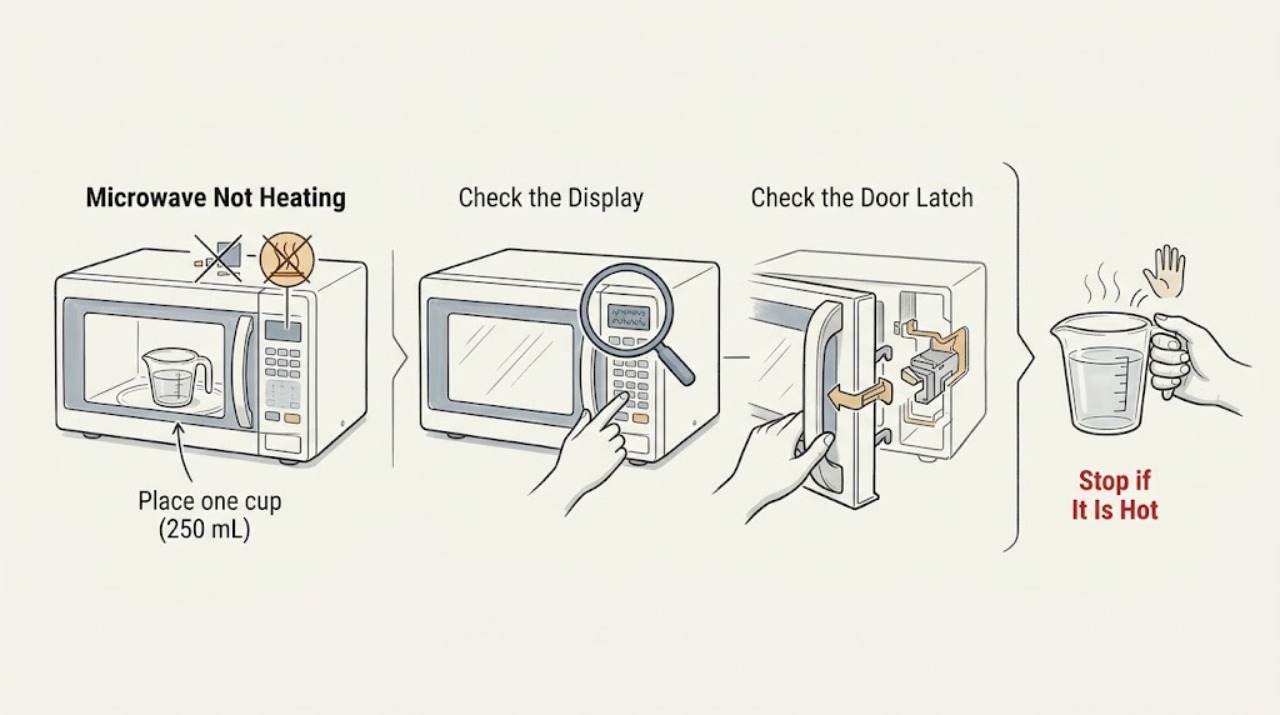
Run a one-minute, full-power test with one cup of water. If the water stays cold while the light, fan, or turntable operates, stop using the microwave and arrange qualified service; do not remove its cabinet.
Work through in order
Diagnostic checks
Use only checks that match the exact appliance or system and its official guide.
-
Check 1
Place one cup (250 mL) of water in a microwave-safe container and run one minute at HI or 100% power.
Expected result: The water warms or remains near room temperature.
Next step: If warm, check the original cycle and power setting.
Stop if: If cold, stop repeated tests and arrange qualified service.
Why this matters
Why: A heat rise shows the heating function works; cold water after a correctly started test needs service-level diagnosis.
-
Check 2
Read the display for LOC, L, a padlock, Demo Mode, or another code and use the exact model manual.
Expected result: A lock, demo indication, or unrecognized code appears.
Next step: Clear only the documented lock/demo setting; use service for an unexplained code.
Stop if: Continue to power and door checks.
Why this matters
Why: Control Lock can disable pads and Demo Mode can run motion and lights without heating; other codes are model-specific.
-
Check 3
Verify a grounded wall outlet works with a small appliance and close the microwave door firmly without packing material blocking the latch.
Expected result: The outlet fails, the breaker trips again, or the door will not latch normally.
Next step: Stop using the unit and call an electrician or qualified appliance technician.
Stop if: If water remains cold, arrange service without opening the cabinet.
Why this matters
Why: Power delivery or door interlock prevents safe operation.
Use your observations
Decision map
Find the observation that best matches what you see, then follow the next safe action.
-
PATH 01Next step
What you see
The water warms but the original food does not
Do this next
Repeat with the intended cycle and model guidance.
-
PATH 02Next step
What you see
The controls and turntable run but water stays cold
Do this next
Stop use and arrange qualified service.
Helpful context
Understand the symptom
Setting or internal fault
Control Lock, Demo Mode, low power, a door-latch issue, or an internal heating fault can produce the same symptom. Separate those checks before assuming a failed part.
When checks do not resolve it
Need a professional?
Use qualified microwave service for an internal heating fault.
Common questions
FAQ
Why do the fan and turntable work while food stays cold?
Demo Mode or an internal heating fault can allow visible motion without heat. Use the water test, then arrange service if the water stays cold.
Can I replace the heating parts myself?
No. Leave internal microwave diagnosis to qualified service because high-voltage parts can remain hazardous.
Read the exact guide
Official sources
- How to troubleshoot a microwave that’s not heatingKitchenAid · KitchenAid microwave no-heating checks
- Microwave is Not Starting or Operating - Countertop MicrowaveKitchenAid · KitchenAid microwave power and door checks
Community feedback
Share a repair observation
Share a plain-text repair observation. Accepted observations are published automatically; this page may take a moment to update.