
On this page
Start here
Quick answer
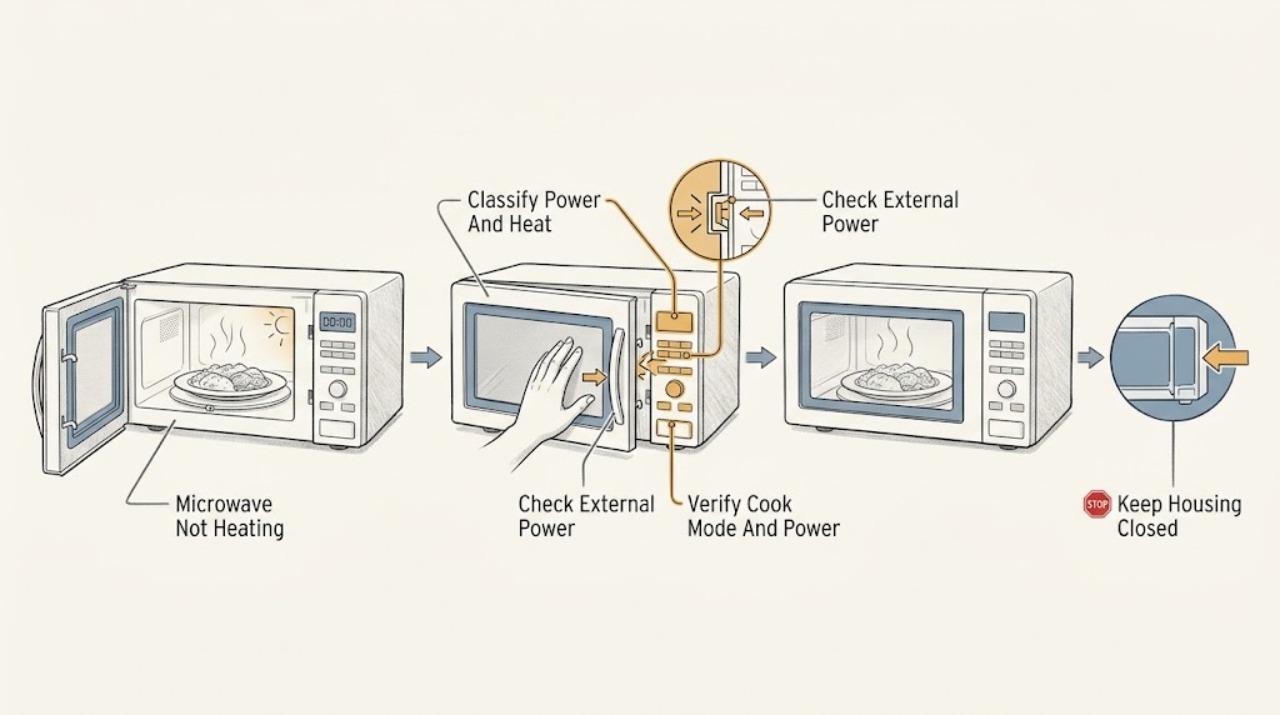
First separate a microwave that is completely dead from one that runs but leaves food cold. If the display and cavity light are dark, check the breaker and the correctly grounded supply from outside the appliance; Frigidaire says a recent surge can trip the breaker and that a microwave should use a dedicated non-GFI circuit. If the display counts down very quickly or the controls appear to work without heat, check the exact model's Owner's Manual for Demonstration Mode—an official Frigidaire-hosted manual documents that demo mode runs functions without microwave or convection heat, but its button sequence is model-specific. For a normal powered test, select microwave cook rather than timer, use a nonzero power level and a microwave-safe container with food or liquid, confirm the door closes without damage, and make sure the turntable and support are fitted. If the fan/light/turntable run but a properly set cycle never warms food, or the door, latch, waveguide cover, cord, or cavity is damaged, stop using it and arrange qualified service. Never open the case: the high-voltage microwave system, interlocks, capacitor, magnetron, and related wiring are not DIY repair areas.
Before you begin
Safety first
- This article covers external supply checks, model-specific setting and demo-mode recognition, door/cavity observation, safe cookware, and one supervised food-containing test. The case, high-voltage system, interlocks, magnetron, capacitor, diode, transformer/inverter, control, and internal wiring require qualified service.
Work through in order
Diagnostic checks
Use only checks that match the exact appliance or system and its official guide.
-
Check 1
With no food or container inside yet, note whether the display is lit, the cavity light responds when the door opens, the keypad accepts a command, the timer counts down at a normal pace, the turntable moves, and the fan runs. Record whether the complaint is no power, no heat, or uneven/slow heating.
Expected result: The display and cavity light are dark; the controls run a countdown but food stays cold; the timer races unusually fast; the turntable or fan runs; or only one program behaves differently.
Next step: Follow the matching branch below and write down the complete model number before using a reset or a demo-mode sequence.
Stop if: Do not run the oven empty, open the case, or test whether heat returns by defeating the door.
Why this matters
Why: A dark display selects the supply branch. A normal countdown without heat selects settings, demo mode, door/interlock, or internal heating diagnosis. A very fast countdown is a demo-mode clue on applicable models, while a single-program issue may be a mode or power selection problem.
-
Check 2
If the display and cavity light are dark, check the breaker and any safely accessible plug or wall connection from outside the microwave. After a recent outage or surge, restore the breaker once only if there is no smell, heat, damage, or water; do not move an over-the-range or built-in microwave or remove an electrical cover.
Expected result: The breaker was tripped and the display returns; the receptacle or circuit is also dead; the breaker trips again; the cord or plug is damaged; or the microwave remains dark with a sound supply.
Next step: If power returns normally, continue with a food-containing test. If the unit stays dark, trips again, or the cord/plug is damaged, leave it disconnected and arrange qualified service or electrical inspection.
Stop if: Stop for smoke, sparking, burning smell, heat, damaged insulation, water, or repeated breaker trips; do not keep resetting the circuit.
Why this matters
Why: Frigidaire identifies breaker trips and supply type as no-power checks. A recurring trip or sound supply with no display shifts the issue to the cord, internal protection, controls, or wiring, not the food or power-level setting.
-
Check 3
For a powered microwave, select the exact model's microwave-cooking function rather than a kitchen timer, fan, light, defrost-only, or convection-only function. Enter a short cook time, confirm the displayed power is not zero, and press START/confirm exactly as the model guide shows.
Expected result: The wrong function or zero power was selected; the display shows a nonzero microwave power level and counts down normally; only convection or a preset behaves differently; or the controls will not accept microwave cooking.
Next step: Correct the setting using the exact manual and retest with food or liquid. If a normal microwave cycle still produces no heat, continue to demo-mode and door checks rather than increasing power blindly.
Stop if: Do not operate with an empty cavity, repeatedly press START on a faulting control, or alter wiring to force microwave mode.
Why this matters
Why: A timer or non-microwave mode can look active without microwave heating. The official Frigidaire-hosted manual documents separate cook-time, power-level, and START controls, including a zero-power setting; control labels and sequences vary by model.
-
Check 4
If the controls work but the countdown runs unusually fast or every cooking function produces no heat, search the exact model's Owner's Manual for Demonstration Mode or Demo. Confirm the display behavior matches that model's documentation and exit it only with the documented menu or key sequence; do not copy a sequence from another Frigidaire family.
Expected result: The exact manual identifies Demo Mode and the behavior matches; the mode is off; the manual has no demo mode; or the controls still count normally but food remains cold.
Next step: Exit demo mode only as documented, then run one supervised food-containing cycle. If heat is still absent with demo mode off, stop owner troubleshooting and arrange service.
Stop if: Do not open the case, defeat an interlock, or use a service-mode sequence not written for the complete model.
Why this matters
Why: The official Frigidaire-hosted manual states that its demo mode runs programming without microwave or convection heat. Because microwave panels differ, a missing or different demo mode does not prove a failed magnetron and cannot justify a cross-model reset.
-
Check 5
With power disconnected if cleaning or inspection is needed, check that the door closes squarely and that the visible hinges, latches, seals, frame, and waveguide-cover area are clean and undamaged. Wipe splatters gently with a damp cloth; never remove the waveguide cover and never operate with a damaged door.
Expected result: The door is bent or loose; a latch or seal is damaged; residue prevents clean closure; the waveguide cover is missing/damaged; arcing or burn marks are visible; or the door and cavity look intact.
Next step: If only removable residue was present, clean and dry it and refit the door accessories. For any damage, arcing, missing cover, or persistent no-heat condition, leave the microwave off and call qualified service.
Stop if: Do not operate with a bent door, loose latch, damaged seal, arcing, burn marks, or a missing/damaged waveguide cover; do not adjust the interlock.
Why this matters
Why: Door damage, an interlock problem, or a cavity/waveguide defect can prevent safe microwave operation or make heating unsafe. Surface residue can be cleaned, but an intact-looking door does not prove the internal interlock is healthy.
-
Check 6
Run one brief supervised test using a microwave-safe container holding food or liquid, with the glass tray and turntable support correctly installed. Keep metal, metallic trim, sealed containers, and non-microwave-safe plastic out of the cavity; confirm that the container is not touching the walls.
Expected result: Food warms; the container or food was unsuitable; the turntable was missing or mis-seated; metal or sealed packaging was present; or the cycle runs normally but the food remains cold.
Next step: Correct the container or tray setup and retest once. If a proper microwave cycle remains cold, stop using the oven and arrange service for internal diagnosis.
Stop if: Press CANCEL and disconnect power for sparks, smoke, fire, scorching, or a hot/damaged container; never test the oven empty or use a metal utensil to diagnose heating.
Why this matters
Why: Container, load, turntable, and food condition affect what the user observes and can create arcing or uneven heating. A proper food-containing test that remains cold after correct settings and door checks makes an internal heating fault more likely.
-
Check 7
After correcting only an external power, mode, demo, door-residue, or container issue, perform one supervised food-containing microwave cycle. Stop immediately if the display fails, the door shifts, arcing occurs, the oven smells burnt, or the food remains cold with the controls running normally.
Expected result: The food warms normally; heating is weak or absent; the display or controls fail; the breaker trips; or arcing, smoke, smell, abnormal noise, or door damage returns.
Next step: Leave the microwave disconnected or switched off and arrange Frigidaire or qualified appliance service with the model, mode, display behavior, door condition, and test result.
Stop if: Never open the case, discharge a capacitor, bypass an interlock, probe live parts, or continue using an oven that arcs, smokes, trips power, or has door damage.
Why this matters
Why: Recovery after an external correction supports a settings, demo, supply, door-closure, or container cause. Persistent no heat with a normal countdown points to internal high-voltage, magnetron, diode, capacitor, transformer/inverter, interlock, or control diagnosis that is not an owner repair.
Use your observations
Decision map
Find the observation that best matches what you see, then follow the next safe action.
-
PATH 01Safety boundary
What you see
The display and interior light are both dark.
Do this next
Check the safely accessible supply and breaker once. If the unit stays dark or trips power again, leave it off and arrange qualified service.
Why this path and its safety boundary
Why it matters: An external supply, breaker, cord, internal protection, control, or wiring issue is more likely than a microwave heating setting.
Safety stop: Do not move an installed microwave or remove an electrical cover.
-
PATH 02Safety boundary
What you see
The display and controls run, the timer counts down very quickly or normally, but every microwave test leaves food cold.
Do this next
Check the exact manual for Demo Mode and power-level behavior, select microwave cook with nonzero power, and test once with food. Escalate if heat remains absent.
Why this path and its safety boundary
Why it matters: Demo mode, a zero/very low power setting, wrong function, door/interlock state, or internal heating fault is possible; a countdown alone does not prove heat.
Safety stop: Do not copy another model's service sequence or open the case.
-
PATH 03Safety boundary
What you see
The door is bent, does not close squarely, the latch/seal is damaged, the waveguide cover is missing/damaged, or arcing is visible.
Do this next
Disconnect power from a safe location, do not operate, and contact qualified service.
Why this path and its safety boundary
Why it matters: Safe microwave operation cannot be assumed; a door/interlock or cavity service issue takes priority over a heat diagnosis.
Safety stop: Never defeat the interlock or attempt a door/cavity repair as a user.
-
PATH 04Safety boundary
What you see
The test used a timer, empty cavity, sealed container, metal/metal-trim cookware, unsuitable plastic, or a missing/mis-seated turntable.
Do this next
Correct the load and cookware using the exact manual, then perform one brief supervised test with food or liquid.
Why this path and its safety boundary
Why it matters: The test cannot establish a heating-system failure and may create a fire, arcing, or burn hazard.
Safety stop: Cancel for sparks or smoke and disconnect power; never repeat an unsafe test.
-
PATH 05Safety boundary
What you see
The supply is stable, Demo Mode is off or not applicable, the correct microwave function and power are selected, the door/cavity are intact, and a proper food-containing test remains cold.
Do this next
Leave the microwave off and arrange Frigidaire or qualified appliance service with the exact model and test observations.
Why this path and its safety boundary
Why it matters: An internal high-voltage, magnetron, inverter/transformer, diode, capacitor, interlock, or control fault is more likely.
Safety stop: Do not open the case, discharge components, bypass interlocks, or perform live tests.
Helpful context
Understand the symptom
Running is not the same as heating
A display countdown, cavity light, fan, or turntable only shows that some functions have power. It does not prove that microwave energy is being produced. Start with a simple classification: no display/light, controls active but no heat, or food warming unevenly because of settings, quantity, container, or door interruption.
Demo mode and zero power are model-dependent
Frigidaire microwave families use different control panels and menu sequences. An official Frigidaire-hosted manual for one model documents a Demonstration Mode that counts through functions without heating and a power-level scale that includes zero power. Use those facts as a reason to inspect the exact manual, not as permission to copy its key sequence to another model.
Door and cavity safety come before a heat test
Microwave energy depends on a correctly closed door and intact interlocks and sealing surfaces. Do not operate a microwave with a bent door, loose hinge or latch, damaged seal, arcing, a missing or damaged waveguide cover, or a cavity defect. The case and internal high-voltage parts remain closed to the owner.
Safety boundary
Stop conditions
- Stop using the microwave for smoke, fire, sparks/arcing, burning smell, abnormal heat, repeated breaker trips, a damaged cord or plug, a bent door, loose latch, damaged seal, or a missing/damaged waveguide cover.
- Never operate the oven empty, defeat or adjust a door interlock, use sealed containers or unsafe metal cookware, or continue a test that produces sparks or smoke.
- Do not open the case, discharge a capacitor, probe live parts, replace high-voltage components, or diagnose the magnetron, diode, transformer/inverter, or internal wiring as a DIY repair.
- If a proper food-containing microwave cycle remains cold after supply, mode, power, demo, door, and container checks, leave the microwave disconnected and arrange qualified service.
When checks do not resolve it
Need a professional?
Arrange Frigidaire or qualified microwave service when the unit remains dead with a sound external supply, the breaker trips again, Demo Mode and settings are ruled out but food stays cold, the door/cavity or waveguide area is damaged, or diagnosis would require the interlocks, high-voltage system, magnetron, capacitor, diode, transformer/inverter, control, or case access.
Safety scope: This article covers external supply checks, model-specific setting and demo-mode recognition, door/cavity observation, safe cookware, and one supervised food-containing test. The case, high-voltage system, interlocks, magnetron, capacitor, diode, transformer/inverter, control, and internal wiring require qualified service.
Common questions
FAQ
Why does my Frigidaire microwave run but not heat?
First verify that it is in microwave-cook mode with a nonzero power level, not a timer, demo mode, or another cooking function. Use a microwave-safe container with food or liquid, confirm the door and waveguide-cover area are undamaged, and test once. If the controls run normally but the food stays cold, stop and call qualified service rather than opening the case.
How can I tell whether my Frigidaire microwave is in Demo Mode?
A fast countdown or fully responsive controls with no heat can be a Demo Mode clue on applicable models. Check the exact Frigidaire Owner's Manual; an official Frigidaire-hosted manual documents that demo mode runs functions without microwave or convection heat. Do not use a sequence from another model.
Can a low power setting make a microwave seem broken?
Yes. Some Frigidaire controls separate cook time and power level and include a zero-power setting. Select microwave cook and confirm a nonzero power level in the exact manual before deciding that the heating system failed.
Can the door or container cause no heating?
A damaged or misaligned door, latch, seal, or interlock can prevent safe microwave operation. A timer-only test, empty cavity, sealed container, metal/metal-trim utensil, unsuitable plastic, or missing turntable can also invalidate the test or create a hazard. Correct only external setup issues; do not adjust an interlock.
Is it safe to repair a microwave's high-voltage parts myself?
No. Frigidaire's manual directs adjustment and repair to qualified service personnel. Do not open the case, discharge a capacitor, bypass an interlock, or perform live tests; arrange qualified service for persistent no heat.
Read the exact guide
Official sources
- Microwaves - No PowerFrigidaire · Official Frigidaire owner-support article for microwaves; installation and supply arrangements remain model-specific.
- Microwave Oven User Manual: EMBS2411BBFrigidaire / Electrolux · Model-specific official manufacturer manual hosted on Frigidaire's asset domain; control sequences and feature availability must not be generalized to other Frigidaire microwaves.
- How do I clean my microwave?Frigidaire · Official Frigidaire owner-support article for microwaves; exact removable accessories and cleaning instructions vary by model.
Community feedback
Share a repair observation
Share a plain-text repair observation. Accepted observations are published automatically; this page may take a moment to update.