
On this page
Start here
Quick answer
For a Breville microwave that is not heating, first identify the exact model and confirm that you selected microwave mode rather than oven, grill, air-fry, or another combination mode. Use a microwave-suitable food or beverage, the intended power level and time, and observe whether the cycle runs, the turntable moves, and the food warms. Confirm the door closes fully and its accessible sealing surfaces are clean, but do not force or defeat the door safety system. Breville's opened microwave manual lists an incorrectly closed door, power-level setting, and child lock among user-level checks, and it sends a persistent no-heat problem to support. If the oven runs with no heat after those checks, the door or seal is damaged, there is arcing, smoke, burning smell, unusual heat, or the appliance has been dropped or damaged, stop using it and arrange qualified service. The magnetron, high-voltage supply, capacitor, waveguide, and door interlocks are not user repairs.
Before you begin
Safety first
- This article covers only food and container suitability, mode and power selection, normal door closure, visible control and power observations, and stopping the appliance. A qualified technician must handle door interlocks, microwave generation, high-voltage circuits, capacitors, magnetrons, waveguides, controls, and enclosure work.
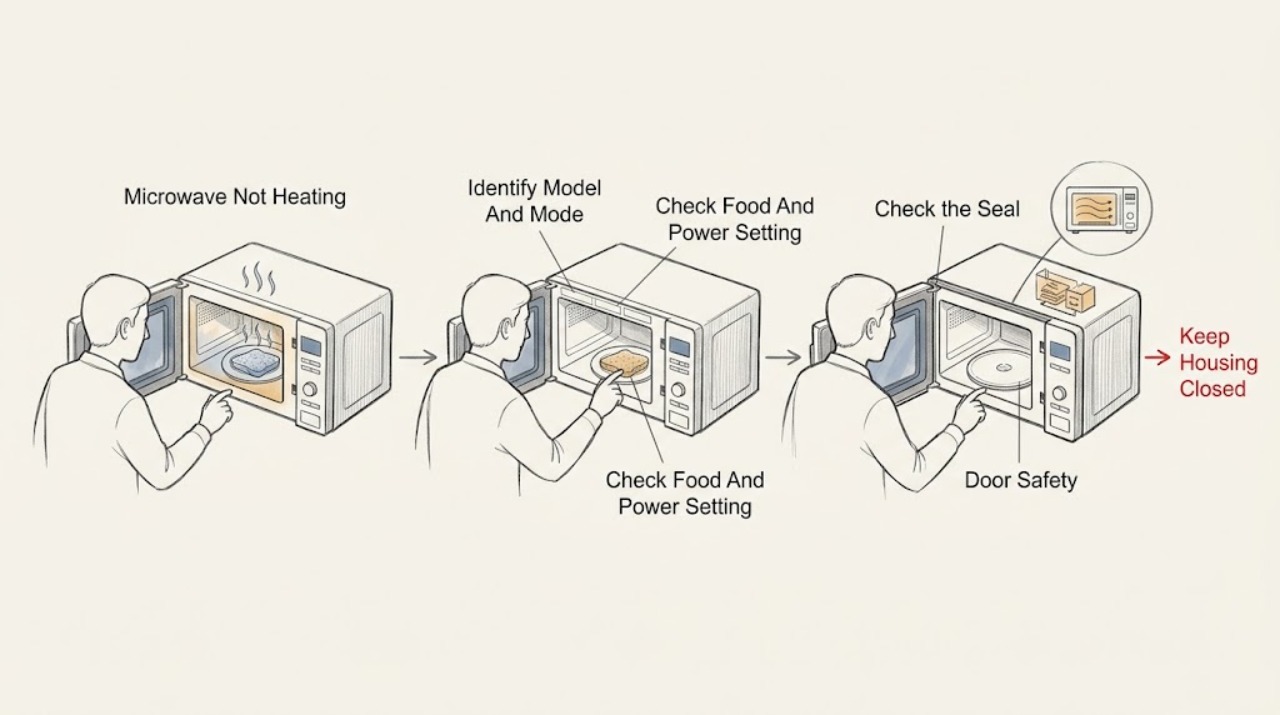
Work through in order
Diagnostic checks
Use only checks that match the exact appliance or system and its official guide.
-
Check 1
Read the exact Breville model from the rating label or manual and record whether it is a microwave-only product or a combination oven. Note the selected function, power level, time, child-lock or other indicator, whether the countdown runs, whether the interior light and turntable operate, and whether the complaint is completely cold food or uneven heating.
Expected result: The model is known or unknown; Microwave, Oven, Grill, Air Fry, Combi, Reheat, or another mode is selected; the cycle runs or does not; and the turntable or display may or may not respond.
Next step: Use the exact model manual to select the intended Microwave function and a suitable power setting. If the model or mode cannot be identified, stop at documentation and arrange Breville support rather than guessing a control sequence.
Stop if: Do not alter hidden settings or open the case to identify the heating system.
Why this matters
Why: Mode, power level, child lock, and model controls can change the result before a component fault is considered. A cycle that never starts is different from a cycle that runs with cold food, and a combination mode may use a different heating method than Microwave.
-
Check 2
For a confirmed microwave mode, use a suitable microwave-safe portion of food or beverage and follow the model manual's time and power instructions. Observe the result without opening the door unnecessarily: the food may be cold throughout, warm at the edges but cold in the center, or heated normally after the power and time are corrected.
Expected result: The food remains cold, heats unevenly, heats after a higher or intended power setting, or the chosen food or container is not suitable for microwave use.
Next step: Correct only the model-documented mode, power, portion, or food arrangement and allow standing time when the recipe or manual calls for it. If a suitable test remains cold, continue to the door and control checks; do not increase settings indefinitely.
Stop if: Do not heat sealed containers, unsuitable metal, empty cookware, or any food in a damaged cavity or with arcing present.
Why this matters
Why: An incorrect mode or low power setting can explain weak heating, and large or dense food can heat unevenly without proving a microwave fault. If a suitable load remains cold while the Microwave cycle runs at the correct setting, a door-sensing or internal heating problem becomes more likely.
-
Check 3
With the oven idle, inspect the accessible door, hinges, latches, and sealing surfaces for a bent frame, looseness, food residue, crack, gap, or other damage. Close the door normally and confirm that it latches without force; clean only accessible residue with the model-approved method.
Expected result: The door is not fully closed, the latch or seal is damaged or dirty, the door closes normally, or the oven will not recognize a closed door.
Next step: Remove only visible residue and close the door normally. If the door, latch, hinge, seal, or safety indication is abnormal, stop using the microwave and arrange service; if closure is normal, continue with power and persistent-no-heat assessment.
Stop if: Do not force, tape, shim, bend, remove, or bypass the door or interlock parts.
Why this matters
Why: Breville identifies an improperly closed door as a reason a microwave may not heat, because the door safety system prevents operation. A damaged door or seal is a safety defect, not a cleaning or alignment experiment; a normal-looking closure does not clear the internal interlock.
-
Check 4
From a dry, safe position, confirm the plug is seated in the intended outlet and note whether the display, interior light, fan, turntable, and controls respond normally. Check only the user-visible child-lock or mode indication described in the exact manual; do not move the microwave or use a different outlet as a diagnostic experiment.
Expected result: The display is dark, the control responds but the food stays cold, a child lock or non-Microwave mode is shown, the outlet is unavailable, or the fan/turntable operates without heat.
Next step: Correct only the documented user setting or obtain qualified household electrical help for an unavailable outlet. If the machine runs but does not heat after the food, power, mode, and door checks, stop using it and arrange Breville service.
Stop if: Do not open the outlet or appliance, perform electrical measurements, or operate with a damaged cord or wet base.
Why this matters
Why: A dark display or unavailable outlet points to supply or control power. A responsive cycle with a fan or turntable but no heat makes mode, door sensing, or the internal heating system more likely; a child lock or different mode can suppress or change operation without a failed magnetron.
-
Check 5
After the model, food, mode, power, door, and visible control checks, record whether the cycle completes, whether the food warms at all, and whether there is arcing, smoke, burning odor, unusual heat, liquid, or damage. Stop further use rather than repeating long cycles to reproduce the symptom.
Expected result: The food heats normally after a user-level correction, remains cold while the cycle runs, or a safety hazard is present.
Next step: Monitor only a normal, model-compliant cycle if the issue is resolved. Otherwise stop using the oven and arrange qualified Breville service, providing the exact model and the observed cycle, food, mode, and safety details.
Stop if: Do not dismantle the microwave, test internal components, or continue operation after arcing, smoke, burning odor, abnormal heat, or door damage.
Why this matters
Why: Improvement after a mode, power, food, or door correction supports an operating or user-control cause. Persistent no heat with a running cycle points to door sensing, magnetron, high-voltage, control, or another internal fault that cannot be identified safely from the outside. A hazard symptom overrides all functional checks.
Use your observations
Decision map
Find the observation that best matches what you see, then follow the next safe action.
-
PATH 01Next step
What you see
The cycle runs in Oven, Grill, Air Fry, Combi, Reheat, or another mode, or the power level is lower than intended for the food.
Do this next
Select Microwave and the exact model's intended power level, then use a suitable load and time. Escalate if the food remains cold in the correct mode and setting.
Why this path and its safety boundary
Why it matters: The selected function can explain a different heating result without proving the microwave heating system is faulty.
-
PATH 02Next step
What you see
Edges are hot but a dense center is cold, the load is large or thick, or the food/container is not suitable for the selected function.
Do this next
Follow the manual's food arrangement, stirring, standing, and container guidance. Do not continue if the container, cavity, or food produces arcing or smoke.
Why this path and its safety boundary
Why it matters: Food size, composition, arrangement, or cookware can produce uneven results even when the oven is heating.
-
PATH 03Safety boundary
What you see
The door does not close or latch normally, the seal or hinge is damaged or dirty, a child lock is active, or the oven indicates that the door is not recognized as closed.
Do this next
Clear only visible residue and use the documented child-lock procedure for the exact model. Stop and arrange service for any damage, abnormal latch, or persistent door indication.
Why this path and its safety boundary
Why it matters: The door safety system or a user lock is more likely than a confirmed failed heating component.
Safety stop: Do not defeat or simulate the door safety system.
-
PATH 04Safety boundary
What you see
The display and light are dark, the outlet is unavailable, the cord is damaged, or the controls do not respond as the manual describes.
Do this next
Leave the appliance out of use and obtain qualified electrical or Breville service. Do not open the outlet or change the cord yourself.
Why this path and its safety boundary
Why it matters: A supply, outlet, cord, or control issue is more likely than a food or power-level issue, and the appliance may not be safe to energize.
Safety stop: Do not use a damaged cord, wet plug, or improvised power connection.
-
PATH 05Safety boundary
What you see
The correct Microwave mode and power level are selected, the door closes normally, the cycle and turntable run, but a suitable food load remains cold.
Do this next
Stop using the microwave and arrange qualified Breville service. Provide the model, mode, power, timing, display, turntable, and food observations.
Why this path and its safety boundary
Why it matters: An internal door-sensing, magnetron, high-voltage, control, or related heating fault is more likely; user-level checks cannot distinguish those parts.
Safety stop: Do not remove the guide cover or case, probe the oven, or attempt an internal test.
-
PATH 06Safety boundary
What you see
There is arcing, flashing, smoke, burning odor, unusual heat, a damaged door or seal, liquid near the base, or a dropped or damaged appliance.
Do this next
Stop the cycle, keep the door closed for smoke or flame, isolate power only when safe, keep clear, and arrange qualified service. Do not use the oven again until assessed.
Why this path and its safety boundary
Why it matters: The immediate problem is a fire, shock, burn, microwave-exposure, or mechanical safety hazard rather than insufficient heating.
Safety stop: Do not touch a wet base, open the door into a fire, or attempt a live or internal repair.
Helpful context
Understand the symptom
Separate a no-heat symptom from a mode or food result
Breville sells both dedicated-looking microwave products and combination ovens with microwave, oven, grill, or air-fry functions. A cycle can run without using microwave heating if the selected mode is not Microwave, and low power can look like no heat. Dense or large food can also remain cold in the center even when the oven is producing heat. Record the model, mode, power level, time, display, turntable, and food result before concluding that the heating system has failed.
Microwave energy and high-voltage parts stay inside service
Only check food, settings, the closed door, and accessible exterior or cavity surfaces. Do not remove the microwave guide cover, outer case, or any fixed panel; do not probe live wiring or attempt to adjust the magnetron, waveguide, capacitor, high-voltage supply, or door interlock. If there is smoke or fire, keep the door closed, stop the cycle, and isolate power only when safe. A bent or damaged door/seal, arcing, burning smell, unusual heat, liquid ingress, or a dropped appliance requires qualified service.
Safety boundary
Stop conditions
- Stop using the microwave for arcing, flashing, smoke, burning odor, unusual heat, liquid near the base, a damaged cord, a bent or damaged door/seal, exposed internal parts, or a dropped appliance.
- Do not remove the microwave guide cover, outer case, or fixed panels; do not probe live wiring or work on the magnetron, waveguide, capacitor, high-voltage supply, or door interlock.
- Do not defeat or simulate the door safety system, heat unsuitable sealed or metal containers, or continue long cycles to reproduce a no-heat fault.
- Arrange qualified Breville service when the correct mode, food, power, door, and visible control checks do not restore heating.
When checks do not resolve it
Need a professional?
Safety scope: This article covers only food and container suitability, mode and power selection, normal door closure, visible control and power observations, and stopping the appliance. A qualified technician must handle door interlocks, microwave generation, high-voltage circuits, capacitors, magnetrons, waveguides, controls, and enclosure work.
Common questions
FAQ
Why is my Breville microwave running but not heating?
Confirm the exact model's Microwave mode, power level, suitable food or beverage, and fully closed undamaged door. If the cycle and turntable run but a suitable load remains cold after those checks, stop using the oven and arrange qualified service rather than opening it.
Can the Breville microwave power level make it seem like it is not heating?
Yes. Breville's opened microwave manual lists the power-level setting as a no-heat check. Combination models can also use a different heating mode, so select the documented Microwave function and power level for the exact model before escalating.
Can a Breville microwave door stop it from heating?
Yes. The microwave will not heat if the door is not properly closed, and a damaged door, latch, hinge, or seal is a safety defect. Clean only accessible residue and arrange service for damage or a persistent door-safety indication; never bypass the interlock.
What food test is safe for a Breville microwave that is not heating?
Use only a suitable microwave-safe food or beverage and the exact model's documented mode, power, and time, under supervision. Do not test with an empty cavity, sealed container, unsuitable metal, damaged cookware, or a microwave showing arcing or smoke.
When should I call service for a Breville microwave that does not heat?
Call when a suitable load stays cold in the correct Microwave mode after the power and door checks, or immediately for arcing, smoke, burning odor, unusual heat, liquid near the base, cord or door damage, or a dropped unit. Magnetron, high-voltage, capacitor, waveguide, and interlock work is not a user repair.
Read the exact guide
Official sources
- the Breville Quick Touch Product HubBreville · Breville BMO734 Quick Touch microwave product hub; use the selected model's manual for actual controls and troubleshooting.
- Quick Touch Crisp Instruction ManualBreville · Breville BMO700 Quick Touch Crisp microwave; use the exact manual for other Breville microwave or combination-oven models.
- Product Hub — Find Support, Spare Parts & Service for Your MachineBreville · Breville U.S. product support hub; select the exact microwave model before applying documentation or service guidance.
Community feedback
Share a repair observation
Share a plain-text repair observation. Accepted observations are published automatically; this page may take a moment to update.