
On this page
Start here
Quick answer
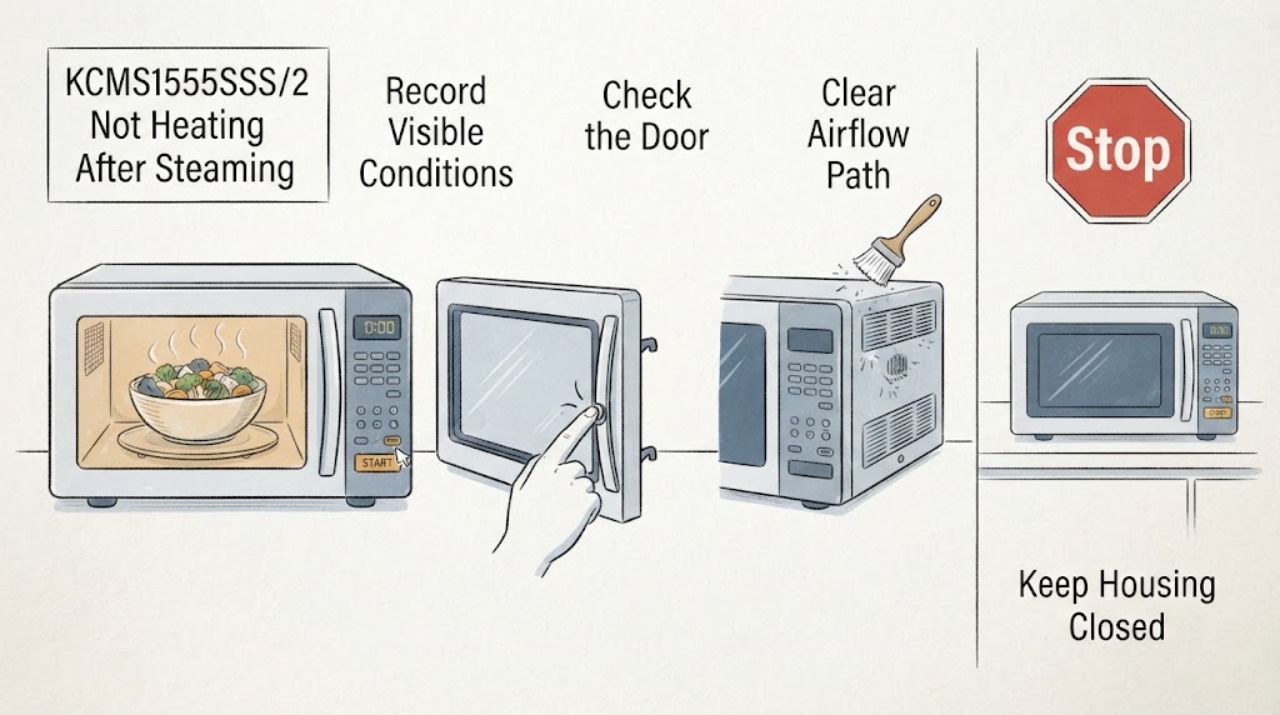
After steaming vegetables, first separate a sensor or moisture problem from a true no-heat fault on the KitchenAid KCMS1555SSS/2. Steam and condensation can be normal, and a sensor cycle can be affected if the door is opened while it is detecting humidity or if the cavity or container is wet. Wipe the cavity and door, make sure the external air openings are not blocked, and use the exact model's documented settings. Then perform one supervised water test: place one cup (250 mL) of water on the turntable and run one minute at HI or 100% power. If the water stays cold while the controls, light, fan, or turntable operate, stop using the microwave and arrange qualified service. Do not remove the cover, defeat the door interlock, or test high-voltage parts.
Before you begin
Safety first
- Do not remove the cabinet or inlet cover, probe capacitors or other high-voltage components, bypass the door interlock, operate with a damaged door or seal, or select a magnetron, switch, diode, capacitor, transformer, or control part from a cold-food symptom. Stop for arcing, smoke, burning or electrical smell, repeated breaker operation, a hot damaged cord, or a door that will not latch.
Work through in order
Diagnostic checks
Use only checks that match the exact appliance or system and its official guide.
-
Check 1
Record the full model and serial information and the exact sequence: whether the vegetables were cooked with a sensor or timed setting, whether the door was opened during the cycle, whether the display showed sensing, and whether the light, fan, turntable, or timer still operated. Use the complete model in KitchenAid's Owner Center rather than a shortened KCMS1555SSS label.
Expected result: The exact /2 identity is confirmed and the problem occurred only during a sensor steam or vegetable cycle, or the microwave also fails during a manual full-power cycle.
Next step: Continue with the safe moisture and vent checks only when the oven is intact and cool. Do not borrow controls or procedures from another KitchenAid model; use the exact model documentation for any setting or lock message.
Why this matters
Why: A sensor-only failure can be caused by moisture, venting, timing, or an interrupted sensing program. Failure during a correctly started manual full-power cycle is a stronger indication that the heating path needs service.
-
Check 2
After the microwave is cool and switched off, wipe visible water from the cavity, door, and outside of the cooking container. Leave the door open for about 15 minutes if moisture remains between or around the door glass. If using a sensor vegetable or steam cycle again, use the supplied or microwave-safe cover with the required vent and do not open the door while sensing is active.
Expected result: The cavity dries and the next sensor cycle completes, or the unit still fails to heat even after the moisture has dissipated and the sensor procedure was followed.
Next step: If the symptom is limited to the sensor cycle, use the exact manual's venting and serving-size guidance. If the oven also fails a manual full-power water test, stop testing and arrange service.
Why this matters
Why: Normal condensation or an interrupted moisture-reading cycle can explain the original result. A persistent no-heat symptom after the cavity is dry is less consistent with steam alone.
-
Check 3
From outside the appliance, confirm that the air intake and exhaust openings are not covered by cookware, cabinetry items, towels, or grease buildup, and that the oven has the clearance specified by its installation instructions. Do not remove grilles or the microwave inlet cover. Allow the appliance to cool fully before another test.
Expected result: An external opening is blocked or the unit was unusually hot, or the openings are clear and the microwave remains cold during operation.
Next step: Correct only a plainly visible external obstruction and allow cooling. If the unit repeatedly shuts down, smells hot, trips the breaker, or remains cold, stop using it and arrange qualified service.
Why this matters
Why: KitchenAid's manual says blocked vents can produce poor cooking results and can cause a thermal device to turn the microwave off until it cools. Clear external airflow can rule out that user-level condition but cannot diagnose the high-voltage system.
-
Check 4
With no visible door damage and a microwave-safe container, place one cup (250 mL) of water on the turntable and run one minute at HI or 100% power. Attend the test, use care with the hot container, and do not repeat it if the result is cold or if the appliance sparks, smells electrical, or behaves abnormally.
Expected result: The water warms, remains near room temperature, the door will not latch normally, or the control shows a lock or another unexplained status.
Next step: If warm, review the original sensor or timed cycle, cover vent, food amount, and power setting. If cold or the door/status is abnormal, stop using the microwave and arrange qualified service without opening the cabinet or bypassing an interlock.
Why this matters
Why: A heat rise shows that the heating function operated during the test; cold water with motion or controls still running needs service-level diagnosis. A damaged or abnormal door is a safety issue, not a setting issue.
Use your observations
Decision map
Find the observation that best matches what you see, then follow the next safe action.
-
PATH 01Next step
What you see
The cavity was wet after steaming, the door was opened while sensing, or the sensor cover was sealed without the required vent, but a later correctly prepared sensor cycle or full-power water test warms.
Do this next
Dry the cavity and container, use the exact model's vented-cover and serving-size guidance, and avoid opening the door during moisture detection. Do not label a sensor issue as a failed high-voltage part.
Why this path and its safety boundary
Why it matters: The evidence favors a moisture or sensor-procedure issue rather than a confirmed failure of the microwave heating system.
-
PATH 02Next step
What you see
The one-cup HI or 100% test warms the water, but the steamed vegetables remain undercooked or the sensor cycle ends unexpectedly.
Do this next
Repeat only with the exact model guidance, a properly vented microwave-safe cover, a dry cavity and container, and the intended portion. Arrange service if the manual cycle repeatedly fails despite those conditions.
Why this path and its safety boundary
Why it matters: The microwave is producing heat during the controlled test, so food amount, starting temperature, cover vent, moisture detection, power setting, or cycle selection is more likely than a total no-heat failure.
-
PATH 03Next step
What you see
The controls, timer, light, fan, or turntable operate but the water stays cold during the correctly started full-power test, or the appliance is silent and does not move normally.
Do this next
Stop using the microwave and arrange qualified appliance service. Do not remove the cabinet, measure high-voltage components, bypass the door interlock, or order a heating part from the symptom alone.
Why this path and its safety boundary
Why it matters: The heating function is not confirmed. The cause may be internal, but KitchenAid's user guidance does not make it safe to distinguish a magnetron, switch, power component, wiring, or control fault from the outside.
-
PATH 04Next step
What you see
The door is bent or does not latch, sealing surfaces are damaged, there is arcing, smoke, a burning or electrical smell, repeated breaker operation, or the unit remains hot and shuts off after the vents are cleared.
Do this next
Stop operation. If safe, isolate power at the accessible disconnect and keep the door closed; obtain qualified service. Do not recreate the fault or operate the appliance with damaged panels, latches, seals, or inlet cover.
Why this path and its safety boundary
Why it matters: The situation has crossed the microwave safety boundary. Door interlocks and high-voltage systems must not be defeated or tested by the owner.
Helpful context
Understand the symptom
Why steaming vegetables changes the first check
Steaming vegetables adds a large amount of moisture to the cavity. KitchenAid says condensation on the door and cavity can be normal with high-moisture foods; it recommends wiping the moisture and allowing the door to stand open so it can dissipate. On sensor cycles, the oven estimates cooking from moisture released by the food. Opening the door while the sensor is detecting moisture can cancel that program, and a wet cavity or container can affect sensing. These observations can explain a failed or incomplete steam cycle, but they do not prove that the microwave's heating system has failed.
What a cold water test tells you
The visible symptoms after steaming can be misleading: a light, timer, fan, or turntable can operate without proving that microwave energy is being produced. KitchenAid's support test isolates the heating question with one cup of water at full power. A warm result sends the diagnosis back to the original food, sensor cycle, cover vent, power setting, or moisture conditions. A cold result is a service boundary, not an invitation to identify a magnetron, switch, capacitor, diode, or other high-voltage part at home.
When checks do not resolve it
Need a professional?
Arrange qualified KitchenAid or appliance service when the one-cup full-power test stays cold, the microwave repeatedly shuts down after cooling and clear external vents, the door or latch is damaged, the cycle remains abnormal after the cavity is dry, or any electrical or high-voltage diagnosis would be required.
Safety scope: Do not remove the cabinet or inlet cover, probe capacitors or other high-voltage components, bypass the door interlock, operate with a damaged door or seal, or select a magnetron, switch, diode, capacitor, transformer, or control part from a cold-food symptom. Stop for arcing, smoke, burning or electrical smell, repeated breaker operation, a hot damaged cord, or a door that will not latch.
Have this ready
- Provide the complete KCMS1555SSS/2 model and serial information, the cycle and power setting used, whether the door was opened during sensing, the amount of condensation, the water-test result, whether the light, fan, timer, or turntable operated, and any display, smell, spark, or breaker behavior.
Common questions
FAQ
Can steaming vegetables make a KitchenAid microwave stop heating?
Steam can create normal condensation and can interfere with a sensor cycle if the door is opened during moisture detection or the cavity and container are wet. That does not prove a heating-system failure. Dry the cavity, follow the exact model's vented-cover guidance, and use one supervised full-power water test to separate a cycle problem from a true no-heat symptom.
Why do the light and turntable work when the microwave does not heat?
Those functions do not prove that microwave energy is being produced. KitchenAid uses a one-cup water test at HI or 100% power for one minute. If the water stays cold, stop using the appliance and arrange service instead of opening the cabinet.
Can I replace the magnetron or primary door switch myself?
No. A cold water test cannot identify which internal component failed, and the microwave contains hazardous high-voltage parts and safety interlocks. Do not remove the cover, bypass the latch, or perform live tests; provide the exact model and test observations to qualified service.
Read the exact guide
Official sources
- Microwave Sensor Cooking: Settings & Tips | KitchenAidKitchenAid · Opened KitchenAid's official sensor-cooking guidance. It explains humidity-based sensing, dry-cavity and container preparation, vented coverage, and vegetable steaming; features vary by model, so the exact KCMS1555SSS/2 manual controls the final procedure.
- KitchenAid Microwave Owner's Manual W10497768KitchenAid · Opened the official KitchenAid-hosted countertop microwave manual while checking the assigned KCMS1555 platform. It provides the relevant manufacturer safety, sensor, vent, door, water-test, and airflow guidance; the complete /2 model identity should still be matched through KitchenAid's Owner Center before using model-specific settings.
- Owner's Center | KitchenAidKitchenAid · Opened to confirm that KitchenAid requires the complete model and serial information for support and provides a microwave model-number lookup path. Use the full KCMS1555SSS/2 identity when retrieving documentation.
- Cavity Condensation - Over-the-Range Microwave | KitchenAid Product HelpKitchenAid · Opened as KitchenAid's official moisture guidance. The page explains that high-moisture foods can create normal condensation and gives safe drying and venting suggestions; it is used for the post-steaming symptom, not to infer an internal component failure.
- Microwave is Not Heating - Countertop Microwave | KitchenAid Product HelpKitchenAid · Opened the official countertop-microwave support page. It gives the one-cup, one-minute HI test, explains alternate power-source limits, and identifies control and demo-mode checks; it does not authorize cabinet or high-voltage work.
Community feedback
Share a repair observation
Share a plain-text repair observation. Accepted observations are published automatically; this page may take a moment to update.