
On this page
Start here
Quick answer
If a Bosch microwave will not turn on, first separate a dark display from a display that works but will not start. For a dark display, check the plug and accessible grounded outlet, test the outlet only if you can do so safely, and check the household breaker without opening the microwave or moving a built-in unit. For a lit display, close the door fully, check the visible seal and door area for packing material, soil, or damage, press Clear/Off as described in the exact manual, and re-enter the cooking instructions. If the breaker trips again, the outlet is dead, the door or latch is damaged, a fault message persists, or the microwave still will not operate, stop using it and arrange qualified Bosch service. Never operate with the door open, defeat the door interlocks, remove panels, or perform live electrical tests; the high-voltage microwave circuit can remain hazardous even when unplugged.
Before you begin
Safety first
- This article covers display-state classification, accessible outlet observation, visible door/seal inspection, and exact-model message recording. A qualified technician or electrician must handle built-in access, fuses, wiring, high-voltage components, controls, interlocks, live testing, and internal repair.
Work through in order
Diagnostic checks
Use only checks that match the exact appliance or system and its official guide.
-
Check 1
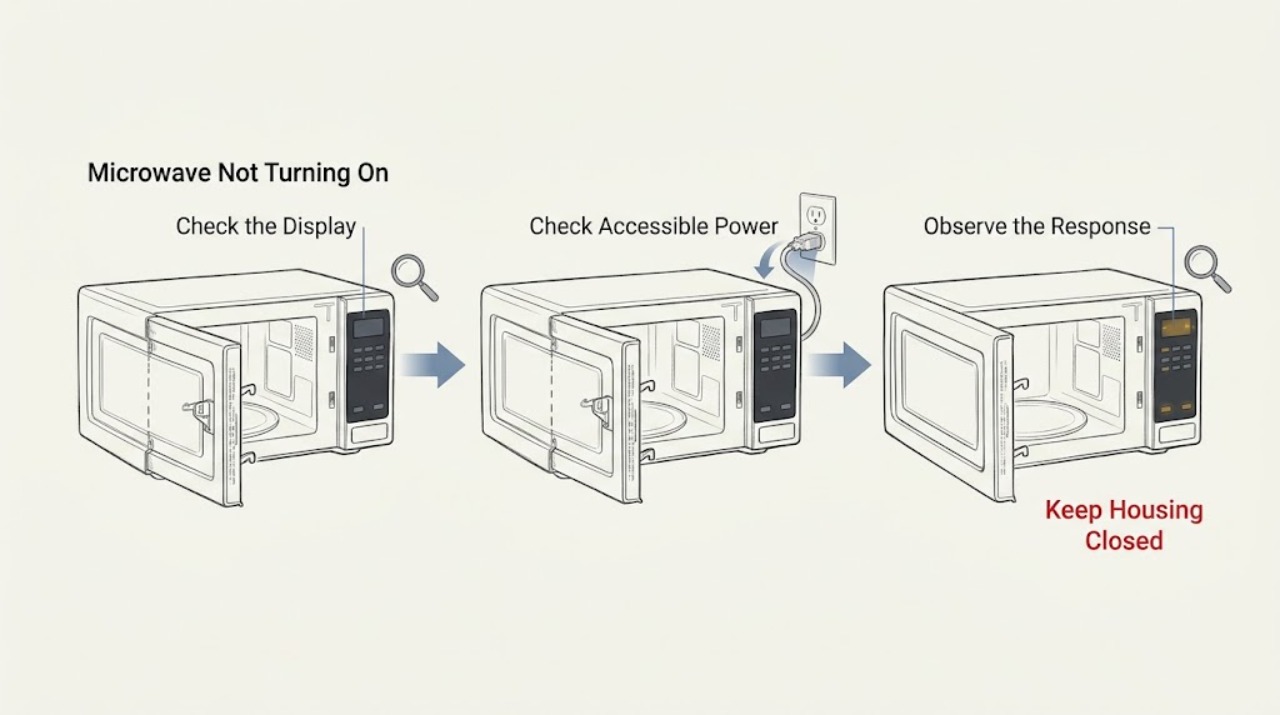
Without opening the enclosure or defeating the door latch, observe whether the display is completely dark, whether the controls illuminate, and whether the issue is that Start does not begin cooking. Note any interior-light, fan, beep, or display response only during normal user operation; do not run the microwave empty.
Expected result: The display and controls are dark; the display is lit but Start does nothing; the display shows an E-number or other message; or the microwave starts and then stops.
Next step: Use the dark-display power checks for a dead display, the door/control checks for a lit display, and the exact manual or Bosch error-code page for a message. Stop and arrange service for an unsafe symptom or persistent failure.
Stop if: Do not open panels, hold the door switch closed, run an empty cavity, or repeat a fault to see what happens.
Why this matters
Why: A dark display points first to the accessible power path. A lit display with no start makes door closure, control state, or a model-specific fault more likely. A message or mid-cycle stop needs exact-model instructions.
-
Check 2
If the unit is a countertop model and the cord and outlet are safely reachable, confirm the plug is seated in its grounded outlet. Test the outlet with another suitable appliance only if this can be done without moving the microwave or exposing wiring. Check the household breaker once from a dry, safe position; do not open the microwave or replace an internal fuse.
Expected result: The plug was loose; the outlet is dead; the other appliance also fails; the breaker is tripped; the outlet and breaker work but the microwave remains dark; or the unit is built in and the supply is hidden.
Next step: Secure only a loose accessible plug and retry once. Have a qualified electrician address a dead outlet or repeated breaker trip; arrange Bosch service for a confirmed supply with a dark microwave or for a built-in unit needing access.
Stop if: Do not use an extension cord, bypass grounding, repeatedly reset a tripping breaker, pull out a built-in microwave, or remove a fuse or panel.
Why this matters
Why: A loose plug, dead outlet, or tripped breaker can explain a dark display. If the supply is confirmed but the microwave remains dead, an internal power or control fault is more likely. Hidden built-in wiring is not a user-accessible check.
-
Check 3
If the display works but the microwave will not start, close the door firmly and inspect the visible seal and sealing surface for packing material, cleaner residue, soil, bent door parts, or other damage. Press Clear/Off twice and re-enter the cooking instructions only as documented for the exact model; keep food in the cavity for any normal cooking attempt.
Expected result: The door was not fully closed; material or residue is visible on the seal; the door, hinge, latch, or sealing surface is damaged; Clear/Off restores normal controls; or the display remains lit with no start.
Next step: Remove only loose residue or packing material from an intact visible seal as the manual permits. Stop using the microwave and arrange service for door damage, a latch that will not engage, or persistent no-start behavior.
Stop if: Do not pry the door, bend the latch, hold a switch closed, defeat an interlock, or operate with a damaged seal or door.
Why this matters
Why: An incomplete or damaged door closure can prevent operation because the safety interlock must be satisfied. A control reset may clear an instruction state, but it does not repair a damaged latch, door, interlock, or control circuit.
-
Check 4
If an E-number, warning, spark, burning odor, unusual noise, repeated shutdown, or breaker trip occurs, stop the appliance and record the exact display, model or E-Nr., and sequence of events. Match a message only to the exact Bosch manual or official Bosch oven-and-microwave error-code page; do not remove covers to investigate.
Expected result: No message and no unsafe symptom; a message clears once with the documented model reset; the message returns; the breaker trips again; there is smoke, burning odor, sparking, or door damage; or the model cannot be identified.
Next step: For a single documented reset with no unsafe symptom, follow the exact manual and monitor one normal use. For a returning message, any electrical or microwave hazard, or uncertain model/code, disconnect power only by the safe normal control or breaker and arrange qualified Bosch service.
Stop if: Do not repeatedly reset a fault, test live voltage, open the high-voltage section, operate with sparks or smoke, or bypass any safety switch.
Why this matters
Why: A returning message or unsafe symptom indicates a fault beyond user-level power or control checks. The same-looking code can have different applicability across Bosch appliance families and model series.
Use your observations
Decision map
Find the observation that best matches what you see, then follow the next safe action.
-
PATH 01Safety boundary
What you see
The display is dark, the accessible plug was loose, the outlet is dead, or the household breaker is tripped.
Do this next
Secure a loose plug or have a qualified electrician address a dead outlet. Reset a breaker only once if safe; if it trips again, leave the microwave off and arrange electrical or Bosch service as appropriate.
Why this path and its safety boundary
Why it matters: The external supply path is more likely than a door-latch problem; a dead outlet or repeated breaker trip may be a household electrical fault.
Safety stop: Do not repeatedly reset a breaker, bypass grounding, use an extension cord, or open the microwave.
-
PATH 02Safety boundary
What you see
The outlet and breaker work, but an accessible Bosch microwave display remains completely dark, or the built-in unit has no user-accessible supply path.
Do this next
Stop using the appliance and arrange qualified Bosch service; provide the complete model or E-Nr. and the result of the safe outlet check.
Why this path and its safety boundary
Why it matters: An internal power, fuse, control, or wiring fault is more likely, and hidden built-in connections cannot be safely diagnosed from the front.
Safety stop: Do not pull a built-in microwave, remove panels, replace an internal fuse, or perform a live test.
-
PATH 03Safety boundary
What you see
The display is lit but Start does not begin a cycle, the door does not close or latch fully, or the visible seal has packing material, residue, or damage.
Do this next
Remove only loose visible residue or packing material if the seal is intact, use the exact model's documented Clear/Off procedure, and arrange service if the latch, door, seal, or no-start symptom remains abnormal.
Why this path and its safety boundary
Why it matters: Door closure, latch/interlock sensing, or a control state is more likely than a total power loss. Damage to the door or seal is a safety boundary.
Safety stop: Do not hold the latch closed, bend door hardware, defeat interlocks, or operate with a damaged door or seal.
-
PATH 04Safety boundary
What you see
An error message returns, the breaker trips again, or the microwave sparks, smells burnt, smokes, makes an abnormal noise, or stops unexpectedly.
Do this next
Stop operation. Disconnect power at the normal plug or breaker only if safe, keep the door closed if there is smoke or sparking, and arrange qualified Bosch service or an electrician for a supply fault.
Why this path and its safety boundary
Why it matters: An internal electrical, control, microwave-generation, cooling, or safety fault is more likely and cannot be identified safely from generic symptoms.
Safety stop: Do not repeatedly reset, operate with sparks or smoke, open the high-voltage section, test live circuits, or bypass any safety device.
Helpful context
Understand the symptom
A dark display and a no-start microwave are different faults
Start without opening the cabinet. If the display, interior light, and controls are all dead, the first decision is the appliance's accessible power path. If the display is lit but pressing Start does not begin a cycle, the power supply may be present and the door latch, control state, or a model-specific fault becomes more likely. Do not hold or defeat the latch to make the oven run, and do not use an empty-cavity test; Bosch warns against open-door operation and says the microwave should not be operated without food except for a documented short cookware test.
Use only accessible power checks
For a countertop unit with an accessible cord, confirm that the plug is fully seated in a properly grounded outlet. Bosch's troubleshooting table allows an outlet check with another appliance and a single household breaker reset; if the other appliance also fails, the outlet needs a qualified electrician. A built-in or over-the-range Bosch microwave should not be pulled from its mounting to reach hidden wiring or a receptacle. Do not substitute an extension cord or open the microwave to inspect an internal fuse.
A lit display still depends on a closed, intact door
When the controls illuminate but the cooking cycle will not start, close the door securely and inspect only the visible door seal and sealing surface for packing material, residue, or damage. Bosch lists an incompletely closed door, material on the seal, and door damage as no-operation checks. Press Clear/Off twice and re-enter the instructions only as the exact model manual describes. If the latch does not engage, the door is bent, the seal is damaged, or the oven still will not start, stop using it rather than trying to adjust the latch or interlock.
Error messages and internal repairs are model-specific
If the display shows an E-number or another fault message, record every character and find the manual using the complete Bosch model or E-Nr. Bosch's support page covers oven and microwave codes together and includes model-dependent reset and service directions; do not transfer a code meaning from another microwave or oven. Persistent no-start behavior, a repeated breaker trip, burning smell, sparking, damaged door, or any need to remove a panel requires qualified service. Microwave high-voltage components and safety circuits are outside user-level troubleshooting.
Safety boundary
Stop conditions
- Do not operate a Bosch microwave with the door open, a damaged or bent door, broken or loose hinges/latches, or a damaged seal or sealing surface.
- Do not defeat, hold closed, or tamper with any door safety interlock; do not remove panels, inspect an internal fuse, access the magnetron or capacitor, or perform live electrical tests.
- Stop immediately for smoke, burning odor, sparking, exposed wiring, repeated breaker trips, water intrusion, or a door that will not latch, and disconnect power only by the normal safe means.
- Do not pull a built-in or over-the-range microwave from its mounting to reach wiring or an outlet; use qualified service.
When checks do not resolve it
Need a professional?
Safety scope: This article covers display-state classification, accessible outlet observation, visible door/seal inspection, and exact-model message recording. A qualified technician or electrician must handle built-in access, fuses, wiring, high-voltage components, controls, interlocks, live testing, and internal repair.
Common questions
FAQ
Why is my Bosch microwave not turning on at all?
If the display is dark, check only the accessible plug, grounded outlet, and household breaker as Bosch describes. If the outlet works and the microwave remains dead, or if the unit is built in with hidden wiring, stop and arrange qualified service rather than opening the microwave.
Why does my Bosch microwave have power but not start?
A lit display with no cycle can result from an incompletely closed door, material on the visible seal, a damaged door, or a control state. Close the door securely, inspect the visible seal, and follow the exact model's Clear/Off procedure. Do not bypass the door interlock.
Can I reset a Bosch microwave that will not turn on?
Bosch manuals describe a brief unplug/reconnect or household breaker reset for certain power-interruption symptoms, but the applicable procedure varies by model. Perform only the documented accessible reset once and stop if the breaker trips again or the fault returns; never open the appliance to reset an internal fuse.
Is it safe to bypass the Bosch microwave door switch?
No. Bosch explicitly warns not to operate with the door open or tamper with safety interlocks. A door, latch, hinge, seal, or no-start fault that remains after visible checks requires qualified service.
When should I call service for a Bosch microwave that will not start?
Arrange service for a dark display with a confirmed supply, a returning error message, repeated breaker trips, a damaged or non-latching door, sparks, smoke, burning odor, exposed wiring, or any problem requiring panel removal, fuse access, high-voltage testing, or interlock work.
Read the exact guide
Official sources
- Bosch Microwave Use and Care Manual 9001152494_CBosch · Official Bosch manual for the cited microwave model family; used for the listed symptom split and safe user checks, not as universal wiring or part instructions.
- Bosch Oven & Microwave Error CodesBosch · Official Bosch US error-code guidance that combines oven and microwave families; exact model and displayed code control the applicable remedy.
- Bosch Microwave Use and Care Manual 9001885897_CBosch · Official Bosch manual for the cited microwave family; used for safety boundaries and model-dependent operation, not to infer compatibility with other Bosch units.
Community feedback
Share a repair observation
Share a plain-text repair observation. Accepted observations are published automatically; this page may take a moment to update.