
On this page
Start here
Quick answer
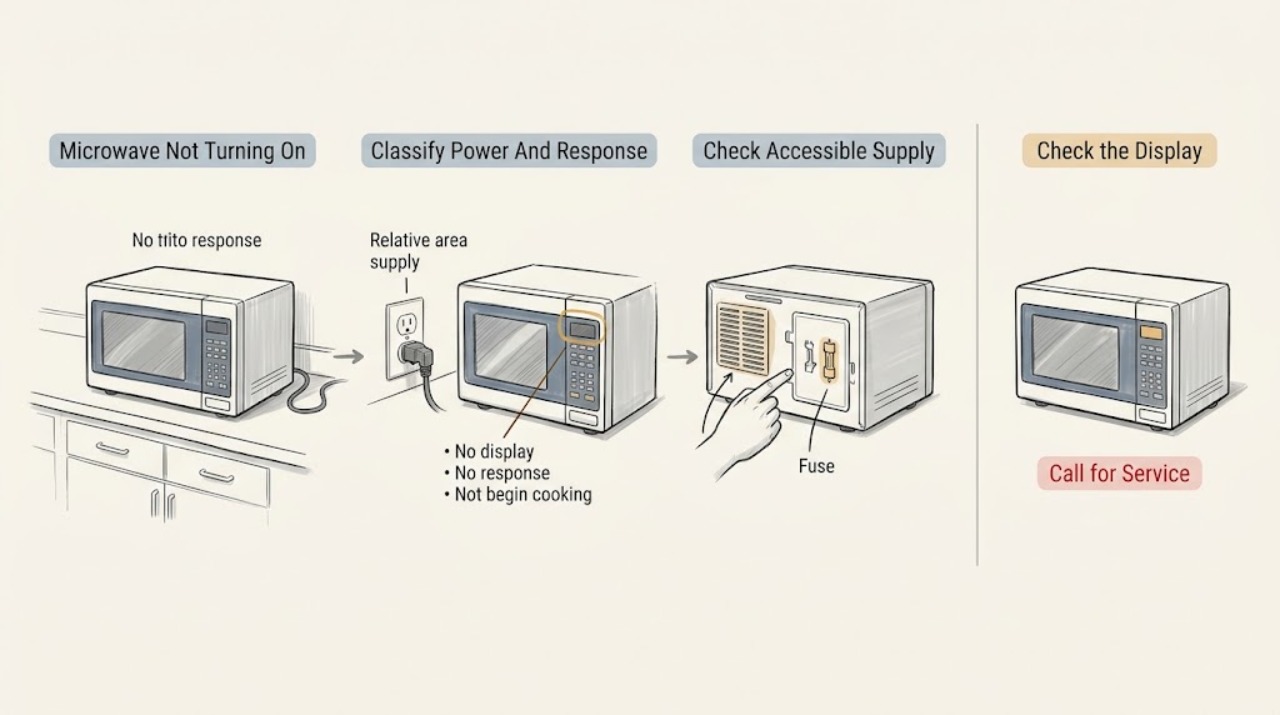
First decide whether the microwave is completely dark, has a display but ignores buttons, or responds but does not begin when Start is pressed. For a dark unit, check the dry, accessible breaker, fuse, outlet, or wall switch once; GE says a microwave that shut down can also have overheated if vents were blocked, so clear external airflow and allow about 30 minutes to cool. If the display is present, check whether Display Off or Power Saver is normal for the model, clear an unfinished program, and check the model's Control Lock or Child Lock. If buttons respond but cooking will not begin, close the door securely and remove any dish touching it so the safety interlocks can engage. A breaker that trips again, power that does not return after cooling, a damaged cord or outlet, smoke, burning odor, arcing, or a door or control fault requires service. Do not open the cabinet or attempt internal fuse, interlock, control, magnetron, capacitor, or other electrical repair: GE warns that an internal high-voltage capacitor can retain charge after unplugging and provides no do-it-yourself microwave repair procedure.
Before you begin
Safety first
- The user may inspect a dry accessible supply, use documented model controls, clear an obvious door obstruction, check external ventilation clearance, and allow a documented cool-down. Qualified service must handle the cabinet, internal fuse, control, latch or interlock assembly, thermal protection, magnetron, capacitor, wiring, and any live or safety testing.
Work through in order
Diagnostic checks
Use only checks that match the exact appliance or system and its official guide.
-
Check 1
Without repeatedly pressing Start, note whether the clock or display is visible, whether the interior light comes on when the door opens, whether button presses beep or change the display, and whether the microwave stopped during a prior cook. Record the model and installation style from an accessible label or paperwork.
Expected result: The display and light are both dead, the display is blank but other signs of power exist, the panel is lit but unresponsive, or the panel responds but cooking does not begin.
Next step: Follow the corresponding branch below and the exact Owner's Manual. Do not open the microwave to identify a fuse, switch, or control.
Stop if: Stop immediately for smoke, burning odor, arcing, a hot or damaged cord or outlet, water near the appliance, or a damaged door.
Why this matters
Why: These states lead to different checks: external supply or cooling for a dead unit, display settings for a blank clock, lock or programming for an unresponsive panel, and door interlocks for a responsive no-start condition.
-
Check 2
If the microwave is dark and non-responsive, inspect only the dry, accessible plug, wall switch, outlet, and household breaker or fuse that serve it. A single household load check with a small lamp can show whether the outlet has power; do not remove an outlet cover or use the microwave as a repeated test load.
Expected result: The switch is off, the outlet is dead, the breaker or fuse is open, the accessible supply is normal but the microwave remains dark, or the breaker trips again.
Next step: Restore only a normal accessible switch or breaker/fuse state once. Have an electrician assess a dead, damaged, or repeatedly tripping circuit; arrange microwave service if household power is stable but the appliance remains dead.
Stop if: Do not repeatedly reset, change fuse or breaker ratings, use an extension cord or improvised adapter, open house wiring, or touch a hot, wet, or scorched connection.
Why this matters
Why: An external supply problem can explain a completely dark microwave. A stable outlet with a dead appliance or a protective device that trips again points to service rather than a normal control setting.
-
Check 3
If the microwave otherwise appears powered but the clock is blank, look for a Display On/Off control, Power Saver setting, or the model-specific clock behavior in the Owner's Manual. Open the door only normally and check whether the cavity light or buttons respond; do not infer lost power from the clock alone.
Expected result: The manual documents a blank display or Power Saver state, the display returns after the documented control, other functions work while the clock is blank, or all functions are dead.
Next step: Use only the documented Display or Power Saver control. If other functions remain dead or the display behavior does not match the model manual, stop and arrange service.
Stop if: Do not remove the control panel, alter wiring, or repeatedly cycle power to force a display state.
Why this matters
Why: GE says some models intentionally turn off the display or clock. A normal model-documented display state is not a no-power fault; a blank display with no other function or a mismatch with the manual needs service or supply diagnosis.
-
Check 4
If the display is lit but buttons do not start cooking, look for LOCK, LOC, L, or another model-specific lock indication and check whether a prior program or Delay Start remains. Use the exact manual's Clear/Off, Pause/Off, or lock-release procedure once; do not guess a combination if the panel differs.
Expected result: The lock indication clears and the panel responds, an unfinished program clears, the display remains locked or unresponsive, or the panel responds but Start still does nothing.
Next step: Run only the model-documented no-load control check after the state is cleared. If the panel stays locked or Start still fails, continue to the secure-door check and service boundary.
Stop if: Do not pry keys, bypass Control Lock, open the keypad, or apply liquid to the panel.
Why this matters
Why: GE says Child Lock and unfinished programming can prevent normal button response, and lock procedures vary by model. A panel that remains unresponsive after the documented procedure needs service, while a responsive panel with no start moves the decision to the door.
-
Check 5
If the panel responds but the microwave does not start, remove any dish, rack, packaging, or residue touching the door or front frame. Close the door normally and observe whether it sits squarely and latches without force; do not run the microwave with a gap or while holding the door shut.
Expected result: The door closes and latches after an obstruction is removed, the door appears closed but will not latch, the door is bent or loose, or the door latches but Start still does nothing.
Next step: Use the microwave only when the undamaged door latches securely and the model manual permits operation. If it will not latch or is damaged, leave it off and arrange qualified service.
Stop if: Do not defeat the interlocks, insert tools into the latch, straighten hinges, or operate with the door open or held shut.
Why this matters
Why: GE says a secure door is required to engage the safety interlocks, and a dish touching the door can prevent firm closure. A clear, securely latched door with a no-start symptom needs service diagnosis rather than interlock bypass.
-
Check 6
If the microwave lost power during a long cook and the outlet remains normal, check from outside that its case vents are not covered by packaging, a wall, or nearby items and that the model's required clearances are met. Leave it off and allow approximately 30 minutes for cooling before one normal restart attempt.
Expected result: Power returns after cooling and the vents were clear, the vents were blocked, power does not return, or the breaker trips again on restart.
Next step: Correct only an obvious external clearance issue and monitor one normal use. If the microwave stays dead or the protective device operates again, unplug it and arrange service.
Stop if: Do not move a built-in unit, remove case panels, bypass thermal protection, or keep restarting a microwave that overheats or trips.
Why this matters
Why: GE says blocked ventilation or long cooking can overheat the microwave and that power may return after about 30 minutes. A return to normal supports a temporary overheat explanation; no recovery or another trip is a service condition.
-
Check 7
Stop owner troubleshooting when safe supply, display state, lock state, door closure, and external cooling checks do not restore operation, or when the unit has a recurring trip, damaged cord, unusual heat, smoke, odor, arcing, or an internal-sounding click without starting. Give the technician the model, installation style, display state, timing, and last safe observations.
Expected result: A documented external correction restores normal operation once, or the microwave remains dead, unresponsive, or unable to start with the correct model conditions.
Next step: Keep the microwave isolated and arrange qualified microwave service; use an electrician for the house circuit. Do not recreate a trip or open the cabinet for diagnosis.
Stop if: Do not remove the cover, test internal parts, replace a fuse, bypass interlocks, or work on the high-voltage section even after unplugging.
Why this matters
Why: A successful external correction supports monitoring. Persistent failure can involve an internal fuse, control, door interlock, magnetron circuit, capacitor, or another component that GE does not make an owner repair.
Use your observations
Decision map
Find the observation that best matches what you see, then follow the next safe action.
-
PATH 01Safety boundary
What you see
The display, interior light, and controls are dead, and the accessible outlet, switch, breaker, or fuse is off, dead, damaged, or trips again.
Do this next
Leave the microwave off and have a qualified electrician assess the supply; arrange appliance service if the household supply is stable but the microwave remains dead.
Why this path and its safety boundary
Why it matters: A household supply, protective-device, outlet, or appliance power-path problem is more likely than a lock or door setting.
Safety stop: Do not repeatedly reset, alter protective-device ratings, or open the outlet or microwave.
-
PATH 02Safety boundary
What you see
The clock is blank but the door light, buttons, or other functions work, and the model manual documents Display Off, Power Saver, or a non-continuous clock.
Do this next
Use the model-documented display control and arrange service only if other functions also fail or the display does not match the manual.
Why this path and its safety boundary
Why it matters: A normal display feature is more likely than total loss of power.
Safety stop: Do not open the control panel to restore the clock.
-
PATH 03Safety boundary
What you see
The display is lit but shows a lock indication, ignores keys, or retains a prior or delayed program.
Do this next
Clear the program or unlock the controls using the exact manual. If the panel remains unresponsive, arrange service.
Why this path and its safety boundary
Why it matters: Control Lock, Child Lock, or unfinished programming is more likely than a total power failure; GE says the unlock sequence varies by model.
Safety stop: Do not guess undocumented key combinations or bypass the lock.
-
PATH 04Safety boundary
What you see
The panel responds, but Start does nothing because the door is blocked, does not latch, is misaligned, or a dish touches the front frame; or the door latches securely and Start still fails.
Do this next
Clear only an obvious obstruction and close the door normally once. For a damaged or persistent no-start condition, keep the microwave off and arrange qualified service.
Why this path and its safety boundary
Why it matters: A door-interlock condition is more likely when closure is incomplete. A secure, undamaged latch with a persistent no-start symptom needs internal diagnosis rather than an interlock workaround.
Safety stop: Do not operate with an unlatched door, hold it shut, or open the cabinet.
-
PATH 05Safety boundary
What you see
The microwave shut down after extended cooking or blocked external vents and returns after one cooling period, or it stays dead, overheats again, trips the breaker, or shows smoke, odor, or arcing.
Do this next
Monitor only a normal recovery. For recurrence or any hazard, unplug or isolate the microwave from a safe position and arrange qualified appliance or electrical service.
Why this path and its safety boundary
Why it matters: One recovery after clear vents can fit GE's documented overheating behavior. No recovery, repeated shutdown, or a protective-device trip points to a service condition.
Safety stop: Do not bypass thermal protection, repeatedly restore power, or open the high-voltage or control area.
Helpful context
Understand the symptom
“Not turning on” has three useful meanings
A blank display and no interior light suggest a supply or power-path problem, but a display can also be intentionally blank on models with Display Off or Power Saver. A lit panel that ignores buttons suggests a lock, unfinished program, or control issue. A responsive panel that will not begin cooking points first to the door and safety interlocks. These observations should be kept separate so a control reset is not used to mask a circuit or door fault.
Cooling can explain one shutdown, not a recurring failure
GE says long cooking or blocked case vents can overheat a microwave and that power may return after an approximately 30-minute cool-down. Clear only external obstructions and observe from a safe position. If power does not return, or a breaker trips again, service is the next step rather than another restart attempt.
The door is part of the start decision
GE says the oven will not start unless the door closes securely enough to engage its safety interlocks, and a dish touching the door can prevent a firm closure. The outer door, mesh, inner shield, latches, and interlocks are safety-related. Leave door adjustment, alignment, and internal control work to qualified service.
Microwave cabinet work is not a reset
Unplugging a microwave can clear a program or allow cooling, but it does not make cabinet repair safe. GE warns that an internal capacitor can retain a charge after the appliance is unplugged and directs service for internal microwave diagnosis. Do not remove the cover, defeat an interlock, or replace an internal part by symptom.
Safety boundary
Stop conditions
- Stop using the microwave for smoke, burning odor, arcing, a hot or damaged cord or outlet, repeated breaker operation, water near electrical parts, a damaged door, or a door that will not latch securely.
- Do not repeatedly reset a breaker, operate with the door open or held shut, bypass safety interlocks or thermal protection, or use an improvised power connection.
- Do not remove the cabinet, door, control panel, internal fuse, latch, interlock, magnetron, capacitor, or other electrical parts. Unplugging does not eliminate internal microwave hazards.
- Use the exact GE Owner's Manual for Display Off, Power Saver, lock, reset, door, and model-specific operating behavior. Internal diagnosis and any door or high-voltage repair require qualified service.
Only after diagnosis
Potential parts
- door latch or safety interlock assembly
Consider this category only when qualified diagnosis confirms a failed latch or interlock after the door is clear, aligned, undamaged, and correctly closed.
Interlock and latch designs vary by GE model and installation style; do not bypass or select a part from a no-start symptom alone. - control panel or electronic control
Consider this category only when the exact model remains unresponsive after documented lock, program, display, and external power checks and service diagnosis identifies the control.
Control layouts and programming differ by model. Internal microwave diagnosis and replacement belong to qualified service. - internal fuse or thermal protection component
Consider this category only after a qualified technician diagnoses an internal protection component following a verified supply, cooling, and repeat-failure history.
Do not open the cabinet or replace an internal fuse by symptom; GE warns of retained internal charge and model-specific safety requirements.
When checks do not resolve it
Need a professional?
Arrange qualified appliance service when the GE microwave remains dead after a stable accessible supply, does not recover after one model-appropriate cooling period, remains unresponsive after the documented lock and program checks, or will not start with an undamaged door that closes and latches securely. Arrange qualified electrical service for a dead, damaged, hot, or repeatedly tripping circuit, outlet, or cord. Stop immediately for smoke, burning odor, arcing, water near electrical parts, or any damaged or unlatched door.
Safety scope: The user may inspect a dry accessible supply, use documented model controls, clear an obvious door obstruction, check external ventilation clearance, and allow a documented cool-down. Qualified service must handle the cabinet, internal fuse, control, latch or interlock assembly, thermal protection, magnetron, capacitor, wiring, and any live or safety testing.
Common questions
FAQ
What should I check first when my GE microwave has no display?
Check the dry, accessible wall switch, plug, outlet, and household breaker or fuse once. If it shut down during a long cook, clear only external vent obstructions and allow about 30 minutes to cool. A dead outlet, repeated trip, or microwave that stays dead on a stable outlet needs service.
Why is my GE microwave display blank but the unit may still have power?
GE says some models have Display Off or Power Saver behavior, and some do not continuously show the time. Check the exact Owner's Manual and whether the light or buttons respond before treating a blank clock as a power failure.
Why does my GE microwave have lights but not start?
Check for a Control Lock or unfinished program, then make sure the door closes securely and no dish touches it. GE says the safety interlocks must engage before microwave energy can start. If the door latches normally and Start still fails, arrange service rather than bypassing the interlock.
Can I reset my GE microwave by unplugging it?
GE documents an unplug period for clearing some no-start situations and a roughly 30-minute cool-down after possible overheating, but the exact procedure is model dependent. Use it only as one safe, isolated attempt; recurring failure or a breaker trip requires service.
What if my GE microwave trips the breaker when I try to start it?
GE says a microwave should not trip the household breaker during use. Reset or replace the household protection only once as appropriate; if it trips again, unplug the microwave and contact service. Do not install a larger breaker or keep retrying.
Can I replace the fuse or door switch in a GE microwave that will not turn on?
No. GE warns that an internal capacitor can retain charge after unplugging and provides no do-it-yourself internal microwave repair advice. A fuse, door interlock, control, or high-voltage diagnosis belongs to qualified service.
Read the exact guide
Official sources
- Microwave - Display Goes Blank, Turns OffGE Appliances · Primarily addresses GE over-the-range models; display behavior and settings vary by model.
- Microwave - Tripping Circuit BreakerGE Appliances · General GE microwave electrical guidance; exact installation requirements are model and site dependent.
- Microwave - Touch Control Panel Not Operating CorrectlyGE Appliances · General GE microwave touch-control guidance; exact panel and reset behavior vary by model.
- Microwave - Runs But Does Not HeatGE Appliances · General GE microwave safety guidance; internal components and service requirements vary by model.
- Microwave - Door DesignGE Appliances · Applies to GE microwave door design; exact layout varies by model.
- Microwave - Child Lockout FeatureGE Appliances · Applies to many GE over-the-range and countertop models; exact key sequence varies and some locks persist after power disconnection.
- Microwave - Will Not StartGE Appliances · General GE microwave no-start guidance; model controls and door designs vary.
- Microwave - Door Adjustment or RepairsGE Appliances · Applies to GE microwave and Advantium door repair guidance; exact parts and construction vary.
- Microwave - Power is OffGE Appliances · General GE microwave guidance; exact air clearances and controls vary by model.
Community feedback
Share a repair observation
Share a plain-text repair observation. Accepted observations are published automatically; this page may take a moment to update.