
On this page
Start here
Quick answer
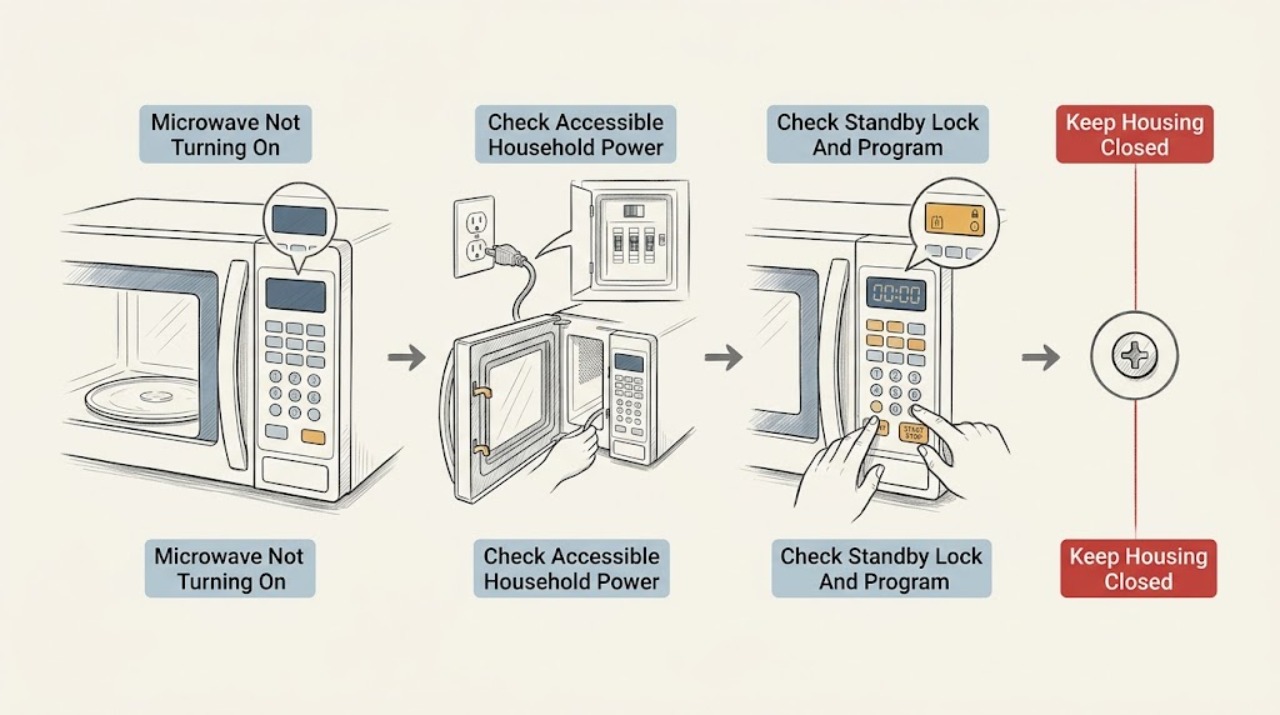
First separate a completely dark Breville microwave from one whose display works but will not start. If the display and interior light are both off, check only the accessible household outlet, breaker or fuse, and visible power-cord connection; Breville's manual lists an unplugged cord, blown fuse or breaker, and outlet trouble as possibilities. If the outlet has power but the microwave remains dark, stop and arrange qualified service. If the display is on but the cycle will not start, clear any paused or finished program, set a time or supported function, and press the model's START control. Check whether child lock is shown and use only the exact model manual to release it. The door must close fully and engage its safety lock; inspect the visible door edge, seals, and sealing surfaces for soil, an object, a bent door, or a loose hinge/latch, but do not adjust or bypass the lock. On a Combi Wave 3 in 1, choose the intended Microwave function—Air Fry, Oven, Grill, and combination functions are separate modes—then follow that model's start sequence. Standby can make the display look inactive while controls remain available. If the microwave display works but it still does not heat, the door does not close or latch, an interlock is suspect, a breaker trips again, or there is smoke, arcing, a burning smell, or a damaged cord, unplug it and arrange Breville or qualified appliance service. Never open the casing or attempt high-voltage, magnetron, capacitor, fuse, door-switch, or interlock repair.
Before you begin
Safety first
- This article covers dry, external power, control, program, mode, and visible door/seal checks only. A qualified provider must handle the casing, high-voltage system, microwave source, internal fuse, door switches, interlocks, hinges, latches, and any electrical repair.
Work through in order
Diagnostic checks
Use only checks that match the exact appliance or system and its official guide.
-
Check 1
Record the complete Breville model number and observe the microwave without opening its casing: is the display blank, is the cavity light on, does the panel respond, is a clock or lock symbol shown, and is the issue no start or no heating after a cycle begins?
Expected result: There is no display or light, the display is lit but controls do not start a cycle, the door appears closed but start is refused, or a cycle runs without heating.
Next step: Use the matching branch below and the exact model manual. If the model cannot be found without moving or opening the appliance, stop and arrange service.
Stop if: Do not continue testing with smoke, arcing, a burning smell, a damaged cord, or a door that will not close safely.
Why this matters
Why: No display and no light make external power or an internal input fault more likely. A lit display shifts attention to program, lock, standby, door safety, mode, or heating-system conditions.
-
Check 2
For a blank display and dark cavity light, check whether the accessible outlet has power using a suitable external check, inspect the household breaker or fuse, and look at the visible power-cord connection without moving a heavy unit or touching damaged wiring.
Expected result: The outlet or circuit is dead, the breaker or fuse is open, the plug is visibly loose, the outlet is powered but the microwave remains dark, or the breaker trips again.
Next step: Restore only an obvious external power condition if dry and safe. If the outlet is faulty, the breaker trips, the cord is damaged, or the microwave stays dark with normal power, unplug it and arrange qualified service.
Stop if: Do not replace an internal fuse, open the casing, use an extension cord as a repair, or repeatedly reset a tripping circuit.
Why this matters
Why: A household supply or visible connection can explain an entirely dark microwave. Normal external power with a dark appliance makes the cord, input, control, or internal fuse path more likely; a repeated trip is not a reset condition.
-
Check 3
If the display is visible, wake the controls according to the exact manual, clear any paused or finished program, check for a child-lock indication, set a short manual time or supported start function, and press the model's START control once.
Expected result: The display wakes from standby, the child lock is shown, the timer or program was not set, the start control responds, or the panel still refuses to start.
Next step: Use only the model's documented wake, child-lock release, and start sequence. If the lock cannot be released, the panel remains unresponsive, or the problem returns, stop and arrange service.
Stop if: Do not guess a lock sequence, enter undocumented diagnostics, or repeatedly press start while the door or interlock is abnormal.
Why this matters
Why: Standby, child lock, an unset timer, or a paused/finished state can prevent an expected start without loss of household power. A responsive panel that refuses every valid start points more toward the door lock, control, or another fault.
-
Check 4
With the microwave stopped and cool, inspect the visible door edge, door seals, sealing surfaces, cavity front, and latch area for food residue, a foreign object, a bent door, loose hinge or latch, or a damaged seal. Wipe accessible surfaces with a soft, slightly damp cloth only as the manual allows; do not insert anything between the door and frame.
Expected result: A removable residue or object is present, the door now closes evenly, the door is bent or loose, a seal or sealing surface is damaged, or the door closes but the cycle still will not start.
Next step: Remove only loose accessible residue, close the empty door gently, and try the documented start once. If any structural or seal damage exists, or the interlock still does not recognize closure, unplug the appliance and arrange qualified service.
Stop if: Do not bend the door, adjust hinges or latches, tape the interlock, wedge the door shut, or operate with a damaged seal or sealing surface.
Why this matters
Why: Residue or an object can keep the safety lock from engaging. A bent or loose door, damaged seal, or persistent refusal with a visibly closed door makes a latch, interlock, alignment, or control fault more likely.
-
Check 5
For a Breville combination model, confirm that the intended Microwave function—not Air Fry, Oven, Grill, or another combination mode—is selected. If a valid cycle starts but the food remains cold, record whether the turntable, light, fan, and timer behave normally without opening the door during operation.
Expected result: A non-microwave mode was selected, the cycle starts and counts down but does not heat, the door opens or pauses the cycle, or the controls and turntable behave abnormally.
Next step: Select the documented Microwave function and use a suitable test only as the model manual permits. If the microwave still does not heat, or any door, interlock, arcing, or abnormal electrical symptom appears, stop and arrange service.
Stop if: Do not run an empty microwave, remove the guide cover, test high-voltage components, or continue after arcing, smoke, burning odor, or a repeated trip.
Why this matters
Why: A mode mismatch can look like no microwave heating. A cycle with normal controls but no heat makes the microwave power system or an interlock fault more likely; abnormal door or control behavior makes service more urgent.
-
Check 6
Prepare a service report with the model number, display and light state, outlet and breaker observations, lock/program state, door and seal condition, selected function, whether the cycle starts, and any sound, odor, arc, or error indication.
Expected result: The microwave remains dark, the panel refuses a valid start, the door appears closed but is not recognized, a cycle runs without heat, or a safety symptom is present.
Next step: Unplug the appliance and arrange Breville or qualified microwave service. Provide the exact model and the observed pattern rather than opening the casing or ordering a fuse, switch, magnetron, or control board.
Stop if: Do not remove covers, test energized circuits, discharge capacitors, bypass interlocks, replace internal fuses, or continue operation after damage or arcing.
Why this matters
Why: The remaining possibilities include internal power, control, door-switch/interlock, high-voltage, magnetron, transformer, capacitor, or sealed microwave-system faults. No safe replacement part can be inferred from the symptom alone.
Use your observations
Decision map
Find the observation that best matches what you see, then follow the next safe action.
-
PATH 01Safety boundary
What you see
The display and cavity light are both off.
Do this next
Check only the accessible outlet, circuit, and visible connection. If power is normal but the microwave remains dark, or the breaker trips again, unplug it and arrange qualified service.
Why this path and its safety boundary
Why it matters: An outlet, household fuse or breaker, plug, power cord, input, or internal power fault is more likely than a door-program problem.
Safety stop: Do not open the casing or replace an internal fuse.
-
PATH 02Safety boundary
What you see
The display is on, but pressing a valid start control does not begin a cycle.
Do this next
Wake or clear the panel and check child lock and program state using the exact manual, then inspect the door closure and visible sealing surfaces. Escalate if the panel still refuses to start.
Why this path and its safety boundary
Why it matters: Standby, child lock, missing timer/program, a paused state, or the door safety lock is more likely than total power loss.
Safety stop: Do not guess lock codes or bypass the door safety system.
-
PATH 03Safety boundary
What you see
The door is bent, loose, obstructed, damaged at its seal or latch, or appears closed but the appliance does not recognize it.
Do this next
Remove only loose residue, do not force the door, unplug the appliance, and arrange service for any damage or persistent closure-recognition failure.
Why this path and its safety boundary
Why it matters: A door alignment, seal, latch, or safety-interlock problem is more likely, and microwave operation is not safe until the closure is confirmed by a qualified provider.
Safety stop: Do not tape, wedge, adjust, or defeat the door interlock.
-
PATH 04Safety boundary
What you see
A combination model starts in Air Fry, Oven, Grill, or another non-microwave mode, or a valid microwave cycle counts down without heating.
Do this next
Select the exact model's Microwave function once. If it still does not heat, stop and arrange qualified microwave service; do not run an empty-cavity test.
Why this path and its safety boundary
Why it matters: A mode selection can explain the first pattern. A valid microwave cycle with no heat makes an interlock or internal microwave power-system fault more likely.
Safety stop: Do not open the microwave system or continue after arcing, smoke, odor, or abnormal noise.
-
PATH 05Safety boundary
What you see
The appliance has a damaged cord, repeated breaker trips, smoke, burning odor, arcing, broken glass, or another electrical or structural hazard.
Do this next
Stop using the microwave, unplug only from a dry and safe position, keep clear of damaged parts, and arrange qualified service.
Why this path and its safety boundary
Why it matters: An immediate electrical, fire, radiation-shielding, or structural hazard is more likely than a simple program or outlet issue.
Safety stop: Do not reset repeatedly, touch exposed parts, operate with a damaged door or seal, or attempt internal microwave repair.
Helpful context
Understand the symptom
Classify power, start, and heating separately
A blank display and dark cavity light suggest a supply or input problem. A lit display that will not run points instead to a timer/program state, child lock, standby, door closure, or door safety lock. A cycle that runs without heating has a different path again. Breville sells both compact microwaves and combination models such as the Combi Wave 3 in 1, so use the E-Nr.-matched manual for button names and mode behavior.
The casing and interlocks are never a user repair
Microwave energy and high-voltage parts remain a serious hazard even when the appliance is unplugged. Do not operate the unit with the door open, remove the microwave guide cover, defeat or tape down a door interlock, open the casing, replace an internal fuse, or test a magnetron, capacitor, transformer, or door switch. If the door, seals, latches, or sealing surfaces are damaged, or there is arcing, smoke, a burning odor, or a repeated breaker trip, stop using the appliance and arrange qualified service.
A mode or standby state can look like a failure
Breville's Compact Wave has a child-lock state and a standby state, and its Combi Wave product page lists separate Microwave, Oven, Air Fry, Grill, and combination functions. A darkened or idle-looking screen is not necessarily loss of power, and a non-microwave mode will not behave like a microwave cycle. Wake the controls and select the intended function only as the exact manual describes; do not use a reset or lock sequence from another Breville model.
Safety boundary
Stop conditions
- Stop for a bent or loose door, damaged seal or sealing surface, broken or loose hinge/latch, smoke, arcing, burning odor, damaged cord, or repeated breaker trip.
- Do not operate with the door open or partly latched, place objects between the door and frame, or defeat or tape down a safety interlock.
- Do not remove the microwave guide cover, open the casing, discharge capacitors, replace an internal fuse, or test high-voltage components.
- Do not run an empty microwave to test heating, and do not infer a compatible magnetron, switch, fuse, control board, or transformer from the symptom.
When checks do not resolve it
Need a professional?
Safety scope: This article covers dry, external power, control, program, mode, and visible door/seal checks only. A qualified provider must handle the casing, high-voltage system, microwave source, internal fuse, door switches, interlocks, hinges, latches, and any electrical repair.
Common questions
FAQ
Why is my Breville microwave completely dark?
If the display and cavity light are both off, check the accessible outlet, household breaker or fuse, and visible power-cord connection. Breville lists those external power conditions for a microwave that will not start. If the outlet works but the microwave remains dark, unplug it and arrange qualified service; do not open the casing or replace an internal fuse.
Why does my Breville microwave have a display but not start?
Check for standby, child lock, a paused or finished program, an unset timer, and a door that is not fully engaging its safety lock. Use the exact model manual for the wake, lock-release, and start controls. If the panel still refuses a valid start, arrange service rather than bypassing the door interlock.
Can a Breville microwave door stop it from turning on?
Yes. Breville says the door must close properly and engage the safety lock, and that a damaged door, hinge, latch, seal, or sealing surface is a reason not to operate the appliance. Remove only loose residue from accessible surfaces; never adjust or defeat the lock.
Why does my Breville Combi Wave run but not microwave?
The Combi Wave has separate Microwave, Air Fry, Oven, Grill, and combination functions. Confirm that the Microwave function is selected using the exact BMO model instructions. If a valid microwave cycle counts down without heating, stop and arrange qualified service; do not run an empty-cavity test or open the casing.
Can I repair the Breville microwave fuse or door switch myself?
No. An internal fuse, door switch, interlock, magnetron, capacitor, transformer, and other high-voltage parts require qualified microwave service. Breville directs users not to adjust or repair the oven themselves and warns against tampering with safety interlocks.
Read the exact guide
Official sources
- Countertop Microwave Ovens - Air Fryer & Convection Combos | BrevilleBreville · Official Breville US microwave category page; exact functions, child-lock controls, and repair instructions remain model-specific.
- Combi Wave 3 in 1 Multifunction Oven | Breville (US)Breville · Official Breville US product page for BMO870; its mode list, door, and combination features are specific to the Combi Wave 3 in 1 model.
- Instruction Book – BMO650 / the Compact Wave™ Soft CloseBreville · Official Breville US instruction book for BMO650 models; controls, safety lock, standby, and troubleshooting details are model-specific and should not be copied to other Breville microwaves.
- the Combi Wave™ 3 in 1 - MICROWAVES Support & FAQs | Breville USBreville · Official Breville US BMO870 product hub for model-specific manuals and service resources.
Community feedback
Share a repair observation
Share a plain-text repair observation. Accepted observations are published automatically; this page may take a moment to update.