
On this page
Start here
Quick answer
First decide which symptom you actually have: a dark display and cavity light, a lit display that will not respond to Start, or a unit whose fan or surface light works while microwave cooking does not. For a completely dark unit, check the accessible plug, outlet, household breaker, and any GFI/GFCI protection from a dry, safe position; Frigidaire says a recent surge can trip the breaker and that its microwave should use a dedicated non-GFI circuit. If the display is lit, cancel any timer or delay, check the model-specific control/lock state, make sure the door closes and latches normally, and use the exact Owner's Manual sequence for Start. A working vent fan or surface light is only partial operation and does not prove that the cooking circuit is safe or functional. Stop immediately for smoke, burning odor, sparks, a hot or damaged cord, repeated breaker trips, or a damaged door/waveguide area. Never bypass the door interlock, remove the waveguide cover, open the cabinet, or attempt high-voltage testing; persistent no-start symptoms need qualified appliance service, and an outlet or breaker problem may need an electrician.
Before you begin
Safety first
- The user may observe the display, cavity light, exterior door condition, accessible plug/outlet, household breaker or GFI/GFCI, and exact model-documented controls from a safe position. Qualified service personnel must handle the cabinet, interlock, internal wiring, control board, waveguide, capacitor, magnetron, transformer, and all live or high-voltage testing.
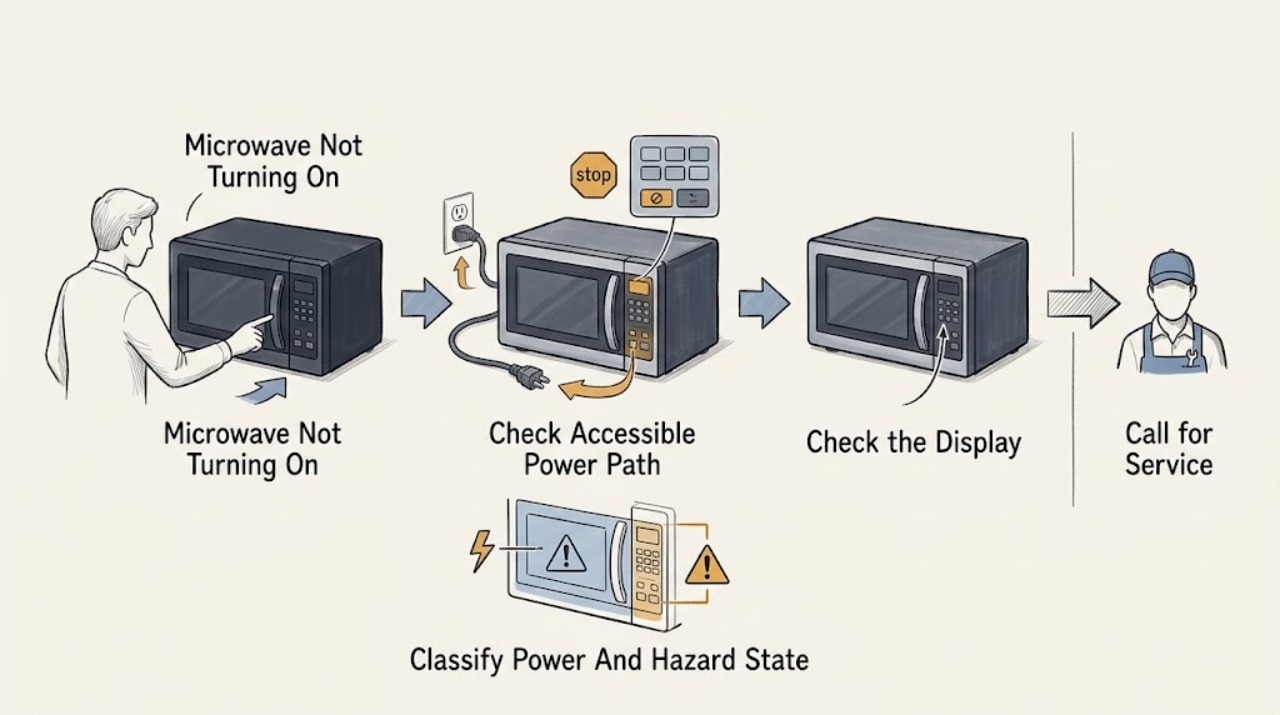
Work through in order
Diagnostic checks
Use only checks that match the exact appliance or system and its official guide.
-
Check 1
From a dry, safe position, note whether the control display and cavity light are both dark, whether the display is lit, and whether any smoke, burning odor, sparks, arcing marks, hot or damaged cord, liquid intrusion, or damaged door/window is present. Do not open the microwave or touch a suspected damaged part.
Expected result: There is an immediate hazard; the display and cavity light are both dark; the display is lit but the controls do not respond; or a fan/surface light works while cooking does not start.
Next step: For smoke, odor, sparks, heat, damage, or liquid near electrical parts, stop using the microwave and isolate power only from a safe location. If there is no hazard, continue with the accessible supply check for a dark unit, or the model-specific control and door checks for a lit unit.
Stop if: Do not keep testing after an arc, spark, burning smell, smoke, repeated trip, exposed conductor, damaged door, or hot/damaged cord.
Why this matters
Why: A hazard overrides all reset and control checks. A dark display and light are a possible total-power problem. A lit display is partial operation and shifts attention to controls, door-start permission, or internal service; fan or surface-light operation does not establish that the cooking circuit works.
-
Check 2
If the unit is completely dark and there is no hazard, inspect the accessible plug for a loose connection or visible damage and check whether the outlet supplies another small appliance. Inspect the household breaker or fuse once. If the microwave is on a GFI/GFCI-protected outlet, note whether that protection has tripped; do not open the outlet or use test instruments.
Expected result: The outlet is dead, the breaker or GFI/GFCI trips again, the outlet works but the microwave remains dark, or the display returns.
Next step: Use a qualified electrician for a failed outlet or recurring household protection event. If the outlet is normal but the microwave remains dark, leave it disconnected and arrange Frigidaire or qualified appliance service. If power returns, record the outage or surge and continue only with external controls and door checks.
Stop if: Do not repeatedly reset a breaker/GFI/GFCI, use a damaged cord, add an extension-cord workaround, or remove an outlet, plug, cabinet, or service panel.
Why this matters
Why: A dead outlet points to household supply and a recurring protection trip can indicate an electrical fault or overload. A known-good outlet with a dark microwave makes an appliance-side power fault more likely. Restored display means power was interrupted, but it does not explain a later no-start or authorize internal repair.
-
Check 3
For a lit display, identify the exact model and use only its Owner's Manual to check for a control lock, timer or delayed-start state, an unfinished or cancelled program, or a required Start/OK confirmation. Cancel or clear a documented setting once, then select a normal cooking function as the manual describes. Do not guess a button combination from another Frigidaire model.
Expected result: The panel is locked or showing a timer/delay, the panel accepts keys but Start is not being confirmed, the controls ignore every key, or the controls appear normal but no cooking cycle begins.
Next step: Use the exact model procedure once and record the display message or indicator. If the lock cannot be cleared, the display freezes, or Start still does nothing, stop user testing and arrange service rather than entering service mode or opening the cabinet.
Stop if: Do not defeat a lock, bridge a switch, enter undocumented diagnostics, or continue pressing controls after an electrical warning sign.
Why this matters
Why: A documented lock, timer, or required confirmation can make a powered microwave appear not to start. A panel that ignores all keys after the exact model procedure, or a normal panel that still will not begin a cycle, makes a control, door-interlock, or internal fault more likely.
-
Check 4
With power isolated before any cleaning, inspect the outside of the door, latch area, window, and visible cavity for a loose or bent door, obstruction, heavy food splatter, or damage. Clean only accessible surfaces with a soft, lightly damp cloth as Frigidaire describes; wipe splatters from the waveguide cover gently but leave the cover installed. Restore power only when the exterior is dry and the door closes normally.
Expected result: The door closes and latches normally, a loose obstruction or accessible splatter was found, the latch/door/window or waveguide cover is damaged or loose, or nothing visible explains the no-start.
Next step: If the condition is only an accessible obstruction or splatter, clean it with power disconnected and follow the exact model's normal start procedure once. For damage, looseness, or persistent no-start, leave the unit off and contact qualified appliance service.
Stop if: Never remove the waveguide cover, force the door, tape or bypass the latch/interlock, use the microwave with a damaged door or cover, or clean while energized.
Why this matters
Why: A normal door closure and clean accessible surface do not prove the interlock is healthy; they only remove visible causes. A damaged door, latch area, window, or waveguide cover is a safety and service condition, not a part to bypass or reposition experimentally.
-
Check 5
Record the exact model, whether the display/cavity light is dark or lit, the button response, the door condition, any message or indicator, whether only the vent fan or surface light operates, when the symptom began, and whether a breaker or GFI/GFCI opened. If the safe external checks do not restore a normal cooking start, stop testing.
Expected result: Cooking starts normally after a documented correction, only the fan or surface light works, the display is lit but Start remains ineffective, the unit is completely dark with a known-good outlet, or an electrical warning recurs.
Next step: Keep the microwave out of service for persistent no-start or any warning sign and give the observation record to Frigidaire or a qualified appliance technician. An electrician should assess a failed outlet or household protection problem; appliance service should diagnose the microwave after the supply is confirmed.
Stop if: Do not open the cabinet, test live wiring, remove the waveguide cover, discharge or handle a capacitor, inspect a magnetron, bypass a door switch, or order an internal part from the symptom alone.
Why this matters
Why: A documented control or supply correction may explain a temporary symptom. Partial fan/light operation or a lit display with no cooking start points to a separate control, door-interlock, or heating-path issue; a dark unit with known-good supply points to an appliance-side electrical fault. Recurrent warning signs require immediate service handling.
Use your observations
Decision map
Find the observation that best matches what you see, then follow the next safe action.
-
PATH 01Safety boundary
What you see
The display and cavity light are dark, and the accessible outlet is dead or a breaker/GFI/GFCI will not stay on.
Do this next
Stop resetting protection. Have a qualified electrician assess a failed outlet or circuit; if protection trips because of the microwave, leave the appliance disconnected and arrange appliance service.
Why this path and its safety boundary
Why it matters: A household supply/protection issue is more likely than a timer or door-start setting, although a microwave fault can also cause a recurring trip.
Safety stop: Do not open the outlet, use a damaged cord, repeatedly reset the breaker/GFI/GFCI, or bypass the circuit protection.
-
PATH 02Safety boundary
What you see
The display and cavity light are dark, but the outlet and household protection appear normal.
Do this next
Leave the microwave off and contact Frigidaire or qualified appliance service with the model and power-event history. Do not remove a panel to look for a fuse or wiring.
Why this path and its safety boundary
Why it matters: An appliance-side power or control fault is more likely; an external plug check cannot identify the failed internal component.
Safety stop: Do not perform live tests, open the cabinet, replace an internal fuse, or keep attempting starts.
-
PATH 03Safety boundary
What you see
The display is lit and responds, but a timer/lock/delay is shown, Start is not being confirmed as the model requires, or the door does not close and latch normally.
Do this next
Clear only the documented setting, close the undamaged door normally, and follow the exact model's Start sequence once. If the state cannot be cleared or the door remains abnormal, arrange service.
Why this path and its safety boundary
Why it matters: A model-specific control state or door-start permission issue is more likely than total loss of supply. A normal-looking display does not make it safe to bypass the interlock.
Safety stop: Do not force the latch, tape the door, bridge an interlock, or use another model's reset sequence.
-
PATH 04Safety boundary
What you see
The display or cavity light works, or an over-the-range vent/surface light works, but the microwave cooking cycle will not start after the exact control and door checks.
Do this next
Stop user testing and arrange qualified appliance service. Tell the technician which functions work and whether the display accepts keys; do not test for heat by repeatedly starting the unit.
Why this path and its safety boundary
Why it matters: This is partial operation, not proof of a healthy heating circuit. A control, door-interlock, or internal microwave fault is more likely than a dead outlet.
Safety stop: Do not run empty or repeated test cycles, open the cabinet, remove the waveguide cover, or perform high-voltage work.
-
PATH 05Safety boundary
What you see
There is smoke, burning odor, sparking/arcing, a hot or damaged cord, damaged door/window/waveguide area, liquid near electrical parts, or a breaker trips again.
Do this next
From a safe location isolate power if possible, keep people away from the unit, and contact qualified appliance service or an electrician as appropriate. If there is fire or continuing smoke, use emergency services according to local procedure.
Why this path and its safety boundary
Why it matters: The appliance is unsafe to continue operating; a reset or cleaning step cannot establish safe operation.
Safety stop: Do not touch exposed parts, reopen the door to inspect an arc, reproduce the symptom, or attempt any repair.
Helpful context
Understand the symptom
“Not turning on” can mean no power or no cooking start
A dark display and dark cavity light point first toward the accessible supply path. A lit display means the microwave has at least some low-voltage operation, but it does not prove that a cooking cycle can start. Record whether the panel beeps, whether it accepts number or function keys, and whether the door closes without looseness or damage. Do not use a fan, surface light, or display as proof that the heating system is healthy.
Controls and door behavior are model-specific
Frigidaire microwave families do not all use the same keypad, lock, timer, Start, or door-interlock indication. Use the exact model's Owner's Manual for clearing a timer or lock and for starting a cycle. A control that is lit but ignores Start, a timer or lock that will not clear, or a door that does not latch normally is a different decision path from an outlet with no power. Never force a latch or defeat an interlock.
The high-voltage boundary is not a DIY step
Microwave heating faults can involve internal wiring, interlock switches, the control, and high-voltage components. The safe user boundary ends at visual checks from outside, model-documented controls, and an accessible plug or breaker. Frigidaire also says to unplug before cleaning and never remove the waveguide cover. Leave the microwave out of service and arrange qualified diagnosis for persistent no-start behavior or any electrical warning sign.
Safety boundary
Stop conditions
- Stop using the microwave for smoke, burning odor, sparks/arcing, a hot or damaged cord, liquid near electrical parts, a damaged door/window/waveguide area, or a breaker/GFI/GFCI that trips again.
- Do not repeatedly reset a breaker or GFI/GFCI, run empty or repeated test cycles, or use a damaged plug, cord, door, or cover.
- Do not remove the cabinet, waveguide cover, rear/control panel, or any high-voltage component; do not discharge a capacitor or perform live electrical tests.
- Do not bypass, tape, bridge, or force the door latch/interlock, and do not use undocumented control or diagnostic sequences.
- If the exact model's external power, control, and door checks do not restore a normal start, leave the microwave off and arrange qualified service.
Only after diagnosis
Potential parts
- door latch or interlock assembly
Consider this only if qualified diagnosis finds that the correctly closed door is not being recognized after the external door and control checks; a latch should never be bypassed or selected from the symptom alone.
Confirm the exact model and the manufacturer's fit information before ordering; Frigidaire microwave door and switch arrangements vary by model. - microwave control or high-voltage heating assembly
Only a qualified technician should identify an appliance-side control or high-voltage fault after supply, settings, door closure, and visible safety checks pass; a no-start symptom does not identify a board, magnetron, capacitor, diode, or transformer.
Do not order or handle high-voltage parts without an exact model-specific diagnosis and fit confirmation; these components are service-only.
When checks do not resolve it
Need a professional?
Safety scope: The user may observe the display, cavity light, exterior door condition, accessible plug/outlet, household breaker or GFI/GFCI, and exact model-documented controls from a safe position. Qualified service personnel must handle the cabinet, interlock, internal wiring, control board, waveguide, capacitor, magnetron, transformer, and all live or high-voltage testing.
Common questions
FAQ
Why is my Frigidaire microwave completely dark?
Check the accessible plug, outlet, household breaker, and any GFI/GFCI protection once from a dry, safe position. Frigidaire specifically recommends checking whether the display and inside light turn on and notes that a surge can trip the breaker. If the outlet is good but the microwave stays dark, leave it disconnected and arrange appliance service; do not open the cabinet or replace an internal fuse yourself.
The display is on but pressing Start does nothing. What should I check?
Use the exact model's Owner's Manual to clear a timer, delayed start, or control lock, confirm the required Start/OK sequence, and check that the door closes and latches normally. If the panel still ignores Start or the door is damaged or loose, stop testing and call service rather than bypassing the interlock.
Can I use the microwave if its vent fan or surface light works but cooking will not start?
No. A fan, surface light, or lit display is only partial operation and does not prove that the microwave cooking circuit or door interlock is safe. Do not run repeated or empty tests; record which functions work and arrange qualified appliance diagnosis.
Can I remove the metal-looking waveguide cover to see why the microwave will not start?
No. Frigidaire says to unplug before cleaning, wipe splatters from the waveguide cover gently, and never remove the cover. Cabinet, interlock, waveguide, capacitor, magnetron, and other high-voltage work belongs to qualified service.
When should I stop troubleshooting immediately?
Stop for smoke, burning odor, sparks or arcing, a hot or damaged cord, a damaged door or waveguide area, liquid near electrical parts, or a breaker/GFI/GFCI that trips again. Isolate power only from a safe location and contact qualified service or an electrician as appropriate.
Read the exact guide
Official sources
- How do I clean my microwave?Frigidaire · Official Frigidaire Owner Center article labeled Applies to: Microwaves; cleaning instructions are limited to accessible surfaces and do not authorize internal service.
- Microwaves - No PowerFrigidaire · Official Frigidaire Owner Center article labeled Applies to: Microwaves; model-specific control behavior still requires the exact Owner's Manual.
Community feedback
Share a repair observation
Share a plain-text repair observation. Accepted observations are published automatically; this page may take a moment to update.