
On this page
Start here
Quick answer
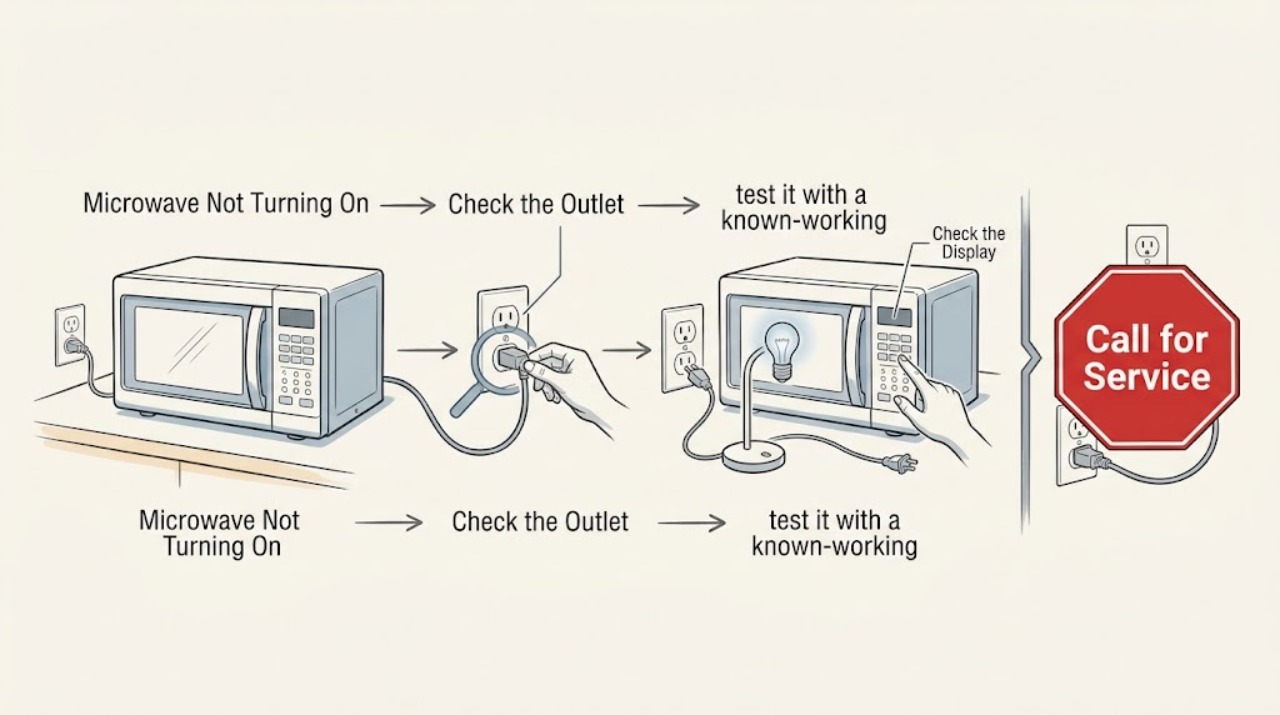
If a Maytag microwave is completely dark or will not power on, check that its cord is connected to a grounded, working wall outlet and inspect the appliance breaker or fuse. A single safe power reset may be appropriate for the model, but do not keep resetting a breaker that trips again. If the outlet works and the microwave stays dead, arrange qualified service.
Work through in order
Diagnostic checks
Use only checks that match the exact appliance or system and its official guide.
-
Check 1
Inspect the accessible power cord and plug for looseness, scorching, cuts, or heat damage. Confirm it is connected to a polarized, grounded wall outlet rather than an extension or alternate power source.
Expected result: The plug or cord is damaged or loose, the outlet is inaccessible, or the connection appears normal.
Next step: Do not energize a damaged cord or outlet. Request an electrician or qualified appliance service; otherwise continue with a safe outlet test.
Why this matters
Why: Visible electrical damage is a safety stop. A sound connection moves the check to the outlet and circuit protection.
-
Check 2
If the outlet is easily accessible, test it with a known-working small appliance of a similar type. Do not remove the microwave cabinet or use exposed wiring for the test.
Expected result: The test appliance also fails, or the outlet works while the Maytag microwave remains dark.
Next step: Have a qualified electrician address a dead or ungrounded outlet. For a working outlet and dark microwave, leave the unit disconnected and arrange appliance service.
Why this matters
Why: A failed outlet points to household power. A working outlet with no microwave response points toward the microwave's cord, fuse, control, or internal power path.
-
Check 3
Check the labeled microwave circuit breaker or fuse. Reset or replace it only once if safe and permitted, then watch for an immediate repeat trip; also confirm Control Lock or Demo Mode only if the display returns.
Expected result: Power returns and stays stable, the breaker trips again, or the display returns but controls remain disabled.
Next step: Do not continue operating after a repeat trip. Disconnect or switch off the circuit and arrange qualified service; if power returns, use the model's Control Lock guidance.
Why this matters
Why: A stable return can indicate a single interruption. A repeated trip is a protection response, and a powered but disabled panel requires a control-specific check.
Use your observations
Decision map
Find the observation that best matches what you see, then follow the next safe action.
-
PATH 01Next step
What you see
The outlet fails the safe test
Do this next
Use a qualified electrician for the outlet or circuit; do not keep plugging the microwave into a suspect receptacle.
-
PATH 02Next step
What you see
The outlet works but the microwave remains completely dark
Do this next
Leave it disconnected or unused and arrange qualified appliance service; do not open the cabinet.
-
PATH 03Next step
What you see
The breaker trips again after one reset
Do this next
Do not attempt another reset or operate the microwave; disconnect power and call qualified service.
Helpful context
Understand the symptom
First establish whether power reaches the microwave
A dark display and no interior response point to the power path, while a lit display with a rejected Start command belongs to a not-starting or door/control check. Maytag's power guidance keeps the user at the cord, outlet, breaker, and controls.
When checks do not resolve it
Need a professional?
Arrange qualified service when a working outlet does not restore a dark Maytag microwave, the cord is damaged, the breaker trips again, or the unit needs internal fuse, control, or wiring diagnosis.
Common questions
FAQ
What should I do if my Maytag microwave breaker trips again?
Do not keep resetting or operating the microwave. Maytag advises disconnecting the appliance or switching off the controlling breaker when it trips again, then arranging qualified service.
Can a Maytag microwave have a dark display but still have power?
A completely dark display usually warrants an outlet and circuit check first. If the outlet works and the microwave remains dark, leave it unused and have the appliance power path diagnosed; do not open the cabinet.
Read the exact guide
Official sources
- Not Powering On - Over-the-Range MicrowaveMaytag Product Help · Maytag over-the-range microwave power
- Microwave is Not Starting or Operating - Countertop MicrowaveMaytag Product Help · Maytag countertop microwave operation
Community feedback
Share a repair observation
Share a plain-text repair observation. Accepted observations are published automatically; this page may take a moment to update.