
On this page
Start here
Quick answer
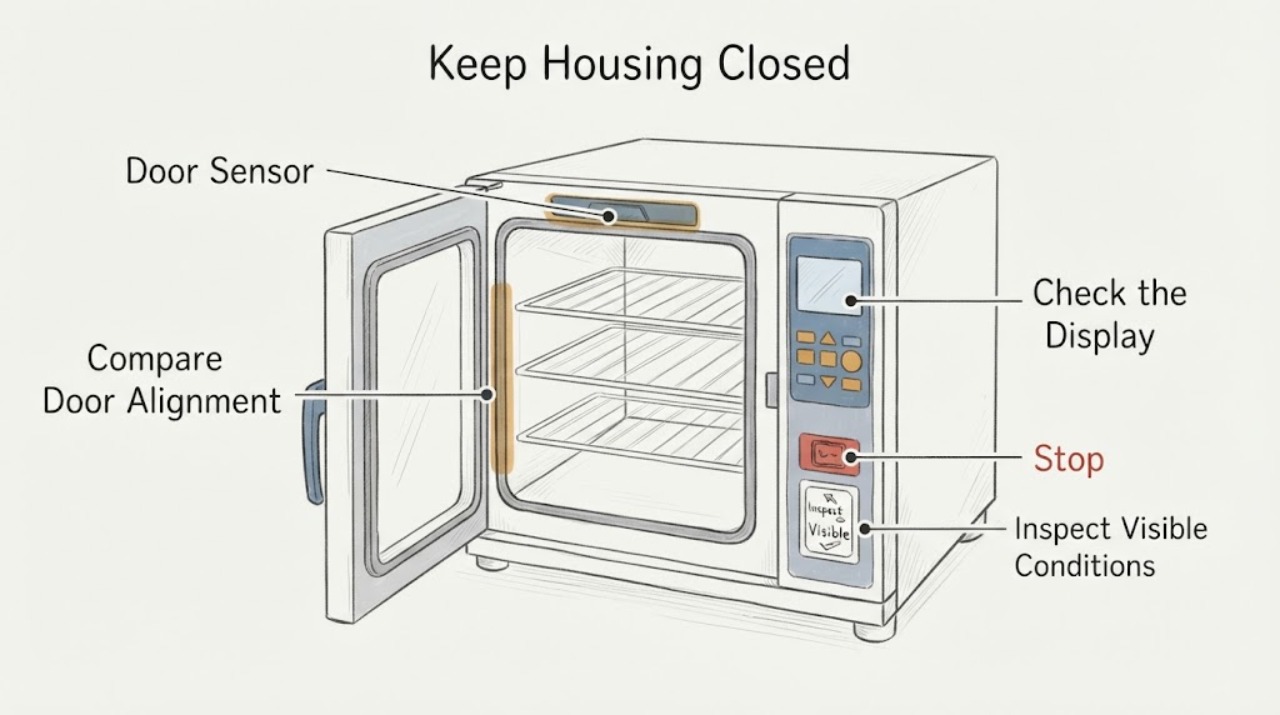
On the Breville Smart Oven Air Fryer Pro family covered by the BOV900 manual, opening the door during cooking should pause the timer and turn on the oven light; closing the door should let the timer resume, while a door left open for more than 10 minutes turns the heaters off. That makes a normal pause different from a closed door that is still treated as open. Confirm that the door closes fully and that no rack or cookware is obstructing it, then observe one attended cycle using the normal controls. Do not bend, remove, or bypass a latch or sensor, and do not name or order an internal part from appearance alone. Stop for smoke, sparks, burning odor, cracked glass, a hot cord, or uncontrolled heating and arrange qualified service.
Work through in order
Diagnostic checks
Use only checks that match the exact appliance or system and its official guide.
-
Check 1
With the oven cool and unplugged only when the plug is safely reachable, remove any loose rack, pan, foil, or cookware that could prevent the door from closing fully. Look at the door edge, hinge area, and opening from outside without forcing the door or removing a cover.
Expected result: The door closes flush with no accessible obstruction, or it stops short, rubs, sits unevenly, or has visibly damaged glass, hinge, or latch hardware.
Next step: Remove only a loose accessible obstruction and close the door gently once. If the door remains misaligned or damaged, stop using the oven and arrange qualified Breville appliance service.
Stop if: Do not force the door, bend the latch, remove panels, or continue with a damaged door or cracked glass.
Why this matters
Why: A clear, fully closing door permits a sensor-behavior check. A door that cannot close normally can keep the closure state from being recognized, but the visible symptom does not identify which internal part is at fault.
-
Check 2
From a safe position, use the normal BOV900 control sequence for one attended cooking attempt: select a documented function, set the temperature and time, close the door gently, and press START/CANCEL once. Do not repeatedly press the control to reproduce the symptom.
Expected result: The cycle starts normally, the display accepts settings but will not start, or the cycle starts and immediately behaves as though the door is open.
Next step: If the cycle will not start or returns to a door-open state with the door closed, record the exact display behavior and stop further attempts; arrange service.
Stop if: Do not run the oven unattended, open the housing, or bypass a door or thermal safety device.
Why this matters
Why: A normal start makes a missed sequence or accessible obstruction more plausible. An active display with a valid sequence but no start keeps a door-sensor, control, thermal, or internal power fault in scope.
-
Check 3
During the single attended cycle, observe the documented response to a brief, normal door opening only if needed to confirm behavior. Keep hands clear of hot surfaces and close the door gently; do not intentionally leave it open for 10 minutes as a test.
Expected result: Opening the door pauses the timer and turns on the light, then closing it allows the timer to resume, or the timer does not resume and the oven continues to show an open-door condition.
Next step: Treat normal pause-and-resume as expected. If closure is not recognized, stop testing, keep the oven out of service, and give the technician the timing and display observations.
Stop if: Do not hold the door open, defeat the interlock, touch the rack or elements while hot, or repeat the test after abnormal heating.
Why this matters
Why: The first pattern matches the BOV900 manual's Door Sensor behavior. The second pattern means the oven is not recognizing the closure as expected and needs diagnosis of the door alignment, sensor, control, or related safety circuit.
-
Check 4
Check the exact model label and document the symptom without guessing at the unidentified part. Record BOV900BSSUSC, whether the door is flush, whether the timer pauses and resumes, any door-open message, when the issue began, and whether a rack or pan was present.
Expected result: The model and behavior can be documented clearly, or the model label and closure behavior remain uncertain.
Next step: Use the exact model information when contacting Breville or qualified appliance service. If the model or symptom cannot be confirmed, do not order an internal part or continue testing.
Stop if: Do not substitute a manual or part listing for another model and do not claim compatibility from a similar photograph.
Why this matters
Why: Breville's official product hub and parts entry point are model-scoped. A precise model and observed behavior are more useful for selecting the correct support path than a part's appearance or a generic BOV900-family assumption.
-
Check 5
Stop immediately and screen for hazards before any further use. Look from a safe position for smoke, sparks, a burning smell, a hot or damaged cord, cracked glass, melting, or heating that continues after the controls should stop it.
Expected result: No hazard is present, or any smoke, sparking, burning odor, heat damage, cracked glass, or uncontrolled heating is present.
Next step: For a hazard, stop using the oven. Unplug it only if the plug is reachable from a dry, safe position, then arrange qualified appliance or electrical service; contact emergency services for an active fire.
Stop if: Do not touch exposed wiring, keep resetting power, open the case, or attempt to bypass a safety circuit.
Why this matters
Why: A clean safety screen permits only the limited observation above. Any hazard changes the task from closure diagnosis to shutting the appliance down and obtaining qualified help.
Use your observations
Decision map
Find the observation that best matches what you see, then follow the next safe action.
-
PATH 01Next step
What you see
The door opens briefly, the timer pauses, the light turns on, and closing the door allows the timer to resume.
Do this next
Use the oven normally if there is no other abnormal behavior. If the concern is an unidentified piece, photograph it with the model label and ask Breville or a qualified technician to identify it.
Why this path and its safety boundary
Why it matters: This matches the BOV900 manual's expected Door Sensor response and does not by itself show a failed closure sensor.
-
PATH 02Next step
What you see
The door is fully closed and unobstructed, but the timer will not resume or the display continues to treat the door as open.
Do this next
Stop using the oven and arrange Breville or qualified appliance service with the exact model, display message, and observed pause or non-resume behavior.
Why this path and its safety boundary
Why it matters: The closure state is not being recognized as documented. Door alignment, the sensor, control logic, or a related safety circuit may need diagnosis; the symptom alone does not establish a replaceable part.
-
PATH 03Next step
What you see
The door will not close flush, rubs, or has damaged hinge, latch, or glass hardware.
Do this next
Do not force or operate the oven. Arrange qualified service and provide the model and a description of the visible door condition.
Why this path and its safety boundary
Why it matters: A mechanical closure problem can prevent reliable door sensing and creates a separate physical safety concern. It still does not identify an internal replacement part without model-specific service evidence.
-
PATH 04Next step
What you see
Smoke, sparks, burning odor, cracked glass, a hot or damaged cord, melting, or heating that does not stop is present.
Do this next
Stop use, keep clear, unplug only from a dry safe position if possible, and obtain qualified appliance or electrical service before reuse.
Why this path and its safety boundary
Why it matters: This is an immediate electrical, fire, or uncontrolled-heating boundary rather than a door-sensor troubleshooting branch.
Helpful context
Understand the symptom
Use the BOV900 Door Sensor behavior as the first distinction
A door opening during a cooking cycle is not automatically a fault on this oven. Breville's BOV900 manual says the timer pauses and the light turns on when the door opens, and that closing the door lets the timer resume. It also says the heaters turn off if the door remains open for more than 10 minutes. A brief pause followed by normal resumption is therefore expected sensor behavior; a door that is physically closed but still behaves as open is a different service path.
An unknown piece is not enough to select a replacement
The official BOV900 support hub links to model support, repair, and parts resources, but the reviewed material does not map an unidentified physical piece to a door-sensor replacement for BOV900BSSUSC. Keep the exact model label and a clear description or photo for service. Do not remove the housing, bend the door hardware, defeat an interlock, or install a part based on a similar-looking oven.
Common questions
FAQ
Is it normal for the BOV900 timer to pause when I open the door?
Yes. Breville's BOV900 manual says opening the door during cooking pauses the timer and turns on the light; closing the door should allow the timer to resume. A closed door that remains treated as open is a different fault pattern.
What part should I replace if the oven does not detect the closed door?
Do not choose a sensor, latch, control board, or other internal part from an appearance or symptom alone. The reviewed official BOV900 pages do not establish a door-sensor replacement part number for BOV900BSSUSC. Give Breville or a qualified technician the exact model and the observed pause or non-resume behavior.
Can I bypass the door sensor to keep using the oven?
No. Do not defeat or bypass a door or thermal safety device, and do not open the housing to reach it. If a closed door is not recognized, stop using the oven and arrange qualified service.
Read the exact guide
Official sources
- Parts for ovensBreville US · Official Breville parts page; the page provides a parts and add-ons route but does not establish an internal door-sensor replacement part for the exact symptom.
- Smart Oven Air Fryer Pro - Convection OvenBreville US · Official Breville US product page for the BOV900 product family and its support documentation.
- the Smart Oven Air Fryer Pro - OVENS Support & FAQsBreville US · Official Breville product hub for the Smart Oven Air Fryer Pro; support and repair routes remain model-scoped.
- the Smart Oven Air Instruction Book - Suits all BOV900 modelsBreville · Official Breville instruction manual for the BOV900 family; confirm the exact model label before applying model-specific instructions.
Community feedback
Share a repair observation
Share a plain-text repair observation. Accepted observations are published automatically; this page may take a moment to update.