
On this page
Start here
Quick answer
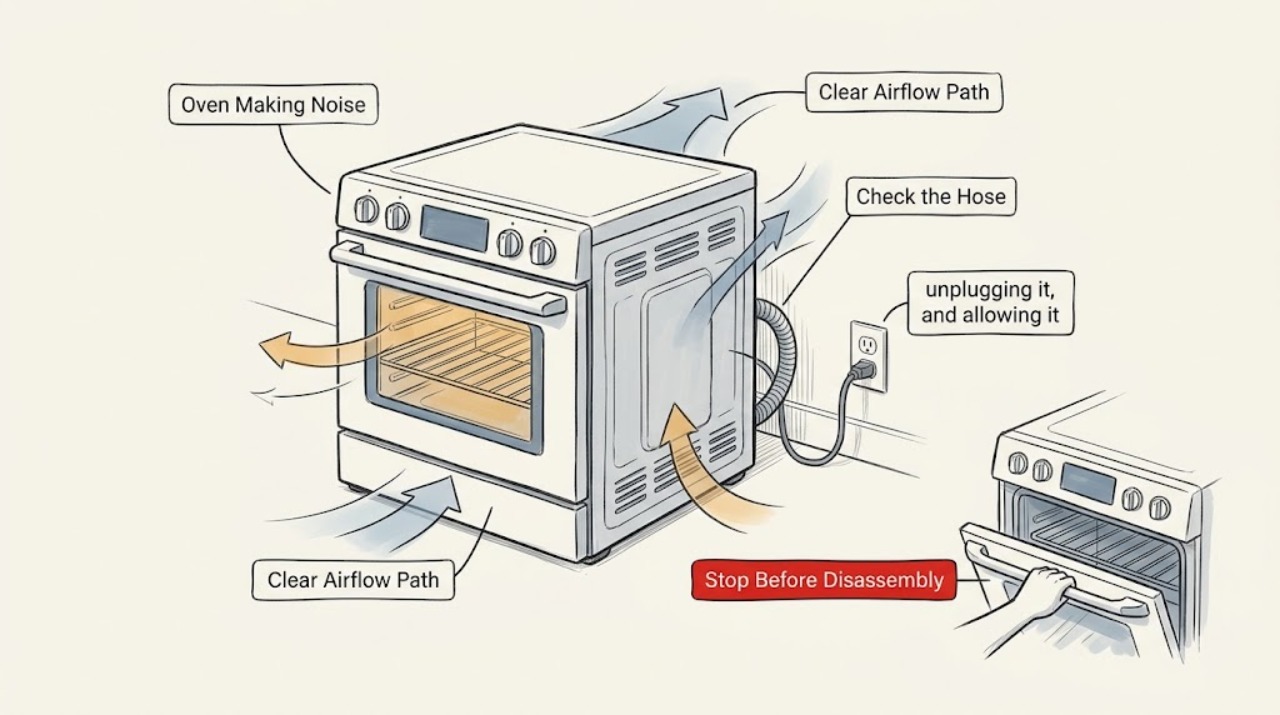
A Breville oven may hum or blow after a cooking cycle because its cooling fan protects the electronics, and convection modes also use a fan while cooking. First identify when the sound occurs, then let the oven cool completely and check only the removable tray, rack, pan, clearance, and external ventilation openings. A scraping, grinding, repeated clicking, burning smell, smoke, visible damage, or noise that continues abnormally after cooling is a reason to stop using the oven and arrange service.
Work through in order
Diagnostic checks
Use only checks that match the exact appliance or system and its official guide.
-
Check 1
Note whether the sound begins during a convection cooking cycle, immediately after the oven is turned off, or while the oven is otherwise idle. From a safe distance, describe it as a smooth hum or airflow, a rattle, a repeated click, or scraping/grinding; do not touch the hot oven.
Expected result: A steady airflow sound limited to convection or the cooling period is different from an irregular mechanical sound that occurs while idle or changes in pitch.
Next step: If it is smooth and linked to convection or cooldown, continue to Action 2. If it is scraping, grinding, sparking, or accompanied by smoke or a burning smell, stop using the oven and follow the stop conditions.
Why this matters
Why: A timed, steady fan sound can be normal operation. An irregular or idle sound needs the removable-part and safety checks below, and may need service.
-
Check 2
On a model whose controls allow convection to be deselected, compare the sound on a suitable cool-start test with the convection indicator on and off. Follow the model's own manual, stay nearby during any test, and do not run the oven empty if the manual for that model does not permit it.
Expected result: The sound appears only, or becomes clearly louder, when convection is selected; or it remains with convection off.
Next step: For a convection-linked steady sound, check clearances and removable items in Action 3. If the sound is rough or persists with convection off, turn the oven off and continue only after it is fully cool.
Why this matters
Why: A sound that follows the convection setting points toward the fan or airflow path. A sound independent of that setting is more likely to be a loose removable accessory, external vibration, or a fault that needs service if it persists.
-
Check 3
After turning the oven off, unplugging it, and allowing it to cool completely, slide out the crumb tray and remove the rack and pan. Check for trapped crumbs, a bent or damaged accessory, a tray that is not seated, or anything loose that could vibrate; do not insert tools or remove the oven housing.
Expected result: The noise source is a visibly loose or poorly seated removable item, or all removable items look sound and the noise was heard from inside the case.
Next step: Clean and dry the tray as directed, reseat the accessories, and perform only a supervised normal-use check. If the sound remains or is internal, proceed to Action 5 and arrange service.
Why this matters
Why: A loose tray, rack, or pan can rattle and may be corrected by cleaning, drying, and reseating it. A noise with no removable cause should not be chased by opening the appliance.
-
Check 4
With the oven cool and unplugged, verify that it stands level on a stable heat-resistant surface, the ventilation openings are not covered, and nearby objects are not touching the sides or top. Keep the clearance specified by the model's manual and remove items stored on top before the next use.
Expected result: Moving a nearby object or restoring clear space changes the rattle, or the sound is unchanged and comes from the oven itself.
Next step: Remove the external source and observe during a normal cycle only if there are no stop symptoms. If the oven itself still rattles, scrapes, or buzzes, stop and use the service path.
Why this matters
Why: A counter or object can amplify normal fan vibration. An unchanged internal sound is not a clearance adjustment and may indicate a fan, mount, or electrical issue.
-
Check 5
After a normal cycle, press the oven's stop control and leave the appliance undisturbed while the cooling fan runs. Do not unplug it during the documented cooling period; note whether the airflow sound gradually ends after the oven has cooled, or whether it becomes rough, intermittent, or continues abnormally.
Expected result: The fan sound is smooth and ends as the oven cools, or the sound persists without settling, becomes rough, or is joined by an error or unusual heat.
Next step: If it ends normally, monitor the pattern and keep the oven clear. If it does not settle or any stop symptom appears, discontinue use and arrange qualified service.
Why this matters
Why: A smooth sound that ends with cooldown is consistent with the manufacturer's cooling-fan explanation. Persistent, rough, or worsening noise is not something to repair from the outside.
-
Check 6
If the noise remains after the cool, unplugged checks, record the model label, selected function, when the sound starts, where it is loudest, and whether heating or the display also behaves abnormally. Keep the oven unplugged if there is smoke, a burning smell, sparks, damaged insulation, a damaged cord or plug, or a harsh mechanical sound.
Expected result: The sound is repeatable and internal, or a visible or electrical safety symptom is present.
Next step: Use Breville's official support or warranty-and-repair route for the exact model. Do not remove the case, probe live parts, bypass a control, or attempt an internal fan or wiring repair.
Why this matters
Why: A repeatable internal noise needs diagnosis by Breville support or a qualified appliance technician. Safety symptoms mean the appliance should not be operated for another test.
Use your observations
Decision map
Find the observation that best matches what you see, then follow the next safe action.
-
PATH 01Safety boundary
What you see
Does the sound occur after cooking and sound like smooth airflow, then stop as the oven cools?
Do this next
Treat it as consistent with the documented cooling-fan behavior; keep the oven ventilated and do not unplug it while the fan is cooling the electronics.
Why this path and its safety boundary
Safety stop: Continue with the cool, unplugged removable-item and clearance checks.
-
PATH 02Safety boundary
What you see
Does the sound follow the convection setting on a model that provides that control?
Do this next
A steady fan sound may be airflow operation; a rough or worsening sound still requires stopping and service.
Why this path and its safety boundary
Safety stop: Look for a loose removable accessory or external vibration only after the oven is cool; persistent internal noise goes to service.
-
PATH 03Safety boundary
What you see
After the oven is cool, is the crumb tray, rack, pan, or nearby object loose or contacting the appliance?
Do this next
Clean, dry, and reseat the removable item or remove the external contact, then make only a supervised normal-use check.
Why this path and its safety boundary
Safety stop: Do not open the housing. Treat a continuing internal rattle, scrape, or buzz as a service symptom.
-
PATH 04Safety boundary
What you see
Is there smoke, a burning smell, sparking, damaged insulation, a damaged cord or plug, or an abnormal error display?
Do this next
Stop the appliance, keep the door closed if food is burning, disconnect it only when safe to do so, and leave it out of service for qualified help.
Why this path and its safety boundary
Safety stop: If the noise remains repeatable after the safe checks, document the symptom and contact Breville support or a qualified appliance technician.
-
PATH 05Safety boundary
What you see
Does the cooling sound remain rough or continue abnormally after the oven has had time to cool?
Do this next
Stop using the oven and arrange service; do not repeatedly power-cycle it or dismantle the fan area.
Why this path and its safety boundary
Safety stop: A smooth sound that ends with cooldown is consistent with normal cooling operation; monitor for a change in pattern.
Helpful context
Understand the symptom
Start with the timing and character of the sound
Noise after pressing Stop is not automatically a fault. Breville's Pizzaiolo instructions explain that cooling fans can remain on after cooking until sensitive electronics reach an acceptable temperature. On Smart Oven models, convection is also a selectable or preset cooking function, so a steady airflow sound can occur during a cycle. The useful distinction is whether the sound is a smooth fan or air movement, or a new irregular sound that suggests something is vibrating, rubbing, or failing.
Use a cool, unplugged inspection for anything removable
Do not reach into a hot cavity or remove the case. Turn the oven off, unplug it, and allow it to cool fully before checking the crumb tray, rack, pan, door area, and ventilation clearance. Breville's care guidance also says to keep the tray dry and reinsert it before operation. If the sound remains after the outside and removable accessories are secure, the next decision is service rather than disassembly.
What a normal result looks like
A normal result is a consistent fan or airflow sound that follows convection or cooling, with no smell of burning, smoke, scraping, or change in heating behavior. A noise that changes into grinding, metallic rubbing, a repeated click, or an electrical buzz should not be diagnosed by opening the housing. Record when it starts, where it seems loudest, which function was selected, and whether it stops after the oven has cooled; that record helps Breville support or a qualified appliance technician reproduce the symptom.
Safety boundary
Stop conditions
- Stop using the oven for smoke, a burning smell, sparks, damaged wiring, a damaged cord or plug, fire, or an abnormal electrical sound.
- Do not reach into a hot cavity or remove the housing to inspect a fan, motor, wiring, or control board.
- Do not bypass a control or safety feature, probe live electrical parts, or continue testing a harsh scraping or grinding sound.
- If a fault indication appears or the noise persists after the oven is cool and its removable items are secure, leave the appliance unplugged and arrange qualified service.
When checks do not resolve it
Need a professional?
Arrange Breville support or qualified appliance service when the noise is harsh, intermittent, electrical, internal, repeatable with no loose accessory, accompanied by a fault indication, or does not settle after normal cooling. Include the exact model and a description of when and where the sound occurs.
Common questions
FAQ
Is it normal for a Breville oven to make noise after it is turned off?
Often, yes. Breville documents cooling fans that continue after cooking to protect sensitive electronics. The sound should be smooth and should end as the oven cools; rough, worsening, or persistent noise needs service.
Why does my Breville oven hum while it is cooking?
Convection modes use fan assistance to circulate heated air, so a steady airflow hum can be expected when convection is selected or preset. Compare the timing with the convection indicator only if your model provides that control.
What should I check before calling for service?
After the oven is fully cool and unplugged, check the crumb tray, rack, pan, nearby objects, level surface, and ventilation clearance. Do not remove the case or inspect internal electrical parts.
Should I keep using the oven if the noise sounds like scraping or grinding?
No. Stop using it if the sound is harsh or mechanical, especially with smoke, a burning smell, sparking, damaged wiring, or unusual heat. Leave internal diagnosis and repair to qualified service.
Read the exact guide
Official sources
- the Smart Oven® Pizzaiolo 2Breville · Breville Pizzaiolo oven operation, safety, and troubleshooting
- the Smart Oven® - OVENS Support & FAQs | Breville USBreville · Breville Smart Oven product support, instruction manuals, warranty, repair, and parts resources
- the Smart Oven® Compact ConvectionBreville · Breville Smart Oven Compact Convection operation, safety, care, and troubleshooting
Community feedback
Share a repair observation
Share a plain-text repair observation. Accepted observations are published automatically; this page may take a moment to update.