
On this page
Start here
Quick answer
Some Bosch oven fan sounds are expected: the convection fan may run during preheating or a convection mode, and a cooling fan may continue after the oven is turned off until the appliance cools. A new or unusually loud grinding, scraping, rattling, clicking, or high-pitched noise needs a pattern check before the oven is used again. Note whether the sound follows preheat, convection, cooking, self-clean, door opening, or cooldown; when the oven is cool, make sure racks and visible cookware are seated and the vent is not blocked. If a fault code, smoke, burning odor, sparking, a fan that strikes something, or a noise that remains outside the documented operating pattern appears, stop using the oven and arrange qualified Bosch service rather than opening the appliance or lubricating a fan.
Before you begin
Safety first
- This article covers safe listening from outside the oven, cool-cavity inspection, removable-item checks, visible vent observation, and model-manual lookup only. Do not open the appliance, lubricate a fan, test energized parts, bypass protection, or keep heating through a hazardous noise.
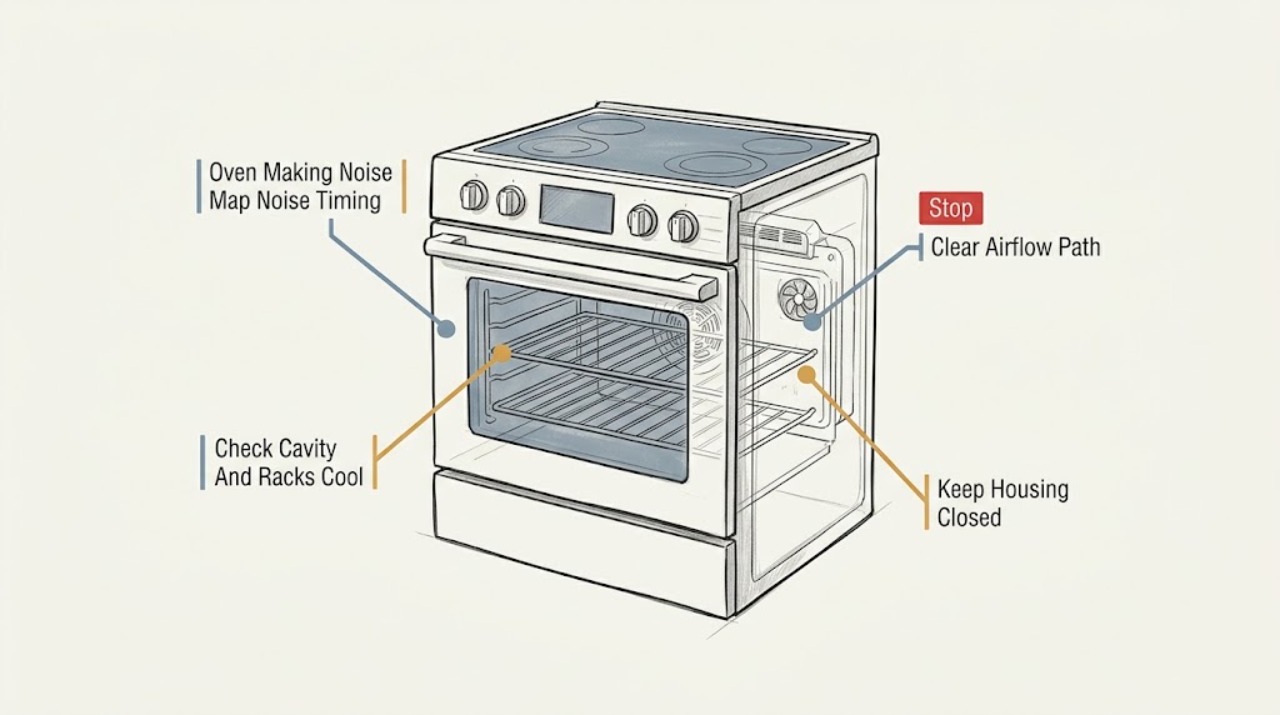
Work through in order
Diagnostic checks
Use only checks that match the exact appliance or system and its official guide.
-
Check 1
From outside the oven, record when the noise occurs without touching controls or opening the door while the oven is hot: during preheat, bake, convection, self-clean, door opening, immediately after shutdown, or while the oven is idle.
Expected result: The sound occurs only during documented fan phases, only during heating, only after shutdown, only with the door open, or it is present continuously or independently of a selected mode.
Next step: Write down the mode, oven temperature state, door position, duration after shutdown, and whether the sound changes with the fan phase; compare those observations with the exact Bosch owner manual.
Stop if: Stop using the oven for smoke, sparks, a burning smell, harsh metal contact, visible fan impact, or any noise accompanied by loss of control or heating behavior.
Why this matters
Why: Bosch states that some convection fans run during bake preheat, that convection fans operate in convection modes, and that cooling fans can run after shutdown. A sound that follows a normal fan phase may be expected for the model; continuous, worsening, rubbing, or mode-independent noise is not established as normal by timing alone.
-
Check 2
After the oven has cooled completely, turn it off and inspect from ordinary safe access for a loose rack, tray, pan, foil, removable accessory, or visible debris contacting the cavity, door, or vent area; reseat only removable items described by the model manual.
Expected result: A rack or accessory is visibly loose or contacting another surface; the cavity and removable items are clear; the noise source is behind a panel or vent; or an item is stuck and cannot be removed without force.
Next step: Remove only a plainly accessible removable item, restore the rack or tray according to the manual, and make one controlled observation only if the oven is otherwise safe; arrange service if the sound remains.
Stop if: Do not insert tools into the fan or vent, pry trim or panels, touch a hot element, remove a fan guard, or use the oven with a loose component that can contact moving or heated parts.
Why this matters
Why: A loose removable item can create a rattle that is unrelated to the fan. A clear cavity does not rule out a fan, motor, mount, control, or internal obstruction, and a concealed or trapped object is not a user-access diagnosis.
-
Check 3
From a safe position while the oven is operating normally or cooling, observe whether air is escaping at the intended oven vent and whether a towel, foil, cookware, installation trim, or other visible item is blocking that outlet; do not place fingers or objects into the vent.
Expected result: Warm air or steam exits the intended vent with no obstruction; airflow is weak or redirected; the vent is visibly blocked; or the sound comes with unusual airflow, odor, or vibration.
Next step: Remove only a plainly external obstruction after the oven is cool, restore the installation arrangement specified by Bosch, and stop for persistent noise, abnormal airflow, or any need to access the rear or internal vent path.
Stop if: Do not cover, seal, redirect, probe, or clean inside the vent with tools, and do not operate if heat or steam is reaching wiring, cabinetry, or a person unexpectedly.
Why this matters
Why: Bosch says warm air or steam at the oven vent can be normal and warns not to block the vent. A blocked or altered airflow path can change fan sound and cooling behavior, but a clear vent with abnormal noise points to a fan, mount, motor, control, or model-specific installation question.
-
Check 4
Read the display and control panel without opening the cabinet, and record any E or F code, repeated beeps, loss of response, fan behavior that differs from the selected mode, or heating change before attempting any model-specific reset.
Expected result: No fault appears and the oven heats normally; a fault code or repeated beep appears; the controls are unresponsive; or the noise occurs with a heating, door, or fan symptom.
Next step: Record the exact code, model, mode, and sound timing, then follow only the reset or shutdown instruction in the exact Bosch manual; contact qualified service when the code returns or the noise continues.
Stop if: Do not repeatedly reset a recurring fault, remove the control panel, test live wiring, or continue a self-clean or heating cycle when the oven shows a fault, smoke, or abnormal heat.
Why this matters
Why: Bosch identifies an E-number or similar display as a malfunction or fault condition that should be recorded and taken to support if it remains. A code or control symptom changes the next step from sound observation to model-specific service diagnosis; a normal display does not prove a fan assembly is healthy.
-
Check 5
Use Bosch Owner Support to find the exact manual and service path from the oven model number, then provide the technician with the noise recording, mode timing, visible rack or vent result, display information, and whether the sound persists during cooldown.
Expected result: The manual identifies the sound as a normal model-specific fan phase; it provides a safe user check that resolves the noise; or the noise remains unexplained, unusually loud, or associated with a fan, motor, mount, wiring, or heating fault.
Next step: Stop further testing and arrange Bosch-authorized or otherwise qualified appliance service when the manual does not resolve the symptom or when any internal inspection would be required.
Stop if: Do not lubricate a fan, remove covers, bypass a safety device, work on energized wiring, or select a replacement motor or fan from the sound alone.
Why this matters
Why: Bosch support is model-specific because oven fan and cooling behavior varies by appliance. An unexplained persistent noise cannot distinguish a fan blade, motor, mount, airflow path, control, bearing, or another internal component from outside the appliance.
Use your observations
Decision map
Find the observation that best matches what you see, then follow the next safe action.
-
PATH 01Safety boundary
What you see
The sound occurs only during a fan phase that the exact Bosch manual identifies, such as convection preheat, convection operation, self-clean operation, or post-shutdown cooling.
Do this next
Keep the vent clear, record the duration and mode, and use the manual's normal-operation guidance; contact service if the sound changes, grows louder, or persists outside the documented phase.
Why this path and its safety boundary
Why it matters: The noise may be normal operating behavior for that model, although a new or unusually harsh change still deserves support review.
Safety stop: Do not block the vent or assume a fan is safe if smoke, burning odor, rubbing, or abnormal heat accompanies the sound.
-
PATH 02Safety boundary
What you see
A rack, tray, pan, foil, or other removable item is visibly loose or contacting the cavity and the noise stops after safe manual reseating.
Do this next
Use the item only in the model-approved position and observe one normal cycle; arrange service if contact marks, deformation, or noise returns.
Why this path and its safety boundary
Why it matters: The item was a plausible source of the rattle, but a repeat noise or visible damage needs separate assessment.
Safety stop: Do not force a rack, use damaged cookware, or reach into a hot cavity to silence a noise.
-
PATH 03Safety boundary
What you see
The intended oven vent is visibly obstructed or airflow is redirected by a removable external item.
Do this next
After the oven is cool, remove only the external obstruction and restore the documented installation; arrange service if airflow or noise remains abnormal.
Why this path and its safety boundary
Why it matters: Bosch warns not to block the vent; airflow restriction can affect cooling and change fan sound, but it does not prove that the fan itself is sound.
Safety stop: Do not probe or seal the vent, move built-in trim, or continue if heat is reaching wiring or cabinetry unexpectedly.
-
PATH 04Safety boundary
What you see
An E or F code, repeated beep, unresponsive control, abnormal heating, or recurring fan-related fault accompanies the noise.
Do this next
Record the code and turn the oven off according to the exact manual, then arrange qualified Bosch diagnosis if the code or symptom remains.
Why this path and its safety boundary
Why it matters: The oven has a control or appliance fault indication, so sound classification alone is insufficient.
Safety stop: Do not keep resetting, run self-clean, or work behind the control panel to clear a recurring fault.
-
PATH 05Safety boundary
What you see
The noise continues with the cavity clear and the vent unobstructed, occurs outside a documented fan phase, or sounds like rubbing, striking, grinding, or a progressively louder whine.
Do this next
Stop using the oven and arrange Bosch-authorized or otherwise qualified appliance service with the exact model and symptom record.
Why this path and its safety boundary
Why it matters: A fan blade, motor, mounting, airflow path, control, bearing, or another internal condition remains possible and cannot be safely distinguished by a user listening test.
Safety stop: Do not lubricate, open the oven, remove a fan guard, test energized parts, or order a component from the noise alone.
-
PATH 06Safety boundary
What you see
Smoke, sparks, burning odor, electrical arcing, uncontrolled heat, damaged wiring, or an active fire accompanies the sound.
Do this next
Stop the oven if it can be done without approaching the hazard, isolate power only through a safe accessible control if appropriate, keep people away, and arrange urgent qualified service; call emergency services for an active fire.
Why this path and its safety boundary
Why it matters: This exceeds ordinary troubleshooting and may present immediate fire, electrical, or burn risk.
Safety stop: Do not open a smoking oven unnecessarily, touch wiring, pour water on an electrical or grease fire, or restart the appliance to reproduce the noise.
Helpful context
Understand the symptom
When Bosch oven fan noise can be normal
The timing of the sound matters. Bosch manuals explain that a convection fan can run during preheating in some bake modes, that a convection fan operates in convection modes, and that a cooling fan can keep running after the oven is switched off until it has cooled. Warm air or steam at the oven vent can also be normal, but the vent must remain unblocked. Normal does not mean every fan sound is harmless: a new harsh scrape, rubbing, intermittent strike, or sound that grows louder needs assessment.
Separate a loose rack from a fan or control problem
With the oven off and cool, identify whether a rack, tray, pan, or visible removable accessory is vibrating against another surface. Never reach toward a fan through the cavity or vent, and do not remove covers to listen more closely. A noise that continues with the oven empty, follows the fan rather than a rack, or appears with a fault display should be handled through model-specific Bosch support.
Do not lubricate or disassemble a noisy oven fan
A community report about a newly installed Bosch wall oven describes a high-pitched cooling-fan noise that remained after fans were replaced, illustrating that a sound can involve airflow, mounting, or the surrounding assembly rather than one guessed motor. That report is anecdotal and does not establish a repair method. Use the exact model manual and qualified service boundary instead of introducing lubricant, bypassing a guard, or opening an energized or hot oven.
Safety boundary
Stop conditions
- Do not block, seal, redirect, or probe the oven vent, and do not place objects near a moving fan.
- Do not lubricate a fan, remove covers or guards, test live wiring, or bypass an oven safety device.
- Do not reach into a hot cavity, touch heating elements, or force racks, trim, fan parts, or trapped objects.
- Stop for smoke, sparks, burning odor, electrical arcing, uncontrolled heat, damaged wiring, or an active fire.
- Stop and arrange qualified service when noise persists outside a documented fan phase, remains with the oven cavity clear, or returns after a safe external correction.
Only after diagnosis
Potential parts
- Bosch-compatible convection fan assembly
Consider this category only if qualified diagnosis confirms that the convection fan or its motor is producing abnormal noise outside normal model operation.
Confirm the exact Bosch model, fan arrangement, mounting, electrical specification, and manufacturer repair procedure; do not replace or lubricate it from sound alone. - Bosch-compatible cooling fan assembly
Consider this category only when the exact model's cooldown behavior and service diagnosis identify a failed or damaged cooling fan assembly.
Confirm the exact Bosch model and airflow design with qualified service; a persistent fan sound may originate from mounting or airflow rather than the motor. - Bosch oven fan mounting or guard component
Consider this category only when a technician confirms that a damaged mount, guard, or related support is allowing contact or vibration.
Confirm the exact model and component position before ordering; do not remove a guard or operate with a loose support.
When checks do not resolve it
Need a professional?
Arrange Bosch-authorized or otherwise qualified oven service when a new or unusually loud noise persists after the cool-cavity, rack, and vent checks; when the sound is grinding, rubbing, striking, or progressively louder; when an E or F fault, repeated beep, abnormal heating, or control problem appears; or when fan, motor, mounting, wiring, or internal access would be required to diagnose it. Seek urgent help for smoke, sparks, burning odor, electrical arcing, uncontrolled heat, or fire.
Safety scope: This article covers safe listening from outside the oven, cool-cavity inspection, removable-item checks, visible vent observation, and model-manual lookup only. Do not open the appliance, lubricate a fan, test energized parts, bypass protection, or keep heating through a hazardous noise.
Common questions
FAQ
Is it normal for a Bosch oven fan to run during preheating?
On some Bosch models, the convection fan can run during bake preheating, and a cooling fan can run during cooking or after the oven is turned off until it cools. Check the exact owner's manual. A new harsh, rubbing, striking, or unusually loud sound is not automatically normal because a fan is operating.
Why does my Bosch oven keep making noise after I turn it off?
Bosch documentation says a cooling fan may continue to run after shutdown while the oven cools. Record how long the sound continues and whether it is smooth airflow or a new scrape, rattle, or whine. Keep the vent clear and arrange service if the sound is abnormal, worsening, or accompanied by smoke, odor, or a fault.
What should I check first when my Bosch oven is rattling?
After the oven is fully cool, check from ordinary safe access for a loose rack, tray, pan, foil, or removable accessory contacting the cavity. Do not probe the fan or vent. If the cavity is clear and the rattle follows fan operation or remains without removable items, stop and request model-specific service.
Can I oil a noisy Bosch oven fan?
Do not oil the fan or open the oven to reach its motor. The sound can involve a fan blade, motor, mounting, airflow path, control, or another internal part, and lubricant may create a separate hazard. Use the exact Bosch manual and a qualified technician for internal diagnosis.
When is a Bosch oven noise an emergency?
Stop using the oven for smoke, sparks, burning odor, electrical arcing, uncontrolled heat, damaged wiring, visible fan impact, or an active fire. Keep people away, use only a safe accessible shutdown or power control, and arrange urgent qualified service; call emergency services for an active fire.
Read the exact guide
Official sources
- 9000135013_5V0AQ6_RevD.bookBosch Home Appliances · Use as a model-family manual example; the installed Bosch oven's exact owner manual controls the final procedure.
- Brand new Bosch 800 wall oven cooling fan high pitched EEEEEE whine noise.Reddit · A user-reported Bosch wall-oven high-pitched fan-noise case used as an anecdotal escalation example, not a verified diagnostic or repair instruction.
- Ovens FAQs | Tips and Tricks | Bosch Home AppliancesBosch Home Appliances · Use for general Bosch oven operating context and vent guidance; the exact model manual controls installation and repair.
- Oven & Microwave | Error Codes | BoschBosch Home Appliances · Applies when a Bosch oven displays an E-number, beeps, or shows a related fault condition; exact model instructions still control.
- Get Support - Ovens & Ranges | Bosch Home AppliancesBosch Home Appliances · Applies to Bosch ovens and ranges as a model-identification and support-routing source; it does not replace the exact owner manual.
- Bosch Oven Replacement Parts.Bosch Home Appliances · Use only after qualified diagnosis and exact Bosch model identification; the page is not proof that a fan or motor has failed.
Community feedback
Share a repair observation
Share a plain-text repair observation. Accepted observations are published automatically; this page may take a moment to update.