
On this page
Start here
Quick answer
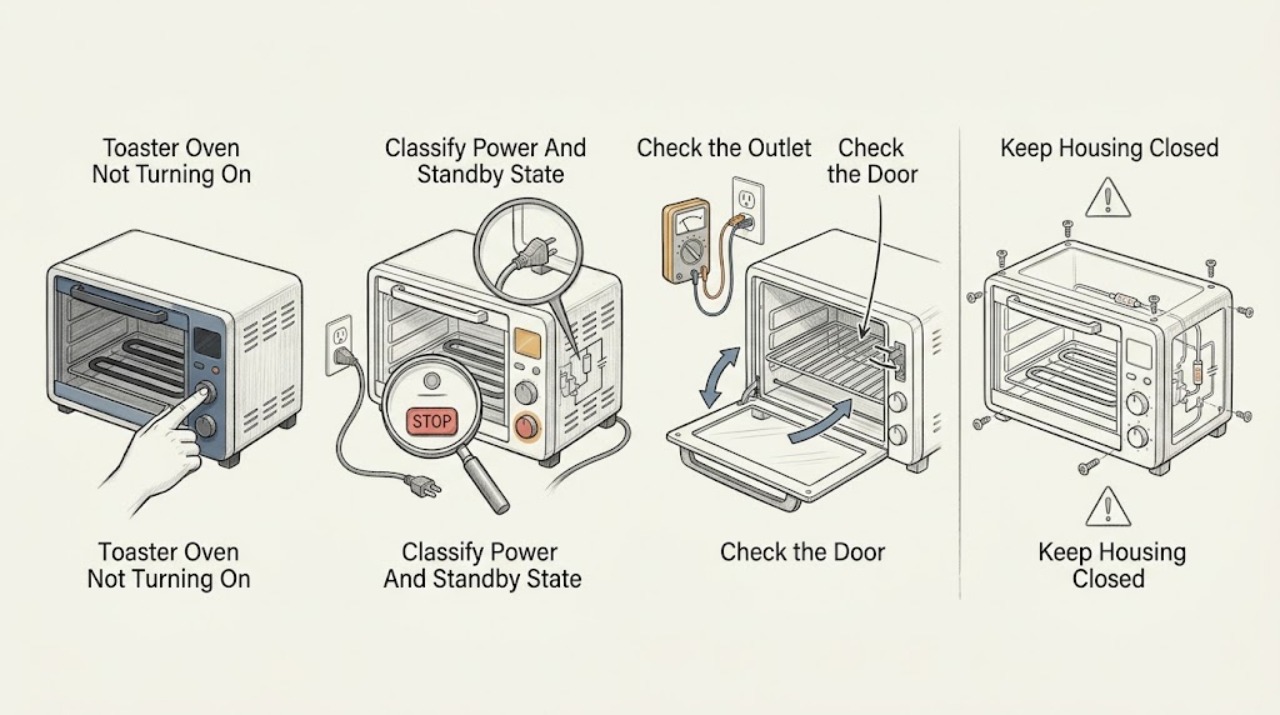
If a Breville toaster oven will not turn on, first separate a completely dark oven from an LCD that is dark because the oven is in standby. On supported Smart Oven models, pressing START/CANCEL or turning a dial reactivates standby; the exact control depends on the model. With the oven cool and unplugged, check the plug, cord, outlet, and household breaker once, then make sure the door closes normally and the rack or tray is not obstructing it. Select a valid function and temperature according to the exact BOV model manual and make one start attempt. If the oven stopped after prolonged heating, let it cool fully; do not assume that a thermal fuse or cut-out can be reset by the user. Breville manuals direct an owner to service for a persistent no-start, damaged appliance, or internal fault. Leave it unplugged for smoke, sparks, burning odor, a hot or damaged cord, repeated breaker trips, a door that will not close, or an LCD that stays dead after an accessible power check. Do not remove the case, bridge a thermal device or fuse, test live wiring, force a door switch, or keep cycling power.
Before you begin
Safety first
- This article covers model identification, accessible supply, standby, normal controls, door/rack condition, cool-down, and one documented reset. Qualified service must handle thermal fuses/cut-outs, internal wiring, relays, boards, heating elements, door switches, and live testing.
Work through in order
Diagnostic checks
Use only checks that match the exact appliance or system and its official guide.
-
Check 1
Identify the full BOV model and, with the oven cool, observe the LCD, buttons, dials, interior light, and any standby wording or indicator. Press START/CANCEL once or turn a dial only if that is the model's documented standby wake command.
Expected result: The display is completely dark, standby or dash marks are visible, the panel illuminates but ignores input, or the controls respond normally.
Next step: Use the matching manual for the next power and mode check. If the panel stays dark after the accessible supply check or becomes hot or erratic, stop and arrange service.
Stop if: Do not press controls repeatedly, force a dial, remove the control panel, or continue if there is smoke, sparking, burning odor, or abnormal heat.
Why this matters
Why: A standby indication can be normal and should wake through the documented command. A completely dead panel points toward supply or internal power. A lit but unresponsive panel points toward a control, mode, or internal fault rather than the outlet alone.
-
Check 2
With the oven switched off and cool, inspect the plug and cord for visible damage and confirm the plug is fully inserted in the intended wall outlet. Check the household breaker once without opening an electrical box; if the model manual permits, use a known-good independent outlet for one check.
Expected result: The outlet is unavailable, the breaker is tripped, the cord or plug is damaged or hot, the oven works only on another outlet, or the accessible supply appears normal.
Next step: Correct only an obvious accessible plug connection or reset the breaker once if there is no hazard. If the breaker trips again, the cord is damaged, the unit is hardwired, or the display remains dark on normal power, leave it unplugged and arrange service.
Stop if: Do not repeatedly reset the breaker, use a damaged cord, open the outlet or oven, use a power strip as a diagnostic workaround, or test live terminals.
Why this matters
Why: A tripped breaker, damaged cord, or failed outlet can leave the oven dark. Breville's toaster-oven manuals specifically list secure plug connection, an independent/different outlet, and a breaker check for a no-on condition. A normal supply with a dead oven makes an internal power or control fault more likely.
-
Check 3
With power disconnected and the oven cool, check that the glass door closes and latches or seats normally, the rack and tray are in the correct position, and no foil, food, or accessory is preventing door movement or contacting a control or heating element. Do not force the door or try to actuate a hidden switch.
Expected result: The door is loose, skewed, damaged, or unable to close; a rack or tray obstructs travel; food or foil is near an element; or the door and accessories move normally.
Next step: Remove only a loose, cool, accessible accessory or residue and close the door normally for one start attempt. Arrange service for a damaged door, hinge, latch, rack support, or any symptom that would require reaching behind the front panel.
Stop if: Do not tape, wedge, bend, or force the door, hold a hidden switch closed, operate with cracked glass, or reach near hot elements.
Why this matters
Why: A mechanical obstruction or damaged door can prevent normal operation and can create a heat or fire hazard. A normal door and rack arrangement makes standby, controls, power, thermal protection, or an internal heating fault more likely; it does not prove an interlock or element is healthy.
-
Check 4
Use the exact BOV manual to select a valid function and temperature, then press START/CANCEL or turn the documented control once. Check whether the LCD shows a timer, preheat, or active function; do not change several modes at once or rely on a button sequence from another model.
Expected result: The function starts, the display wakes but no function is accepted, the timer or function immediately cancels, or the display and controls remain dead.
Next step: Complete only the model-documented function selection once. If a valid command is accepted but the oven does not heat, proceed to the cool-down/heat branch; if no command is accepted, stop and arrange service.
Stop if: Do not enter undocumented diagnostics, repeatedly cycle modes, force a dial, bypass a door switch, or continue through smoke, sparks, burning odor, or unusual heat.
Why this matters
Why: A standby state or incomplete function/temperature selection can look like a no-start. Immediate cancellation can reflect a control or door state. A dead display after a valid supply points toward internal power, while a functioning display with no heat moves the problem toward thermal or heating control.
-
Check 5
If the oven stopped after a long, hot, or repeated cooking session, turn it off, unplug it, and allow the exterior and interior to cool completely before touching the rack, tray, door, or controls. Do not attempt to reset or replace a thermal fuse or cut-out; wait only as a safe cooling observation.
Expected result: The oven returns after cooling, the controls work but heating does not, the oven remains dark, or smoke, burning odor, abnormal heat, or a breaker trip occurred.
Next step: Make no more than one normal start attempt after the oven is fully cool and the manual's setup is complete. If it remains cold, dark, or abnormal, leave it unplugged and arrange Breville service.
Stop if: Stop immediately for smoke, sparks, burning odor, melted material, a hot cord, abnormal cabinet heat, or repeated breaker trips; do not open the case or touch the elements.
Why this matters
Why: Temporary recovery after cooling can be consistent with a protective thermal state but does not prove the appliance is repaired. Controls with no heat or a returning no-start make a thermal, relay, element, sensor, or power fault more likely and require qualified diagnosis.
-
Check 6
Record the full model, display/standby state, outlet and breaker result, door and rack condition, selected function, and cool-down result. If the matching manual documents a reset to defaults, unplug for that manual's interval and make one final normal start attempt after reconnecting; do not use a substitute thermal or electrical part.
Expected result: The oven starts normally, the LCD remains dark, the controls work but elements stay cold, the same mode or no-start returns, or the supply trips again.
Next step: Stop further resets and arrange qualified Breville service. Give the technician the model, function, display state, power observations, door result, and whether cooling or a documented reset changed anything.
Stop if: Do not open the housing, bridge a fuse or thermal cut-out, test live wiring, replace an internal part, or keep cycling power.
Why this matters
Why: A one-time documented reset may clear a temporary standby or setting state, but it does not confirm the power board, thermal device, relay, or heating elements. A persistent no-start or no-heat pattern after visible checks is an internal fault boundary.
Use your observations
Decision map
Find the observation that best matches what you see, then follow the next safe action.
-
PATH 01Safety boundary
What you see
The LCD and controls remain dark after an accessible plug/outlet/breaker check, or the cord, plug, or outlet is damaged or hot.
Do this next
Leave the oven unplugged and arrange qualified Breville service or electrical help for the supply. Do not open the oven to find an internal fuse.
Why this path and its safety boundary
Why it matters: A supply, cord, plug, or internal power problem is more likely than a standby or mode state.
Safety stop: Do not repeatedly reset the breaker, use a damaged cord, open the outlet, or test live terminals.
-
PATH 02Safety boundary
What you see
The LCD shows standby, dash marks, or available options and wakes when the documented START/CANCEL or dial command is used, or a valid function was never accepted.
Do this next
Use the matching BOV manual to select the function and temperature and make one normal start attempt. If the panel remains unresponsive or the state returns, arrange service.
Why this path and its safety boundary
Why it matters: A normal standby or incomplete model-specific setup is more likely than a dead power circuit.
Safety stop: Do not copy another BOV model's sequence, enter undocumented diagnostics, or force a dial or button.
-
PATH 03Safety boundary
What you see
The door cannot close normally, a rack or tray obstructs travel, glass or hinge hardware is damaged, or the oven operates only when the door is forced or repositioned.
Do this next
Remove only an accessible cool obstruction and close the door normally. Stop and arrange service for damaged glass, hinges, latches, rack supports, or any intermittent door behavior.
Why this path and its safety boundary
Why it matters: A mechanical or door-sensing issue is more likely and continued use could create heat, injury, or fire risk.
Safety stop: Do not wedge, tape, bend, or manually actuate a door switch, and do not operate with damaged glass or a door that will not close.
-
PATH 04Safety boundary
What you see
The controls and valid function start, but the elements do not heat, the oven stops again after cooling, a breaker trips, or smoke/odor/abnormal heat occurred.
Do this next
Leave the oven unplugged and arrange qualified Breville service. Provide the function, time before stopping, display state, cool-down result, and any odor, heat, or breaker behavior.
Why this path and its safety boundary
Why it matters: A thermal protection, relay, heating-element, sensor, control, or internal connection fault is more likely; cooling or a reset is not proof of a repair.
Safety stop: Do not open the case, replace or bridge a thermal fuse, move internal wires, test live voltage, or continue operating after a safety symptom.
Helpful context
Understand the symptom
A dark LCD may be standby, not a dead oven
Breville Smart Oven controls can enter standby after a period without use. The BOV810 and BOV650 troubleshooting sections say the LCD can stop illuminating in standby while the options remain available; pressing START/CANCEL or turning a dial reactivates it. That is different from a display that never responds, a missing power supply, or a unit whose controls work but whose elements never heat.
Use the matching BOV manual
Breville toaster ovens differ in dials, LCD behavior, functions, and button sequences. BOV810 and BOV650 manuals provide closely related but model-specific standby and reset instructions. Find the full model number, use the matching manual, and select a function and temperature before pressing the model's documented start control. Do not infer that an unfamiliar icon, timer, or mode is a thermal failure or copy a sequence from another oven.
Overheat and internal electrical faults are a service boundary
A toaster oven that stops after heavy use may need to cool, but a thermal fuse, thermal cut-out, relay, loose connection, or control board is not a user-level diagnosis. Breville's manuals say not to operate an appliance that is damaged or malfunctioning and to seek examination or repair. Keep the door, rack, and exterior checks visible and external; never remove the case, bridge a fuse, or test the heating circuit live.
Safety boundary
Stop conditions
- Stop immediately for smoke, sparks, burning odor, melted material, abnormal cabinet heat, a hot or damaged cord, exposed wiring, or repeated breaker trips.
- Do not operate with cracked glass, a damaged or misaligned door, a bent rack support, or a door that requires force or repositioning to close.
- Do not remove the case or control panel, bridge or replace a fuse or thermal cut-out, move internal wires, test live voltage, or touch heating elements while hot.
- Allow the oven to cool fully before moving or cleaning it; do not use cooling as permission to open the housing or continue repeated tests.
- If the oven remains dark, unresponsive, or cold after the matching model's visible checks and one documented reset/retest, leave it unplugged and arrange Breville service.
Only after diagnosis
Potential parts
- toaster-oven door or rack hardware
Consider this category only when the exact BOV model has manufacturer-supported hardware and the door, hinge, latch, or rack support is visibly damaged; a dark display or no-heat symptom alone does not identify these parts.
Confirm the complete Breville BOV model and the manufacturer's fit information before ordering; door and rack components are model-specific.
When checks do not resolve it
Need a professional?
Safety scope: This article covers model identification, accessible supply, standby, normal controls, door/rack condition, cool-down, and one documented reset. Qualified service must handle thermal fuses/cut-outs, internal wiring, relays, boards, heating elements, door switches, and live testing.
Common questions
FAQ
Why is my Breville toaster oven display completely dark?
First check whether the model is in standby: supported BOV manuals say START/CANCEL or a dial can wake the display. If the controls remain dark after a safe plug, outlet, and breaker check, leave the oven unplugged and arrange service.
Why does my Breville toaster oven have power but not start?
Use the exact BOV manual to select a valid function and temperature and press the documented START/CANCEL control. A standby or incomplete setup can look like a no-start; a valid active display with no heat points toward an internal thermal or heating fault.
Can a Breville toaster-oven door stop it from operating?
A damaged, misaligned, or obstructed door can prevent normal operation and create a heat hazard. With the oven cool and unplugged, remove only an accessible obstruction and close the door normally; do not force or bypass a hidden switch. Persistent door problems need service.
What should I do if my Breville toaster oven stops after getting hot?
Turn it off, unplug it, and allow it to cool fully. Make one normal retest only if there was no smoke, odor, abnormal heat, or breaker trip. Do not assume a thermal fuse or cut-out is user-resettable; recurring stops or no heat require qualified service.
Can I replace the thermal fuse in a Breville toaster oven?
Not as a user-level troubleshooting step. A thermal fuse, cut-out, relay, or heating element is inside the appliance and its failure can indicate an underlying overheating or control problem. Leave the oven unplugged and arrange qualified Breville service.
Can I open the Breville toaster-oven case to check a wire?
No. Do not open the case, move internal wires, test live voltage, bridge a fuse, or bypass a door or thermal switch. Breville's safety guidance says to stop using a damaged or malfunctioning appliance and seek examination or repair.
Read the exact guide
Official sources
- Breville Customer Service Center - BOV450 Instruction ManualBreville · Opened Breville BOV450 instruction material; its controls and standby indicators are model-specific.
- the Smart Oven™ Compact Instruction Book - BOV650Breville · Opened Breville BOV650 instruction material; its 10-minute standby and five-second reset behavior are model-specific.
- Product Hub – Find Support, Spare Parts & Service for Your Machine | BrevilleBreville · Official Breville support hub for matching a BOV model to documentation and service resources.
- Breville Convection Smart Oven (Model# BOV800XL) Heating Issues, Thermal Fuse or Not?!r/breville community · Community report of intermittent BOV800XL heating with normal controls; not a manufacturer diagnosis or repair instruction.
- the Smart Oven™ Pro Instruction Book - BOV810Breville · Opened Breville BOV810 instruction manual; standby behavior and control labels are model-specific examples.
Community feedback
Share a repair observation
Share a plain-text repair observation. Accepted observations are published automatically; this page may take a moment to update.