
On this page
Start here
Quick answer
Stop the cooking cycle, keep hands away from hot surfaces, and let the Breville toaster oven cool completely. Check the exact model's placement and ventilation, make sure the crumb tray is present and not covered with foil, and confirm that the selected mode, temperature, rack, pan, and food load match the manual. A cooling fan or pulsing elements can be normal on some Smart Oven models, but smoke that does not quickly subside, a burning or electrical odor, flame, damaged cord, repeated shutdown, or an oven that remains abnormally hot after cooling means stop using it and arrange Breville-authorized service; never remove the housing or defeat thermal protection.
Before you begin
Safety first
- Do not operate the oven in an enclosure, cover vents or the crumb tray with foil, touch hot parts, open the housing, remove internal heating shields, probe live wiring, or bypass thermal protection. Do not continue after persistent smoke, burning/electrical odor, flame, sparking, melted material, dangerous heat, a damaged cord/plug, or a repeated breaker trip.
Work through in order
Diagnostic checks
Use only checks that match the exact appliance or system and its official guide.
-
Check 1
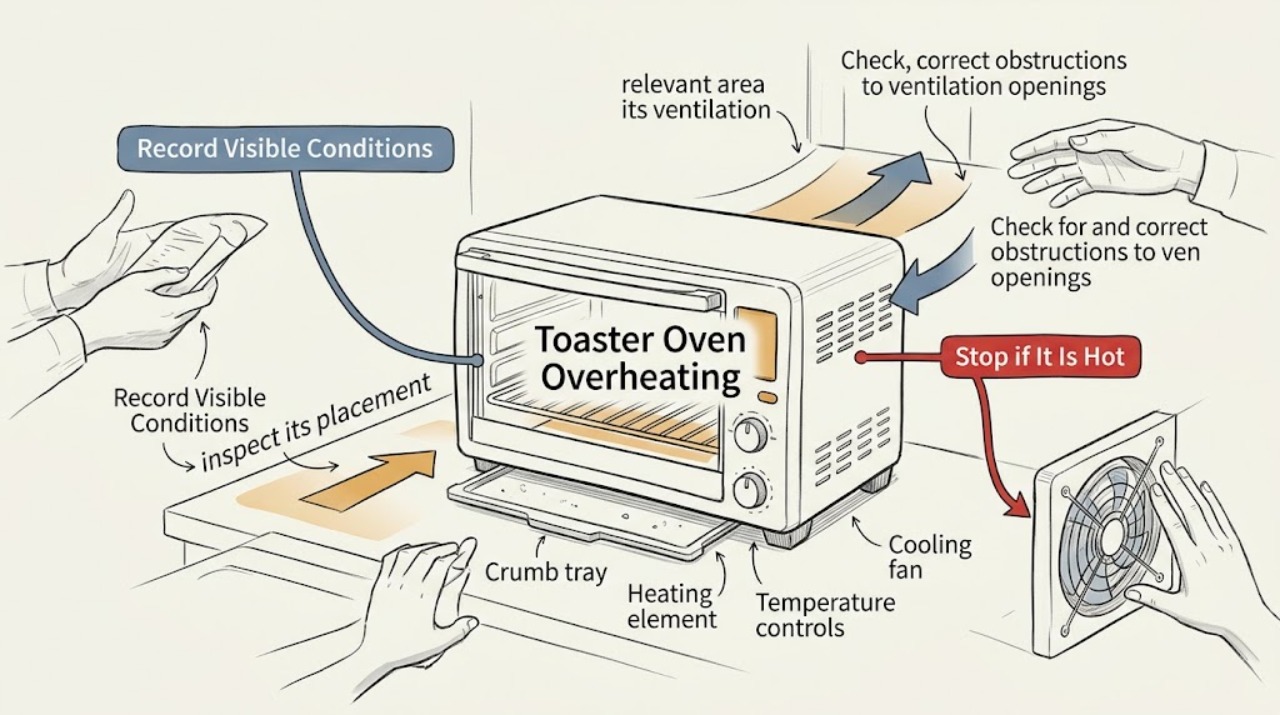
Stop the current cycle and classify the heat symptom without touching hot surfaces: note whether the oven is simply hot during or just after cooking, the cooling fan continues after the cycle, the elements pulse, the control remains on, or heat is accompanied by smoke, burning/electrical odor, flame, a damaged cord, or repeated shutdown. Record the full Breville model.
Expected result: The heat is limited to normal operation/cool-down behavior, or the oven remains abnormally hot or shows smoke, odor, flame, damage, or repeated failure.
Next step: For ordinary heat, proceed only after the oven is cool and the exact model is known. For smoke, flame, burning odor, damaged power parts, or persistent overheat, stop using it and arrange Breville-authorized service; do not restart to compare results.
Why this matters
Why: Some Smart Oven models intentionally pulse elements and run cooling fans after cooking, while hazardous or persistent symptoms can indicate a ventilation, control, element, wiring, or thermal-protection fault.
-
Check 2
After the oven has cooled, inspect its placement from the outside. It should be on a stable, heat-resistant surface with the model manual's clearance around the sides and vents, not in a cabinet or small appliance enclosure, and with no stored items touching the housing or covering ventilation slots. Do not move a hot oven or squeeze it into a tighter space while powered.
Expected result: The oven is enclosed, close to walls or flammables, has blocked vents, has items on top, or has the documented clearance and airflow but still overheats.
Next step: Correct the placement only while the oven is fully cool and disconnected as the manual directs. If the oven still overheats in the correct location, leave it out of service and contact Breville; do not remove panels or bypass thermal protection.
Why this matters
Why: BOV850 and BPZ820 manuals each recommend about 10 cm/4 inches of space around the oven and warn that enclosure or blocked airflow can cause overheating; exact installation details remain model-specific. Correct placement can remove an environmental cause but does not rule out an internal fault.
-
Check 3
With the oven cool and disconnected, check the crumb tray, rack, pan, and other user-removable accessories against the exact manual. The crumb tray must be inserted, clean, dry, and uncovered; do not line it or any part of the oven with metal foil. Use only suitable, model-approved cookware and keep food from blocking normal airflow around the rack.
Expected result: Foil, accumulated crumbs/grease, a missing or wet tray, an unsuitable/oversized pan, or a load that crowds the cavity is found, or the accessories are correct but the oven still overheats.
Next step: Clean and dry removable parts only as the model manual permits, replace the tray before operation, and use the supplied or approved accessories. If overheating persists, stop and arrange service; never scrape live elements, remove internal shields, or restart with the tray missing.
Why this matters
Why: Breville specifically warns that covering the crumb tray or oven with foil causes overheating, and food residue or a poor accessory fit can increase heat or fire risk. Correcting a visible setup issue does not prove the elements, sensor, control, or fan are healthy.
-
Check 4
Review the selected function, temperature, rack position, preheat state, and cooking time against the exact model manual. Do not use a high-temperature pizza or grill setting for a different food or pan without following its instructions, and do not leave the door open for extended periods or place objects on top during operation.
Expected result: The mode, temperature, rack, pan, or time was inappropriate or the oven was still preheating, or the same abnormal heat occurs with a documented setting and suitable load.
Next step: Use the exact manual's normal mode and loading instructions only after the oven has cooled. If the oven becomes abnormally hot, shuts down, or continues heating beyond control, stop using it and arrange Breville service; do not force a control or bypass a safety device.
Why this matters
Why: A mode-specific high temperature or obstructed load can make the exterior and cavity very hot by design. The BOV850 manual identifies different rack positions for functions, while a persistent overheat on a correct setting makes a sensor, element, fan, control, or thermal fault more likely.
-
Check 5
Observe the cool-down behavior without touching the oven. On the BPZ820, a cooling fan can continue after cooking until sensitive electronics are cool, and pulsing elements can be normal temperature control. If the fan never settles, the oven remains hot long after the documented cool-down, the display or heating stays active when stopped, or the oven repeatedly shuts down, do not unplug or restart it as a test until it is safe and cool.
Expected result: The fan stops after the model's normal cool-down and the oven returns to a normal state, or the fan/control/heat behavior persists or returns on a normal cycle.
Next step: For normal cool-down, keep the area clear and follow the manual. For persistent or repeated abnormal behavior, leave the oven out of service and contact Breville-authorized service; never remove the housing or defeat thermal protection.
Why this matters
Why: Normal fan run-on or element pulsing can protect and regulate the oven. Persistent heat, a fan that does not settle, uncontrolled heating, or repeated shutdown is more consistent with a fault than with ordinary cool-down.
-
Check 6
Treat smoke, flame, a burning or electrical odor, sparking, melted material, dangerous heat, a damaged cord/plug, or repeated breaker trips as an immediate stop. Press the normal stop control and isolate power only from a safe position; for an oven fire, keep the door closed and follow the exact manual's emergency instruction rather than opening the cavity to investigate.
Expected result: The hazard is active, power has been safely isolated, or the event stopped but left odor, scorch marks, melted material, heat, or other damage.
Next step: Leave the oven out of service and arrange Breville-authorized service. For active flame, dense smoke, or dangerous heat, leave the area and contact emergency services; do not restart, open the housing, or bypass a thermal protector.
Why this matters
Why: Brief cooking vapors can be model- and food-dependent, but smoke with odor, visible damage, or recurrence can involve residue, wiring, insulation, elements, or controls. A stopped event does not make internal inspection safe.
Use your observations
Decision map
Find the observation that best matches what you see, then follow the next safe action.
-
PATH 01Next step
What you see
The oven is hot only during high-temperature cooking or its fan continues after the cycle.
Do this next
Keep ventilation clear and allow the documented cool-down. If the oven remains hot or the control does not settle, stop using it and arrange Breville-authorized service; do not unplug during a model-documented fan cool-down unless the manual permits it.
Why this path and its safety boundary
Why it matters: The first pattern is consistent with designed temperature control or electronics cool-down, especially for the BPZ820. Persistent activity or a failure to cool makes a fan, sensor, control, element, or thermal-protection fault more likely.
-
PATH 02Next step
What you see
Overheating occurs with enclosed placement, blocked ventilation, foil on the crumb tray, a missing/wet tray, an unsuitable pan, or crowded food.
Do this next
Correct the setup only while the oven is cool and disconnected, then follow the exact model manual. If the symptom persists, keep it out of service and call Breville; do not cover vents or bypass thermal protection.
Why this path and its safety boundary
Why it matters: A setup-related airflow or heat-retention cause is more likely in the first pattern. Continued overheating after the safe correction makes an internal thermal, fan, element, sensor, or control issue more likely.
-
PATH 03Next step
What you see
The oven overheats or shuts down even with the correct mode, temperature, rack, pan, load, placement, and clean uncovered crumb tray.
Do this next
Stop using the oven and arrange Breville-authorized service. Do not open the housing, work on elements, or defeat a thermal protector.
Why this path and its safety boundary
Why it matters: The environmental and loading explanations are less likely; a temperature sensor, heating element, cooling fan, control, or thermal-protection problem becomes more likely. A restart or external reset cannot safely identify it.
-
PATH 04Next step
What you see
Overheating is accompanied by smoke that persists, burning/electrical odor, flame, melted material, sparking, dangerous heat, cord damage, or a repeated breaker trip.
Do this next
Stop using the oven, isolate power only from a safe position, and arrange authorized service. For active fire or dangerous smoke/heat, leave the area and contact emergency services; keep the door closed as the exact manual directs and do not restart or open the housing.
Why this path and its safety boundary
Why it matters: These signs override ordinary ventilation and mode checks and can involve residue fire, insulation, wiring, elements, or controls.
Helpful context
Understand the symptom
Overheating can mean a hot exterior during normal high-temperature cooking, heat trapped by poor placement, a covered or dirty crumb tray, an unsuitable mode or load, or a real control or heating fault. Breville's BOV850 Smart Oven Pro and BPZ820 Smart Oven Pizzaiolo are different designs with different clearances and accessories, so record the model and follow its manual. A fan that continues after cooking or heating elements that pulse may be normal on the BPZ820; those signs alone do not prove a failure.
Turn the oven off and allow hot surfaces, racks, pans, and the crumb tray to cool before unplugging for cleaning or moving. Do not cover the crumb tray or oven with foil, block the ventilation slots, place the oven in a small enclosure, leave items on top, use an oversized or unsuitable pan, remove a heating-element shield, open the housing, or bypass a thermal protector. Treat smoke, a burning smell, flame, electrical odor, or repeated overheating as a stop-and-service condition.
When checks do not resolve it
Need a professional?
Arrange Breville-authorized service when overheating persists after the oven is correctly placed, ventilated, loaded, and cooled; when controls continue heating, the cooling behavior is abnormal, the oven repeatedly shuts down, or a fan, sensor, element, or control fault is suspected. Stop immediately for smoke, burning odor, flame, sparking, dangerous heat, damaged power parts, or repeated trips; contact emergency services for active fire or dangerous smoke/heat.
Safety scope: Do not operate the oven in an enclosure, cover vents or the crumb tray with foil, touch hot parts, open the housing, remove internal heating shields, probe live wiring, or bypass thermal protection. Do not continue after persistent smoke, burning/electrical odor, flame, sparking, melted material, dangerous heat, a damaged cord/plug, or a repeated breaker trip.
Have this ready
- Provide the full Breville model, selected function and temperature, rack/pan and food load, placement and ventilation, crumb-tray condition, whether the fan continued, whether elements pulsed, how long abnormal heat lasted, and any smoke, odor, flame, spark, melted material, cord, plug, or breaker symptom.
Common questions
FAQ
Why does my Breville toaster oven get so hot?
High exterior and cavity temperatures can be normal during high-temperature cooking, but enclosure, blocked ventilation, foil over the crumb tray, an unsuitable pan/load, or a control/fan/element fault can make overheating worse. Let it cool, check the exact model's placement and accessories, and call service if the heat persists or is hazardous.
Can I cover the crumb tray with foil in a Breville oven?
No. Breville's BOV850 manual says covering the crumb tray or any part of the oven with metal foil causes overheating. Keep the tray clean, dry, inserted, and uncovered, and use the exact model's supplied or approved accessories.
Is it normal for a Breville oven fan or heating element to keep running after cooking?
On the BPZ820, a cooling fan can continue after cooking until sensitive electronics cool, and pulsing elements are documented temperature control. If the fan never settles, the oven remains abnormally hot, or heating continues after stop, leave it out of service and arrange authorized service.
What should I do if my Breville toaster oven smokes or smells burnt?
Stop using it and do not restart to see whether the symptom returns. For flame, dense smoke, dangerous heat, or electrical danger, leave the area and contact emergency services; otherwise isolate it only from a safe position, let it cool, and arrange Breville-authorized service—especially if smoke persists, a burning/electrical odor remains, or there is visible damage.
Read the exact guide
Official sources
- the Smart Oven® Pizzaiolo EN Instruction BookBreville · BPZ820 placement, ventilation, pan/foil safety, AT TEMP behavior, pulsing elements, cooling fan, smoke/fire, and authorized-service boundary
- Product Hub – Find Support, Spare Parts & Service for Your MachineBreville · Breville model-specific support, product hubs, replacement parts, and service-case routing
- Instruction Book – BOV850 the Smart Oven™ Pro2Breville · BOV850 placement, 10 cm clearance, crumb-tray and foil safety, rack/function use, cooling, and service boundary
Community feedback
Share a repair observation
Share a plain-text repair observation. Accepted observations are published automatically; this page may take a moment to update.