
On this page
Start here
Quick answer
When a Breville toaster oven is not working, first separate a blank display from a cycle that starts but does not heat, a fan-only or noisy-fan symptom, a door/control problem, and an error code. Check the plug and outlet from a safe position, wake a model that is in standby, select a supported function, set a time and temperature, and press the exact model's START or START/STOP control. Confirm the door closes and that the rack, crumb tray, and food are not obstructing it; some Breville ovens pause with the door open and turn heaters off if it remains open too long. Pulsing elements, steam at the vented door, and a cooling fan that continues briefly after cooking can be normal on documented models. Stop for smoke, fire, a damaged cord or plug, repeated breaker trips, a persistent E-code, or a fan/heater fault, and leave internal wiring, thermal protection, motors, and heating elements to authorized service.
Before you begin
Safety first
- The user may check a safe outlet and plug position, wake standby, select a documented function, inspect the cool door and accessories from outside, and record normal or abnormal indications. Internal heating elements, fan motors, thermal devices, sensors, control boards, fuses, wiring, and interlocks are for authorized or qualified service personnel.
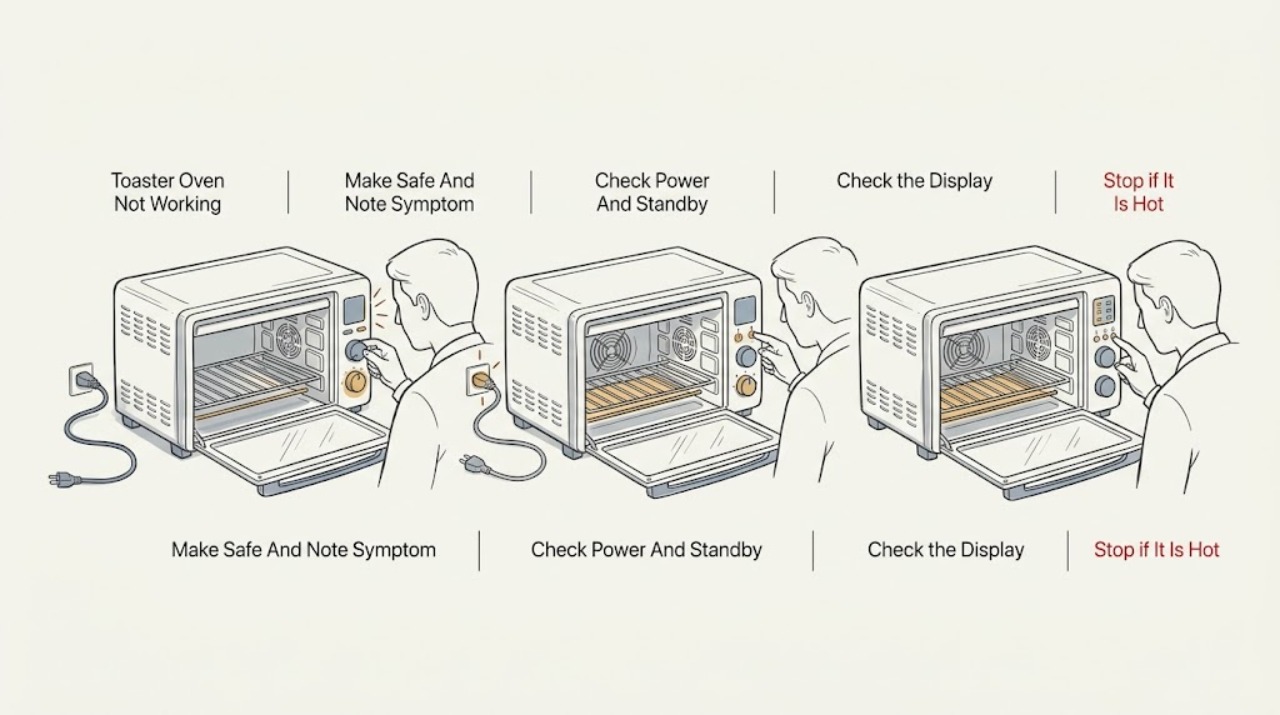
Work through in order
Diagnostic checks
Use only checks that match the exact appliance or system and its official guide.
-
Check 1
Stop the oven and look from outside for smoke, flame, arcing, a burning smell, a hot or damaged cord or plug, a damaged door or glass, melted material near a heating element, or a breaker that trips again. If none is present, note whether the display is fully dark, shows standby, lights normally, counts down, or shows an error; also note whether the fan, light, or any element responds.
Expected result: There is an immediate fire/electrical hazard, a blank display, a standby indication, a normal-looking display that will not start, a running cycle with no heat, a fan-only symptom, or an E-code.
Next step: For a hazard, stop using the oven and isolate power only from a safe position; keep the door closed for an oven fire and follow the model's emergency instructions. If safe, continue with the corresponding external check below; record any error exactly as displayed.
Stop if: Do not open the housing, touch a hot or energized part, or re-energize the oven to reproduce smoke, arcing, a burning odor, or a repeated trip.
Why this matters
Why: The visible pattern separates a supply or safety problem from a control-state, heating, fan, or model-specific error problem. Smoke, fire, damaged electrical parts, and repeated trips take priority over diagnosis.
-
Check 2
From a dry, safe position, check that the plug is fully inserted. If the outlet is safely accessible, use an independent outlet or a small known-good device to distinguish an outlet problem; reset the household breaker only once if appropriate. For a lit display showing standby, press the model's START/STOP or START/CANCEL control or turn a control as its manual directs. Do not use an extension arrangement that the model manual does not allow.
Expected result: The outlet has no power, the breaker opens again, the oven remains completely dark, the display wakes from standby, or the display is normal but the oven still will not start.
Next step: Have a qualified electrician address a faulty outlet. Leave the oven disconnected for a repeated trip, damaged cord/plug, or persistent blank display and arrange Breville service. If it wakes from standby, select a supported function and continue with the door and control check.
Stop if: Do not keep resetting a breaker, open the plug or outlet, or inspect the oven's internal fuse or wiring.
Why this matters
Why: A failed outlet or repeated breaker opening points to a supply or appliance fault. A standby display is not the same as total power loss; a display that remains normal after the outlet check moves the diagnosis toward settings, door, controls, fan, or heating.
-
Check 3
With the door closed and the cavity clear of loose packaging, choose a function that the exact model supports, set a nonzero time and temperature or toast darkness, and press the documented START, START/STOP, or START/CANCEL control. Confirm that the display changes to a preheat or active-cycle state. Do not infer that a button is broken merely because a model restricts a setting to certain functions; for example, the BOV670 manual limits FROZEN FOOD to listed cooking functions.
Expected result: The oven enters preheat or an active cycle, the control does nothing, the timer is already finished or at zero, the selected option is unavailable for that function, or the oven cancels as soon as the door is opened.
Next step: Close the door fully, re-enter the exact model's supported function and time once, and allow its normal preheat indication. If the controls remain unresponsive or the cycle cancels without a door or setting explanation, stop repeated attempts and arrange service.
Stop if: Do not force the door, hold a door switch, bypass an interlock, or use undocumented key combinations to defeat a control state.
Why this matters
Why: A cycle that activates after a valid time/function selection points to a prior control state. An unavailable option can be normal model logic. On documented models, opening the door pauses the timer and a door left open for more than the model's stated period can turn the heaters off; this is not proof of a failed element.
-
Check 4
Once cool, inspect the door edge, glass, hinge area, rack, pan, and crumb tray from outside and remove only an obvious loose obstruction or packing material. Make sure the crumb tray and accessories are inserted in the arrangement required by the model and that the exterior ventilation clearance is not blocked. Close the door normally; do not bend the hinge or remove the door.
Expected result: The door closes and the controls respond, the door or glass does not close normally, a rack or tray obstructs closure or airflow, or the accessible path is clear but the oven still will not operate.
Next step: Correct only an obvious, cool, accessible obstruction and retry the normal model sequence once. If the door, glass, hinge, latch, ventilation path, or crumb-tray fit remains abnormal, leave the oven off and arrange service.
Stop if: Do not operate with broken glass, a door that will not close, exposed wiring, or a blocked ventilation path; do not bypass a door switch or thermal protection.
Why this matters
Why: A mis-seated accessory or door can prevent a valid cooking cycle or cause a pause. A door that is visibly damaged or cannot close normally is a safety fault. Clear ventilation helps the cooling system, but it cannot repair a failed fan, thermal device, or heater.
-
Check 5
For a cycle that starts, observe only from a safe distance whether the display counts down, the fan runs, and the elements glow or heat as expected for the selected function. A cooling fan may continue for a short time after cooking, and Element iQ may pulse elements; do not touch the cavity or test the heater. If the fan is absent when the model requires it, makes grinding or scraping noise, or the oven runs with no heat after normal preheat time, stop the cycle.
Expected result: The fan continues briefly after shutdown, elements pulse on and off, the oven produces normal heat, the fan never starts or is abnormal, or the cycle runs without heat.
Next step: If the oven heats normally, the earlier issue was likely a standby, setting, door, or expected indication. For no heat, a failed or abnormal fan, overheating, or a recurring shutdown, discontinue use and arrange authorized Breville service.
Stop if: Do not remove the rear cover, spin the fan by hand while connected, measure live voltage, bridge a thermal fuse, or test/replace heating elements yourself.
Why this matters
Why: Documented cooling-fan noise and pulsing elements can be normal. A persistent no-heat or fan fault may involve a motor, control, thermal protection, sensor, wiring, or heating element, none of which can be identified safely from the symptom alone.
-
Check 6
If an E-code or other fault message appears, record the exact characters and model before resetting anything. Follow only that model's documented response: some Breville manuals call E01/E02 non-resettable and direct immediate power removal and Breville support; documented BOV950 guidance treats E03 as an over-temperature state and lists a model-specific cool-down and power-cycle response, while E10/E11 relate to connected functions on that model.
Expected result: No code appears, the code clears after the exact manual's permitted response, the same code returns, or the oven will not operate after the documented response.
Next step: For a returning or non-resettable code, leave the oven off and contact Breville or an authorized service representative with the model and code. Do not substitute another model's reset sequence.
Stop if: Do not repeatedly cycle power, erase a code without recording it, or open the control panel to investigate.
Why this matters
Why: An error code is a model-specific diagnostic state, not permission to guess at a component. A returning or non-resettable code makes internal control, temperature, connectivity, or safety diagnosis more likely than a simple standby state.
Use your observations
Decision map
Find the observation that best matches what you see, then follow the next safe action.
-
PATH 01Safety boundary
What you see
The display stays dark, the known-good outlet fails, or the breaker trips again after a single appropriate reset.
Do this next
Leave the oven disconnected and have the outlet checked by a qualified electrician when needed; arrange Breville or authorized appliance service for the oven.
Why this path and its safety boundary
Why it matters: A supply, cord/plug, appliance power, or internal electrical fault is more likely than a timer or fan setting.
Safety stop: Do not keep resetting protection or open the oven to locate a fuse, wiring fault, or power board.
-
PATH 02Safety boundary
What you see
The LCD shows standby or a normal display, but the oven starts after the model's wake/START action or does not start until a supported function, time, and temperature are selected.
Do this next
Use the exact model's documented wake and start sequence, then monitor one normal cycle. If the same control failure returns, arrange service rather than repeating resets.
Why this path and its safety boundary
Why it matters: The control state or an unavailable option is more likely than a failed heater; Breville documents standby and function-specific controls on these model families.
Safety stop: Do not bypass controls, door switches, or interlocks.
-
PATH 03Safety boundary
What you see
The door does not close normally, an accessory or crumb tray obstructs it, or the cycle pauses/cancels after the door remains open.
Do this next
Remove only an obvious cool obstruction, close the door normally, and retry once. Stop and request service for a damaged door, latch, hinge, glass, or recurring cancellation.
Why this path and its safety boundary
Why it matters: A door/accessory condition or documented timer pause is more likely than an internal heater fault. Visible door or glass damage remains a safety issue even if the display works.
Safety stop: Do not hold or tape the door shut or defeat an interlock.
-
PATH 04Safety boundary
What you see
The oven heats normally, elements pulse on and off, steam vents through the door, or the cooling fan runs briefly after shutdown.
Do this next
Continue using the exact model's instructions if there is no abnormal heat, noise, odor, or loss of cooking performance. Arrange service if the fan runs abnormally, the oven overheats, or the behavior changes with a no-heat symptom.
Why this path and its safety boundary
Why it matters: These observations are documented as normal behavior on the cited Breville models and do not by themselves establish a failed component.
Safety stop: Do not touch hot elements or unplug before a model's cooling fan has finished when its manual says the fan protects electronics.
-
PATH 05Safety boundary
What you see
The display counts down but the oven remains cold, the fan never runs when required, the fan makes abnormal noise, or the cycle repeatedly shuts down after starting.
Do this next
Stop using the oven and arrange authorized Breville service. Provide the model, function, set time/temperature, whether the display counted down, fan behavior, and any code or recent power event.
Why this path and its safety boundary
Why it matters: An internal heating, fan motor, sensor, thermal-protection, control, or wiring fault is more likely than standby or a normal pulsing indication.
Safety stop: Do not remove panels, run live tests, bypass thermal protection, or replace a heater, motor, fuse, or control board based only on the symptom.
-
PATH 06Safety boundary
What you see
A non-resettable or returning E-code appears, or there is smoke, fire, arcing, a burning odor, damaged cord/plug, broken glass, or repeated breaker operation.
Do this next
Stop the oven, isolate power only from a safe position, keep the door closed for an oven fire, and contact Breville or authorized service with the exact code and symptom record.
Why this path and its safety boundary
Why it matters: The safety or fault condition outweighs further user troubleshooting and may involve internal electrical, temperature, or control circuitry.
Safety stop: Do not re-energize the oven to test it or attempt to clear a serious code with an undocumented reset.
Helpful context
Understand the symptom
Define what not working means
A dark LCD, a lit oven that will not start a cycle, a countdown with no heat, and a fan that is noisy or never runs lead to different checks. Breville sells several toaster-oven families with different dials, buttons, displays, connected features, and error messages. Use the exact model manual for the control sequence; the checks below use documented patterns from the BOV670, BOV950, and BPZ820 manuals and are not a universal button recipe.
Keep the cabinet and live heating circuit closed
Turn the oven off, unplug it before cleaning or moving, and let the oven, racks, trays, glass, and heating elements cool completely. Breville warns not to use an appliance with a damaged cord or plug or after it malfunctions, and says servicing should be performed by an authorized representative. Do not remove the housing, probe a heating element, bypass a door or thermal safety, or reach through the rack opening while hot.
Normal sounds and indications can look like a fault
On documented Breville models, the LCD can enter standby, heating elements can pulse as Element iQ controls power, steam can leave through a vented door, and a cooling fan can continue briefly after cooking. Those observations do not prove a failed part. A persistent fault, abnormal heat, smoke, damaged power cord, or an error code that the model manual calls non-resettable is a service decision.
Safety boundary
Stop conditions
- Stop immediately for fire, smoke that is not the documented normal first-use vapor, arcing, a burning odor, a hot or damaged cord/plug, broken glass, or repeated breaker trips.
- Keep the door closed during an oven fire; follow the exact model's emergency guidance and isolate power only when it is safe to do so.
- Do not use the oven with a damaged cord, plug, door, glass, casing, or control enclosure, and do not immerse the body, cord, or plug in liquid.
- Do not bypass a door switch, thermal cutoff, temperature sensor, or other safety device, and do not remove the cabinet or perform live electrical tests.
- Do not diagnose or replace internal heating elements, fan motors, wiring, fuses, control boards, or thermal components from the symptom alone.
Only after diagnosis
Potential parts
The outlet is confirmed good but the oven remains dark, or a cord/plug is visibly damaged.
The door cannot close normally, visible damage is present, or a documented door pause persists with a clear accessory path.
The fan never operates when the exact model requires it, makes abnormal noise, or the oven repeatedly shuts down with overheating behavior.
The oven counts down but remains cold, overheats, or repeatedly returns a temperature-related fault after external checks.
When checks do not resolve it
Need a professional?
Arrange Breville or authorized appliance service when the oven remains dark after safe outlet checks, the breaker trips again, a door or cord is damaged, a persistent or non-resettable error appears, a cycle runs without heat, the fan is abnormal or absent when required, the oven overheats or repeatedly shuts down, or the fault returns after the exact model's documented standby, control, and door checks.
Safety scope: The user may check a safe outlet and plug position, wake standby, select a documented function, inspect the cool door and accessories from outside, and record normal or abnormal indications. Internal heating elements, fan motors, thermal devices, sensors, control boards, fuses, wiring, and interlocks are for authorized or qualified service personnel.
Common questions
FAQ
Why is my Breville toaster oven completely dark?
Check the plug and a safely accessible outlet, and reset the household breaker only as an ordinary user reset. If the outlet is good but the oven remains dark, or the breaker trips again, leave it disconnected and arrange Breville or qualified service. Do not open the cabinet to inspect a fuse or wiring.
Could my Breville oven be in standby instead of broken?
Yes. Documented Breville models can turn off the LCD backlight in standby while retaining a standby indication. Press the exact model's START/STOP or START/CANCEL control or turn a dial as its manual directs. A normal display that still will not start after a valid function, time, temperature, and door check needs service.
Why are the heating elements pulsing or appearing to turn off?
Breville describes Element iQ control as pulsing power and adjusting element levels in short bursts on the cited toaster-oven models. Pulsing alone can be normal; no heat, overheating, smoke, or a recurring shutdown is not a safe basis for testing or replacing an element and should be serviced.
Is it normal for the Breville oven fan to keep running after cooking?
On documented models, a cooling fan may remain on briefly after cooking to protect electronics. Do not unplug before the model's cooling guidance permits it. A fan that never starts when required, makes abnormal noise, or accompanies overheating or no heat needs authorized service.
What should I do when an E-code appears?
Record the exact code and model. Breville manuals treat some codes as non-resettable and direct power removal and support; other codes have model-specific cool-down or connected-feature instructions. Follow only that exact manual, and arrange service for a returning or non-resettable code. Do not borrow another model's reset sequence.
Read the exact guide
Official sources
- the Smart Oven Pizzaiolo Instruction Manual (BPZ820)Breville · Pizza-oven model example; power, normal pulsing, cooling-fan, steam, and fire guidance are model-specific and not a universal toaster-oven control sequence.
- the Joule Oven Air Fryer Pro Instruction Manual (BOV950)Breville · Connected toaster-oven model example; its START/STOP, standby, door timer, cooling-fan, and E-code behavior must not be assumed for other models.
- Product Hub – Find Support, Spare Parts & Service for Your MachineBreville · General navigation source; the correct toaster-oven documentation and service path depend on the exact model and market.
- the Smart Oven Compact Convection Instruction Manual (BOV670)Breville · Compact-convection toaster-oven model example; controls, standby behavior, function restrictions, error codes, and door behavior are specific to the covered model family.
Community feedback
Share a repair observation
Share a plain-text repair observation. Accepted observations are published automatically; this page may take a moment to update.