
On this page
Start here
Quick answer
A Crosley dishwasher may appear stuck when a cycle is paused, delayed, waiting for the door to be latched, extending its time to heat incoming water, or sensing a heavy soil load. First identify the exact model and display or indicator state, then check the door, water supply, and the model's documented Start/Cancel or resume sequence. If water remains, check only the accessible air gap, disposer connection, drain hose, and filter or glass trap as the manual allows. A recurring error, failure to fill or drain, failure to heat, a cycle that freezes after these checks, or a unit that stops with smoke, burning odor, water near electrical parts, or a damaged cord requires service. Do not bypass the door or overfill sensor, test live wiring, or open the cabinet to reach the pump, valve, heater, motor, or controls.
Before you begin
Safety first
- The user may identify the model, read indicators, use documented Start/Cancel controls, check the external water valve and accessible hoses, and clean a model-approved air gap, filter, or glass trap with power isolated. The pump, inlet valve, heater, motor, float/overflow protection, sensors, control board, wiring, base, and all live electrical work are for qualified service personnel.
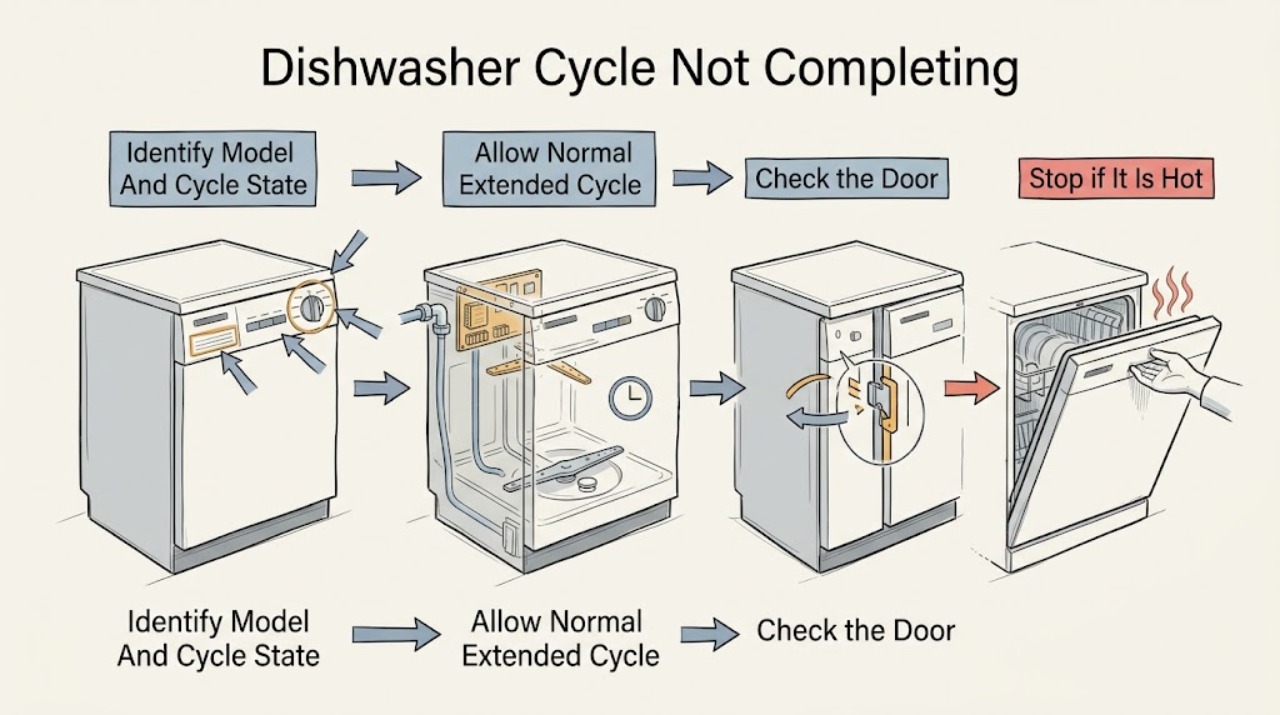
Work through in order
Diagnostic checks
Use only checks that match the exact appliance or system and its official guide.
-
Check 1
Read the model and serial label and record the selected cycle, options, delay setting, indicator lights, display message, and the point at which the cycle stopped. Note whether the machine is silent, filling, spraying, heating, draining, or showing a clean/completed state.
Expected result: The appliance is still progressing or shows a normal delay/pause/end state, or it is frozen, repeatedly stopping, or showing an error/abnormal indicator.
Next step: Use the exact Crosley manual for the recorded model and follow the matching branch below. If an error or hazard is present, stop before attempting to resume.
Stop if: Do not press random buttons, repeatedly cancel and restart, or open the cabinet to identify a control or sensor.
Why this matters
Why: Crosley models use different controls, indicator meanings, and timing behavior. A normal delay, pause, or extended heating interval should not be treated as a failed cycle; a repeatable frozen or error state needs model-specific troubleshooting.
-
Check 2
If the machine is active and the display or indicators show washing, heating, sanitize, or a soil-sensing cycle, allow the model's documented cycle to continue without opening it repeatedly. Check whether delay start or a high-temperature/sanitize option was selected.
Expected result: The cycle eventually advances or completes, or it remains on one stage well beyond the model's expected behavior and does not respond.
Next step: If it completes, record the option and water-temperature conditions. If it remains stuck, cancel only with the exact model's documented control and continue with door, fill, drain, and error checks when safe.
Stop if: Do not keep restarting a hot or partially drained unit, disable a temperature option to conceal a fault, or leave a malfunctioning dishwasher unattended.
Why this matters
Why: Crosley manuals say cool water, heavy soil sensing, and sanitize temperature targets can lengthen a cycle. A cycle that never advances after those normal factors are excluded is more consistent with a fill, drain, heater, sensor, or control fault.
-
Check 3
If the door was opened or the machine is silent after loading, verify that racks or dishes are not blocking the door and that the latch closes normally. Apply only the exact model's resume/start sequence; for the CD-BEH600 guide, press START/CANCEL and close the door immediately after an interruption within its specified window.
Expected result: The cycle resumes after the documented door/start action, remains paused, or the door will not latch or the control does not respond.
Next step: If the cycle resumes, let it complete. If it does not, stop using the dishwasher and arrange service; record the model and whether the door was opened during the cycle.
Stop if: Do not hold or tape a latch/door switch closed, force the door, or apply another Crosley model's reset timing.
Why this matters
Why: A door-open pause or an unlatched door can explain a non-completing cycle. A door or control that remains abnormal after the documented sequence points toward a latch, switch, control, or wiring issue.
-
Check 4
If the cycle stops before filling or shows a fill/inlet indication, confirm that the household water valve is open and inspect only the accessible supply connection for a kink or obvious shutoff issue. Verify the door is latched and the dishwasher has power; do not remove the inlet valve or disconnect a pressurized hose.
Expected result: The water valve was closed, the hose is kinked, the door was not latched, power was interrupted, or all accessible conditions are correct but the dishwasher still will not fill.
Next step: Correct only an obvious external shutoff or kink and use the exact model's normal start procedure once. If the problem repeats, keep the appliance out of service and request diagnosis.
Stop if: Do not remove or test the inlet valve, bypass the float or door switch, pull out the appliance through water, or work on wet electrical connections.
Why this matters
Why: Crosley manuals list water supply, door latch, power, and model-specific inlet-time faults among no-fill causes. A correct external setup with repeated no-fill behavior makes the valve, float, sensor, wiring, or control a service issue.
-
Check 5
If water remains in the tub or the cycle stops at draining, cancel only as the exact manual directs and inspect accessible plumbing: a countertop air gap if fitted, the disposer connection and knockout plug where applicable, the drain hose for kinks, and the model's removable filter or glass trap for visible blockage. Do not reach into a running pump.
Expected result: The air gap/disposer, drain hose, filter, or glass trap is obstructed or kinked, or all accessible drain points are clear but water remains.
Next step: Correct and refit only the accessible item described in the model manual. If water remains, the base is wet, or draining fails again, close the water supply and call service.
Stop if: Do not dismantle the pump, probe the sump, remove the base, tip the dishwasher, or reconnect power while water is near electrical parts.
Why this matters
Why: Crosley troubleshooting links residual water to an interrupted prior cycle and lists a clogged drain, kinked hose, blocked air gap/disposer connection, or clogged glass trap as accessible drain checks. A clear drain path with recurring residual water can indicate a pump, sensor, or control fault.
-
Check 6
If the machine washes but never completes, note whether it is waiting for heat, whether the incoming supply is unusually cool, and whether a model-specific error code or flashing indicator appears. On the ZDM6502AS manual, E1 indicates longer inlet time and E4 indicates overflow into the motor compartment; other Crosley models may use different codes.
Expected result: The cycle completes after a normal heating delay, or a heating/fill/overflow/control error recurs and the cycle stops.
Next step: Record the exact code, model, selected options, water remaining, and stopping stage. Stop using the dishwasher and contact Crosley or qualified service for any recurring error, overflow, failed heating, or frozen cycle.
Stop if: Do not reset an overflow repeatedly, test the heater or wiring live, replace a fuse, bypass a sensor, or open the control or motor compartment.
Why this matters
Why: Temperature-related lengthening can be normal on some models, but a recurring error or failure to complete after correct fill and drain conditions indicates a heater, sensor, valve, pump, motor, or control fault that cannot be identified safely by the owner.
Use your observations
Decision map
Find the observation that best matches what you see, then follow the next safe action.
-
PATH 01Safety boundary
What you see
The dishwasher is actively washing or heating, shows no hazard or recurring error, and the selected cycle includes sanitize, high-temperature, or soil sensing.
Do this next
Allow the exact model's documented cycle to continue. If it never advances or repeats the same stage, cancel using the model control and arrange service.
Why this path and its safety boundary
Why it matters: The cycle may be extended normally to reach temperature or respond to soil level; a long duration alone does not prove that it is stuck.
Safety stop: Do not repeatedly open the door, cancel a hot cycle, or leave an abnormal machine unattended.
-
PATH 02Safety boundary
What you see
The unit is silent after the door was opened, the latch is not engaged, or a delay-start/pause state is shown without a hazard.
Do this next
Close the door normally and use the exact manual's Start/Cancel or resume sequence. If the latch or control still fails, stop using the unit and call service.
Why this path and its safety boundary
Why it matters: A normal pause, delay, or door-latch state is more likely than a heater or pump failure.
Safety stop: Do not hold a switch closed, force the latch, or apply another model's timing.
-
PATH 03Safety boundary
What you see
The cycle stops before water enters, an inlet-time indicator appears, or the machine repeatedly tries to fill with the water valve and door apparently correct.
Do this next
Check only the external valve, hose, power, and door conditions. If the fill fault recurs, close the water supply and request professional diagnosis.
Why this path and its safety boundary
Why it matters: A shutoff, kink, latch, water-pressure, inlet valve, float, sensor, or control issue is more likely; exact error meanings are model-specific.
Safety stop: Do not disconnect a pressurized inlet, bypass a float or latch, or remove the inlet valve.
-
PATH 04Safety boundary
What you see
The cycle stops at drain, leaves water in the tub, or the next start behaves as though the prior cycle was interrupted.
Do this next
Check and refit accessible drain items exactly as the model manual directs. If water remains or returns, keep the dishwasher out of service and call a technician.
Why this path and its safety boundary
Why it matters: A blocked air gap/disposer connection, kinked drain hose, filter/glass-trap obstruction, interrupted cycle, pump, sensor, or control issue is possible.
Safety stop: Do not dismantle the pump or base, use drain chemicals, or restart with water near electrical parts.
-
PATH 05Safety boundary
What you see
Fill and drain conditions are normal but the cycle never completes, the heating stage repeats, an error recurs, or overflow/base water is indicated.
Do this next
Stop using the dishwasher, record the model and exact indicator/code, close the water supply if needed, and arrange Crosley or qualified appliance service.
Why this path and its safety boundary
Why it matters: A heater, temperature sensor, valve, pump, motor, overflow protection, or control fault is more likely than normal timing.
Safety stop: Do not test live circuits, replace internal electrical or thermal parts, bypass protection, or keep resetting an overflow or heating fault.
Helpful context
Understand the symptom
A long cycle is not automatically an incomplete cycle
Crosley cycle times vary by model, options, soil sensing, and incoming-water temperature. The CD-BEH600 use-and-care guide says a cycle can be automatically lengthened to reach key temperatures, and soil-sensing cycles can extend for heavier soil. A sanitize option also adds time. Before cancelling, check whether the machine is still washing, heating, draining, or showing a normal progress light. A frozen display, repeated return to the same stage, or no response after a model-specific Start/Cancel command is a different symptom from a long but active cycle.
Door and pause behavior depends on the model
Opening the door can pause a Crosley cycle, but the resume sequence is model-specific. The CD-BEH600 guide says that after opening the door during a running cycle, START/CANCEL must be pressed and the door shut immediately, within the guide's stated time window, for the selected cycle and option to continue. Do not transfer that timing or button sequence to another Crosley model without checking its manual. A door that will not latch normally or a control that ignores the documented sequence should be serviced rather than bypassed.
Separate fill, drain, and heat symptoms
A cycle that stops before water enters points toward the supply, inlet valve, latch, or a model-specific fill fault. A cycle that leaves water in the tub points toward an interrupted cycle or drain restriction, including a kinked hose, blocked air gap, disposer connection, or filter/glass trap where fitted. A cycle that washes but never reaches completion can be waiting for temperature or reporting a heating/control fault. These observations narrow the service diagnosis but do not authorize work on the pump, valve, heater, motor, wiring, or control board.
Safety boundary
Stop conditions
- Stop using the dishwasher and isolate power only from a safe, dry location if water reaches the plug, outlet, controls, wiring, or motor compartment, or if there is smoke, burning odor, a damaged cord, or abnormal heat.
- Close the water supply for substantial, persistent, overflow-related, or unexplained water and keep the appliance out of service until it is assessed.
- Do not bypass the door latch, overfill protector, float, leak protection, temperature sensor, or other safety control; do not force a door or run with a damaged seal or cabinet.
- Do not remove the cabinet, base, pump, inlet valve, heater, motor, control board, wiring, or other internal parts; do not perform live electrical tests or replace fuses or thermal components.
- Do not use another Crosley model's cycle times, error-code meanings, reset sequence, or service procedure; confirm the exact manual first.
Only after diagnosis
Potential parts
- Crosley dishwasher door latch or door gasket
Consider this category only if the exact model diagnosis confirms a latch or gasket fault; an incomplete cycle can instead be a pause, fill, drain, heater, or control issue.
Match the complete Crosley model/product code and door configuration before ordering or fitting. - Crosley dishwasher drain hose, filter, or air-gap connection
Consider this category only when an accessible drain component is confirmed kinked, blocked, or damaged; residual water alone does not identify the failed part.
Confirm the exact model, drain arrangement, disposer/air-gap setup, and installation requirements. - Crosley dishwasher inlet valve, pump, heater, or sensor
These are service-diagnosis categories for a confirmed fill, drain, heating, or sensing fault, not parts to order from a non-completing cycle alone.
Do not order or install without exact model diagnosis by Crosley or qualified appliance service.
When checks do not resolve it
Need a professional?
Arrange Crosley or qualified appliance service when the cycle repeatedly freezes or stops after the exact model's pause, door, fill, drain, and heating checks; when a model-specific error recurs; when water remains in the base or tub; or when there is overflow, water near electrical parts, a damaged cord, smoke, odor, abnormal heat, or a door/latch fault. A longer cycle can be normal only when it matches the model's documented delay, soil-sensing, or temperature behavior.
Safety scope: The user may identify the model, read indicators, use documented Start/Cancel controls, check the external water valve and accessible hoses, and clean a model-approved air gap, filter, or glass trap with power isolated. The pump, inlet valve, heater, motor, float/overflow protection, sensors, control board, wiring, base, and all live electrical work are for qualified service personnel.
Common questions
FAQ
Why is my Crosley dishwasher running for a long time?
A longer cycle can be normal when the selected model uses soil sensing, sanitize/high-temperature options, or extra time to heat cool incoming water. Check the exact cycle and options. If the display freezes, the same stage repeats, or the dishwasher never completes after those normal factors are excluded, arrange service.
How do I resume a Crosley dishwasher after opening the door?
Use the exact model manual. The CDBEH600 guide says to press START/CANCEL and close the door immediately after an interruption within its stated time window. Other Crosley models may use different controls or timing, so do not hold the latch or transfer this sequence without checking the model.
Why is there water left in my Crosley dishwasher when the cycle does not finish?
An interrupted cycle can leave water, but a drain restriction is also possible. Check only the accessible air gap, disposer connection, drain hose, and model-approved filter or glass trap for blockage or kinks. If water remains or returns, keep the appliance out of service and have the pump or drain system diagnosed.
What does a Crosley dishwasher error code mean when the cycle stops?
Meanings are model-specific. For example, the ZDM6502AS manual lists E1 as longer inlet time and E4 as overflow into the motor compartment; it also gives separate meanings for other codes. Record the exact model and code, stop for overflow or water near electrical parts, and use Crosley or qualified service for recurring errors.
Read the exact guide
Official sources
- Use & Care Manual — CDBEH600Crosley · Crosley CDBEH600 model family; the stated START/CANCEL timing, indicators, and cycle behavior are not universal to all Crosley models.
- Dishwasher Use & Care Manual — ZDM6502ASCrosley · Crosley ZDM6502AS model family; control labels, cycle times, error meanings, and accessible parts vary on other Crosley dishwashers.
- CDBEH960TS/D Crosley DishwasherCrosley Home Products · Crosley CDBEH960TS/D product page; product features, manuals, and controls vary by model.
Community feedback
Share a repair observation
Share a plain-text repair observation. Accepted observations are published automatically; this page may take a moment to update.