
On this page
Start here
Quick answer
A Crosley refrigerator can feel warm at the center divider, sides, or another heat-rejection area while the inside stays at the set temperature; one Crosley guide specifically says the mullion may feel warm during the first 24 hours. That is different from a warm food compartment, a cabinet that keeps getting hotter, continuous running with poor cooling, or an electrical warning. First record the exact model, inside temperature, and where the warmth is located without touching the compressor, tubing, coils, or wiring. From the outside, check that the lower front and ventilation spaces are not blocked, the refrigerator is not pressed against a wall or heat source, the doors close fully, the gaskets contact evenly, and food is not blocking visible air outlets. If cleaning is permitted by the exact manual, unplug first and remove only accessible dust from the floor or grille; do not reach behind panels or touch the compressor or refrigeration system. For a hot or scorched plug or outlet, burning smell, smoke, exposed wiring, repeated breaker trips, or a rapidly warming interior, stop using the refrigerator and isolate power only from a safe dry point, then arrange qualified appliance service and electrical inspection when the household supply is involved.
Before you begin
Safety first
- Owner checks stop at external temperature observation, installation clearance, accessible dust, door/load, and normal control readings. Qualified service must handle compressor, fans, coils, refrigerant tubing, defrost parts, controls, wiring, electrical measurements, and sealed-system work.
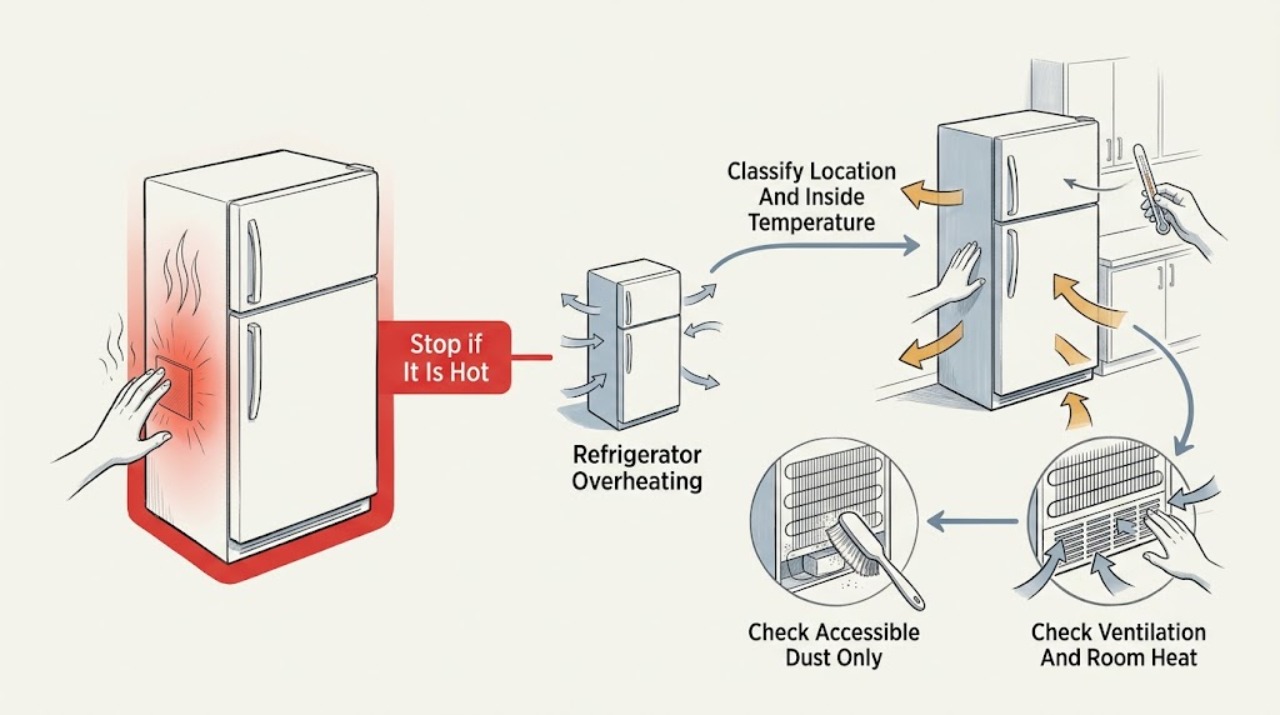
Work through in order
Diagnostic checks
Use only checks that match the exact appliance or system and its official guide.
-
Check 1
Identify the exact Crosley model from the exterior label or paperwork. Without touching the compressor, tubing, coils, or wiring, note where the warmth is felt or seen from a safe distance and check the refrigerator and freezer temperatures using the normal display or a suitable appliance thermometer.
Expected result: Only the center divider or cabinet exterior is warm while food temperatures are stable; the interior is warming; the cabinet is increasingly hot; or the warmth is near the plug, outlet, or cord.
Next step: Continue only with external clearance, door, load, and moisture checks when the supply is normal and there is no odor or smoke. Stop and isolate power from a safe dry point for electrical symptoms or rapidly rising interior temperature.
Stop if: Do not touch a hot compressor, refrigerant line, coil, plug, or outlet; do not open a cover to measure a hidden temperature.
Why this matters
Why: Localized exterior warmth with stable compartment temperatures can be normal heat rejection, including the first-day mullion behavior described by Crosley. A warming interior, escalating cabinet heat, or heat at the electrical supply is not explained by normal mullion warmth and requires a more cautious branch.
-
Check 2
From the front and sides, check whether the lower front grille or air path is covered, the cabinet is pressed against a wall, the room is unusually hot, or the refrigerator is beside a range, radiator, or in direct sun. Compare the visible arrangement with the exact model's installation instructions.
Expected result: The lower front is blocked, the rear or sides have less clearance than the model requires, a heat source or sun warms the cabinet, the room is unusually hot, or ventilation appears clear.
Next step: Remove only a loose external obstruction and reduce nearby heat exposure when safe. Do not move a heavy appliance, disconnect fixed wiring, or reach behind it; arrange service if the installation cannot meet the manual's clearance or if symptoms continue.
Stop if: Do not cover vents, wedge material behind the refrigerator, use a fan against an exposed electrical area, or touch rear components.
Why this matters
Why: Blocked airflow, an excessively warm location, and insufficient clearance can prevent heat from leaving efficiently and can make the compressor run longer. Clear ventilation makes an internal cooling or electrical issue more likely if the cabinet is still unusually hot or the inside is warming.
-
Check 3
Look for dust, lint, or pet hair on the accessible floor area or external grille without removing a panel. If the exact Crosley manual permits that cleaning, unplug the refrigerator from a dry, safe position before wiping or vacuuming only the accessible area, then leave the compressor, tubing, fan, coils, and wiring untouched.
Expected result: Accessible airflow areas are visibly clogged, the area is reasonably clean, the plug is wet or hot, or cleaning would require moving the unit or opening a cover.
Next step: Clean only the model-approved external area with power disconnected and restore no power if the plug, outlet, cord, or cabinet shows damage. Arrange service for inaccessible dust, persistent heat, or any need to reach internal parts.
Stop if: Do not touch the compressor or refrigerant tubing, remove the rear cover, spray liquid, use a live vacuum near wiring, or perform any energized measurement.
Why this matters
Why: External dust can restrict ventilation on models that direct air through that area, but a clean exterior does not rule out a hidden condenser, fan, or cooling fault. A wet or hot supply and any internal access requirement are safety boundaries, not cleaning opportunities.
-
Check 4
Check that the refrigerator and freezer doors close without an obstacle and that the gaskets contact the cabinet evenly. Reposition only accessible food that is blocking a door, visible air outlet, or rear wall; note recent warm-food loading and frequent or prolonged door opening.
Expected result: A package holds a door open, the gasket is torn or has a visible gap, food blocks an outlet, warm food was recently loaded, doors are opened often, or closure and loading look normal.
Next step: Remove only the accessible obstruction, clean and dry the gasket with a soft cloth, close doors normally, and monitor the inside temperature. Arrange service for a torn gasket, damaged hinge, misalignment, or persistent warm interior.
Stop if: Do not force, tape, heat, bend, or dismantle a door seal, and do not remove an interior cover to reach an air outlet or fan.
Why this matters
Why: Warm air entering through a door gap, blocked airflow, or a large warm load can make the motor run longer and increase exterior heat while cooling recovers. A normal seal and load make a ventilation, control, fan, or sealed-system issue more likely if the inside remains warm.
-
Check 5
From a dry position, observe whether the refrigerator keeps running without recovering its set temperature, whether the cabinet heat is worsening, and whether there is a burning smell, smoke, buzzing or arcing, a hot/scorched plug or outlet, exposed wiring, or a repeated breaker/RCD trip.
Expected result: The interior reaches and holds temperature with no electrical warning; it stays warm while the motor runs; the cabinet or supply is hot or scorched; smoke or odor is present; or a protective device trips.
Next step: For any electrical or fire warning, stop using the refrigerator and isolate power only from a safe dry point; contact emergency services for fire or spreading smoke. Otherwise leave it out of service and arrange qualified Crosley appliance service, adding electrical inspection when the outlet, cord, or breaker is involved.
Stop if: Do not reset the breaker to test, keep cycling power, touch the plug or outlet when hot or wet, or test the compressor, fan, heater, wiring, or refrigerant circuit.
Why this matters
Why: Stable cooling and localized warmth support a normal operating condition or an external environment issue. Poor cooling with prolonged running makes an airflow, fan, control, or refrigeration fault more likely. Smoke, odor, abnormal electrical heat, arcing, or repeated trips is an immediate stop-use condition.
Use your observations
Decision map
Find the observation that best matches what you see, then follow the next safe action.
-
PATH 01Safety boundary
What you see
The center divider or cabinet exterior is mildly warm, the inside compartments hold their temperatures, ventilation is clear, and there is no smoke, burning odor, abnormal noise, or electrical heat.
Do this next
Keep the model's installation clearances and normal door/load practices, and monitor compartment temperature. Do not try to cool the cabinet by touching or wetting internal components.
Why this path and its safety boundary
Why it matters: Normal heat rejection is more likely than overheating; Crosley specifically notes that a mullion can be warm during the first 24 hours on the covered model family.
Safety stop: Arrange service if the warmth escalates, cooling falls off, the warm area moves to the plug or outlet, or any odor, smoke, or trip appears.
-
PATH 02Safety boundary
What you see
The lower front or ventilation path is blocked, the cabinet is too close to a wall or heat source, the room is unusually hot, or the refrigerator is in direct sunlight, while the supply and interior temperature are otherwise normal.
Do this next
Remove only accessible external obstructions and reduce nearby heat exposure according to the exact manual. Do not move a heavy unit or reach behind it; arrange service if required clearance cannot be restored or the inside warms.
Why this path and its safety boundary
Why it matters: Heat rejection and longer compressor operation caused by the installation environment are more likely than an immediately failed internal part.
Safety stop: Do not block vents, place the unit against a wall, or improvise a rear cleaning or cooling procedure.
-
PATH 03Safety boundary
What you see
A door was held open by food, a gasket has a visible gap, air outlets are blocked, or a large warm load/frequent opening preceded the heat; the refrigerator still cools after the accessible cause is corrected.
Do this next
Correct the visible obstruction, keep food covered, minimize door-open time, and monitor inside temperature. Service is needed if the gasket cannot seal, the cabinet stays hot, or cooling does not recover.
Why this path and its safety boundary
Why it matters: Warm humid air or a temporary cooling load is more likely, and the compressor may run longer while the cabinet returns to temperature.
Safety stop: Do not force or heat the gasket, remove internal covers, or keep running a refrigerator that is warming food.
-
PATH 04Safety boundary
What you see
The interior remains warm while the refrigerator runs, the cabinet heat increases after visible clearance and door checks, or there is a burning odor, smoke, hot/scorched plug or outlet, exposed wiring, arcing, or repeated breaker/RCD operation.
Do this next
For smoke or fire, leave the area and contact local emergency services. Otherwise isolate power from a safe dry point, keep the refrigerator out of service, and arrange qualified appliance service plus an electrician when the household supply is implicated.
Why this path and its safety boundary
Why it matters: An internal cooling, fan, control, compressor, sealed-system, or supply fault is more likely; an electrical or fire symptom makes continued operation unsafe. External checks cannot identify the failed component.
Safety stop: Do not touch hot or wet supply parts, reset to retest, open panels, touch the compressor or tubing, or perform live measurements.
Helpful context
Understand the symptom
Warm exterior does not automatically mean overheating
Refrigeration removes heat from the cabinet and releases it outside, so an exterior section can feel warm even when the food compartments are holding temperature. Crosley's guide says the mullion can be warm for the first 24 hours on that model family and that this is normal. The useful distinction is location and consequence: stable inside temperatures with mild, localized warmth are different from rising food temperatures, a cabinet that becomes unusually hot, continuous running, smoke, burning odor, or an electrical supply that trips.
Clearance and heat around the cabinet matter
Crosley installation material says not to block the lower front and gives model-specific clearance requirements for airflow and heat emission. Another official manual says to use a well-ventilated location away from heat and direct sunlight. Do not invent a universal clearance for every Crosley refrigerator; compare the actual installation instructions for the model, and do not push or pull a heavy refrigerator just to investigate a hot rear area.
Dust and internal refrigeration parts are different boundaries
Some Crosley instructions call for cleaning dust from the back and floor, but that does not authorize touching a compressor, refrigerant tubing, condenser fan, wiring, or a hidden coil. If the exact manual permits cleaning, unplug first and limit the work to an accessible grille or floor area. A refrigerator that remains hot or warm inside after visible airflow and door checks needs service rather than a live test or a panel removal.
Safety boundary
Stop conditions
- Stop using the refrigerator immediately for smoke, burning odor, arcing, exposed wiring, a hot or scorched plug/outlet, or repeated breaker or RCD trips.
- Isolate power only from a dry, safe, accessible point; do not touch a wet or hot plug, cord, outlet, or cabinet and do not cross water to reach it.
- Do not touch the compressor, refrigerant tubing, coils, condenser fan, heater, control board, or internal wiring, and do not perform live electrical or sealed-system tests.
- Do not move a heavy refrigerator, remove a rear or interior panel, spray liquid, or improvise a cooling or defrost method to investigate heat.
- Arrange qualified service for a warming interior, persistent operation without temperature recovery, escalating cabinet heat, inaccessible ventilation, damaged door sealing, or any electrical warning.
Only after diagnosis
Potential parts
- refrigerator or freezer door gasket
Consider this category only when the exact model's gasket is visibly torn, loose, or unable to contact the cabinet evenly after accessible door obstructions are removed; exterior warmth or continuous running alone does not identify a gasket.
Confirm the complete Crosley model and the manufacturer's fit information before ordering; door seals are model-specific.
When checks do not resolve it
Need a professional?
Safety scope: Owner checks stop at external temperature observation, installation clearance, accessible dust, door/load, and normal control readings. Qualified service must handle compressor, fans, coils, refrigerant tubing, defrost parts, controls, wiring, electrical measurements, and sealed-system work.
Common questions
FAQ
Is it normal for a Crosley refrigerator to feel warm on the outside?
Localized warmth can be normal when the compartments hold temperature. Crosley specifically notes that the mullion may be warm during the first 24 hours on the covered model family. Escalate if the warmth increases, the inside warms, or there is odor, smoke, abnormal electrical heat, or repeated tripping.
What outside checks can reduce refrigerator overheating?
Check that the lower front and model-required side, top, and rear spaces are not blocked, the cabinet is away from direct heat and sun, the doors seal, and food does not block visible airflow. Clean only an accessible area if the exact manual permits it and power is disconnected first.
Can I touch or clean the compressor and coils if the refrigerator is hot?
No. Do not touch the compressor, refrigerant tubing, coils, fan, wiring, or hidden panels. If the exact manual permits cleaning, unplug first and limit it to an accessible grille or floor area; otherwise arrange service.
When should I shut off a hot Crosley refrigerator?
Stop using it for smoke, burning smell, arcing, exposed wiring, a hot or scorched plug or outlet, repeated breaker/RCD trips, or a rapidly warming interior. Isolate power only from a dry, safe point and arrange qualified appliance service; involve an electrician when the household supply is affected.
Read the exact guide
Official sources
- 未命名 -1Crosley · Opened official Crosley use-and-care PDF; examples are model-specific but the listed external contributors are useful decision cues, not a universal diagnosis.
- ZFDM2185RSCrosley · Opened official Crosley PDF for the ZFDM2185RS model; its numeric clearances and controls are model-specific examples.
- CROSLEY FRIDGE FREEZER User ManualCrosley · Opened official Crosley use-and-care PDF; its clearance values and first-day mullion statement apply to the covered model family and are not universal values for every Crosley refrigerator.
Community feedback
Share a repair observation
Share a plain-text repair observation. Accepted observations are published automatically; this page may take a moment to update.