
On this page
Start here
Quick answer
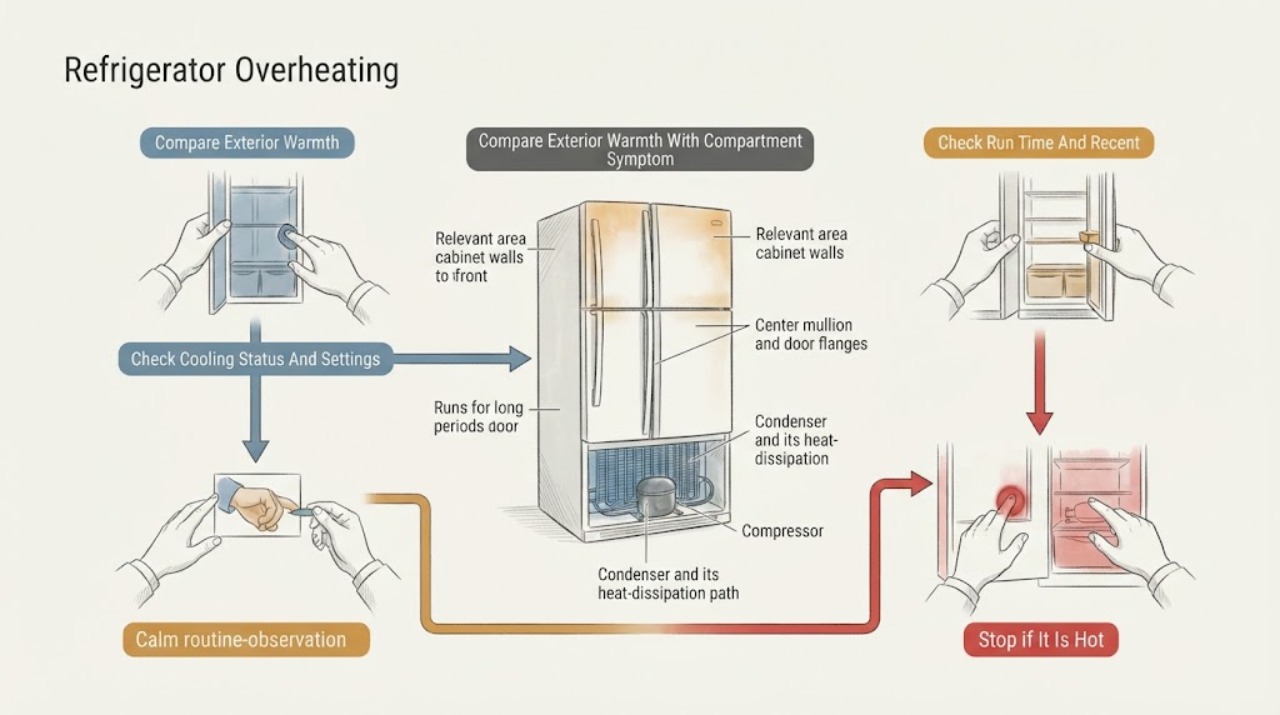
A warm JennAir cabinet, front frame, or center mullion is often part of normal heat rejection: the refrigerator moves heat from the compartments into the room, and a heat loop near gasket areas helps limit exterior moisture. Warmth can increase after installation, a large warm grocery load, frequent door openings, or in a hot room; a high-efficiency compressor may also run for extended periods. First distinguish a warm exterior with cold food from a genuinely hot or hazardous appliance with rising compartment temperatures, a burning smell, smoke, sparks, a hot cord, water near electricity, or repeated breaker trips. Check the exact model's temperatures, cooling status, door seal, loading, ventilation, heat sources, and base-grille condition. JennAir's general guidance uses about 37°F for the refrigerator and 0°F for the freezer as common starting points, with small changes and 24 hours to stabilize, but the owner guide controls. Do not remove panels, reach into fans, or work on refrigerant or internal electrical parts. If the cabinet stays unusually hot while cooling fails, the condenser area is restricted or dirty, the door seal is damaged, or any electrical or fire warning appears, stop use safely and arrange JennAir service; use a qualified electrician for the household power path.
Before you begin
Safety first
- This page covers exterior warmth classification, compartment temperature observation, cooling-state and setting checks, accessible door, loading, ventilation, environment, and model-approved condenser observations. Cabinet panels, fans, sensors, compressors, capacitors, wiring, refrigerant, sealed systems, restricted condenser access, and live testing require qualified service.
Work through in order
Diagnostic checks
Use only checks that match the exact appliance or system and its official guide.
-
Check 1
Record where the refrigerator feels warm—the side walls, front frame, center mullion, door flange, rear, or base—and compare that observation with an appliance-thermometer reading in the center of each accessible compartment. Note whether food remains cold and whether any smoke, odor, melting, or abnormal noise is present.
Expected result: Only the cabinet or mullion is warm while compartment temperatures are stable, or the exterior is very hot while one or both compartments are warming.
Next step: Continue with model, setting, door, airflow, and environment checks only when no hazard is present. Keep the unit off and arrange service for rising temperatures plus unusual heat or any hazard sign.
Stop if: Stop immediately for smoke, burning odor, sparks, shock, melting, a hot or damaged cord, water near electricity, abnormal noise with heat, or repeated breaker trips.
Why this matters
Why: Warm cabinet areas with stable internal temperatures are consistent with heat rejection or an anti-moisture heat loop. Warmth combined with rising internal temperatures needs cooling and service triage; touch alone cannot diagnose a compressor or condenser fault.
-
Check 2
From a dry, safe position verify that the exact model is turned on, cooling is not turned off, and Showroom or Demo mode is not active. Record the displayed settings and compare them with the owner guide; if an adjustment is needed, make one small change and wait 24 hours before judging it.
Expected result: Cooling is off, Showroom or Demo is displayed, settings are warmer or colder than intended, or the controls appear correct while temperatures continue to rise.
Next step: Use only the exact model guide to restore cooling or make a small setting change, then monitor temperatures through the model's stabilization period. Escalate if cooling does not recover.
Stop if: Do not use a generic button sequence, rapidly change settings, open the control enclosure, or continue a hazardous unit because the display responds.
Why this matters
Why: A cooling-off or showroom state can leave lights and controls active while temperatures rise. A setting can affect run time, but correct settings with worsening compartment temperatures move the problem beyond a control-only explanation.
-
Check 3
Note whether the refrigerator was recently installed, loaded with many warm groceries, exposed to a hot room, opened frequently, or set colder than needed. Record whether the compressor seems to run continuously and whether compartment temperatures recover during the documented stabilization period.
Expected result: The unit is new, heavily loaded, in a warm environment, opened often, or set very cold, and temperatures are gradually recovering; or these conditions are absent and temperatures continue to rise.
Next step: Limit prolonged door opening, avoid adding more warm food, correct only a documented setting or environment issue, and allow the model's stated recovery time. Arrange service if the compartments do not recover.
Stop if: Do not compensate by setting the control to an extreme value, move a built-in unit by force, or keep using the appliance when food-safety temperatures are not maintained.
Why this matters
Why: JennAir attributes longer run time and temporary exterior warmth to heat load, ambient heat, door use, and initial cool-down; a new efficient model can also run for extended periods. Failure to recover under suitable conditions makes a cooling fault more likely.
-
Check 4
Inspect only accessible areas: confirm doors close fully and gaskets contact evenly, food is not pressed against internal air vents, the base grille is not blocked, and the refrigerator has the model-required clearance from walls and heat sources. Do not remove panels or reach into a fan.
Expected result: A door or gasket has a visible gap, loading blocks an air path, the base grille or clearance is obstructed, or placement is near an oven, radiator, hot vent, or unusually hot room.
Next step: Remove only an obvious loading obstruction, clean or close the gasket according to the exact guide, and correct only a documented external clearance issue. Monitor recovery; call service if the condition persists.
Stop if: Do not bend or replace a gasket without model guidance, block or modify the base grille, remove a rear cover, reach into a fan, or move a built-in unit unsafely.
Why this matters
Why: Warm-air entry and restricted heat or air movement can lengthen run time and increase exterior warmth. A normal visible door and grille do not rule out an internal fan, sensor, compressor, or sealed-system issue.
-
Check 5
With the appliance disconnected only when the exact guide requires it and without opening the cabinet, look for obvious lint, pet hair, grease, or debris at an accessible condenser or grille. Confirm from the exact owner or installation guide whether the condenser is user-cleanable; some JennAir designs reserve condenser cleaning for an authorized provider.
Expected result: Debris is visibly restricting an explicitly user-accessible condenser path, the exact guide reserves cleaning for service, or no accessible obstruction is present.
Next step: Follow only the exact guide's safe cleaning method for a user-accessible area. If access is restricted, the exterior stays unusually hot, or cooling is failing, arrange JennAir authorized service.
Stop if: Do not remove panels, use tools near wiring or fans, spray liquid into the base, clean a restricted condenser, or handle refrigerant.
Why this matters
Why: Restricted heat transfer can make the compressor work harder and increase cabinet warmth, but condenser location and cleaning access vary by model. A clear accessible area does not prove the refrigeration circuit is healthy.
-
Check 6
Prepare a service report with the exact model, warm locations, refrigerator and freezer readings, cooling-mode status, settings, run-time pattern, door and gasket observations, load, room and clearance conditions, condenser access, and every hazard or alarm. Keep the unit isolated when the hot exterior accompanies failed cooling or an electrical warning.
Expected result: The refrigerator remains hot or runs excessively after external checks, temperatures do not recover, an alarm persists, or smoke, burning odor, sparks, water, damaged wiring, or repeated trips occurred.
Next step: Contact JennAir authorized service or a qualified appliance technician. Use a qualified electrician for a household outlet, cord, breaker, or circuit issue, and protect temperature-sensitive food while cooling is unreliable.
Stop if: Do not continue operation through smoke or burning odor, remove panels, test live wiring, reach into fans, open the sealed system, or order an internal part from this symptom alone.
Why this matters
Why: A fan, sensor, compressor, control, wiring, thermal path, or sealed-system fault is possible, but exterior warmth and long run time cannot select the failed component.
Use your observations
Decision map
Find the observation that best matches what you see, then follow the next safe action.
-
PATH 01Safety boundary
What you see
The sides, front frame, door flanges, or center mullion feel warm, but compartment temperatures are stable and there is no smoke, burning odor, melting, abnormal heat, or electrical warning.
Do this next
Monitor the compartment temperatures and verify the model's placement and settings. Arrange service if the warmth becomes unusually hot, persistent with failed cooling, or is accompanied by a hazard.
Why this path and its safety boundary
Why it matters: JennAir identifies these areas as normal heat-rejection or moisture-control locations on many models; exterior warmth alone is not proof of overheating.
Safety stop: Do not cover the warm area, alter the gasket heat loop, remove panels, or ignore rising internal temperatures.
-
PATH 02Safety boundary
What you see
The refrigerator is new, recently installed, loaded with warm groceries, opened often, or in a hot room, and the motor runs longer while temperatures gradually return toward the model target.
Do this next
Limit door opening, avoid additional warm loads, keep clearance and ventilation suitable, and allow the exact model's recovery period—JennAir commonly gives 24 to 48 hours for these conditions.
Why this path and its safety boundary
Why it matters: Temporary heat load, ambient heat, door use, and high-efficiency operation can explain long run time and a warmer exterior without a confirmed fault.
Safety stop: Do not force extreme settings, block vents or grilles, or rely on the refrigerator for safe storage if temperatures stay out of range.
-
PATH 03Safety boundary
What you see
The base grille or accessible condenser path is blocked, the unit lacks model-required clearance, or the exact guide permits safe external cleaning and visible debris is present.
Do this next
Correct only the documented external obstruction or clean the explicitly user-accessible area as directed. Use authorized service for restricted access or continued overheating.
Why this path and its safety boundary
Why it matters: Restricted heat transfer or ventilation can raise exterior warmth and extend run time, but the model's access and cleaning instructions determine what a user may do.
Safety stop: Do not remove panels, spray or vacuum around exposed wiring, reach into fans, alter built-in clearances, or clean a condenser reserved for a technician.
-
PATH 04Safety boundary
What you see
The cabinet is unusually hot and one or both compartments remain warm after cooling is on, settings and airflow are suitable, the door seals, and the model's recovery period has passed.
Do this next
Stop user diagnosis, record temperatures and the model, protect food, and arrange JennAir service.
Why this path and its safety boundary
Why it matters: An internal cooling, fan, sensor, compressor, control, or sealed-system issue becomes more likely, but no single part is established by the symptom.
Safety stop: Do not operate indefinitely, remove covers, test capacitors or wiring, open the sealed system, or replace a compressor or fan without model-specific professional diagnosis.
-
PATH 05Safety boundary
What you see
The exterior is hot with smoke, burning or electrical odor, sparks, melting, shock, a hot or damaged cord, water near electrical parts, abnormal noise, or repeated breaker trips.
Do this next
If safe, disconnect or isolate the refrigerator without touching a hazardous part, keep clear, and arrange JennAir service; use a qualified electrician for the outlet, cord, breaker, or circuit.
Why this path and its safety boundary
Why it matters: This is a stop-use safety route, not a normal cabinet-warmth or run-time diagnosis.
Safety stop: Do not reconnect, repeatedly reset protection, remove panels, touch wet or energized parts, or continue checking cooling performance.
Helpful context
Understand the symptom
Warm outside does not automatically mean overheating
JennAir refrigerators reject heat to the room. Slight to moderate warmth along the sides, front frame, mullion, and door-opening area can therefore occur during normal operation, especially after installation or heavy use. The important comparison is whether the food compartments remain at their intended temperatures and whether the exterior warmth is free of smoke, burning odor, melting, or dangerous electrical signs.
Long running has several non-fault explanations
Warm rooms, new groceries, frequent or prolonged door opening, an overly cold setting, a blocked grille, or insufficient clearance can make the motor run longer. JennAir also notes that a new high-efficiency refrigerator may sound and run differently from an older one. Correct only an obvious external condition and allow the model's stabilization period before judging the result.
Internal temperature and hazard signs change the decision
If the cabinet is warm but the refrigerator and freezer temperatures are stable, normal heat rejection remains plausible. If temperatures rise, the unit cannot recover, or the hot exterior is accompanied by a burning smell, smoke, sparks, a hot cord, water near electricity, or repeated trips, leave the appliance off and arrange qualified service. Condenser cleaning is model-dependent; JennAir directs some warm-mullion cases to an authorized provider.
Safety boundary
Stop conditions
- Stop immediately for smoke, burning or electrical odor, sparks, shock, melting, abnormal heat, a hot or damaged cord or plug, water near electricity, cabinet damage, or repeated breaker trips.
- Do not remove refrigerator panels, reach into fans, test live wiring or capacitors, handle refrigerant, pierce the sealed cooling system, bypass safety devices, or select an internal replacement part from exterior warmth or long run time alone.
- Do not block or modify base grilles, condenser paths, air vents, or built-in clearances. Do not clean a condenser area that the exact JennAir guide reserves for an authorized provider.
- Use the exact JennAir owner and installation guide for temperature targets, cooling mode, Showroom or Demo mode, door sealing, airflow, placement, clearance, and condenser access. JennAir refrigerator types and access rules are not interchangeable.
- Arrange qualified service when internal temperatures do not recover, the exterior remains unusually hot with failed cooling, an alarm persists, or an internal fan, sensor, compressor, control, wiring, or sealed-system fault is suspected.
When checks do not resolve it
Need a professional?
Contact JennAir authorized service or a qualified appliance technician when the exterior remains unusually hot while one or both compartments are warm, the refrigerator runs excessively after model-approved external checks, a door seal or condenser path needs model-specific service, an alarm persists, or an internal fan, sensor, compressor, control, wiring, or sealed-system issue is suspected. Use a qualified electrician for a hot, wet, scorched, loose, or damaged receptacle, cord, breaker, or household circuit. Stop use immediately for smoke, burning odor, sparks, shock, melting, abnormal heat, water near electricity, cabinet damage, or repeated trips.
Safety scope: This page covers exterior warmth classification, compartment temperature observation, cooling-state and setting checks, accessible door, loading, ventilation, environment, and model-approved condenser observations. Cabinet panels, fans, sensors, compressors, capacitors, wiring, refrigerant, sealed systems, restricted condenser access, and live testing require qualified service.
Common questions
FAQ
Is it normal for the outside of a JennAir refrigerator to feel warm?
Often, yes. JennAir says cabinet walls, the front frame, door flanges, and the center mullion can release heat or use a heat loop to reduce exterior moisture. Stable compartment temperatures and no hazard signs support normal operation; unusual heat with failed cooling needs service.
Why is my JennAir refrigerator running almost constantly?
Warm rooms, a large warm grocery load, frequent door opening, an overly cold setting, insufficient clearance, or initial cool-down can extend run time. JennAir also notes that high-efficiency models may run for extended periods. Check internal temperatures and escalate if they do not recover.
Can a hot mullion on a JennAir refrigerator be normal?
Yes. JennAir says a heat loop near the gasket area can warm the mullion and cabinet flanges to limit moisture or frost, sometimes for up to 24 hours. If the area stays unusually hot or cooling fails, check the model guidance and arrange service.
What temperature should I use while checking a warm JennAir refrigerator?
JennAir's general guidance uses about 37°F for the refrigerator and 0°F for the freezer as common starting points. Follow the exact model guide, make small adjustments, and wait 24 hours before judging the result.
Should I clean the condenser if my JennAir refrigerator feels hot?
Only if the exact model guide identifies the area as user-accessible and gives a safe method. JennAir notes that some models require an authorized provider for condenser cleaning; do not remove panels or reach into the base.
When is a hot JennAir refrigerator unsafe to keep running?
Stop use for smoke, burning or electrical odor, sparks, melting, shock, a hot or damaged cord, water near electricity, abnormal heat with rising compartment temperatures, or repeated breaker trips. Disconnect or isolate it safely and arrange qualified service.
Read the exact guide
Official sources
- Mullion is Warm/Hot - RefrigeratorJennAir Product Help · JennAir French-door refrigerator mullion and cabinet-flange warmth guidance
- Not Cooling - Refrigerator Section - RefrigeratorJennAir Product Help · JennAir French-door refrigerator loading, airflow, and not-cooling guidance
- Why Does the Outside of the Cabinet Feel WarmJennAir Product Help · JennAir refrigerator cabinet and exterior warmth guidance
- Compressor or Motor Runs too Long - Undercounter RefrigeratorJennAir Product Help · JennAir undercounter refrigerator long-run guidance
- Not Cooling - All Refrigerator - ColumnJennAir Product Help · JennAir all-refrigerator column cooling-state and installation guidance
- Motor or Compressor Runs Too Much - Built-In RefrigeratorJennAir Product Help · JennAir built-in refrigerator long-run and warm-environment guidance
- What is the Proper Location and Environment for a RefrigeratorJennAir Product Help · JennAir refrigerator location, heat-source, grille, and clearance guidance
- Tips for Properly Setting the ControlsJennAir Product Help · JennAir refrigerator settings, cooling state, and temperature verification guidance
Community feedback
Share a repair observation
Share a plain-text repair observation. Accepted observations are published automatically; this page may take a moment to update.