
On this page
Start here
Quick answer
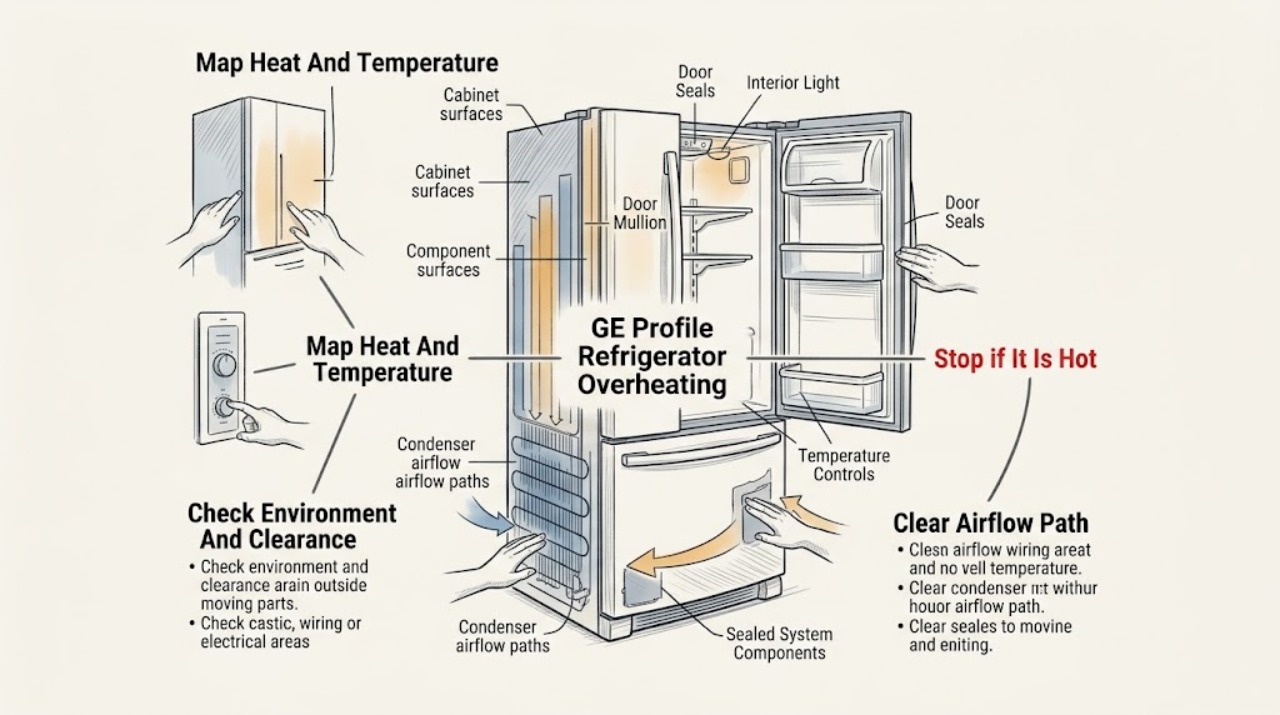
First identify what is hot and whether the food is staying at the model's set temperature. GE says warm or hot air from the bottom, sides, or rear can be normal on auto-defrost refrigerators, and the area between doors can feel hot because the system circulates warm liquid there to prevent condensation. A hot cabinet alone does not prove a failed compressor. Check for blocked clearances, a heat source or extreme room temperature, a door or gasket that is not sealing, an interior light that stays on, and large containers blocking airflow; use the exact owner's manual for any condenser-cleaning instruction because many newer models do not have owner-cleanable coils. If the inside is warming, the compressor runs continuously, the rear or side heat is extreme or worsening, an abnormal fan/noise or odor appears, the plug or outlet is hot, smoke is present, or a breaker trips, stop testing and arrange qualified service. Do not touch a hot compressor or condenser, remove panels, perform live electrical tests, or add refrigerant.
Before you begin
Safety first
- Owner checks stop at normal temperature observation, controls, accessible door/gasket and airflow checks, safe clearance review, permitted exterior cleaning, and model-authorized settings. Qualified service must handle compressors, condensers, fans, controls, wiring, sealed refrigeration, and live testing.
Work through in order
Diagnostic checks
Use only checks that match the exact appliance or system and its official guide.
-
Check 1
Record the exact GE Profile model, room conditions, and where heat is felt: door mullion, side panels, bottom grille, rear area, plug/outlet, or an interior compartment. Check food or appliance temperature with the model-appropriate method and note whether cooling is normal, weak, or absent.
Expected result: Only the front strip or sides are warm; warm air exits below or behind; the cabinet interior is warming; the plug/outlet is hot; or the location cannot be reached safely.
Next step: If interior temperatures are normal and only the documented exterior areas are warm, continue with clearance and operating-environment checks. For an electrical warning or inaccessible hot area, stop and arrange service.
Stop if: Do not pull a built-in Profile unit out, touch a hot rear component, or use a thermometer on energized electrical parts.
Why this matters
Why: Warm cabinet surfaces and air discharge can be normal heat rejection, while a warm interior changes the problem to cooling performance. Heat at a plug or outlet is an electrical warning, not a normal refrigerator surface symptom.
-
Check 2
Inspect accessible space around the refrigerator without moving it unsafely. Look for a wall, cabinet, grille, dust-covered opening, oven, radiator, direct sun, or unusually hot room. Compare required clearances and installation temperature with the exact GE Profile owner's manual.
Expected result: The refrigerator is tightly enclosed, airflow is blocked, a heat source is nearby, the room is unusually hot or cold, or clearances and surroundings appear normal.
Next step: Remove only accessible obstructions and keep heat sources away as the installation instructions permit. Do not alter cabinetry or move a built-in unit; arrange service or installer help if clearance is wrong or the cabinet remains abnormally hot.
Stop if: Do not remove grilles, reach behind a cabinet, spray cleaner into openings, or work near a hot condenser or compressor.
Why this matters
Why: Restricted heat rejection or an extreme installation environment can make the case hotter and extend compressor run time. GE says clearance requirements vary by style and model, and extreme temperatures can affect operation; normal clearance makes an internal fault more likely only when interior cooling is also abnormal.
-
Check 3
Close each accessible door or drawer normally and inspect the visible gasket for gaps, tears, or a section pulled from its groove. Move large containers away from interior vents and check whether an interior light goes out as the door closes, without bypassing a switch or removing a panel.
Expected result: A door is held open, a gasket is damaged or uneven, tall food blocks a vent, or the interior light appears to stay on; or closure, visible gasket, airflow, and light behavior appear normal.
Next step: Correct only the accessible food or drawer obstruction and follow the exact model's gasket instructions. If the gasket is damaged, the light stays on, or internal temperature does not recover, arrange service.
Stop if: Do not force or heat the gasket, remove doors, defeat a door switch, or probe a light circuit.
Why this matters
Why: A poor seal lets warm air in and makes the refrigerator run longer; blocked airflow or a light that remains on can also impair temperature performance and add heat. Normal owner-visible checks do not prove the sealed system or controls are healthy.
-
Check 4
Read the temperature display or controls and compare the setting with the exact GE Profile manual. If the unit was recently installed, moved, or heavily loaded, allow the model's documented stabilization time. Only if the manual explicitly identifies owner-cleanable condenser coils should you disconnect power safely and clean them as directed; otherwise leave the condenser area closed.
Expected result: The setting is incorrect, the refrigerator has not stabilized after installation or a major event, the model manual permits coil cleaning, the manual says coils need no cleaning, or the setting and stabilization are normal.
Next step: Use only the exact manual's control and cleaning procedure, then monitor internal temperature and surface heat. If cooling remains abnormal or the coil location/procedure is uncertain, stop and arrange service.
Stop if: Do not guess a temperature number, clean an energized unit, remove a rear cover, or apply water or compressed air to internal electrical parts.
Why this matters
Why: A wrong setting or recent event can explain extended running without a component failure. GE notes that condenser-cleaning requirements are model-specific and that most newer models do not require owner coil cleaning; a normal setting and elapsed stabilization period leave airflow, controls, or sealed-system faults possible.
-
Check 5
Observe operation from a safe distance over a normal cooling period: record whether the compressor seems to run continuously, whether the interior reaches and holds its setting, whether fans or unusual noises change, and whether the exterior heat is stable or progressively worsening. Do not touch the components or use a hidden diagnostic mode.
Expected result: The cabinet is warm but temperatures are stable; it runs longer during hot/humid conditions; the interior is warm or fails to recover; a fan is absent or abnormal; or heat is accompanied by odor, smoke, repeated trips, or a hot cord/outlet.
Next step: Continue monitoring only for the normal-heat branch. For poor cooling, abnormal fan behavior, or any hazard, protect food, stop testing, and arrange qualified service.
Stop if: Do not open panels, insert hands near fans, reset a tripping breaker repeatedly, or continue running a smoking or burning appliance.
Why this matters
Why: Stable food temperature with warm case surfaces is consistent with normal heat rejection. Persistent warm food, a non-running or abnormal fan, or worsening heat with electrical symptoms points beyond normal operation and needs diagnosis; sound or run time alone cannot name a part.
-
Check 6
Prepare a service record with the model/serial, exact hot location, room conditions and clearances, internal temperature trend, control setting, door/gasket and airflow observations, run-time changes, noises, and photographs taken without opening panels.
Expected result: Internal temperature is rising, surface heat is extreme or worsening, cooling is intermittent, the rear or bottom source is hidden, or smoke, burning odor, melted material, water near electrical parts, a hot plug/outlet, cord damage, or repeated breaker trips are present.
Next step: Stop using the refrigerator for a hazard or uncontrolled temperature problem and arrange qualified GE Profile service; use a qualified electrician for a confirmed house circuit or receptacle issue. Isolate power only from a safe dry position.
Stop if: Do not remove panels, live-test wiring, touch the compressor or condenser, add refrigerant, bypass a control, or order a part from exterior heat alone.
Why this matters
Why: The remaining possibilities include airflow, controls, fan, condenser/heat-rejection, compressor/start, sealed refrigeration, or electrical faults. A broad overheating report cannot select a safe replacement part, and a hazard makes further operation inappropriate.
Use your observations
Decision map
Find the observation that best matches what you see, then follow the next safe action.
-
PATH 01Safety boundary
What you see
Only the sides, bottom, rear discharge, or area between doors feels warm, while food temperatures are stable and there is no odor, noise change, or electrical symptom.
Do this next
Keep the documented clearance, monitor internal temperature, and arrange service only if cooling or safety symptoms develop.
Why this path and its safety boundary
Why it matters: GE identifies these areas as normal heat-rejection or anti-condensation zones; warmth alone is not proof of overheating.
Safety stop: Do not touch or clean a hot condenser or compressor.
-
PATH 02Safety boundary
What you see
The refrigerator is enclosed, near a heat source, in an unusually hot room, or has blocked interior/exterior airflow and is running longer than usual.
Do this next
Correct only accessible obstructions and follow the exact Profile installation requirements. Do not modify cabinetry or move a built-in unit; escalate if temperature remains abnormal.
Why this path and its safety boundary
Why it matters: Restricted heat rejection, extreme room conditions, or blocked cold-air paths can increase surface heat and run time before an internal component is proven faulty.
Safety stop: No rear-cover removal, unsafe moving, or access to hot parts.
-
PATH 03Safety boundary
What you see
A door or drawer does not seal, food blocks a vent, a gasket is damaged, or an interior light remains on when the door is nearly closed.
Do this next
Correct accessible loading or closure issues and use the exact gasket procedure. Arrange service for a damaged gasket, persistent light, or failure to recover.
Why this path and its safety boundary
Why it matters: Warm-air entry, obstructed circulation, or light heat can make the unit run longer and raise temperatures; this is an owner-visible branch but not a complete cooling diagnosis.
Safety stop: Do not bypass the door switch or dismantle the light or door.
-
PATH 04Safety boundary
What you see
Interior temperatures rise or fail to recover after clearance, setting, door, airflow, and stabilization checks, or a fan behavior is abnormal.
Do this next
Protect food and arrange qualified GE Profile service with the temperature trend and symptom record. Keep panels closed.
Why this path and its safety boundary
Why it matters: A fan, control, condenser/heat-rejection, compressor/start, or sealed-system issue is possible; run time and surface warmth do not identify which part.
Safety stop: No live testing, service-mode guess, refrigerant work, or part replacement by symptom alone.
-
PATH 05Safety boundary
What you see
The plug or outlet is hot, smoke or burning odor appears, material is melted, water reaches an electrical area, or a breaker trips repeatedly.
Do this next
Stop using the appliance, isolate power only from a safe dry position, and arrange qualified appliance or electrical service. Do not re-energize it to reproduce the heat.
Why this path and its safety boundary
Why it matters: This is an electrical or fire hazard, not a normal cabinet-temperature branch.
Safety stop: No wet-hand operation, repeated breaker resets, extension cord, live tests, or panel removal.
Helpful context
Understand the symptom
A warm surface is not the same as overheating
Refrigerators must reject heat removed from the cabinet. That can make the sides, bottom, rear, or strip between doors feel warm, especially during hot or humid weather or when the compressor has been running longer. The meaningful split is whether the food compartment is maintaining temperature and whether heat is accompanied by abnormal electrical or mechanical symptoms.
Keep hands away from hot and energized parts
Owner checks stop at a safe temperature reading, normal controls, accessible door and gasket inspection, visible airflow and clearance, permitted exterior cleaning, and the exact owner's manual. Do not touch the compressor, condenser, fan, wiring, or rear cover; do not remove panels or perform a live voltage test. If the plug or receptacle is hot, there is smoke, a burning smell, melted material, water near electrical parts, a damaged cord, or a breaker trips repeatedly, stop using the refrigerator and isolate power only from a safe dry position before arranging qualified service.
When checks do not resolve it
Need a professional?
Safety scope: Owner checks stop at normal temperature observation, controls, accessible door/gasket and airflow checks, safe clearance review, permitted exterior cleaning, and model-authorized settings. Qualified service must handle compressors, condensers, fans, controls, wiring, sealed refrigeration, and live testing.
Common questions
FAQ
Is it normal for a GE Profile refrigerator to feel hot on the sides?
Often, yes. GE says warm or hot air from the bottom, sides, or rear can be normal heat rejection, and the area between doors may feel warm or hot to prevent condensation. Check internal temperatures and safety symptoms; surface warmth alone does not prove overheating.
Why is the area between my GE Profile refrigerator doors hot?
GE says warm liquid is circulated around the front edge of the freezer and fresh-food compartment to prevent exterior condensation, and this area can feel hotter when the compressor runs longer. Check clearance, room heat, door sealing, and internal temperature if the heat is excessive or accompanied by poor cooling.
What can make a GE Profile refrigerator run hot for a long time?
Blocked clearances or interior vents, a door or gasket that does not seal, a large warm load, an extreme installation environment, an interior light that stays on, or a model-specific airflow issue can increase run time. Use the exact manual for clearance and condenser instructions.
Should I clean the condenser coils on a GE Profile refrigerator?
Only if the exact owner's manual says the model has owner-cleanable coils and provides the procedure. GE says most refrigerators made since 2001 do not require coil cleaning, while some compact or smaller models do. Do not remove a cover or clean an energized appliance.
When is GE Profile refrigerator heat an emergency?
Stop using it for a hot plug or outlet, smoke, burning odor, melted material, water near electrical parts, damaged cord, repeated breaker trips, or rising internal temperature. Isolate power only from a safe dry position and arrange qualified appliance or electrical service; do not re-energize it to reproduce the symptom.
Read the exact guide
Official sources
- User Manual & Care for PSS26SGPSS - GE Profile RefrigeratorGE Appliances · GE Profile refrigerator model identity and model-specific owner's manual access
- Refrigerator - Installation Location and TemperatureGE Appliances · GE refrigerator installation temperature extremes and sealed-system risk
- Refrigerator - Warm / Hot AirGE Appliances · GE refrigerator warm or hot air from exterior
- Side-by-Side Refrigerator - External Temperature ControlsGE Appliances · GE Profile side-by-side temperature-display behavior and model-specific setpoints
- Refrigerator - Moisture on the ExteriorGE Appliances · GE refrigerator exterior moisture, gasket, air clearance, and Energy Saver checks
- Refrigerator Exterior Case WarmGE Appliances · GE refrigerator cabinet warmth and automatic energy-saver heat circulation
- Refrigerator - Not Cooling EnoughGE Appliances · GE refrigerator temperature, closure, airflow, condenser, installation, light, and service checks
- Refrigerator - Area Between Doors Warm or HotGE Appliances · GE refrigerator warm or hot door-mullion area and heat during long compressor operation
Community feedback
Share a repair observation
Share a plain-text repair observation. Accepted observations are published automatically; this page may take a moment to update.